-
Written By Kiran Sharma
-
Approved By
Vikash Bajpai -
Updated on April 15th, 2026
Efficient Ways to Convert JSON to PNG: Top Solutions
James Query: “I have multiple JSON files that contain structured data and chat records. I need to save them as PNG images for sharing, presentations, and documentation. However, JSON files are not visually readable. Is there an efficient way to convert JSON to PNG in bulk without losing quality or structure?”
Introduction:- JavaScript Object Notation is one of the most commonly used formats for storing structured data. While it is efficient for systems, it is not designed for visual viewing. On the other hand, Portable Network Graphics is a widely used image format known for its high quality and lossless compression. It is ideal for documentation, presentations, and archiving readable snapshots of data. However, the problem is that JSON files cannot be directly viewed as images. To resolve this, this guide explains efficient ways to change JSON to PNG. Moreover, covers the MigrateEmails JSON Converter Tool for an error-free process.
Is JSON-to-PNG Conversion Necessary? Here’s Why
The following are the main reasons why users want to convert JSON to PNG:
- Makes JSON data visually readable and easy to understand.
- Creates high-quality image files for sharing.
- Suitable for presentations and documentation.
- It preserves clarity with lossless PNG quality.
- Helps archive structured data in image format.
- Also, allows viewing on devices without JSON tools.
Choosing the Right Format: Raw JSON or Scalable PNG?
It is always necessary to know the difference between the two formats before getting deep into the conversion.
| Major Features | JSON File (.json) | PNG File (.png) |
| Type | Structured Data Format | Lossless Image Format |
| Readability | Machine-readable | Human-readable |
| Structure | Key-value pairs | Visual image layout |
| Compatibility | Requires editors/tools | Opens on all devices |
| Use Case | APIs & data storage | Sharing & documentation |
The Best Free Manual Workflows to Convert JSON to PNG
Since there is no direct method for JSON to PNG transformation, you can try these manual ways. But before proceeding, make sure that this process is lengthy and time-consuming.
Way 1: Copy JSON into Word and Save as PNG
- Firstly, open the JSON file in a text editor.
- Copy the content into Word.
- Now, format the data properly.
- Take a screenshot and save it as a PNG.
Way 2: Convert JSON to HTML, then PNG
- Firstly, convert JSON into HTML format.
- Afterwards, open the HTML in the browser.
- Take a screenshot or print as an image.
- Lastly, save as PNG.
Disadvantages: Convert JSON to PNG Manually
- Not suitable for large data due to a lack of bulk conversion.
- Requires technical knowledge and manual formatting.
- Sometimes the data may not appear structured properly.
- Involves multiple steps, making it time-consuming.
- Moreover, some online tools may expose sensitive data.
High-Performance Techniques to Convert JSON File to PNG
The MigarteEmails JSON File Converter is the most practical solution to complete the process. This converts multiple and large JSON files simultaneously with no data leakage. The data during the conversion using this tool remains accurate with no changes. It provides 100% secure results and also supports users to convert JSON to Word and more formats. Additionally, the tool comes with a highly intuitive interface that can be easily used by any user.
A Simplified & Detailed Procedure to Convert JSON to PNG
- Firstly, download the MigarteEmails JSON Converter Tool.
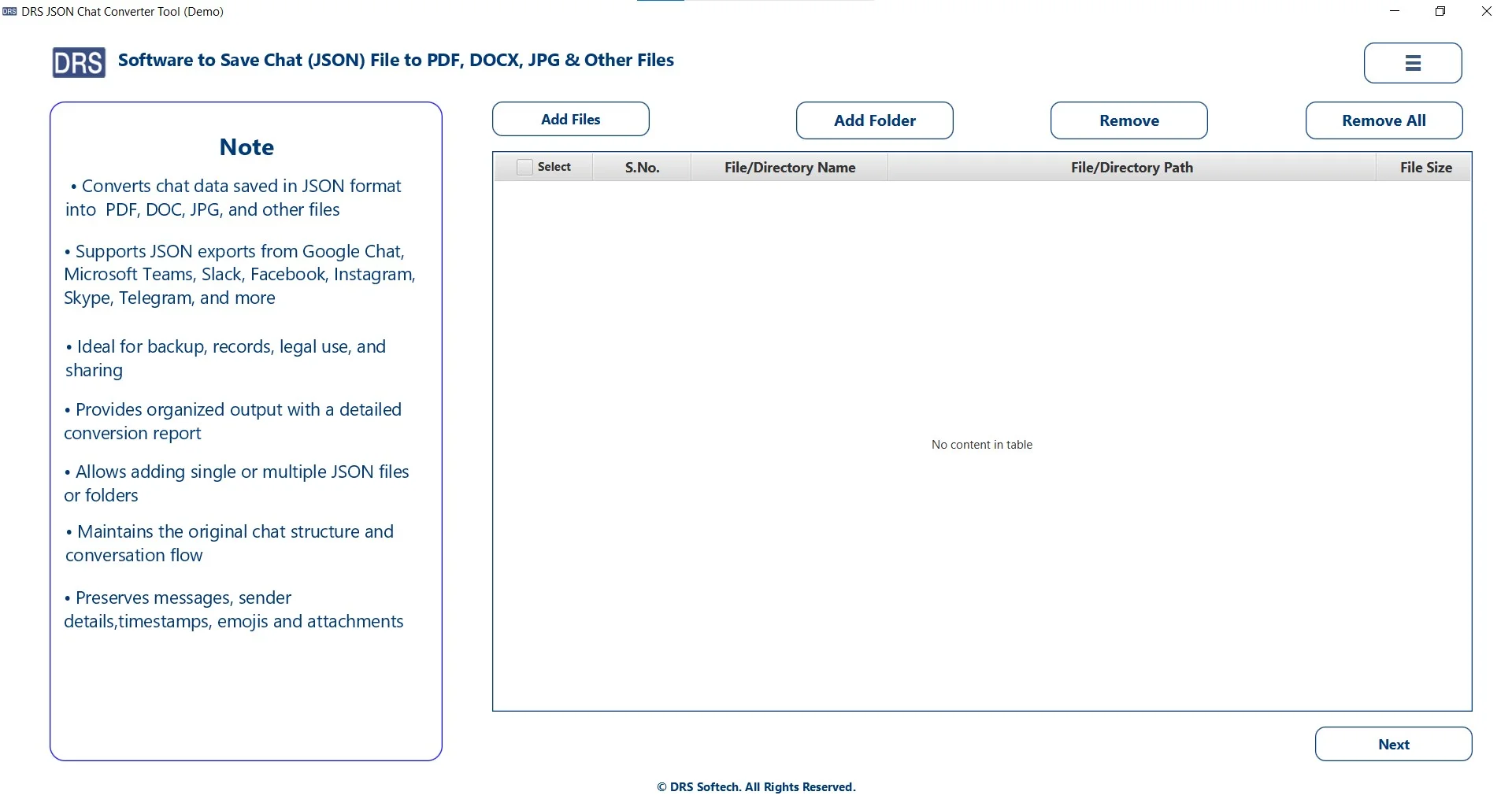
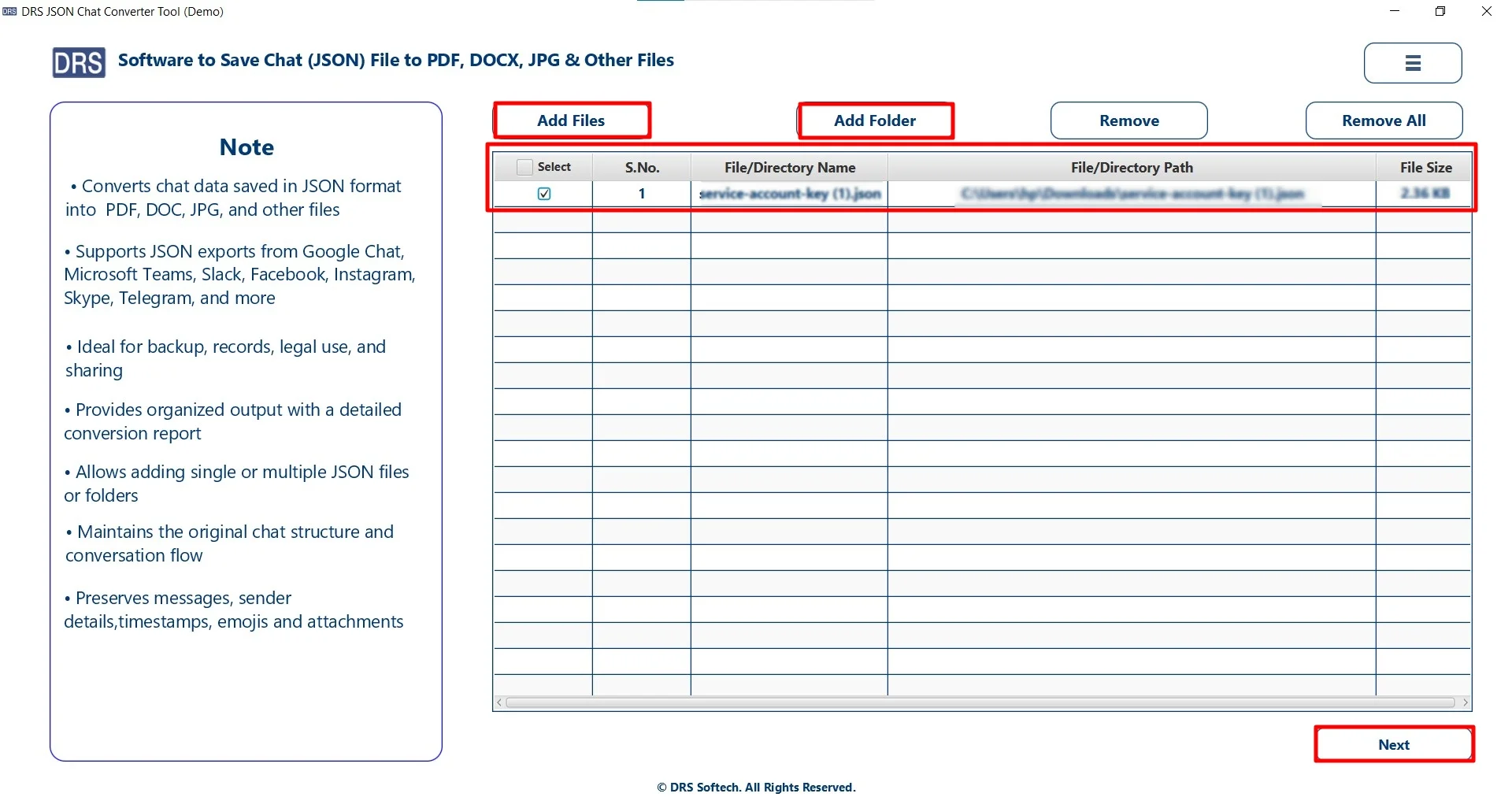
- Click Add Files or Folders, upload the JSON file, and hit Next.
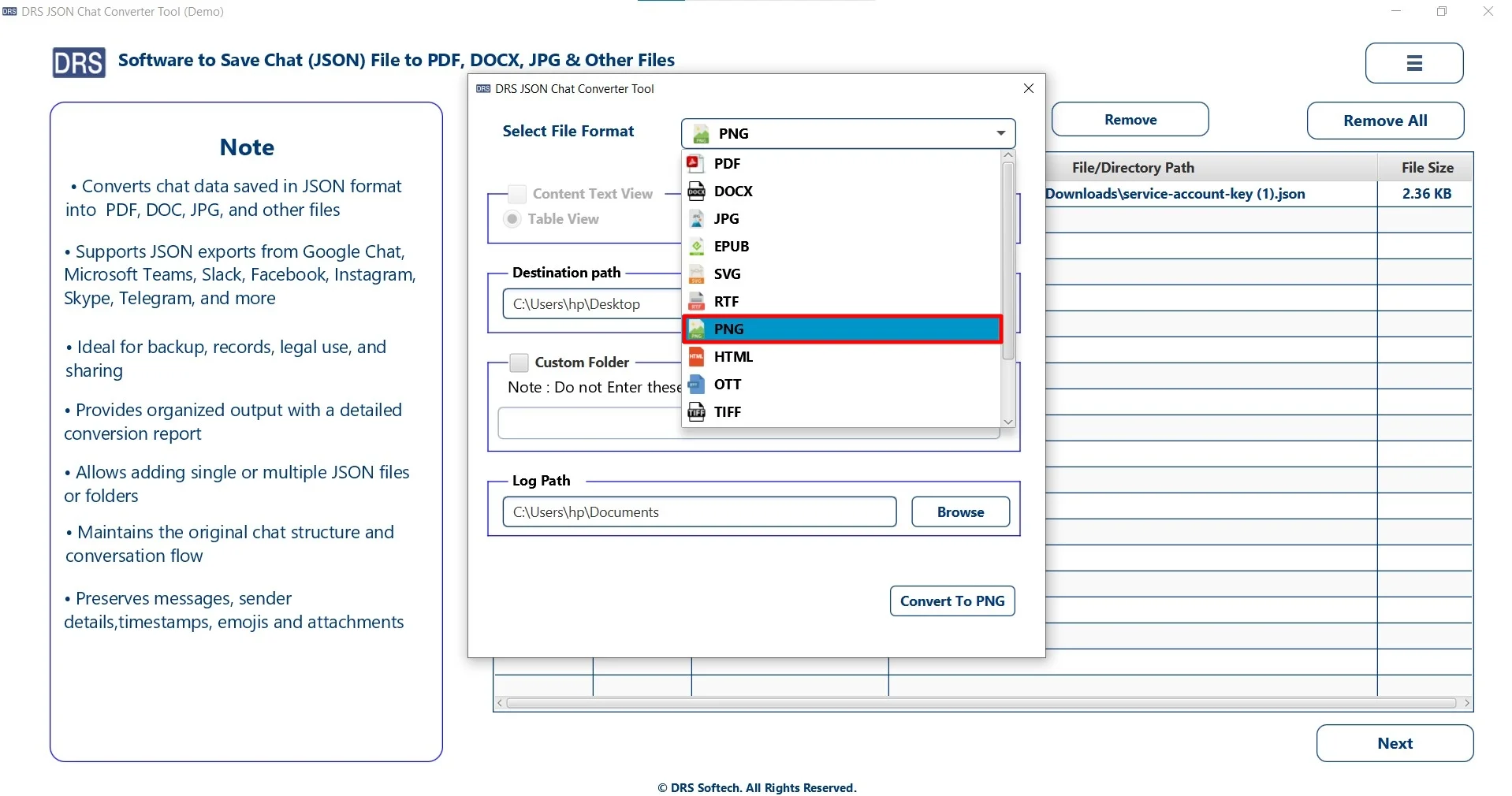
- Furthermore, choose PNG as the saving file format.
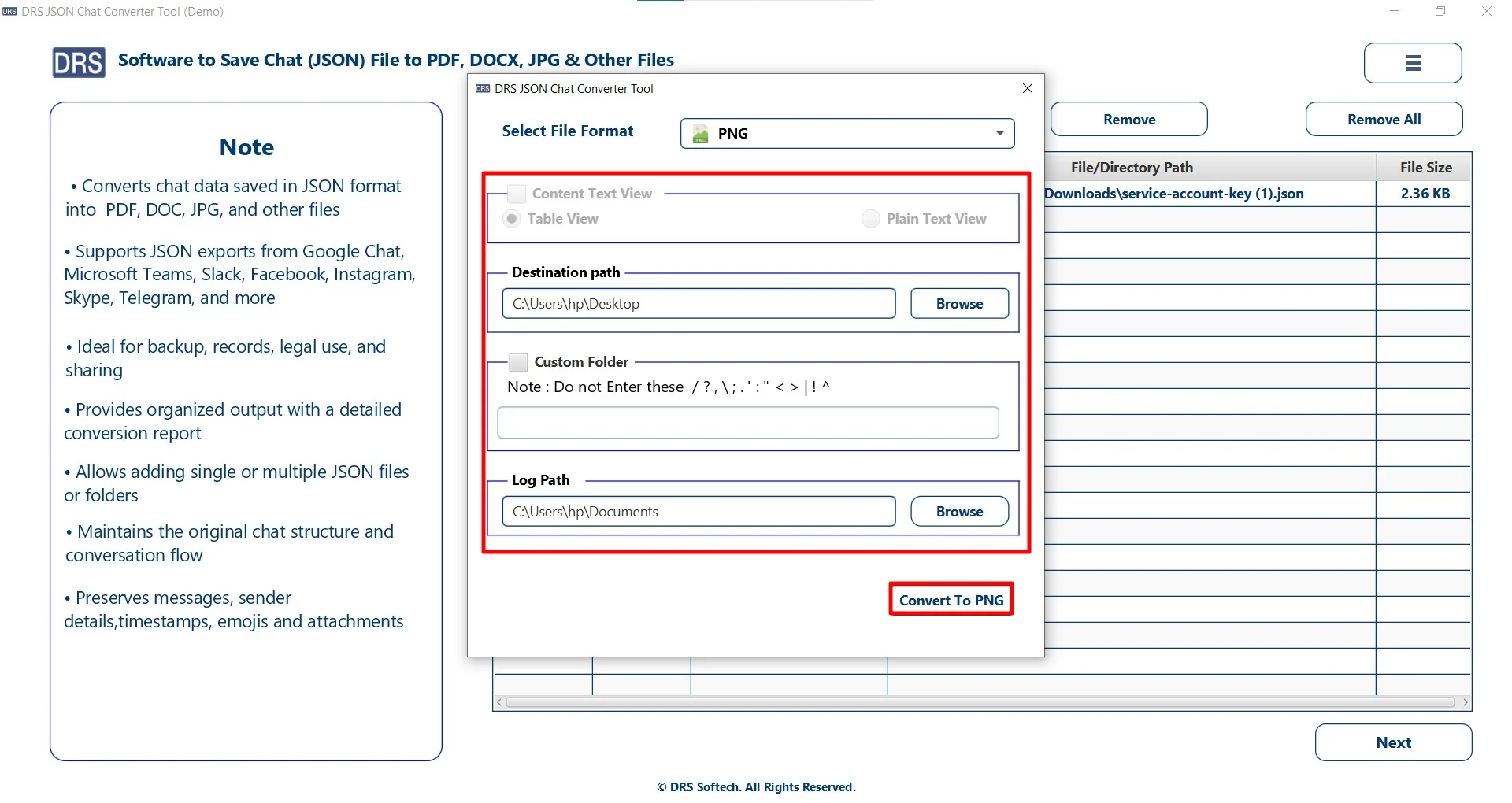
- In the end, apply filters, set the destination to save the file, and click Convert to PNG.
Advantages: Transfer JSON to PNG Using the MigrateEmails Tool
- Convert multiple JSON files at once without any limitations.
- Preserves the original structure during conversion.
- It has an easy-to-use interface suitable for all users.
- Enables users to convert JSON to EPUB for flexible conversion.
- Saves time and effort with fast processing speed.
- Also, provides complete data safety during the conversion process.
One-Time Conversion Option
If you prefer not to perform the conversion manually, you can choose a one-time conversion service for a smooth conversion. This option is perfect for users who have bulk JSON files. Just get in touch with our support team, and they will handle the complete process on your behalf. They will securely convert JSON data into PNG images while maintaining the original image quality, clarity, and data structure.
This one-time service provides several benefits, including:
- Complete Data Security to keep your files safe.
- High-Quality PNG Output with sharp and clear visuals.
- Accurate Conversion without missing or altered data.
- No Technical Knowledge Required from your side.
- Dedicated Expert Assistance throughout the process.
A Real-Life Case Study: A Design Consultancy Firm
Problem: They needed to present JSON-based reports and chat data in image format for client presentations.
Challenge: Taking manual screenshots was slow and inconsistent. Also, it didn’t give accurate results.
Solution: After struggling a lot, they used the MigrateEmails JSON Converter Tool.
Result: The software has some features like:
- Converted bulk JSON files into PNG quickly.
- Maintained clarity and layout quality.
- Improved documentation workflow.
Conclusion
In this blog post, we have discussed that converting JSON to PNG is useful for making structured data easier. However, there are manual methods, but they can work for a few files. Also, they are not ideal for large-scale datasets. On the other hand, using a verified JSON converter tool to convert JSON to PNG ensures fast, accurate, and secure conversion. Lastly, you can also use a one-time service option by MigrateEmails. In case you face any kind of issues, feel free to contact our support team.
Try the tool today and convert your JSON files into PNG format effortlessly.
Frequently Asked Questions
Q1. Suggest the best way to convert JSON to PNG?
Ans. The best way is to use a professional MigrateEmails JSON Converter Tool. It provides fast, accurate, and high-quality conversion while preserving the original structure.
Q2. Can I convert JSON file to PNG without technical knowledge?
Ans. Yes, you can. The MigrateEmails JSON Converter comes with a simple and user-friendly interface, allowing beginners to convert JSON to PNG easily without technical skills.
Q3. Is it safe to change JSON to PNG on Windows and Mac?
Ans. Yes, it is safe when using a trusted converter tool. Reliable software supports both Windows and Mac systems while ensuring secure and smooth conversion.
Q4. Are there any online tools to transfer JSON to PNG?
Ans. Yes, the professional JSON converter tool is available for converting JSON to PNG. However, they may have limitations such as file size restrictions, lower quality output, and possible security concerns.
Q5. How to transfer JSON to PNG in bulk?
Ans. To convert JSON files in bulk, use an advanced JSON converter tool that supports batch processing, allowing multiple files to be converted at once and saving time.
Q6. Can I convert JSON file to PNG securely?
Ans. Yes, you can securely save JSON to PNG by using the MigrateEmails JSON converter tool, which keeps your data private and ensures no information is exposed during the process.
About The Author:

I am Kiran Sharma, a Technical Expert in Content writing. I have technical expertise in the field of Email Backup, Data Recovery, and Email Migration, and resolve technical queries related to Cloud Backup or Email Migration for individuals and businesses.
Related Post