-
Written By Neeru Kuchhal
-
Approved By
Vikash Bajpai -
Updated on April 10th, 2026
Top Solutions to Convert JSON to EPUB: Beginner Guide
Emily’s Question: “I have multiple JSON files. This contains structured content and reading material. I want to shift them into EPUB format so I can read them on eBook devices. However, JSON files are not readable in eReaders. Is there a simple way to convert JSON to EPUB in bulk without losing formatting?”
Introduction:- JSON files are mostly used for storing structured data such as chat logs, API responses, and digital content. While EPUB is a popular eBook format supported by most eReaders and mobile devices. It allows content to be displayed in a structured, readable, and flexible layout. However, there is no direct path to convert JSON file to EPUB. To complete this task, this guide provides various techniques along with the MigrateEmails JSON File Converter Tool .
The Value of Conversion: Why Shifting a JSON File into an EPUB?
The following are the main reasons to do this:
- It makes the data structured and readable as an eBook.
- Enables viewing on eReaders and mobile devices.
- Converts complex data into formatted content.
- Helps in publishing digital content easily.
- Improves readability with proper layout.
- Also, it simplifies sharing and distribution.
JSON and EPUB: Comparing Structure, Function, and Use
| Important Aspects | JSON File (.json) | EPUB File (.epub) |
| Type | Data Storage Format | eBook File Format |
| Readability | Machine-readable | Human-readable |
| Structure | Key-value pairs | Chapters, pages, layouts |
| Compatibility | Requires tools/editors | Supported by eReaders |
| Best Use Case | Data storage & APIs | Reading and publishing |
| Formatting | Raw structured data | Styled and formatted content |
A Guide to Manual JSON-to-EPUB Transformation
There are various techniques to convert JSON to EPUB manually. This conversion is only possible if you have a small number of files. Also, make sure that this method comes with several barriers.
Technique 1: Convert JSON to HTML, then EPUB
- Firstly, convert JSON to HTML using a script or tool.
- Now, open the HTML file.
- Use an EPUB converter tool.
- In the end, save the file as EPUB.
Technique 2: Using Word as an Intermediate
- Open JSON in a text editor.
- Copy and paste content into Microsoft Word.
- Afterwards, format the content properly.
- Lastly, save or export as EPUB.
Barriers Arise to Manually Save JSON to EPUB
- Not suitable for large data due to a lack of bulk conversion.
- Requires technical knowledge and formatting skills..
- Data may not be structured properly in the output.
- It involves multiple steps, which makes it time-consuming.
- Moreover, external tools may leak sensitive data.
The Smart Way: Streamlining JSON to EPUB Conversion
The MigrateEmails JSON File Converter is a highly efficient solution to convert JSON to EPUB. It maintains the original structure and formatting intact with no data loss. The tool is designed with a beginner-friendly interface that is useful for everyone. Apart from that, it helps to convert JSON file to PDF and other supported formats. Additionally, it is highly compatible with all the latest versions of Windows and macOS.
A Comprehensive Guide to Change JSON to EPUB
- Firstly, start getting the MigrateEmails JSON Converter Tool.
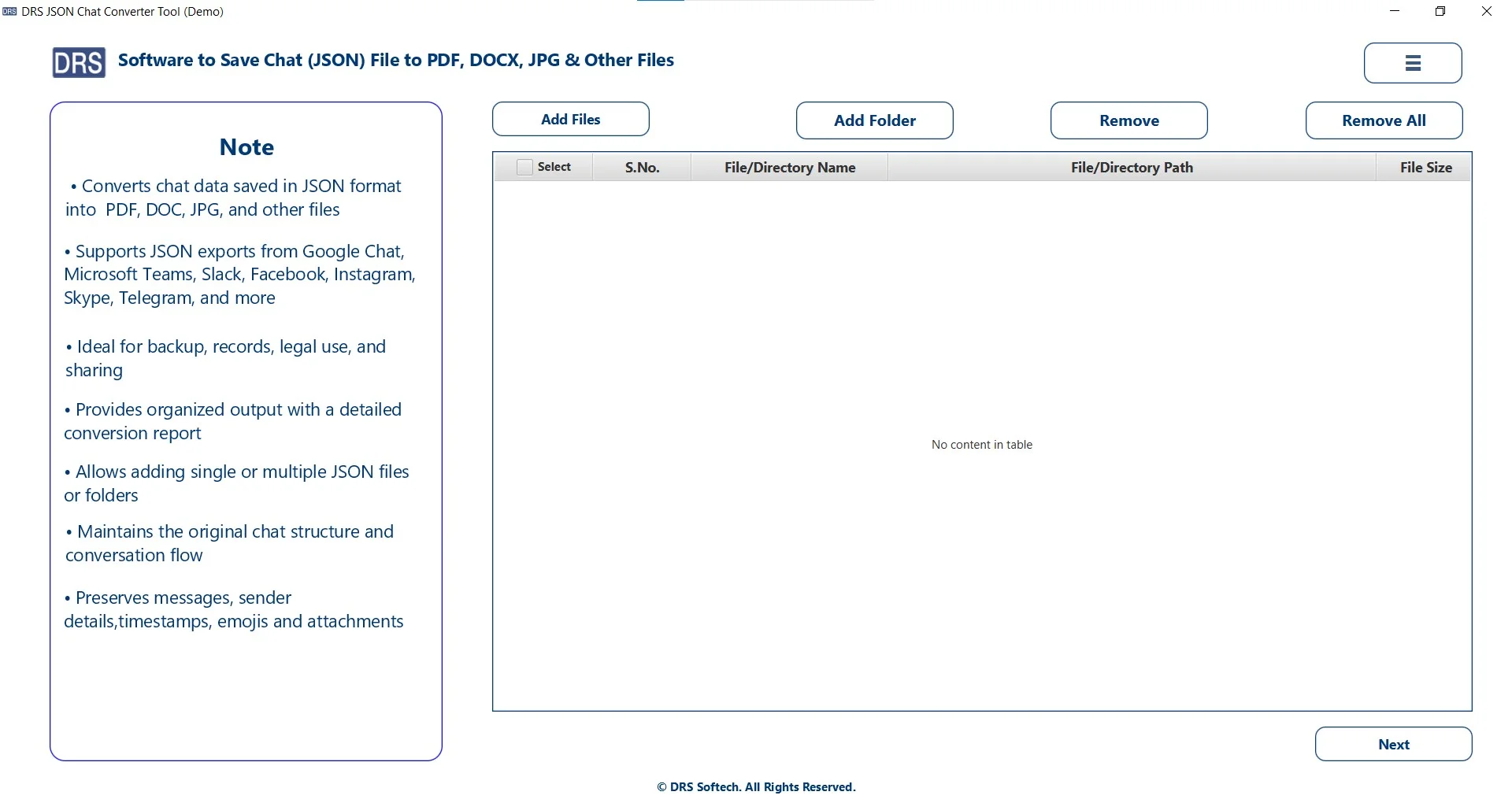
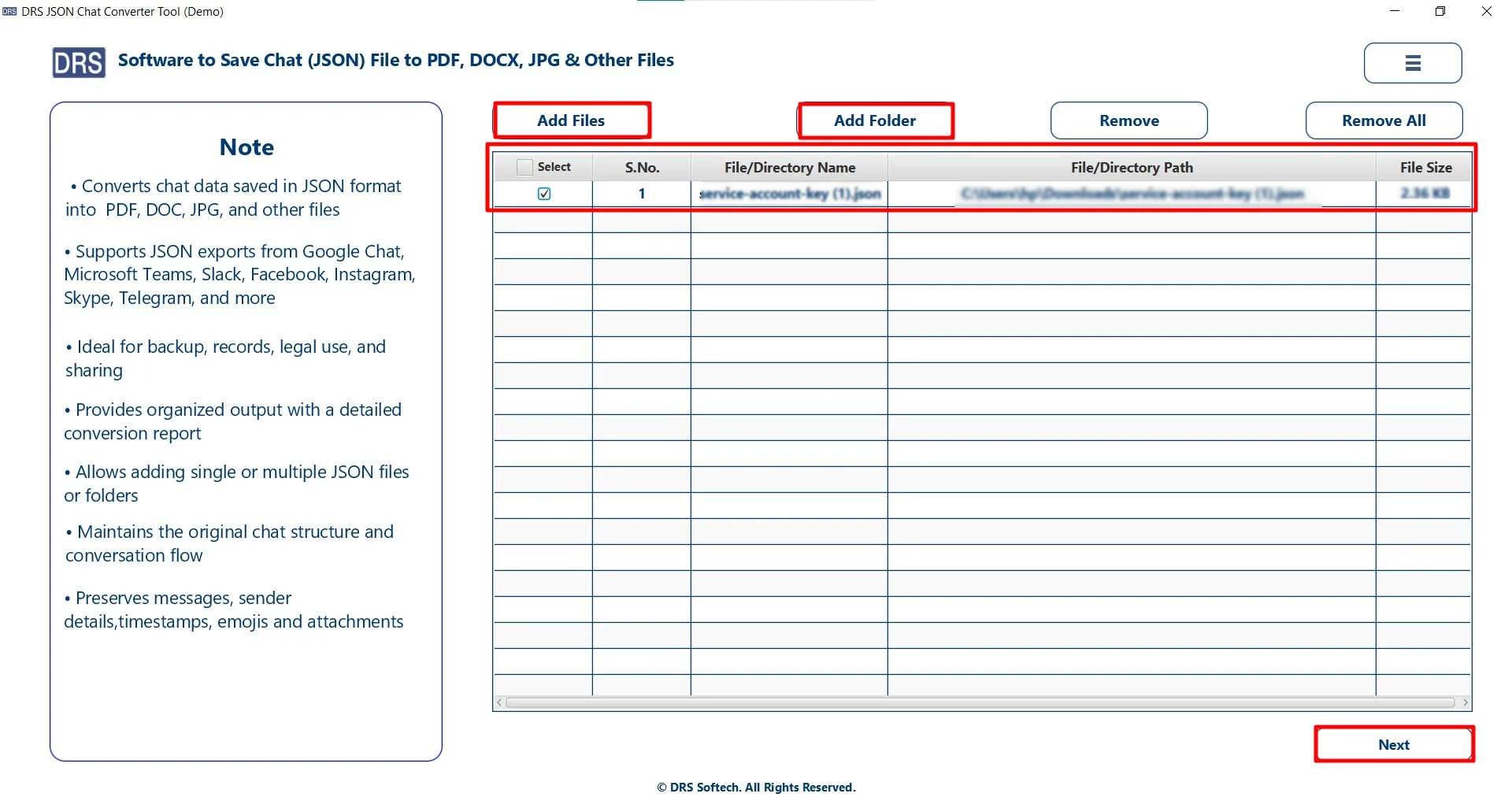
- Add Files/Folders, upload the JSON that you wish to convert, select the file, and click Next.
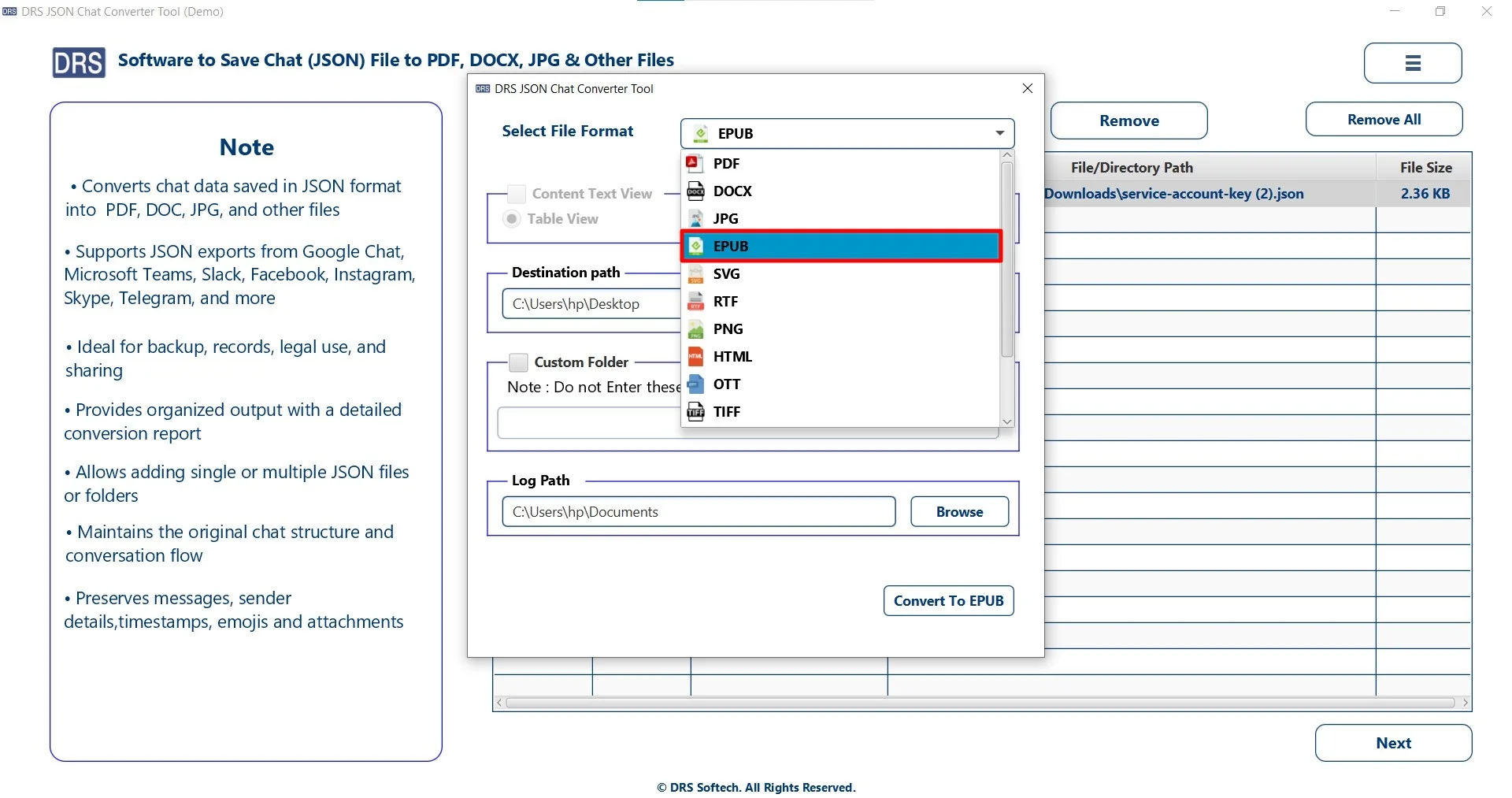
- Furthermore, choose the EPUB as the saving file format.
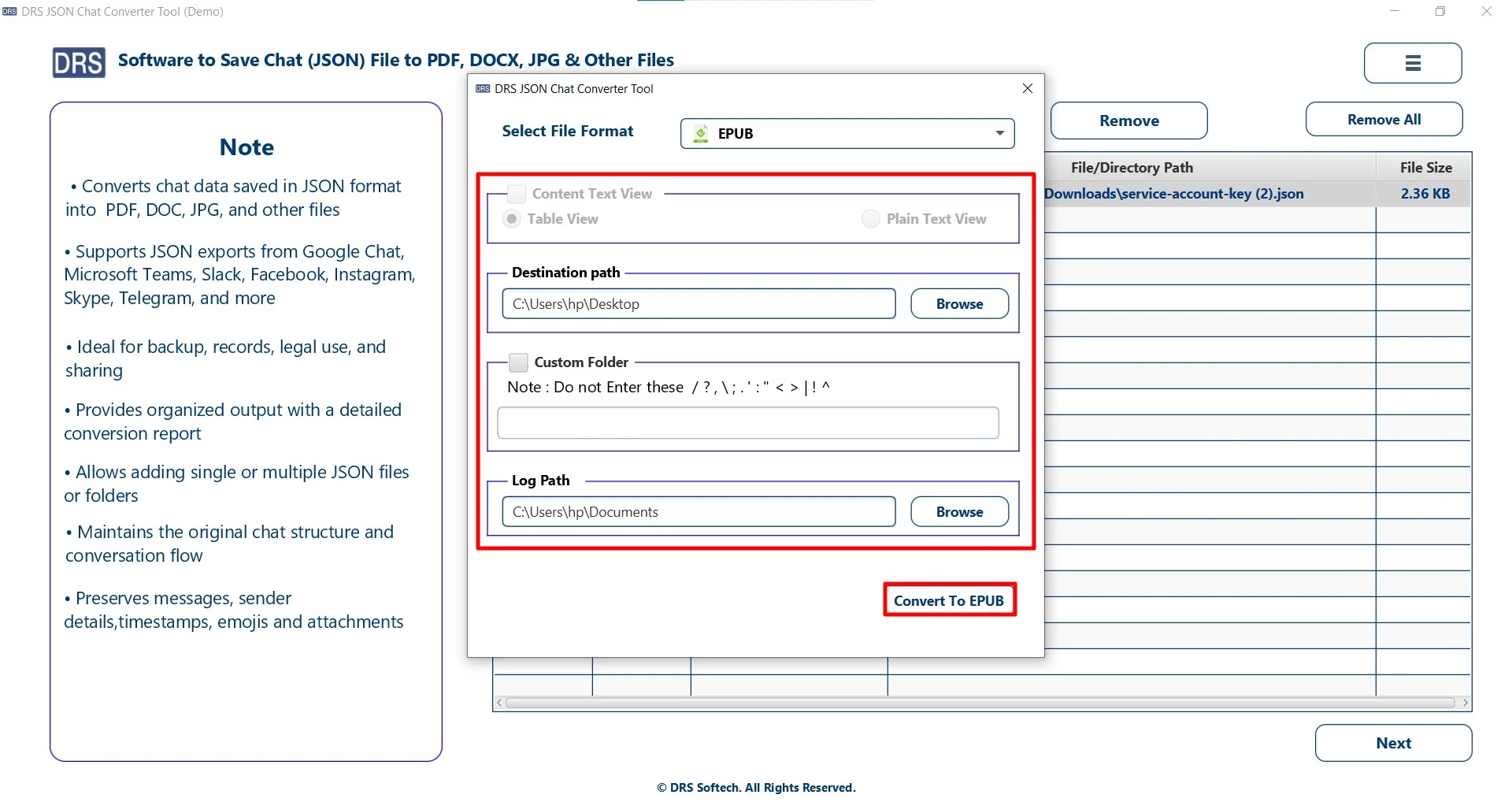
- Finally, set filters, add a location to save the file, and click Convert to EPUB.
Highlighted Benefits of Using the MigrateEmails Utility
- Convert multiple JSON files together without any restrictions.
- Preserves the original key-value hierarchy and data structure.
- Simple and user-friendly interface suitable for all users.
- Supports multiple output formats for flexible conversion.
- Saves time and effort with fast processing speed.
- Also, provides complete data safety during the conversion process.
One-Time Conversion Service
In case you are tired of performing the conversion yourself, you can move on to using the one-time service option. Just get connected with our support team and share the files with them. They will:
- Convert JSON to EPUB in bulk without any loss.
- Maintains every data intact with no changes.
- Ensures complete data accuracy and security.
This option is highly recommended for business and enterprise users with a large number of files.
A Real-Life Case Study: A digital publishing company
Problem: They had large JSON datasets that contained article content that needed to be converted into eBooks. Therefore, the manual conversion required heavy formatting and coding. Also, it consumes a lot of time and does not provide accurate results.
Solution: After struggling a lot, they used the MigrateEmails JSON Converter Tool to complete their task.
Result: This solution successfully converts JSON to EPUB on Windows. Also, it maintained formatting and readability intact with no information leakage. Additionally, it reduced manual effort significantly.
Conclusion
In this entire blog, we have learnt that converting JSON to EPUB is necessary for turning structured data into readable content. While there are manual methods available, they may work for small tasks. Also, they are not suitable for bulk or professional use. Thus, for fast and error-free conversion, using a JSON Converter Tool is recommended to convert JSON to EPUB. Apart from this, you can also use a one-time conversion benefit.
Note: Try the tool today and convert your JSON files into EPUB format effortlessly.
Frequently Asked Questions
Q1. What is the fastest way to convert JSON to EPUB?
Ans. The fastest way is to use a professional MigrateEmails JSON Converter Tool. It allows quick and bulk conversion with minimal effort and high accuracy.
Q2. Can my data be safe when I change JSON to EPUB?
Ans. Yes, your data is safe when using a trusted solution. The MigrateEmails JSON converter tool ensures data security, integrity, and no data loss during the conversion process.
Q3. Suggest the best tool to save JSON to EPUB?
Ans. The MigrateEmails JSON Converter Tool is one of the best options. It supports multiple formats, maintains structure, and provides reliable results.
Q4. How to convert a JSON file to EPUB while preserving formatting?
Ans. To preserve formatting, it is recommended to use a professional tool or convert JSON to HTML first and then to EPUB. This helps maintain layout, structure, and readability.
Q5. Do I need technical knowledge to save JSON to EPUB?
Ans. No, you don’t need technical expertise. The dedicated JSON converter tool come with a user-friendly interface, allowing even beginners to perform the conversion easily.
Q6. Can I batch convert JSON files to EPUB?
Ans. Yes, batch conversion is possible using a reliable JSON converter tool. It enables you to convert multiple JSON files at once, saving time and effort.
About The Author:

I am Neeru Kuchhal, a Technical Content Writer who focuses on turning complex ideas into clear, engaging, and impactful content. I combine creativity with strategy to write blogs, web content, and technical articles that connect with the right audience and support brand goals. I believe great content is not just written. It is thoughtfully created to inform, build trust, and drive action.
Related Post