-
Written By Neeru Kuchhal
-
Approved By
Vikash Bajpai -
Updated on June 2nd, 2026
How to Migrate Roundcube Emails to a New Server Without Data Loss
Michael Thompson Query : “I am managing a mid-sized business with over 500 active Roundcube mailboxes and need to migrate all emails to a new server without any data loss. Our mailboxes collectively hold approximately 200GB of critical business data. What is the most reliable method to migrate RoundCube emails to new server
efficiently?”
efficiently?”
Introduction:- Roundcube functions as a widely adopted open-source webmail client that serves small to mid-sized enterprises for centralized email communication management. As organizational infrastructure scales, modern enterprise-grade server environments demand enhanced security protocols and higher mailbox capacity. This technological shift allows IT administrators to migrate their Roundcube email data to a more scalable server infrastructure. This blog outlines the most reliable methods for bulk roundcube emails to new server migration. We will also cover the MigrateEmails IMAP Backup Tool for a secure migration.
Core IT Benefits to Migrate Roundcube to New Server
- Expands mailbox storage capacity on modern server infrastructure.
- Reinforces enterprise-grade security and data encryption standards.
- Maintains uninterrupted email continuity throughout server transition.
- Establishes centralized administrative control over distributed mailboxes.
- Enhances server response time and email platform performance.
- Produces compliance-ready email archival on the destination server.
- Eliminates operational dependency on legacy webmail architecture.
?
What is the Easiest Way to Move Roundcube Emails to a New Server?
You can easily perform RoundCube to new server migration via the MigrateEmails IMAP Migration Tool. It handles bulk mailbox processing, server-to-server transfer, and date-range filtering, making it a reliable and governance-ready choice for enterprise Roundcube migration workflows.
Trusted Solution to Migrate Roundcube Emails to New Server
The MigrateEmails IMAP Backup Tool is a professionally designed enterprise-grade application built to transfer IMAP-supported mailboxes with full accuracy and no data loss. Its bulk mailbox processing capability & CSV import functionality allow IT administrators to transfer multiple IMAP accounts at once. Moreover, this makes it a scalable and time-efficient choice for enterprise server migration projects. Organizations that want a structured iCloud migration can refer to our comprehensive guide on how to migrate IMAP to iCloud.
Easy Steps to Move Roundcube Mailbox to New Server:
- Download and install the IMAP Email Migration Utility on your system.
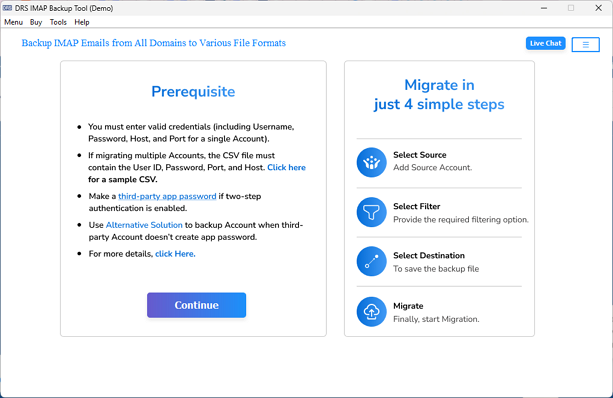
- Enter your Roundcube IMAP credentials and click Sign In to authenticate.
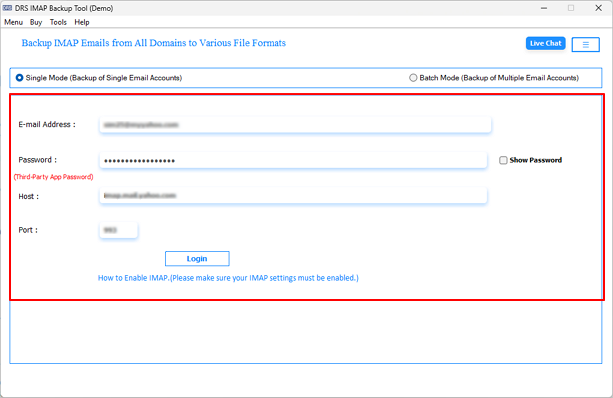
- Select the required mailboxes or folders from the mailbox preview panel.
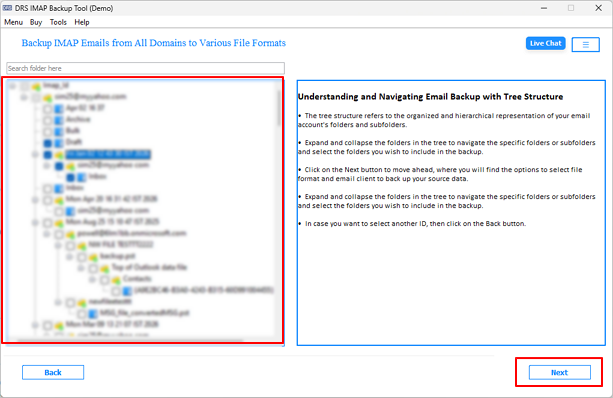
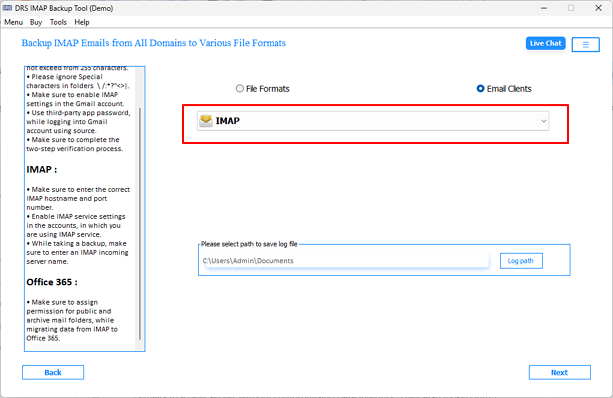
- Choose IMAP as the destination format from the saving options drop-down.
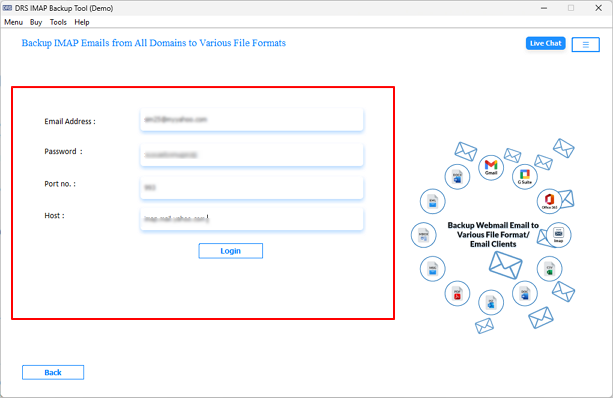
- Enter the new server IMAP credentials to establish the destination connection.
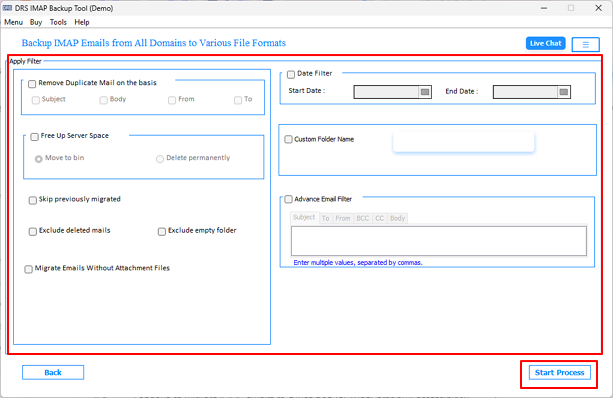
- Configure advanced parameters >> Start Process to transfer Roundcube emails to New Server.
Key Reasons to Choose This Utility
- Transfers multiple IMAP mailboxes simultaneously via batch migration.
- Imports multiple accounts instantly using the CSV file feature.
- Displays mailbox preview before initiating the migration process.
- Exports mailbox data into PST, MBOX, EML, MSG, PDF, and more.
- Filters emails by a specific date range for targeted mailbox migration.
- Segments oversized PST output into smaller, manageable file parts.
- You can securely migrate IMAP to Google Workspace & other email clients.
End Note
To conclude, we have outlined the most effective approaches to migrate roundcube emails to new server. For enterprises that manage large-scale distributed mailbox infrastructures, the MigrateEmails IMAP Backup Tool is helpful. It provides a precise & secure migration experience featuring advanced filtering capabilities and complete metadata retention. IT teams seeking a trusted server migration solution can use this utility for a smooth and loss-free Roundcube mailbox transition. Download the free demo version today & simplify your enterprise Roundcube migration workflow.
Frequently Asked Questions
Q1. What is the safest way to migrate Roundcube emails to a new server?
Ans. The safest method is using the MigrateEmails IMAP Backup Tool because it performs secure server-to-server IMAP migration with complete mailbox integrity. It preserves emails, attachments, folder hierarchy, and metadata while minimizing the risk of data loss during migration.
Q2. Can I migrate Roundcube emails without downtime?
Ans. Yes, the tool allows administrators to migrate Roundcube mailboxes with minimal or no operational downtime. Users can continue accessing their mailboxes while the migration process runs in the background.
Q3. Does Roundcube store emails locally?
Ans. No, Roundcube itself is a webmail client and does not permanently store emails locally. All mailbox data remains stored on the connected mail server through IMAP protocols.
Q4. Can I migrate Roundcube contacts and identities?
Ans. Yes, contacts and mailbox-associated data can also be transferred depending on the destination server configuration. The utility ensures complete mailbox data preservation during migration workflows.
Q5. How do I migrate multiple Roundcube mailboxes at once?
Ans. You can use the bulk mailbox migration and CSV import features available in the MigrateEmails IMAP Backup Tool. These features allow IT administrators to process multiple Roundcube accounts simultaneously in a single migration cycle.
Q6. Can I migrate Roundcube to Microsoft 365 or Google Workspace?
Ans. Yes, you can migrate Roundcube to Microsoft 365 & other cloud platforms like Google Workspace & Gmail, using the above shared utility.
Q7. How long does Roundcube migration take?
Ans. The migration duration depends on factors such as total mailbox size, internet bandwidth, server response time, and the number of accounts being transferred. For enterprise environments with large mailbox data, the tool optimizes migration speed through batch processing capabilities.
About The Author:

I am Neeru Kuchhal, a Technical Content Writer who focuses on turning complex ideas into clear, engaging, and impactful content. I combine creativity with strategy to write blogs, web content, and technical articles that connect with the right audience and support brand goals. I believe great content is not just written. It is thoughtfully created to inform, build trust, and drive action.
Related Post