-
Written By Kiran Sharma
-
Approved By
Vikash Bajpai -
Updated on May 15th, 2026
Convert OST to ICS without Outlook: Best & Easy Methods(2026)
Daniel’s Query:“I have several OST files containing important Outlook calendar events, and I need to save them in ICS format for backup and sharing. Is there an easy and reliable way to convert OST to ICS without losing calendar details?”
Introduction:- OST files store Outlook data like emails, contacts, and calendar events locally on your system. But accessing calendar information becomes difficult when Outlook crashes or the OST file turns orphaned. To solve this, many users convert OST files to ICS, a calendar format supported by Google Calendar, Apple Calendar, Thunderbird, and other applications. Once converted, calendar events can be imported and viewed easily across platforms. In this guide, you’ll learn simple methods to convert OST to ICS, along with a reliable MigrateEmails OST to PST Converter Tool for inaccessible or large OST files.
Export OST Calendar to ICS: Here’s Why It Matters.
There are several situations where users need to export OST to ICS:
- Move calendar events to Google Calendar
- Backup important meeting schedules
- Access calendar without Outlook
- Share calendar events with other users
- Recover data from orphaned OST files
- Open the OST calendar on Mac or mobile devices
- Convert corrupted OST calendar to ICS
Which is Better for Calendar Access: OST or ICS?
| Feature | OST File | ICS File |
| Main Purpose | Primarily used for offline Outlook mailbox storage | iCalendar File |
| Supported By | Mostly supported by Microsoft Outlook | Google Calendar, Apple Calendar, Outlook, Thunderbird, and more |
| Accessibility | Usually requires an Outlook profile or Exchange connection | On the other hand, it can be opened in many calendar applications |
| Portability | Difficult to share across platforms | In comparison, it is easy to share and import anywhere |
| Dependency | Depends heavily on Outlook | Independent calendar format |
| Compatibility | Limited to the Outlook environment | However, it offers broad cross-platform compatibility |
| Enterprise Usage | Internal Outlook mailbox storage | Calendar collaboration and scheduling |
How do I Convert OST to ICS?
There are mainly two ways to convert OST files to ICS. One method uses Outlook’s Save Calendar feature, while the other uses the MigrateEmails OST to PST Converter Tool. Additionally, the tool is helpful for inaccessible OST files and allows users to export calendar events into ICS format without depending on Outlook installation.
Way 01: Conventional Method to convert OST calendar to iCalendar
If Outlook is still accessible and the OST file is connected properly, you can manually save the OST to ICS.
Quick Steps to Save OST to ICS:
- First, open Microsoft Outlook.
- Next, go to the Calendar section.
- Then, select the calendar you want to export.
- After that, click File > Save Calendar.
- Now, choose the location where you want to save the file.
- Then, select iCalendar Format (*.ics) from the file type options.
- Finally, click Save to export the OST calendar as an ICS file.
Loopholes: OST to iCal Manually
- Firstly, you need Outlook installed on the system.
- Also, orphaned OST files usually won’t open properly.
- Moreover, the method may fail if the OST file is damaged.
- In addition, there is no easy way to convert multiple calendars together.
- As a result, large calendar files can take a lot of time.
- Sometimes, some events or entries may get skipped during export.
Way 02: Conventional Method to Convert OST to ICS
When you need to convert important calendar data safely, using a reliable solution is always a better option. In such situations, the MigrateEmails OST Converter Tool helps users convert OST files to ICS without Outlook or lengthy manual steps. The tool supports direct and secure conversion while preserving calendar events, reminders, meeting details, and folder structure. Besides that, it can also convert OST to MBOX and other file formats with minimal effort.
Steps to Convert OST to ICS for free:
- First, download and open the OST to PST Converter Tool.
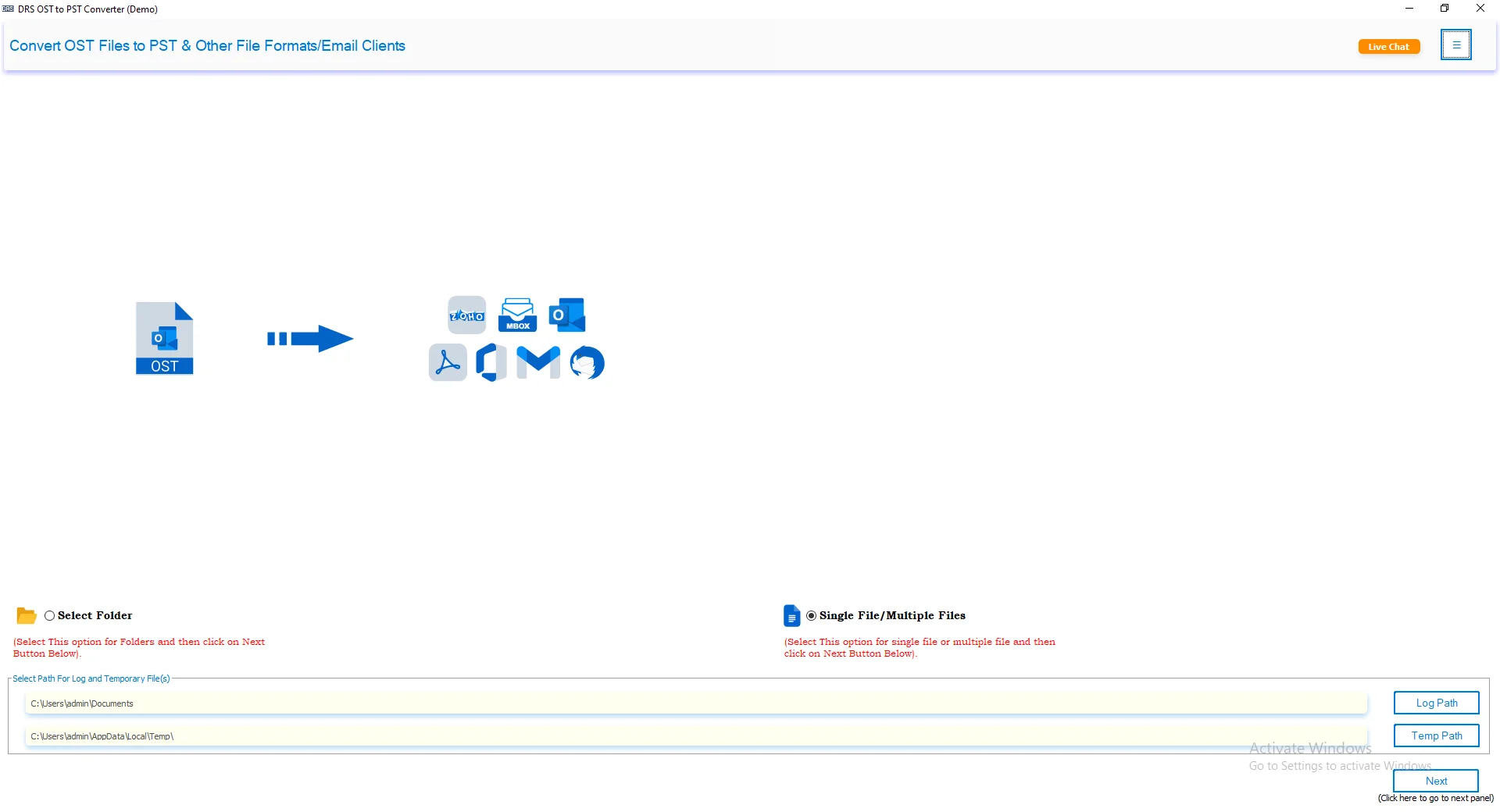
- After that, click Select Files/Select Folder to load the OST files. Press Next.
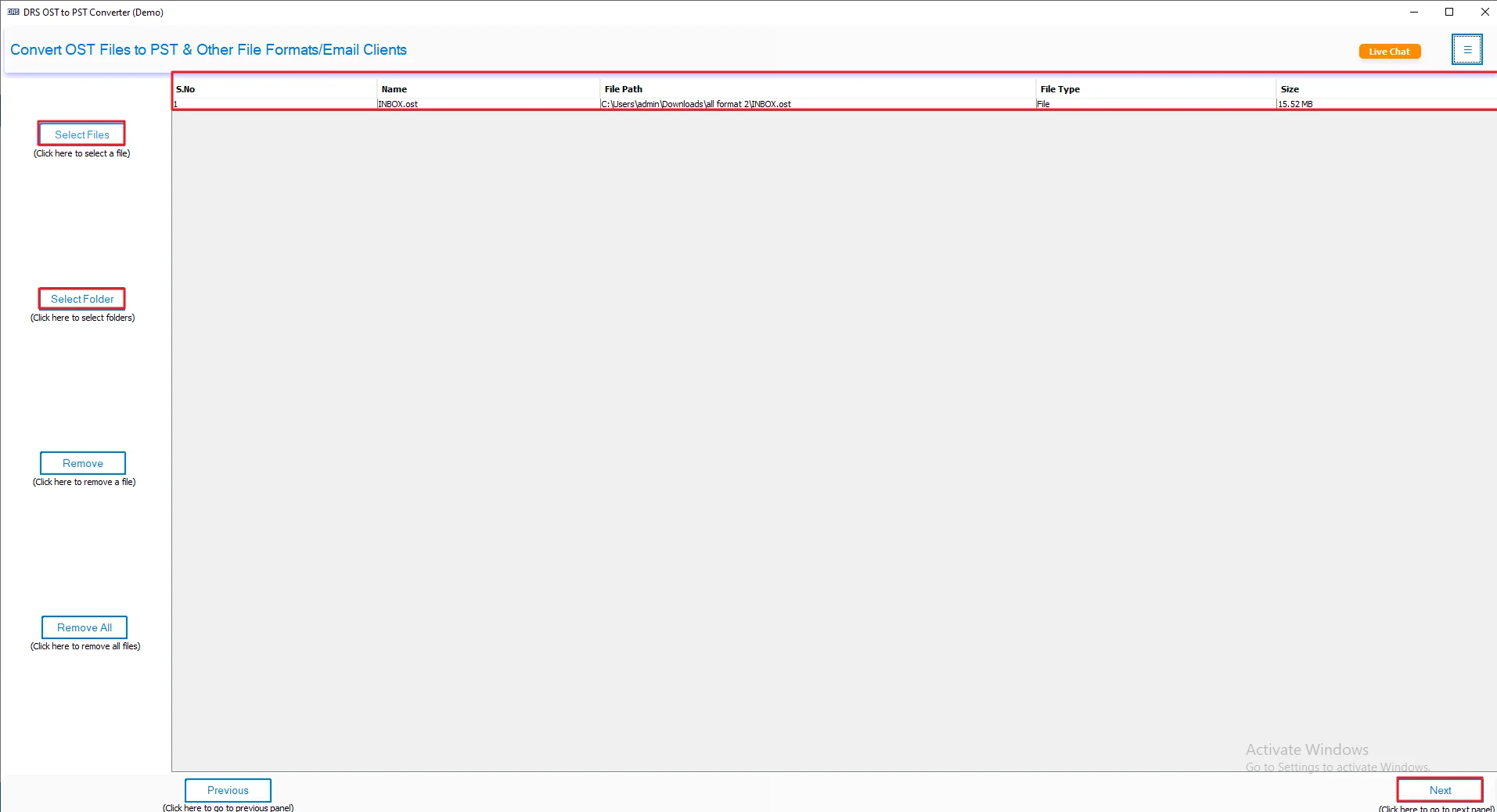
- Now, preview >> select your files >> click Next.
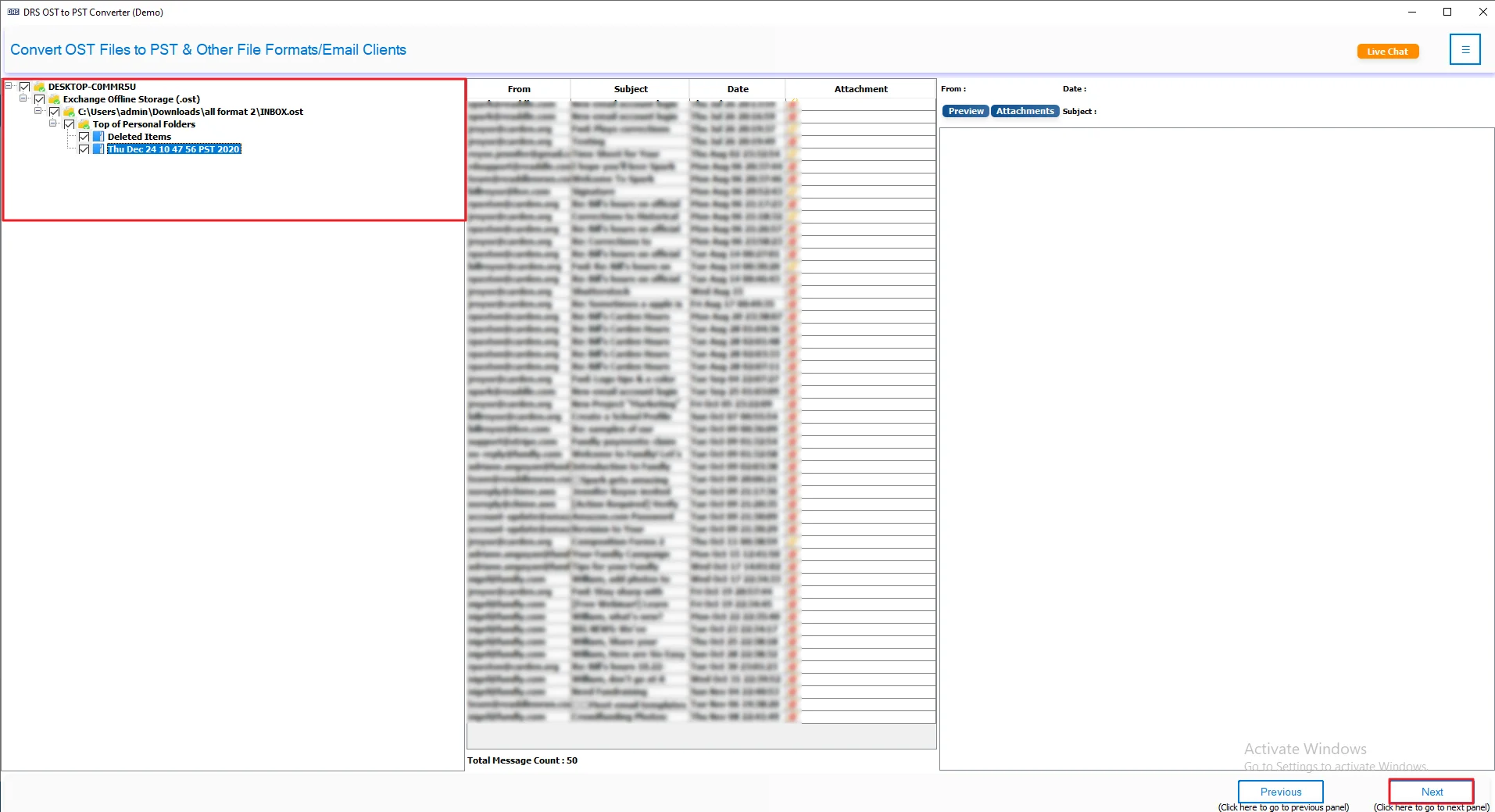
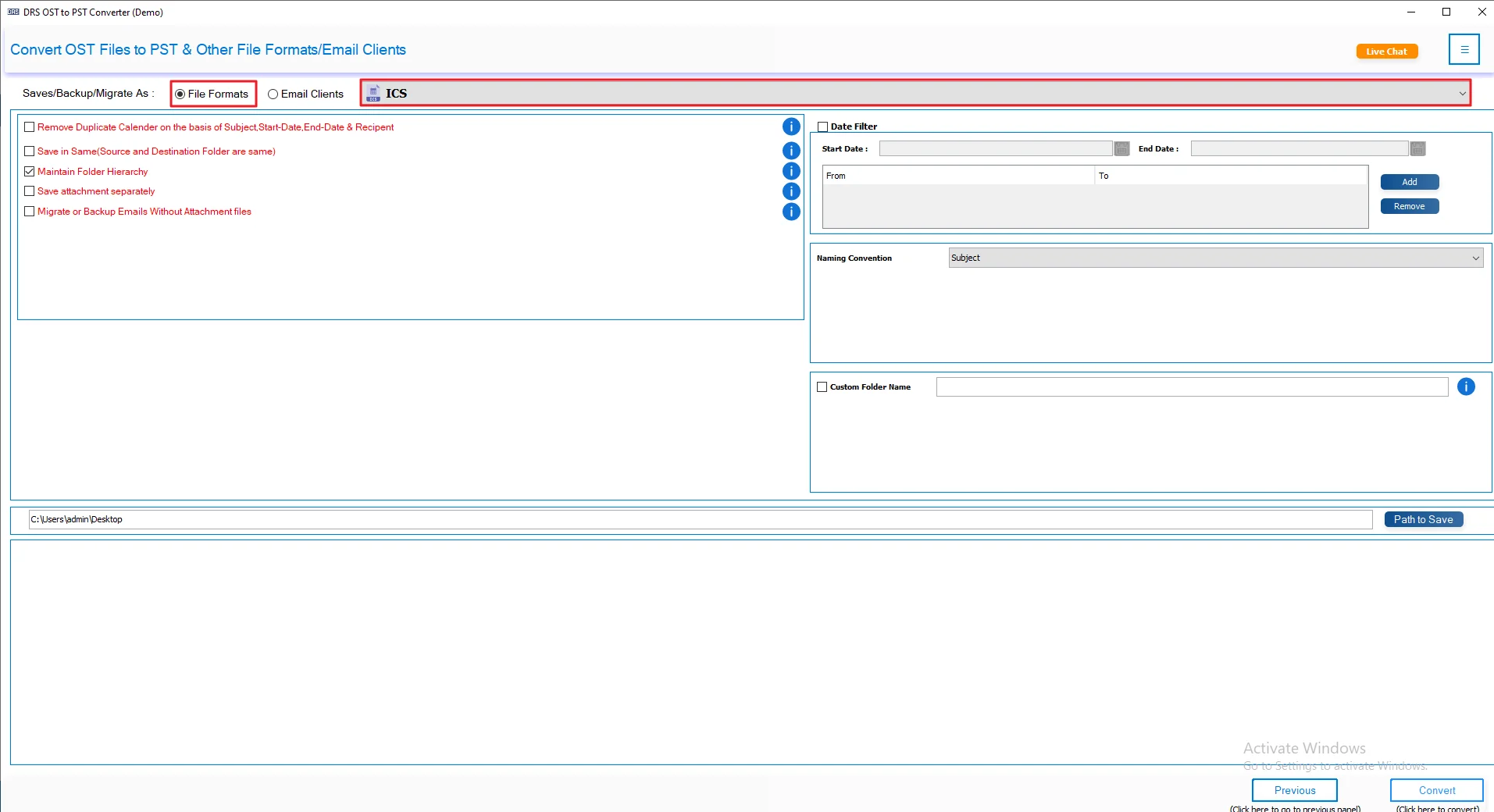
- Then, choose ICS as the saving file format.
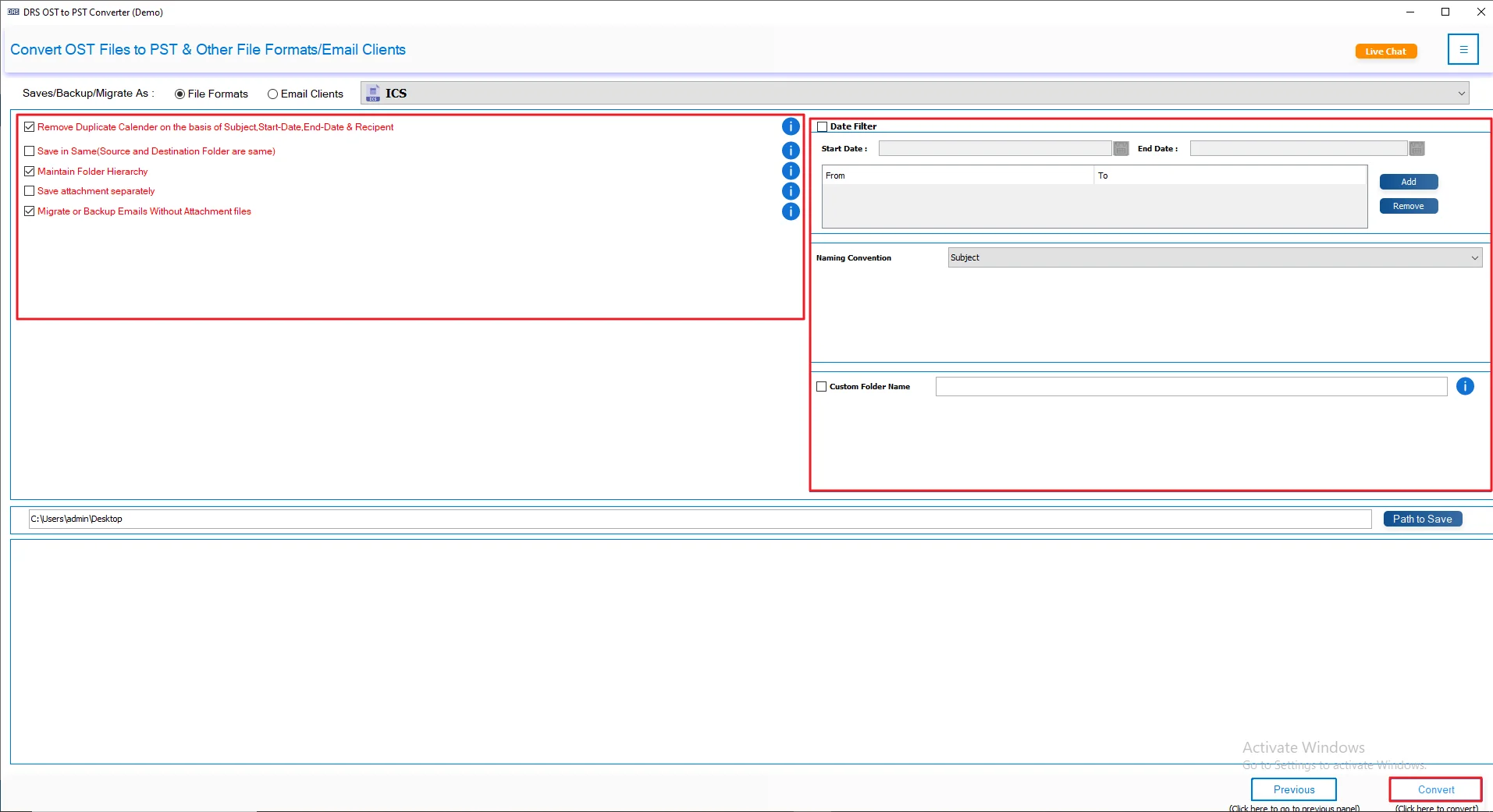
- At last, apply filters/features and click Convert.
A Real-Life Case Study: Convert Corrupted OST Calendar to ICS
The Client: A Financial Consulting Company
Problem:
The company needed to export Outlook calendar data from multiple corrupted OST files into ICS format for employee migration and calendar backup purposes.
Challenge:
Many OST files were orphaned, and Outlook was unavailable on several systems. The team also needed a way to convert OST to MSG for storing important email records separately.
Solution:
They used the MigrateEmails OST to PST Converter Tool to convert OST files to ICS without depending on MS Outlook.
Result:
- Exported multiple OST calendars into ICS format successfully.
- Preserved meeting schedules, reminders, and recurring events.
- Reduced manual effort and simplified calendar management
Why Choose the Professional Tool?
- Convert OST to PST and other formats without Outlook.
- Open OST calendar without Outlook easily.
- Supports orphaned and damaged OST files.
- Convert multiple OST files together.
- Keeps calendar structure and metadata safe.
- Preserves reminders and recurring meetings.
- Works with all Outlook versions.
- Fast and simple conversion process.
Conclusion
In this guide, we looked at both manual and professional ways to convert OST to ICS. The manual method can work fine if Outlook is installed and the OST file opens properly. But for orphaned or damaged files, things can get difficult. In that case, using an OST Converter Tool saves time and makes the process easier. You can choose any method depending on your file condition and what works better for you.
Frequently Asked Questions
Q1. Which is the best OST to ICS Converter Tool?
Ans. MigrateEmails OST to PST Converter is a trusted solution for converting OST calendars to ICS while keeping events and meeting details properly maintained.
2. How to export OST calendar to ICS?
Ans. Users can export calendars manually through Outlook or use a professional OST Converter Tool for a quicker and simpler conversion process.
3. Can I convert multiple OST file calendars to iCalendar at once?
Ans. MigrateEmails OST to PST Converter supports bulk conversion, making it easier to export multiple OST calendars into ICS format together.
4. Is OST to ICS conversion safe and secure?
Ans. Using a professional OST Converter Tool helps maintain calendar structure, reminders, and scheduling information during the entire conversion process.
5. Is there any free method to convert OST to ICS?
Ans. Outlook offers a manual way to save calendars as ICS files, while MigrateEmails OST to PST Converter handles inaccessible OST files more efficiently.
6. Can I save OST to ICS without Outlook installation?
Ans. A professional OST Converter Tool allows users to convert OST calendars into ICS format without installing Microsoft Outlook on the computer.
7. What is OST File?
Ans. An OST file stores Outlook mailbox data offline, and MigrateEmails OST to PST Converter helps access and convert its data into different formats.
8. Is it possible to save OST to ICS without losing data?
Ans. Professional OST Converter software preserves calendar events, reminders, metadata, and recurring meetings while exporting OST files into ICS format.
9. Does converting OST to iCal preserve recurring meetings?
Ans. Recurring meetings, event details, and reminders remain unchanged when calendars are converted using MigrateEmails OST to PST Converter.
About The Author:

I am Kiran Sharma, a Technical Expert in Content writing. I have technical expertise in the field of Email Backup, Data Recovery, and Email Migration, and resolve technical queries related to Cloud Backup or Email Migration for individuals and businesses.
Related Post