-
Written By Neeru Kuchhal
-
Approved By
Vikash Bajpai -
Updated on May 22nd, 2026
How to Export Instagram Chats to PDF in Seconds: Guide 2026
Natalie’s Query:“I have an extensive archive of Instagram direct messages containing significant professional exchanges that require reliable preservation. Is there a reliable method to export Instagram chat to PDF & keep the complete message thread and attachments intact?”
Introduction:- Instagram direct messages represent an extensive collection of organizational interactions with significant long-term archival value. Converting these message threads into PDF format delivers a legally admissible record that addresses both individual and enterprise-level compliance mandates. Since Instagram does not provide native PDF export functionality, this technical blog outlines the most effective methodologies to save Insta DMs to PDF that maintain complete message integrity. We will also demonstrate how the MigrateEmails JSON Converter Tool enables a streamlined conversion workflow.
.
How can I export Instagram chats to PDF?
Users can export their Instagram chats to PDF through manual or automated approaches. The manual technique requires acquiring the Instagram data archive and converting each JSON file independently, limiting its scalability for enterprise-level requirements.
For enterprise-level requirements, the MigrateEmails JSON Converter Tool delivers a precise solution to export Instagram chat to PDF that maintains complete message history & media references throughout the conversion process. To archive Instagram JSON chat data in a browser-accessible format, refer to the technical guide on how to convert JSON to HTML.
How to Manually Save Instagram Chat History to PDF?
For limited datasets, users can utilize the following native manual approaches to export their Instagram chat to PDF. Moreover, this approach can be executed directly from the desktop environment.
Method 01: Using the Print to Save Instagram Chats as PDFs
This approach leverages the system’s built-in print functionality to capture Instagram conversations directly into PDF format.
Steps to Save Insta DMs to PDF:
- You need to launch Instagram and open the target conversation thread.
- After that, simply press Windows + P to trigger the system print dialog.
- Now, you need to select Save as PDF from the Destination dropdown menu.
- Define the desired destination path for the converted files >> Confirm to complete the export operation.
Method 02: Use Copy & Paste to Convert Instagram DMs to PDF Free
This method involves the process of transferring your chat content into a text editor before you export it as a PDF document.
Steps to Export Instagram Messages to PDF:
- You need to open Instagram & navigate to the required conversation thread.
- Sequentially select, copy, and paste the chat messages into Microsoft Word.
- Repeat until all required conversation data is transferred to the document.
- Press Ctrl + S, select PDF under Save as Type, assign a file name, and save.
Limitations of Manual Methods:
- Applicable only for small-scale individual chat exports.
- Screenshot method captures restricted visible content per page.
- Copy-paste approach fails to retain original formatting and media attachments.
- Operationally inefficient and time-consuming for enterprise-level requirements.
- No support for bulk or automated multi-conversation thread conversion.
Enterprise-Grade Solution to Export Instagram Chat to PDF
The MigrateEmails JSON Converter Tool provides a direct, precision-driven solution to export your Instagram chat to PDF without requiring any technical expertise. The tool processes your Instagram JSON chat files exported directly from the platform & converts them into structured, professionally formatted PDF documents. The tool operates entirely offline, guarantees complete data security & privacy throughout the conversion workflow. For transferring your JSON chat files into a fully editable & shareable document, review our comprehensive walkthrough on how to convert JSON file to Word.
One-Time Conversion Service Option:
For organizations or individuals who prefer a fully managed approach without installing any software, the one-time conversion service is an ideal alternative. Simply submit your Instagram exported JSON chat files to the dedicated support team, and certified experts will execute the entire PDF conversion process on your behalf with complete data confidentiality, formatting precision, and structural integrity maintained throughout
Quick Steps to Download Instagram Messages as PDF in Seconds:
- Install the MigrateEmails JSON Converter Tool on your Windows system.
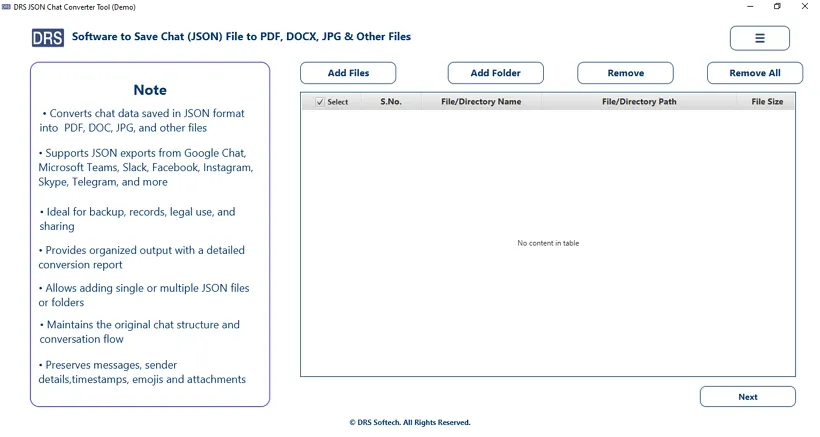
- After that, you need to simply load the Instagram exported JSON chat files.
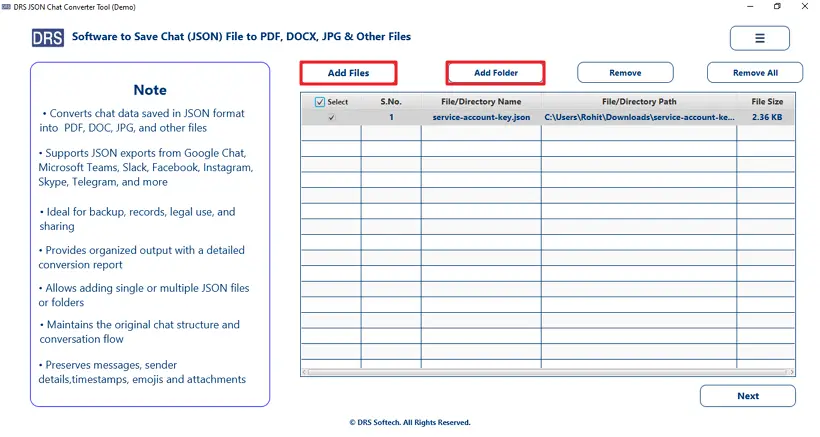
- You need to cross-verify the loaded files via the built-in preview panel.
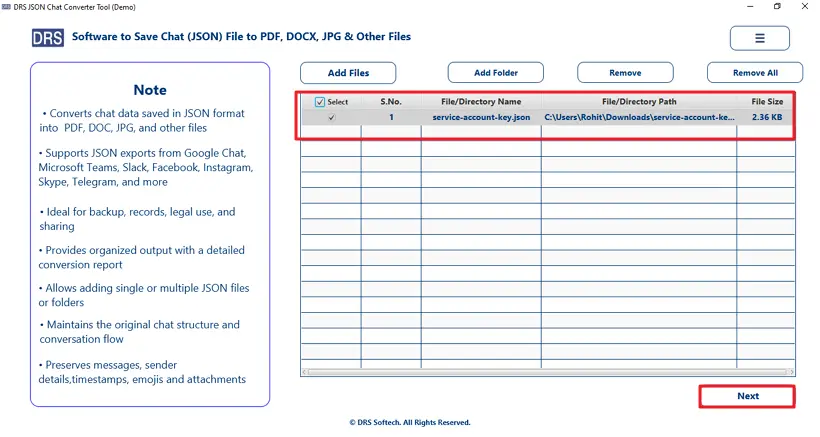
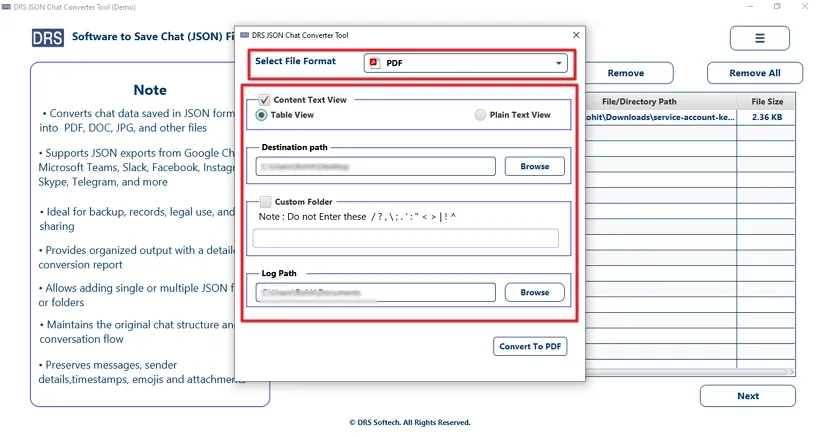
- Now, select PDF as the target output format >> apply advanced filters.
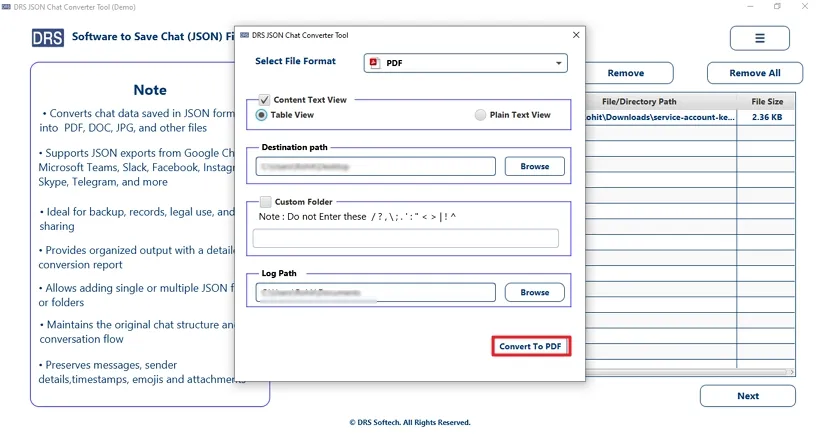
- Finally, you have to press Convert to PDF to execute the PDF export process.
Real-Life Scenario: Export Instagram Chat to PDF
David works as a social media strategist at a digital marketing firm. He consistently manages campaign documentation & client project specifications through Instagram direct message threads. Sharing these lengthy and unstructured conversation threads with the legal and compliance team during internal audits became increasingly difficult.
To address this, he used the MigrateEmails JSON Converter Tool to convert all critical Instagram chat records into structured PDF documents. This enabled the entire team to access, review, and present organized conversation data without requiring any technical expertise or direct platform access.
Why Choose the MigrateEmails JSON Converter Tool?
- Supports batch processing for simultaneous multi-file conversion.
- Retains message structure, timestamps, sender details, and chat sequence.
- The advanced date-range filter enables selective and targeted chat export.
- Fully offline operation ensures complete data privacy during conversion.
- Compatible with Instagram, Facebook, Telegram, Skype, and other platforms.
- Generates output in PDF, HTML, DOCX, and multiple additional formats.
- Built-in preview panel allows data verification prior to conversion.
Note: For extracting JSON chat data into image format for visual documentation, explore our step-by-step guide on how to convert JSON to JPG.
End Note
In the above technical blog, we have examined the most effective approaches to export Instagram chat to PDF. Manual methods such as Print to PDF and Copy-Paste techniques serve adequately for small-scale individual requirements but demand significant time & effort for larger datasets. For enterprise-level deployments, the MigrateEmails JSON Converter Tool delivers an automated conversion pathway that preserves complete message integrity throughout the process. Regardless of data volume or organizational scale, this utility guarantees consistently accurate & professionally structured PDF output.
Frequently Asked Questions
Q1. Can I save Instagram messages as a PDF file?
Ans. Yes, Instagram messages can be saved as PDF using manual methods or the MigrateEmails JSON Converter Tool, which converts chat data into structured PDF format.
Q2. Does Instagram provide an official PDF export option?
Ans. No, Instagram does not offer any built-in feature to export chats directly to PDF.
Q3. Is it possible to print Instagram conversations?
Ans. Yes, you can use browser print options or system “Print to PDF” features, but formatting and attachments may not always be preserved.
Q4. Can I export Instagram DMs without taking screenshots?
Ans. Yes, with the MigrateEmails JSON Converter Tool, you can export complete chat data without relying on screenshots.
Q5. Are Instagram chat exports secure and private?
Ans. Yes, when using the tool, all processing happens securely, ensuring chat data remains private and protected during conversion.
Q6. Can I export Instagram chats from mobile devices?
Ans. Yes, Instagram data can be exported from mobile, but conversion to PDF is more efficient on desktop using a conversion tool.
Q7. What file formats are available besides PDF?
Ans. The tool also supports formats like DOCX, HTML, and other structured export options apart from PDF.
Q8. Can deleted Instagram messages be exported?
Ans. No, deleted messages cannot be recovered or exported, as they are no longer available in the Instagram data file.
About The Author:

I am Neeru Kuchhal, a Technical Content Writer who focuses on turning complex ideas into clear, engaging, and impactful content. I combine creativity with strategy to write blogs, web content, and technical articles that connect with the right audience and support brand goals. I believe great content is not just written. It is thoughtfully created to inform, build trust, and drive action.
Related Post