-
Written By Neeru Kuchhal
-
Approved By
Vikash Bajpai -
Updated on June 23rd, 2026
Migrate Kerio Connect to Gmail: Complete 2026 Migration Guide
“Our organization is planning to migrate Kerio Connect to Gmail, and I need to migrate around 6,000 mailboxes without losing folder structure or metadata. Has anyone handled a Kerio Connect to Gmail migration at this scale?”
– Nathan Brooks, IT Administrator, Sydney, Australia
Kerio Connect functions as a self-hosted, on-premise messaging platform that is widely adopted by mid-sized enterprises that require direct server control & multi-protocol email administration. On the other hand. Gmail delivers a cloud-native communication infrastructure built for centralized IT governance & enterprise-grade data portability at scale. This guide outlines structured procedures to migrate emails from Kerio to Gmail accurately across both individual and multi-tenant organizational deployments. We will also include the MigrateEmails IMAP Backup Tool for secure transfer.
What is Kerio Connect?
Kerio Connect is a self-hosted, on-premise email and collaboration server by GFI Software, which helps in secure multi-protocol communication across mid-sized enterprise environments. It operates across IMAP, POP3, SMTP, & MAPI protocols while providing you with integrated calendar & task management under centralized domain administration. Organizations that run Kerio Connect infrastructure migrate to Gmail to gain cloud-native scalability & Google Workspace data portability at the organizational level.
Kerio Connect vs Gmail
|
Parameter |
Kerio Connect |
Gmail |
|
Deployment Model |
On-premise, self-managed server infrastructure |
Cloud-hosted, which is provider-managed SaaS solution |
|
Supported Protocols |
IMAP, POP3, SMTP and MAPI |
IMAP, POP3 and SMTP |
|
Storage Capacity |
Administrator-defined server-side allocation |
15 GB to 5 TB per user under Google Workspace |
|
Authentication Method |
SSL-based standard credential login |
OAuth 2.0 with multi-factor authentication support |
|
Collaboration Features |
Integrated calendar, contacts, and task modules |
Google Meet, Drive, Docs, and Sheets |
Native Method to Migrate Kerio Connect to Gmail
Users can easily transfer their Kerio Connect mailbox data to Gmail through a structured native approach utilizing existing IMAP protocol configuration and administrative access. Follow the given steps for easy conversion.
Step 01: Enable IMAP Access in Kerio Connect
- To initiate, you need to log in to the Kerio Connect Administration Console.
- After that, you have to simply navigate to Configuration >> Services.
- Confirm IMAP service is active for all migrating mailboxes.
Step 02: Create and Configure Gmail Accounts
- Set up destination Gmail accounts for all migrating users.
- Open Gmail Settings, >>See All Settings, followed by Forwarding & POP/IMAP.
- Now, simply enable IMAP access and save the updated configuration.
Step 03: Configure Both Accounts in an Email Client
- Open Thunderbird or Microsoft Outlook on your system.
- Add a Kerio Connect account using IMAP server credentials.
- Add the destination Gmail account using Google IMAP server settings.
Step 04: Copy Mailbox Folders to Gmail
- Select all folders within the Kerio Connect account.
- Drag and drop email folders into corresponding Gmail account directories.
- You need to allow the email client to complete the full synchronization process.
Step 05: Finally, verify Migrated Data
- Log in to Gmail & confirm all folders, emails, and attachments transferred accurately
- Cross-check message count and folder hierarchy against the original Kerio Connect mailbox
Limitations of the Manual Method:
- Sequential IMAP transfer is time-intensive for large mailboxes.
- Nested subfolder hierarchy may not replicate accurately.
- Embedded attachments risk incomplete transfer via IMAP.
- Simultaneous multi-user migration is unsupported.
- Network interruptions can corrupt mid-migration data.
- Gmail storage quota can halt large archive migrations.
- Multi-account configuration increases administrative workload.
Trusted Solution to Migrate Kerio Connect to Gmail
The MigrateEmails IMAP Backup Tool is a compliance-driven utility for structured transfer of IMAP-enabled mailbox data across multiple destination platforms. The application delivers dual processing modes that cover single account and batch migration. It allows IT administrators to handle multiple Kerio Connect mailboxes concurrently while preserving message-level metadata throughout. Organizations can access a free demo edition supporting up to 50 emails per folder to assess tool performance.
Easy Steps for Migrating from Kerio Connect to Gmail:
- Download the above-discussed IMAP Backup Tool.
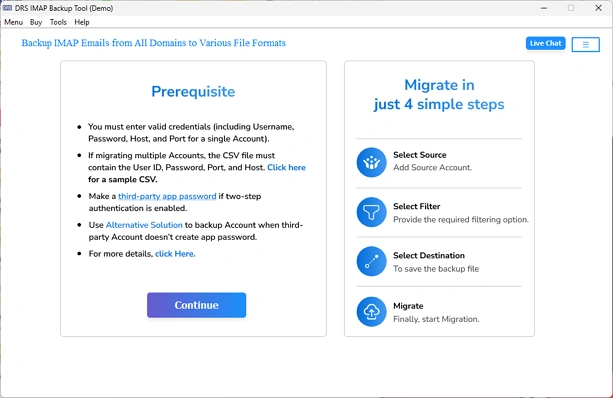
- Enter the Kerio Connect server address, port, and login credentials.
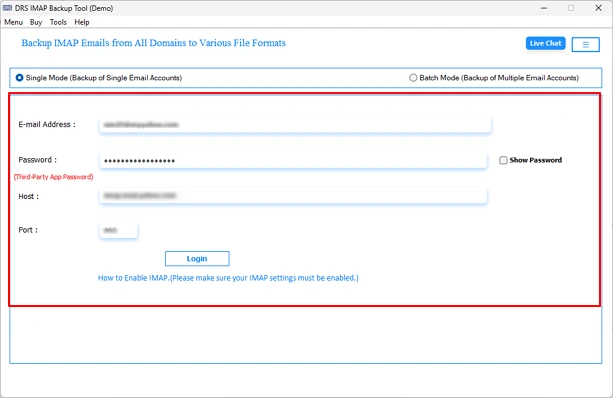
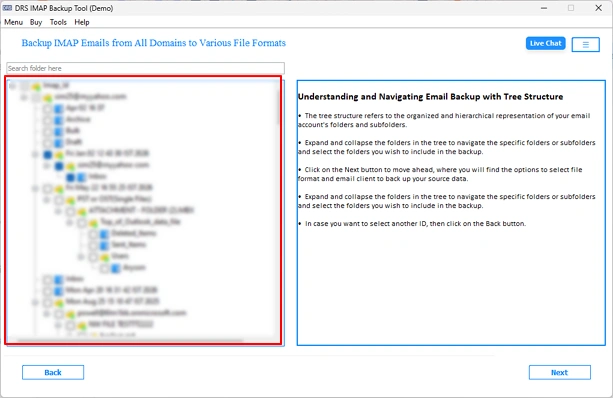
- From the hierarchy, you need to choose specific folders for migration.
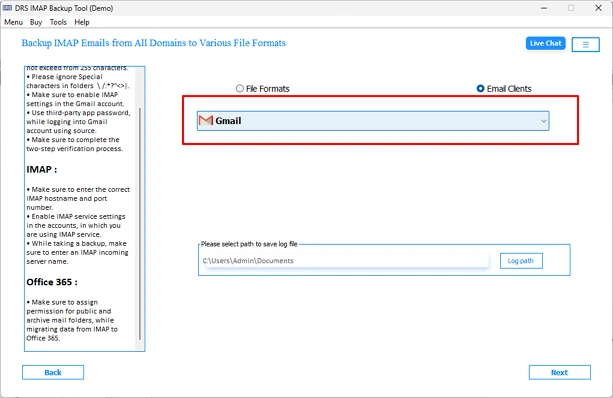
- Now, you need to select Gmail as the destination from the drop-down list.
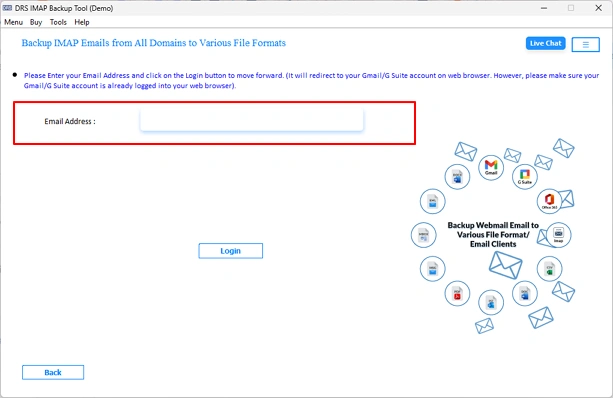
- You need to simply enter the login details for authentication.
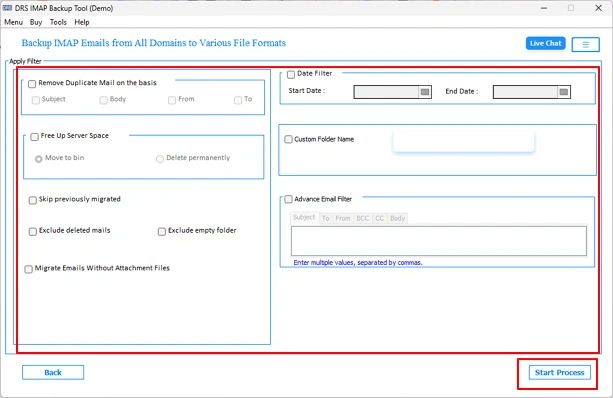
- Thereafter, apply Remove Duplicate settings as needed >> Start Process to transfer Kerio Connect to Gmail.
How Does The Above Utility Simplify Kerio to Gmail Migration?
- Batch mode to process multiple IMAP accounts in a single operation.
- Date Filter to export emails within a defined governance-aligned range.
- Remove Duplicate filter based on To, From, Subject, and Body fields.
- Skip Previously Migrated option to avoid reprocessing transferred records.
- Free Up Server Space feature to clear the source mailbox after migration.
- Splits oversized PST output into smaller, manageable segments.
- Preserve folder hierarchy, inline attachments, and message-level metadata.
Case Study
James Whitfield, an IT Administrator at a legal firm in Toronto, Canada, needed to migrate 4,500 Kerio Connect mailboxes to Gmail following an organization-wide shift to cloud-native communication infrastructure. Manual IMAP configuration resulted in folder hierarchy inconsistencies & metadata loss across test accounts.
James utilized the MigrateEmails IMAP Export Tool in batch migration mode, completing the entire transfer within a single operational window while maintaining attachment integrity and message-level metadata across all migrated mailboxes.
Conclusion
In the above technical blog, we have outlined reliable methods to migrate Kerio Connect to Gmail. The native IMAP approach serves smaller deployments but provides administrative complexity & data integrity risks at enterprise scale. The MigrateEmails IMAP Backup Tool delivers a secure migration pathway that ensures complete data portability across high-volume Kerio Connect environments. Organizations seeking accurate & efficient migration outcomes can download the free demo edition to validate tool performance.
Frequently Asked Questions
Q1. How can I Migrate Kerio Connect to Gmail?
Ans: You can migrate your Kerio Connect to Gmail using the native IMAP method or a professional IMAP migration tool. The manual approach involves configuring both accounts in an email client and transferring mailbox data, whereas a dedicated migration tool simplifies bulk transfers and preserves mailbox integrity.
Q2. What is the best method to Transfer Kerio Connect to Gmail?
Ans: The best method depends on your migration requirements. The native IMAP approach is suitable for small-scale migrations, while an above-the-shred migration tool is better for organizations handling large datasets and metadata preservation.
Q3. Can I selectively Migrate Emails from Kerio to Gmail?
Ans: Yes, the MigrateEmails IMAP Migration Tool offer advanced filtering options, allowing users to migrate specific folders, date ranges, or selected mailbox items instead of transferring the entire mailbox.
Q4. Why do businesses migrate from Kerio Connect to Gmail?
Ans: Businesses often migrate to Gmail to benefit from cloud-based accessibility, simplified administration, enhanced security features, larger storage capacities, and seamless integration with Google Workspace applications such as Drive, Meet, and Calendar.
Q5. Can I Transfer Kerio Connect to Gmail while preserving read/unread status?
Ans: Yes, a reliable migration utility can maintain email properties such as read/unread status, sender and recipient details, timestamps, attachments, and folder hierarchy during the migration process.
Q6. Can I perform incremental migration when I migrate Kerio Connect to Gmail?
Ans: Yes. Incremental or delta migration is supported by many advanced migration tools. This feature transfers only newly added or modified emails, reducing migration time and preventing duplicate data.
Q7. Can Kerio Connect public folders be migrated to Gmail?
Ans: Kerio Connect public folders do not have a direct equivalent in Gmail. Their contents can typically be migrated to shared Gmail accounts or Google Workspace shared mailboxes, depending on the migration strategy and available tools.
Q8. How do I handle duplicate emails during Kerio Connect to Gmail migration?
Ans: Duplicate emails can be minimized by using the above-discussed IMAP Transfer Utility with built-in duplicate detection or incremental migration features. These options compare existing mailbox items and avoid transferring identical messages multiple times.
About The Author:

I am Neeru Kuchhal, a Technical Content Writer who focuses on turning complex ideas into clear, engaging, and impactful content. I combine creativity with strategy to write blogs, web content, and technical articles that connect with the right audience and support brand goals. I believe great content is not just written. It is thoughtfully created to inform, build trust, and drive action.
Related Post