-
Written By Kiran Sharma
-
Approved By
Vikash Bajpai -
Updated on April 15th, 2026
Simple Steps to Convert JSON to HTML: Quick Solutions
David’s Question: “I have many JSON files that consist of structured data and various chat records. I want to save them in HTML format so that I can view them in a browser and share them easily. However, JSON files are not visually readable. Is there a quick and reliable way to convert JSON to HTML in bulk without losing structure?”
Introduction:- Currently, JSON files are primarily used for storing and exchanging structured data across various applications and APIs. On the other hand, HTML is the backbone of web pages. Therefore, turning a JSON file into HTML helps users visualize, present, and share data easily via browsers. Unfortunately, there is no direct option to convert a JSON file to HTML. That is the reason this guide covers the various ways to complete this task. Along with that, it also highlights the MigrateEmails JSON File Converter Tool for effective conversion.
Migrating JSON to HTML: Why This Conversion Matters?
Here are several ways why it is important to convert JSON to HTML:
- It converts complex data into tables and organized formats.
- Makes raw data easy to read, share, and understand.
- Allows direct viewing in any web browser.
- The conversion simplifies sharing via web pages.
- Also, it improves the overall user experience and accessibility.
From Data to Display: Bridging the Gap Between JSON and HTML
For a smooth transition, let’s first understand what makes JSON and HTML different.
| Main Features | JSON File (.json) | HTML File (.html) |
| Type | Data storage format | Web page markup language |
| Readability | Machine-readable | Human-readable |
| Structure | Key-value pairs | Tags and elements |
| Editability | Editable in code editors | Editable in browsers/editors |
| Compatibility | Requires tools to view | Opens in any browser |
| Best Uses | APIs & data exchange | Data presentations and websites |
Step-by-Step: How to Manually Convert JSON to HTML?
For smaller tasks, use these straightforward manual approaches mentioned below. However, this works best in the case of limited files, but it also consumes time and effort.
Approach 1: Using JavaScript Code
- Firstly, open a code editor (like VS Code).
- Create an HTML file.
- Use JavaScript to parse JSON data and display it.
- Save and open the file in a browser.
Approach 2: Convert via Excel or CSV
- First of all, convert JSON to CSV format.
- Now, open the CSV in Excel.
- Lastly, export or save as HTML.
Disadvantages to Transform JSON to HTML Manually
- It is not suitable for large data due to a lack of bulk conversion.
- This process requires technical expertise.
- Data may not display properly due to formatting issues.
- The process is not suitable for non-tech users.
- Moreover, external tools may leak sensitive data. This leads to security risks.
Important Note: However, for bulk conversion, it is highly recommended to use the MigrateEmails JSON File Converter Tool.
Why Choose an Automated Solution Over Manual Solutions?
| Main Features | Manual Solution | Automated Solution |
| Bulk Conversion | Not supported | Converts multiple files together |
| Data Accuracy | Risk of formatting errors | Maintains original structure |
| Time Efficiency | Time-consuming | Fast and instant processing |
| Ease of Use | Requires technical steps | Simple, user-friendly interface |
| Handling Large Files | May crash or slow down | Smooth processing of large data |
| Security | Risk with online tools | Safe and secure conversion |
| Consistency | Inconsistent output | Structured results |
Effortless Conversion: The Best Tool to Convert JSON to HTML
If you found the manual conversion difficult to complete your task, you can freely rely on the MigrateEmails JSON Converter Tool. This tool is most useful for both tech and non-tech users. It ensures secure data conversion with zero data loss. Along with that, it preserves metadata, formatting, and structured layout intact without any alteration. Additionally, it helps users to convert JSON files to PDF and other formats.
A Quick Start Guide to Export JSON to HTML
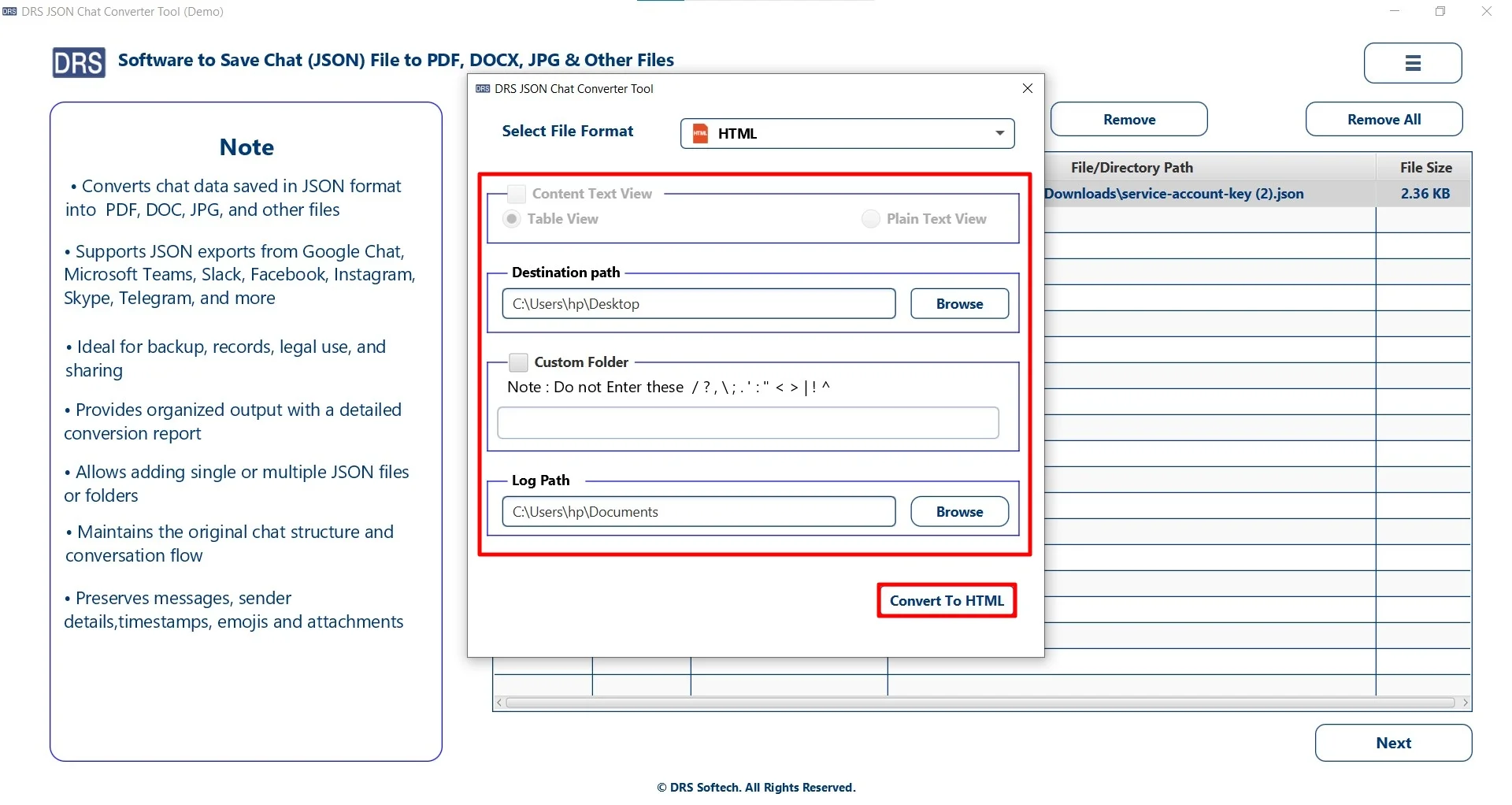
- Firstly, start by installing the MigrateEmails JSON Converter Tool.
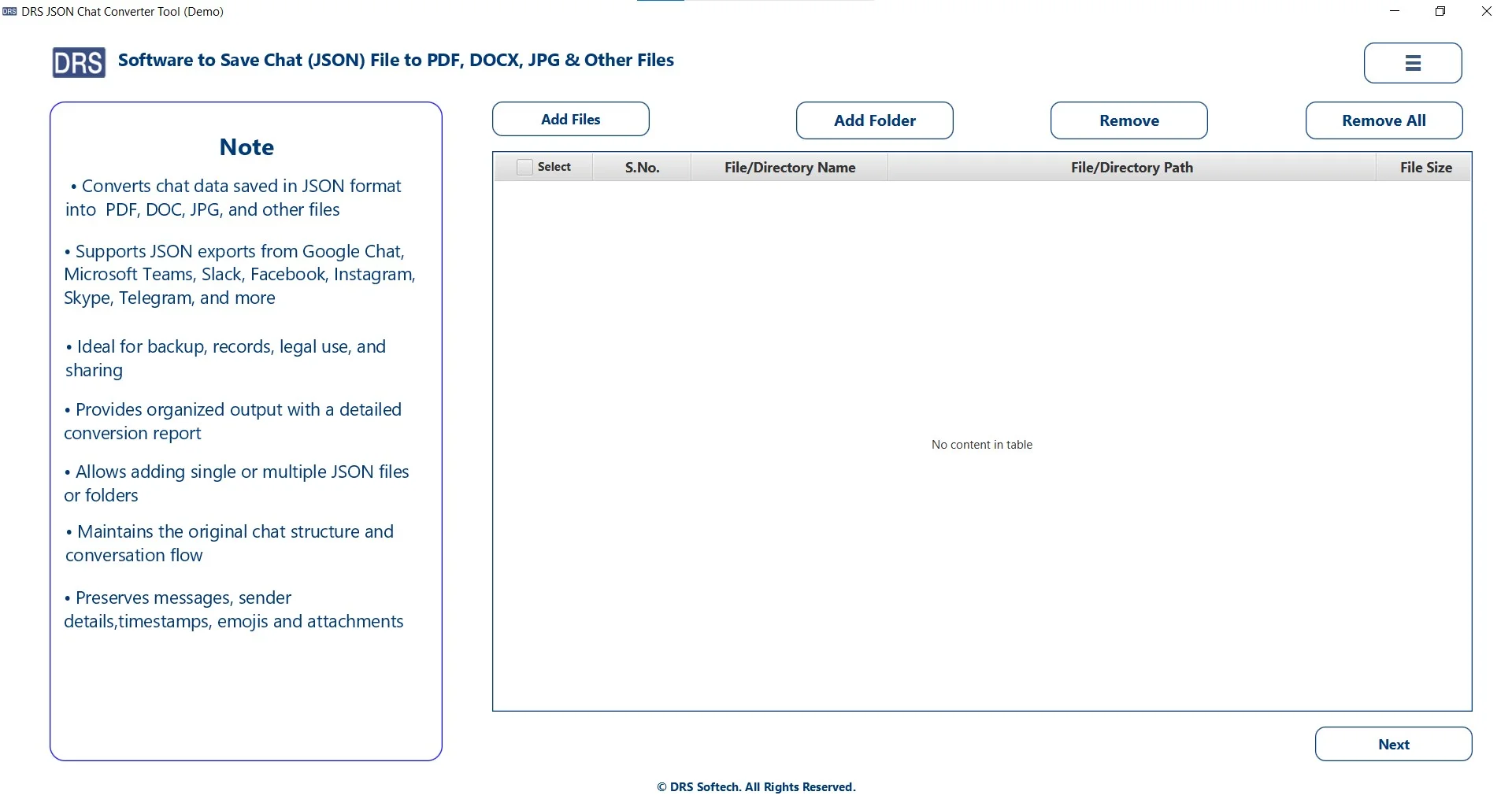
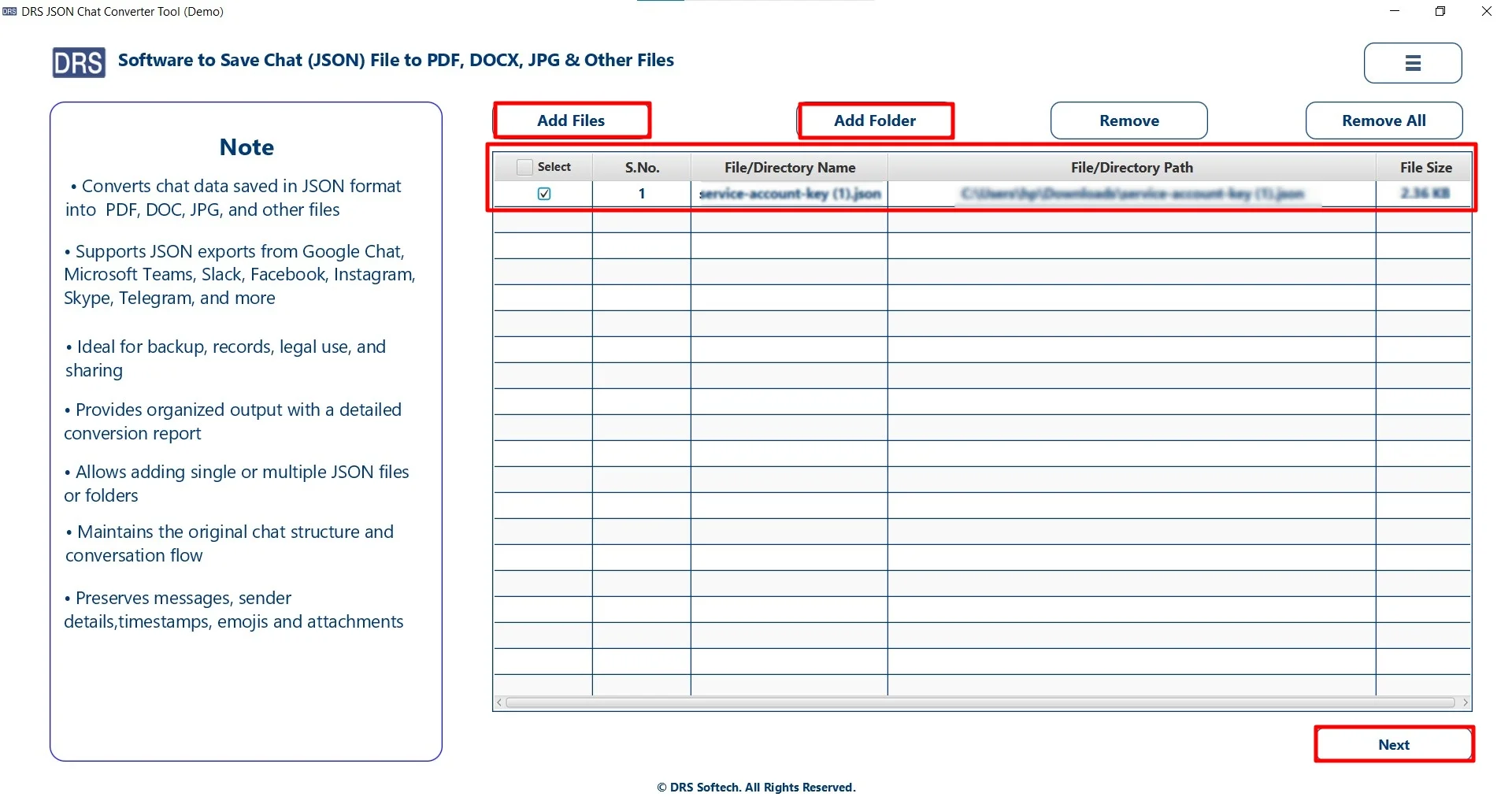
- Add Files or Folders to upload the JSON that you wish to convert, and click Next.
- Afterwards, choose HTML as the saving target option.
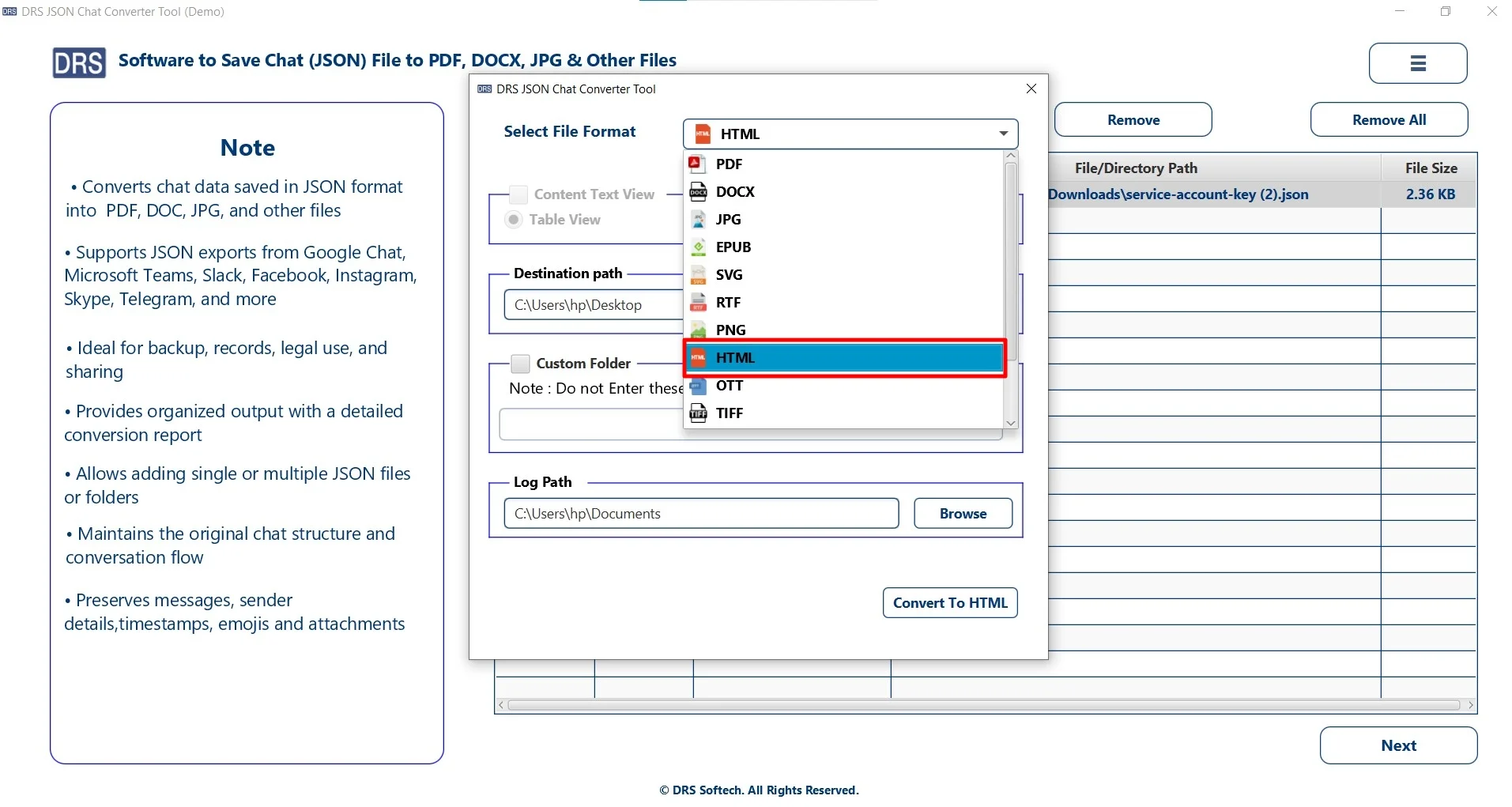
- Finally, apply advanced filters, set the destination to save the file, and click Convert to HTML.
Disadvantages to Transform JSON to HTML Manually
- Converts multiple JSON files at once without any limitations.
- Preserves the original key-value hierarchy and data structure.
- Easy-to-use interface suitable for all types of users.
- Supports multiple output formats for flexible conversion.
- Saves time and effort with fast processing speed.
- Ensures complete data safety during the conversion process.
Quick-Fix: One-Time JSON to HTML Conversion-
Don’t want to complete the task manually? You can go for a one-time conversion option. You just have to get in touch with our support team. They will handle the entire process securely without losing any data. They will:
- Convert JSON to HTML with attachments.
- Ensures data security and integrity.
- Deliver accurate and structured results.
This option is ideal for professional users with a large amount of data.
A Real-Life Case Study: A software development company
Problem: The company stored API responses and logs in JSON format and needed to present them in a readable format. However, the manual conversion required coding and was time-consuming. Along with that, it does not provide accurate results.
Solution: After that, they used the MigrateEmails JSON Converter Tool to complete their task.
Result: It successfully converted large datasets into readable HTML pages. Preserved structure and formatting along with layout without any modification or loss. Moreover, it improved client reporting efficiency.
Final Words
In this blog, we talked about how to convert JSON to HTML. First, we have seen the manual methods, but they are very time-consuming. Most probably, this approach is useful only with a limited number of files. Afterwards, we have covered the professional method using the JSON Converter Tool. This approach is highly beneficial with multiple large files. Therefore, choosing the right method will make the conversion easy and efficient for you. In case you have any issues during the process, feel free to contact our support team.
Frequently Asked Questions
Q1. What are the easiest ways to convert JSON to HTML?
Ans. The easiest ways include using online converters, simple scripts (JavaScript), or a professional tool. For quick and bulk conversion without technical effort, using a dedicated JSON converter tool is the most efficient option.
Q2. Are there any free tools to convert a JSON file to HTML?
Ans. Yes, there is the MigrateEmails JSON to HTML converter and manual coding methods. However, they may have limitations like file size restrictions, formatting issues, and a lack of bulk conversion support.
Q3. Can I export a large file to JSON or HTML?
Ans. Yes, you can export large files, but manual methods may struggle with performance and structure handling. A professional JSON converter tool is recommended to process large JSON files efficiently without errors or data loss.
Q4. Which is the best tool to convert a JSON file to HTML?
Ans. The MigrateEmails JSON Converter Tool is one of the best solutions. It supports bulk conversion, preserves data structure, and provides accurate HTML output with minimal effort.
Q5. Can I safely convert a JSON file to HTML using online tools?
Ans. Online tools can be used for basic tasks, but they may pose security risks, especially when handling sensitive or confidential data. It’s safer to use a trusted MigrateEmails solution.
Q6. Is it safe to transform JSON to HTML on Windows and Mac?
Ans. Yes, it is completely safe when using a reliable tool. The professional JSON converter is compatible with Windows and Mac systems, ensuring secure and smooth conversion without data loss.
About The Author:

I am Kiran Sharma, a Technical Expert in Content writing. I have technical expertise in the field of Email Backup, Data Recovery, and Email Migration, and resolve technical queries related to Cloud Backup or Email Migration for individuals and businesses.
Related Post