-
Written By Neeru Kuchhal
-
Approved By
Vikash Bajpai -
Updated on April 1st, 2026
Convert OneNote Files to TIFF Images Without Losing Quality
User Query:-
“I have multiple OneNote notebooks on my computer, and I need to convert them into TIFF image files for archiving. I checked inside OneNote, but there is no direct export option to TIFF. Can someone guide me on how to convert OneNote to TIFF without losing quality?”
“I have multiple OneNote notebooks on my computer, and I need to convert them into TIFF image files for archiving. I checked inside OneNote, but there is no direct export option to TIFF. Can someone guide me on how to convert OneNote to TIFF without losing quality?”
Introduction:- A OneNote file is something people use every day for taking notes, storing ideas, and keeping information in one place. But OneNote files do not always open or share easily outside the application itself. That is why so many users want to export their OneNote content to TIFF format. TIFF, short for Tagged Image File Format, works really well for high-quality images, printing, and long-term archiving. This blog explains the manual method for a few files and a professional MigrateEmails OneNote Converter for bulk processing.
Real-Life Scenario: Why Users Export OneNote to TIFF:-
In many situations, users need to submit notes as image files. For example, a professional may need to share project notes with a client in a fixed format. Since OneNote files can be edited easily, converting them into TIFF helps keep the content unchanged. It also makes it easier to print or store the data for future use.
Quick Solution to Convert OneNote to TIFF
- Download the MigrateEmails OneNote Converter.
- Add your OneNote files to convert. Click Next.
- Preview and select the files. Press Next.
- Then, choose TIFF as the Saving Format.
- Apply advanced features and click Convert.
Why Users Prefer TIFF Format?
- It provides high-quality output for documents.
- Unlike OneNote, TIFF is suitable for printing and archiving.
- Useful to keep the content fixed and non-editable.
- Organizations widely accept the TIFF format for official use.
- Moreover, it helps in long-term storage of data.
Manual Method to Convert OneNote to TIFF
If you only need to convert a few pages, you can use the print option available in OneNote. Here is how you can perform it:
- Firstly, open Microsoft OneNote on your system.
- Now, select the page or notebook you want to convert.
- Then, click on File and then choose Print.
- Afterwards, select a TIFF printer driver (if installed).
- After that, choose the desired settings and click Print.
- In the end, save the output file in TIFF format.
Limitations of the Manual Conversion from OneNote to TIFF
- The manual method requires a TIFF printer driver.
- It is not suitable for bulk conversion.
- This method takes time for multiple files.
- Formatting may vary depending on print settings.
- Furthermore, needs manual effort for each page.
Professional Tool to Convert OneNote to TIFF: Hassle-Free
To avoid all the limitations of the manual method, you can use the reliable MigrateEmails OneNote to TIFF Converter. This tool is specifically designed to convert multiple or large OneNote files at once. It gives a guarantee that no data is lost during the OneNote file conversion. Also, preserves the original file formatting and structure. You can convert OneNote to HTML and other formats. No technical skill is required. Additionally, this tool is highly compatible with all Windows and Mac versions.
Key Features of Professional Tool
- It supports bulk conversion with 100% accuracy.
- Option to migrate or backup without attachment files.
- Date Filter feature for selective email migration.
- Helpful to convert OneNote to PDF and other formats.
- Plus, a free version of this tool is available to evaluate its features.
Steps to Convert OneNote Notebook to TIFF
- First, download and install the MigrateEmails OneNote Converter Tool.
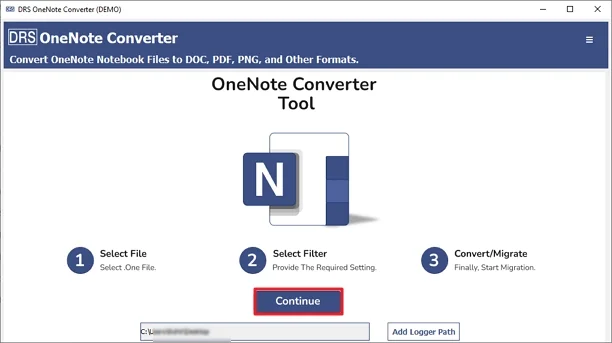
- Now, choose “Add Files” or “Add Folder” to load your OneNote files.
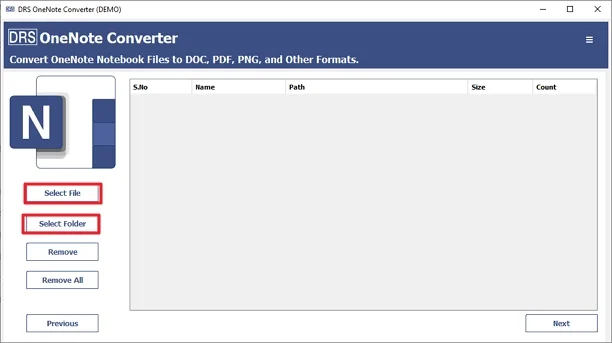
- Then, you can preview and select the OneNote files to convert. Hit Next.
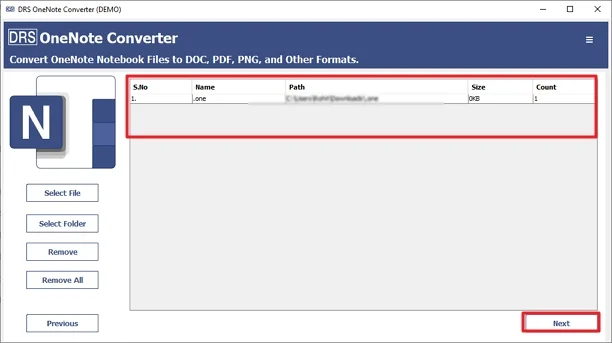
- Further, pick TIFF as the Saving Format from the drop-down list.
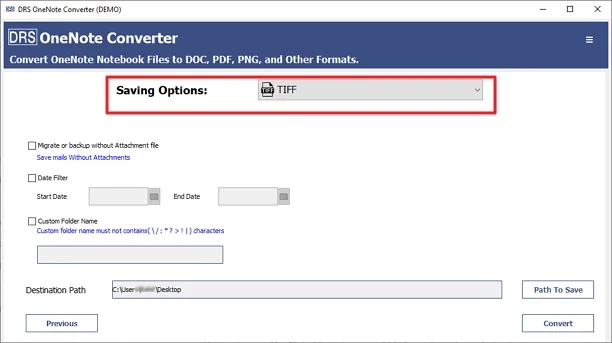
- Lastly, apply advanced features and filters as per your needs. Press Convert.
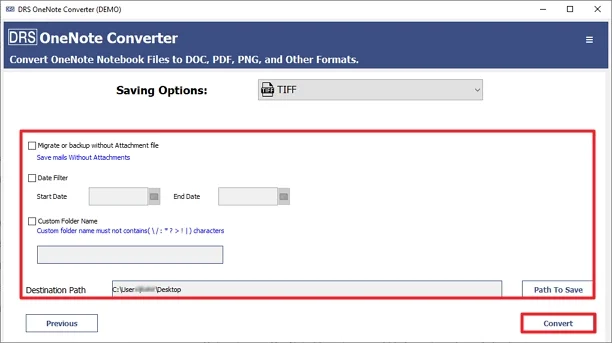
One-Time OneNote to TIFF Conversion Service:
If you only need to convert OneNote files to TIFF once, you can use the OneNote to TIFF one-time service. No software installation, no license purchase — just share your files and get high-quality TIFF images back in return.
Read More: Convert OneNote to BMP and other file formats.
Conclusion
In this complete blog post, we explained the two different methods to convert OneNote to TIFF. The manual method only converts a small number of OneNote files. However, it has several limitations. Therefore, it’s best to use the professional tool. It handles bulk conversion and comes loaded with advanced features. Download the free demo or full version today and get your OneNote files converted to TIFF without any trouble.
Frequently Asked Questions
Q1. Can OneNote export directly to TIFF format?
Ans: No, OneNote does not provide a direct option to export files into TIFF format. You can use the print option with a TIFF printer driver or choose a professional tool for a smoother process.
Q2. Is there any tool to convert OneNote to TIFF?
Ans: Yes, you can use the MigrateEmails OneNote Converter to convert OneNote files into TIFF format. This tool makes the process simple and allows you to convert multiple files without manual effort.
Q3. Will the quality remain intact after conversion?
Ans: Yes, a reliable tool keeps the original layout and quality of the OneNote content. The output TIFF file remains clear and suitable for printing or archiving.
Q4. Can I convert multiple OneNote pages to TIFF at once?
Ans: Yes, with the help of a professional tool, you can convert multiple OneNote pages or notebooks in a single process. This saves time compared to the manual method.
Q5. Do I need special software for OneNote to TIFF conversion?
Ans: For manual conversion, you may need a TIFF printer driver. However, using a dedicated converter tool removes this requirement and simplifies the process.
Q6. Is the one-time service secure?
Ans: Yes, the one-time conversion service is designed to handle files securely. Your data is processed safely, and privacy is maintained throughout the process.
Q7. Can I try before buying?
Ans: Yes, a free demo version is available. You can test the features and understand how the tool works before purchasing the full version.
About The Author:

I am Neeru Kuchhal, a Technical Content Writer who focuses on turning complex ideas into clear, engaging, and impactful content. I combine creativity with strategy to write blogs, web content, and technical articles that connect with the right audience and support brand goals. I believe great content is not just written. It is thoughtfully created to inform, build trust, and drive action.
Related Post