-
Written By Kiran Sharma
-
Approved By
Vikash Bajpai -
Updated on April 7th, 2026
Best Ways to Convert JSON File to PDF: A Complete Guide
Alex’s Query: “I have some JSON files that contain chat data and structured information. I need to convert them into PDF format for documentation and sharing purposes. However, JSON files are not easily readable. Is there a simple way to convert JSON file to PDF in bulk while keeping all the data intact?”
Introduction:- In the 2026 era, JSON is mostly used for storing and exchanging structured data. It is lightweight, easily readable, and commonly used in APIs, applications, etc. However, JSON files are not suitable for reading or presenting data. That’s where PDF comes in. These files are easy to read, share, and print while preserving the layout and formatting. Since there is no direct path to convert JSON to PDF, this guide provides various ways to do this. Moreover, if you need an instant solution, the MigrateEmails JSON File Converter Tool is highly recommended.
The Breakdown: JSON and PDF Essentials
It is most important to understand both platforms before proceeding towards the conversion process.
| Main Features | JSON File (.json) | PDF File (.pdf) |
| Type | Structured data format | Fixed document format |
| Readability | Machine-readable | Human-readable |
| Editability | Editable in code editors | Limited editing |
| Compatibility | Requires specific tools | Universal (all devices) |
| Best Use Case | Data storage & APIs | Documentation & sharing |
| Structure | Key-value pairs | Formatted layout |
The Practical Purpose of Turning JSON Files into PDF
Many users convert JSON file to PDF for the following main reasons:
- Better Readability: PDF presents data in a structured and readable format.
- Easy Sharing: It can be easily shared via email, web, or cloud platforms.
- Professional Documentation: These arevideal for reports, records, and presentations.
- Data Preservation: Also, the PDF locks the content layout, preventing from modifications.
The Best Manual Hacks to Export JSON to PDF
If you don’t want to download any external software for few JSON files, you can move forward using this manual workaround.
Method 1: Using a Text Editor
- Firstly, open the JSON file in Notepad++ or any text editor.
- Format the JSON for better readability.
- Now, press Ctrl + P (Print).
- Select Save as PDF.
- Lastly, save the file.
Method 2: Convert via Word
- Firstly, open JSON file in a text editor.
- Copy the content.
- Paste into Microsoft Word.
- Furthermore, format the data.
- In the end, save as PDF.
Limitations to Manually Convert JSON File to PDF
- No Bulk Conversion: It cannot convert multiple files at once.
- Formatting Issues: The data may not appear structured.
- Time-Consuming: This method requires manual effort.
- Data Complexity Issues: Additionally, nested JSON may not convert properly.
The Accurate Path to Change JSON to PDF Professionally
Apart from this manual method, you can use the modern MigarteEmails JSON Converter Tool. This will makes you complete your task easily and quickly with zero data loss. It is an ideal solution as its information is end-to-end encrypted and secure. Also, it has many advanced features that makes it suitable to be accessed by everyone. Furthermore, it enables users to convert JSON to EPUB and more supported formats.
Major Advantages to Convert JSON File to PDF
- Bulk Conversion: Convert multiple JSON files together.
- Maintains Structure: Preserves key-value formatting.
- User-Friendly Interface: Easy to use for every user.
- Multiple Export Options: Convert JSON to HTML.
- Fast Processing: It saves a lot of time and effort.
- Secure Conversion: Moreover, it guarantees data privacy and accurate results.
The “One and Done” Benefit: Permanent JSON to PDF Conversion-
If you don’t want to perform the conversion yourself, you can opt for a one-time conversion service. Simply contact our support team, and they will complete the whole process. They will:
- Convert from JSON to PDF.
- Provides data security and integrity.
- Deliver accurate and quick results without any loss.
This option is highly beneficial for users with large datasets.
Your Guide to a Successful JSON-to-PDF Transition
- Firstly, start using the MigrateEmails JSON File Converter Tool.
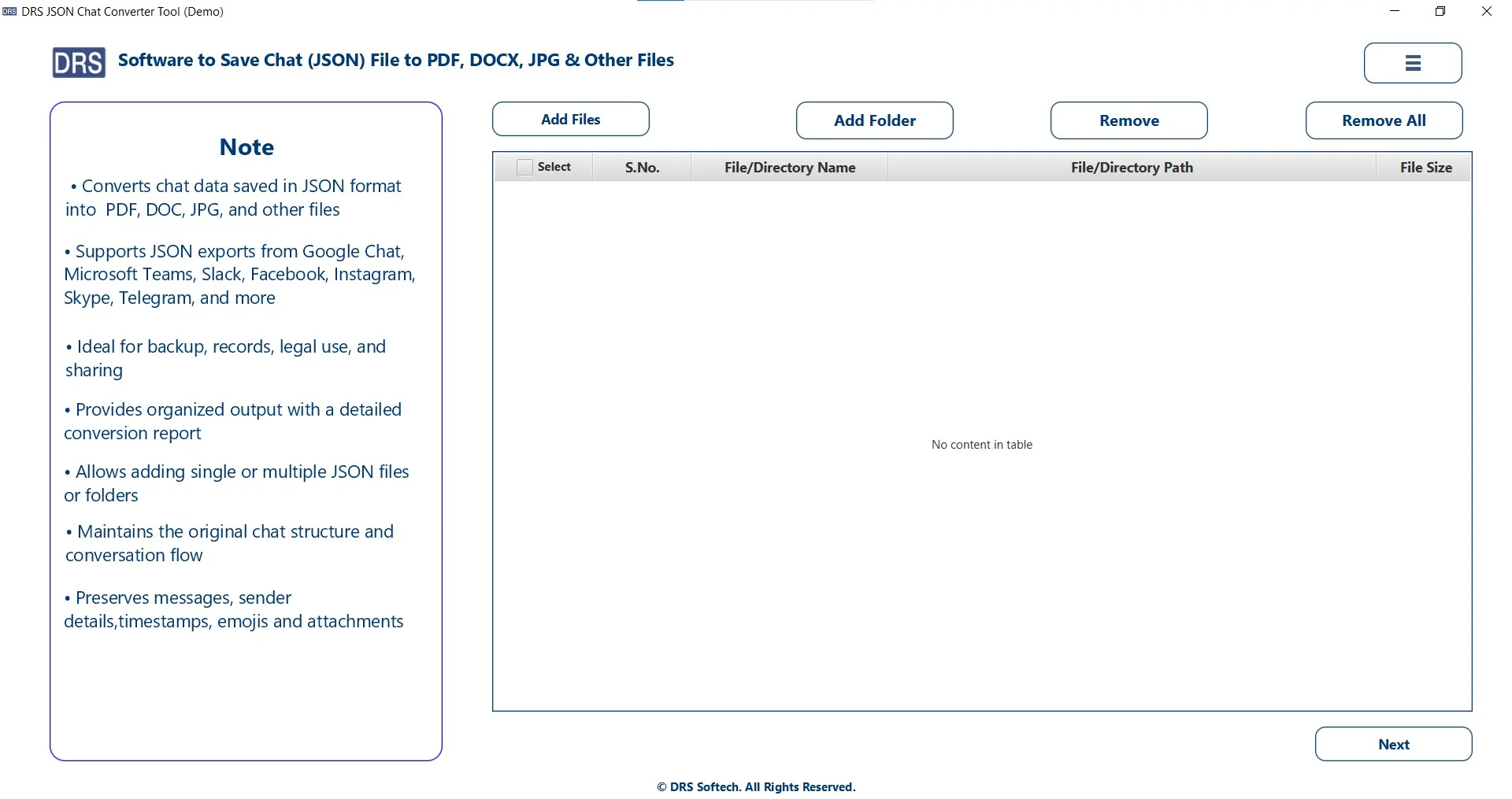
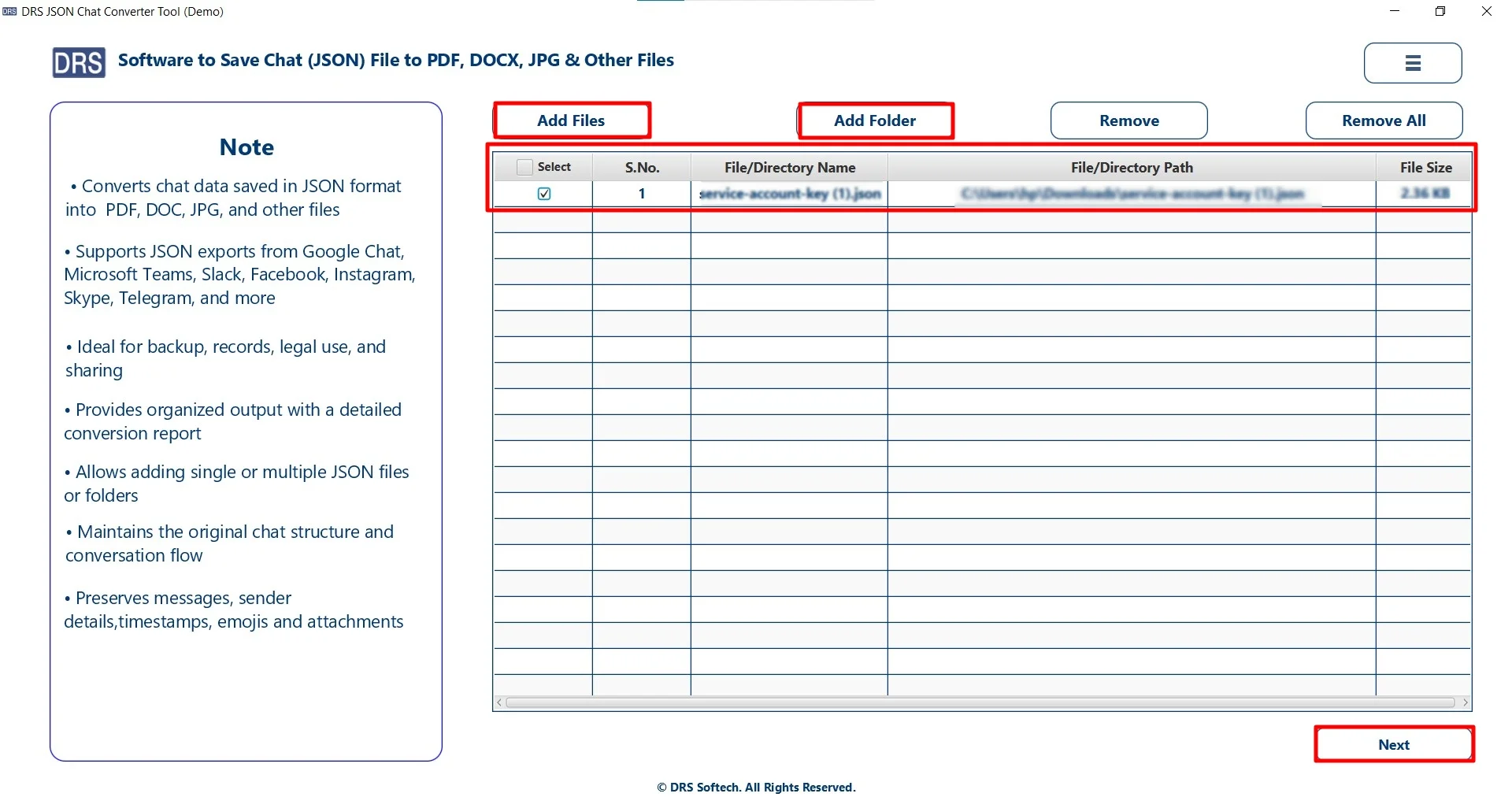
- Add Files/Folders, upload the JSON file that you want to convert, and click Next.
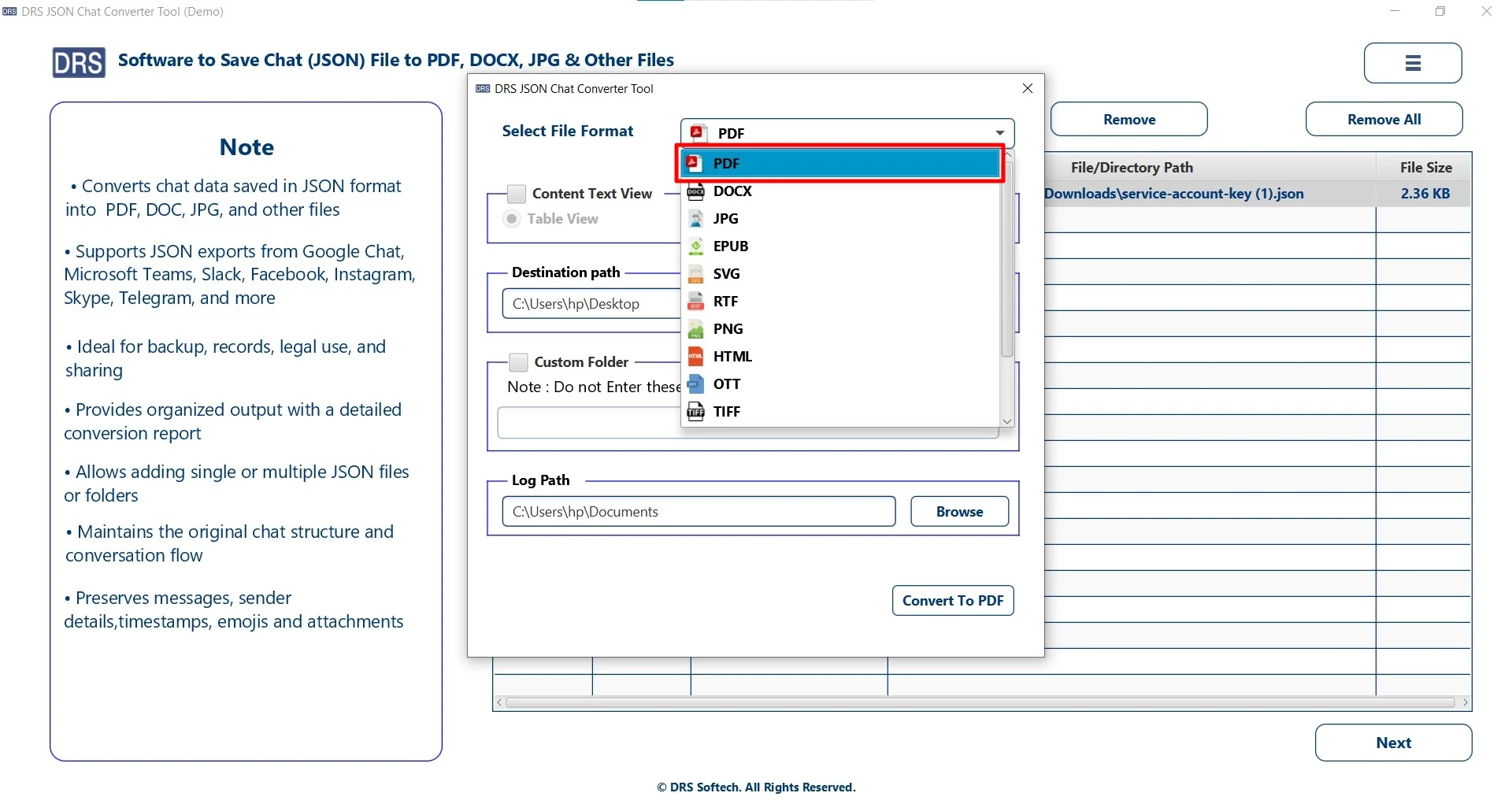
- Afterwards, choose PDF as the saving file format option.
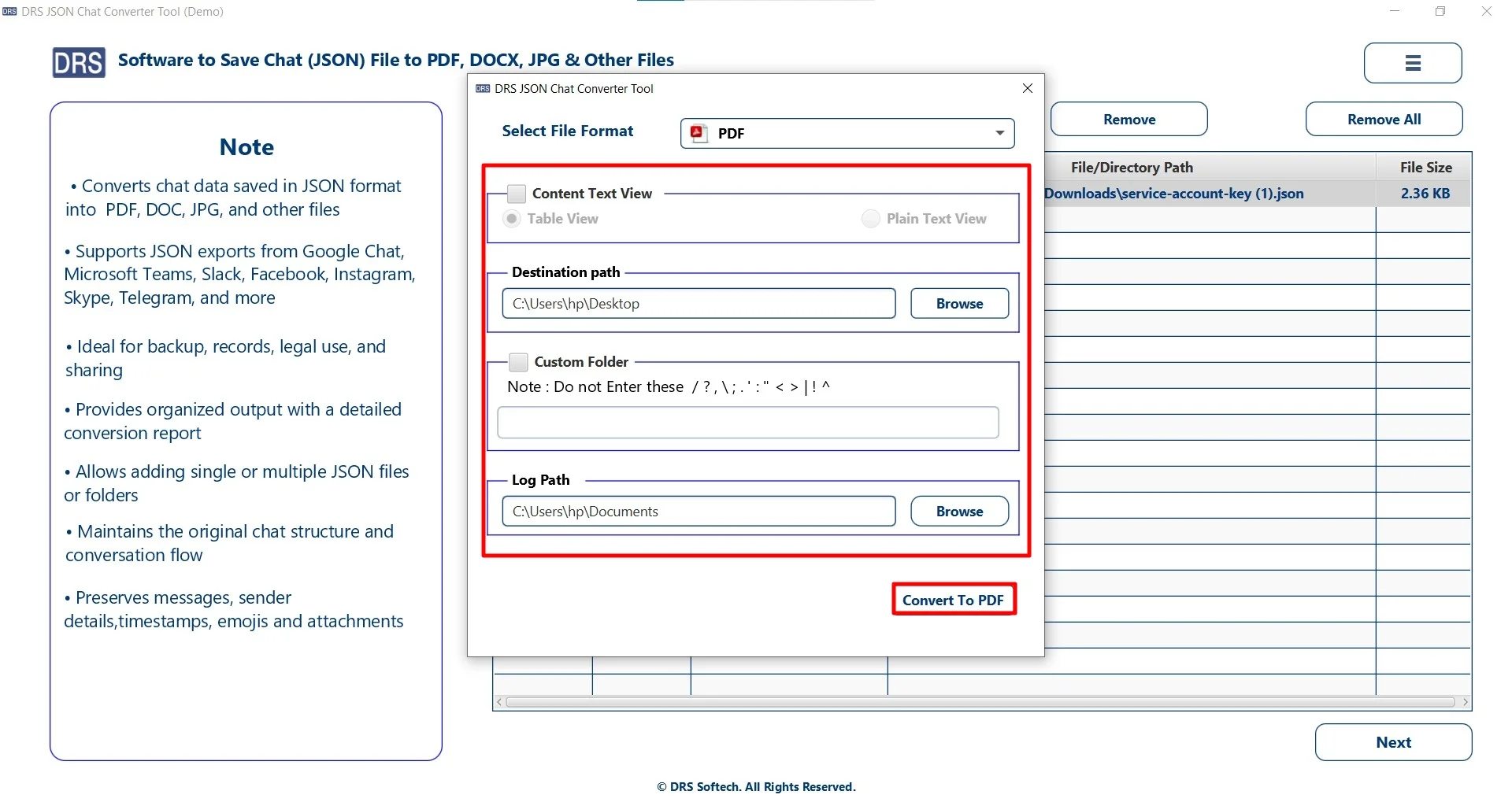
- Finally, apply the filters, set the path to save the file, and click Convert to PDF.
A Real-Life Case Study-
The Client: A SaaS company
Problem: The company stored customers’ data in JSON format. They needed to convert these files into PDF for reporting and compliance. The manual conversion resulted in messy formatting and wasted time. Also, it required a lot of effort.
Solution: They used the MigrateEmails JSON Converter Tool for bulk conversion.
Result: The tool completes this task within a few minutes.
- It converted multiple JSON files into readable PDFs.
- Maintained proper structure and formatting.
- Also, it improved reporting efficiency by 85%.
Conclusion
In this technical blog, we have learn that the process of converting JSON to PDF is essential. It is mostly important for making the data more structured and organized. However, there are manual methods available, but they work for small tasks. Also, they are not reliable for large-scale conversion. Thus, using a professional JSON Converter Tool offers an accurate, fast, and secure process to convert JSON file to PDF. Additionally, you can also complete the process using the one-time conversion service.
If you’re looking for a hassle-free way to shift JSON files into PDF, try this solution today and streamline your workflow effortlessly.
Frequently Asked Questions
Q1. Is it possible to convert a large JSON file to PDF?
Ans. Yes, it is possible to convert large JSON files to PDF. However, manual methods may struggle with large or complex data. Using a MigarteEmails JSON converter tool ensures smooth handling of large files without crashes or data loss.
Q2. Suggest the best tool to convert JSON to PDF?
Ans. The dedicated JSON Converter Tool is one of the best solutions. It supports bulk conversion, maintains data structure, and ensures accurate and high-quality PDF output.
Q3. Can I export JSON to PDF without technical knowledge?
Ans. Yes, you can. The MigarteEmails JSON converter is designed with a simple and user-friendly interface, allowing even non-technical users to convert JSON files into PDF easily.
Q4. Does changing JSON to PDF preserve the original data structure?
Ans. Yes, when using a reliable JSON converter tool, the original structure (key-value pairs, hierarchy, and formatting) is preserved. Manual methods may not always maintain proper structure.
Q5. Are there any free ways to export JSON to PDF?
Ans. Yes, you can use methods like text editors, online converters, or Word to save JSON as PDF. However, these methods have limitations such as no bulk support, formatting issues, and potential security risks.
Q6. Can I convert JSON to PDF without losing any data?
Ans. Yes, it is possible when using a trusted MigrateEmails JSON converter tool. It ensures complete data integrity, accurate formatting, and no data loss during the conversion process.
About The Author:

I am Kiran Sharma, a Technical Expert in Content writing. I have technical expertise in the field of Email Backup, Data Recovery, and Email Migration, and resolve technical queries related to Cloud Backup or Email Migration for individuals and businesses.
Related Post