-
Written By Neeru Kuchhal
-
Approved By
Vikash Bajpai -
Updated on April 18th, 2026
Professional Methods to Convert JSON File to XPS: Quick Ways
User Query: “I have multiple JSON files containing structured data, reports, and records. I need to convert them into XPS format for secure sharing and fixed-layout viewing. However, JSON files are not directly readable for documents. Is there a professional way to convert JSON file to XPS in bulk without losing formatting?”
— Posted by “Amelia Martin”
Introduction:- JSON is a lightweight, human-readable, and supported by web APIs, databases, and applications. But when it comes to producing fixed-layout documents, JSON’s structure doesn’t work. That’s where XPS (XML Paper Specification) comes in. It is a fixed document designed for high-resolution output across platforms. Therefore, converting JSON data into XPS format allows you to produce professionally styled, printable documents, etc.
In this guide, you’ll find several methods to transfer JSON file to XPS manually as well as via the
MigrateEmails JSON Converter Tool.
In this guide, you’ll find several methods to transfer JSON file to XPS manually as well as via the
MigrateEmails JSON Converter Tool.
Learn About JSON and XPS Formats
Before moving ahead to the conversion process, let’s understand both formats.
JSON (JavaScript Object Notation)
- It is a lightweight file format used to store structured data. It organizes information in key-value pairs. This makes it easy for applications, websites, and APIs to read and process data.
- JSON is commonly used for data transfer, configuration files, chat exports, and database records.
XPS (XML Paper Specification)
- It is a fixed–layout document format developed by Microsoft. It is used to preserve the exact appearance of a document, including text, images, fonts, and page layout.
- XPS files are commonly used for printing, archiving, and secure document sharing.
In short, JSON is best for storing data, while XPS is best for sharing documents with fixed formatting.
Why Users Choose JSON to XPS Conversion?
There are many strong reasons why users want to convert JSON file to XPS:
| Enterprise Reporting Generate print-ready and branded business reports from JSON API data with a fixed and consistent layout. | Consistent Output Across Systems Verifies documents appear the same across different devices, preserving layout and formatting integrity. |
| Invoice Generation Convert transactional JSON records into professionally formatted XPS invoices, confirming uniform presentation across systems. | Archival Compliance Support long-term document storage policies by using a fixed-format file type ideal for secure storage and auditing. |
| Windows Workflow Integration Seamlessly integrate with the Windows print spooler and native document processing pipelines. | Offline Document Delivery Distribute styled documents to end users without requiring internet access or additional application installations. |
No Cost Manual Solution to Convert JSON File to XPS
As there is no direct path to save a JSON file into XPS. Therefore, you need manual ways to complete this task. But keep remember that the method will work only with a small number of files.
Way 1: Copy JSON into Word and Save as XPS
- Firstly, open the JSON file in a text editor.
- Copy the content into Microsoft Word.
- Now, format the content properly.
- Lastly, save as an XPS document.
Way 2: Convert JSON to HTML, then Print to XPS
- First of all, convert JSON into HTML format.
- After that, open the HTML in the browser.
- Further, choose the Print option.
- Select Microsoft XPS Document Writer.
- In the end, save as XPS.
Disadvantages of Manually Convert JSON File to XPS
- Not suitable for large datasets due to a lack of bulk conversion.
- Requires technical knowledge and manual formatting.
- The data may not appear structured properly.
- This process is very time-consuming and difficult.
- Moreover, online tools may leak sensitive data.
Ultimate Solution to Convert JSON File to XPS Online
Want freedom from manual limitations? Use the MigrateEmails JSON File Converter Tool. It shares the structured data into fixed-layout documents with complete accuracy. Users can convert multiple files together with no data loss. They are allowed to convert JSON file to PDF and various other formats. It preserves the originality of the metadata, formatting, and layout intact. This software is designed with an intuitive interface that is suitable for everyone.
One-Time Conversion Option
If you prefer not to perform the conversion manually, you can choose a one-time conversion service. Just get connected with our support team. They will manage the entire conversion process on your behalf. You only need to share your JSON files. They will securely export JSON file to XPS while maintaining the original document quality, page structure, formatting, and readability.
This one-time service offers several benefits, including:
- Data Security to keep your files protected.
- High-Quality Output with accurate formatting.
- No Data Loss during the conversion process.
- No Technical Knowledge is required from your side.
This is a perfect choice for businesses, professionals, and entrepreneurs who need a reliable and professional conversion without any complexity.
Beginner-Friendly Procedure to Convert JSON File to XPS
- Firstly, start accessing the MigrateEmails JSON Converter Tool.
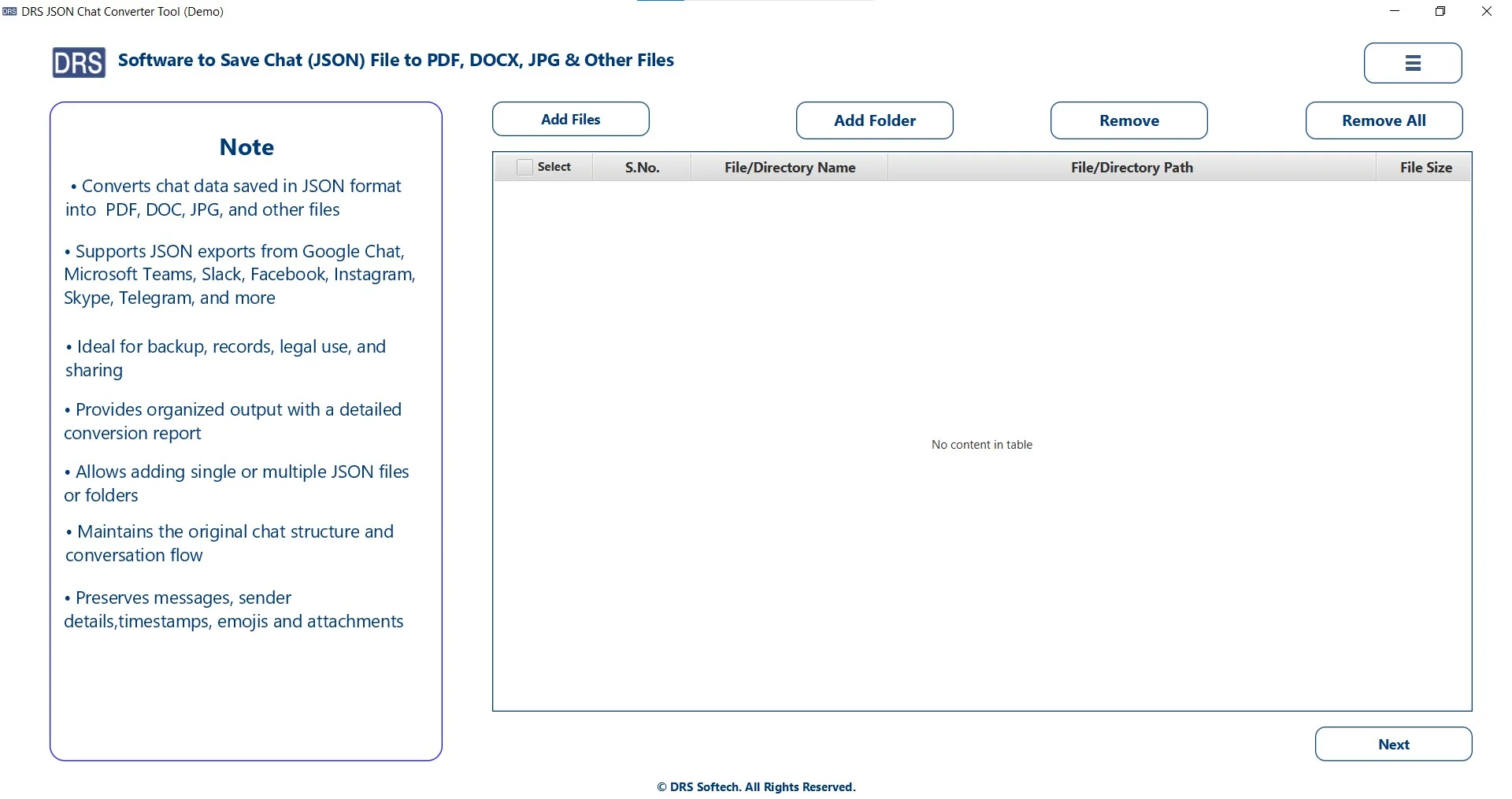
- Add Files/Folders to upload the JSON file, select the file/folder that you want to convert, and click Next.
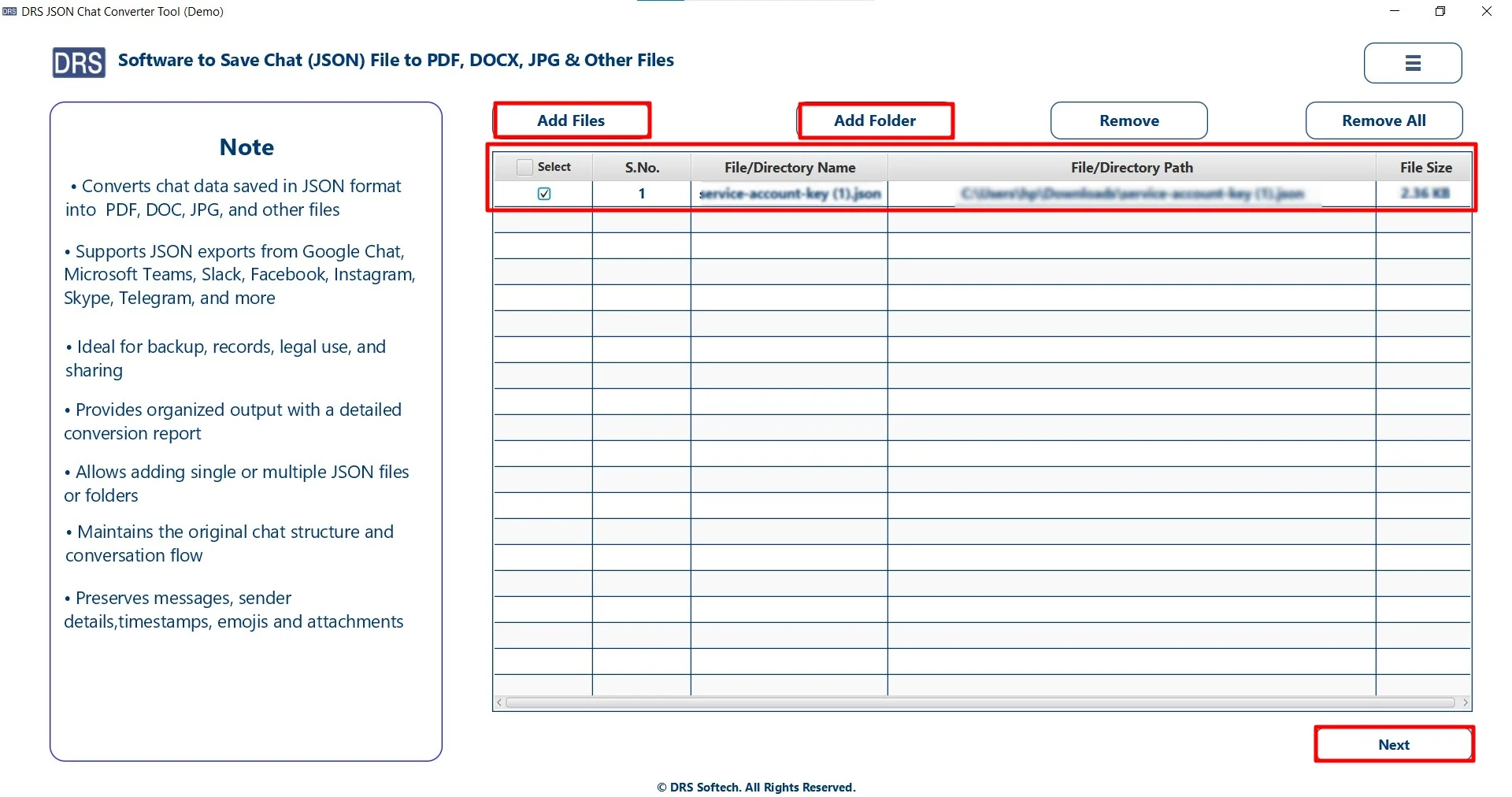
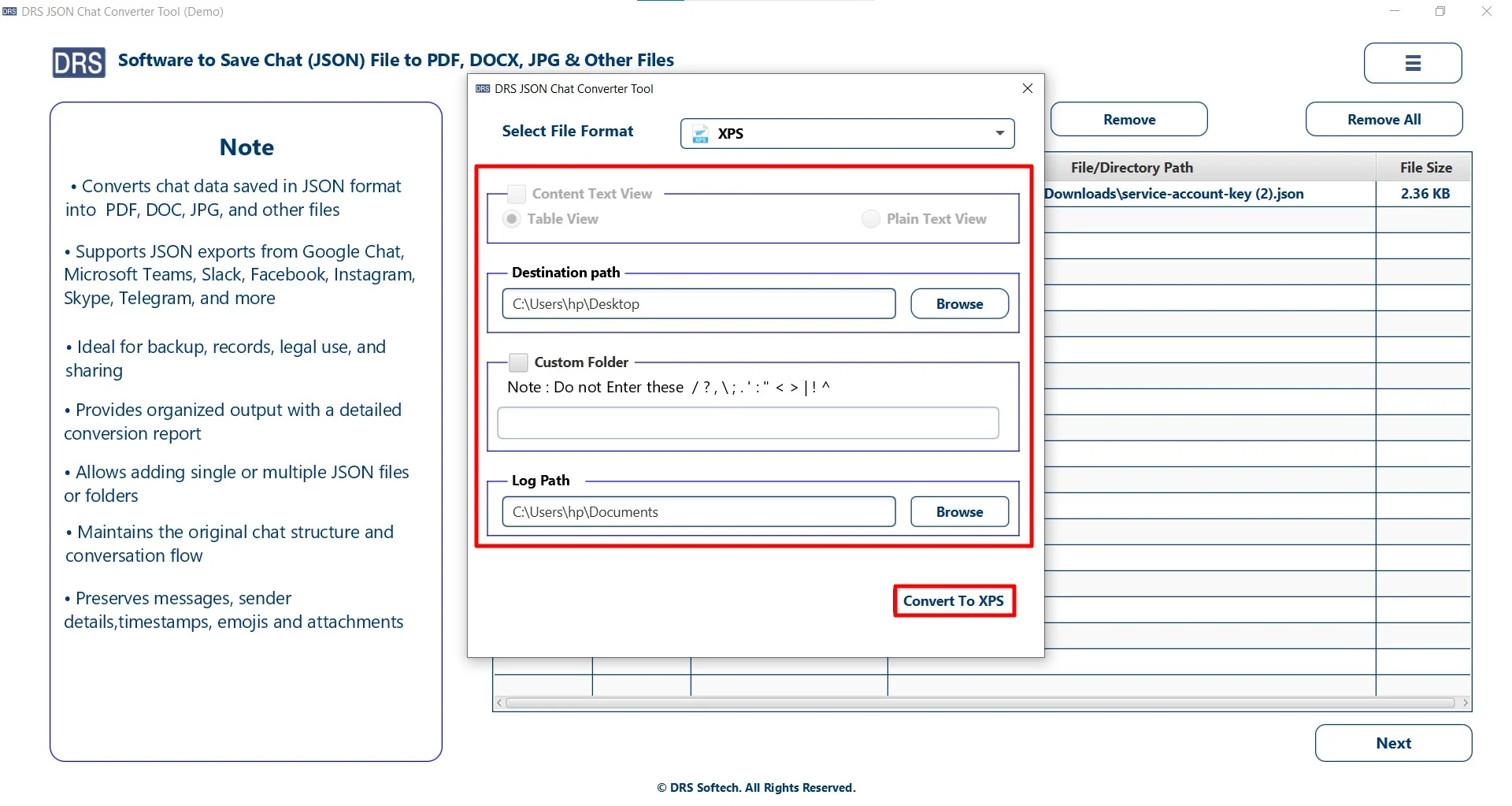
- Afterwards, choose the XPS as the saving file format.
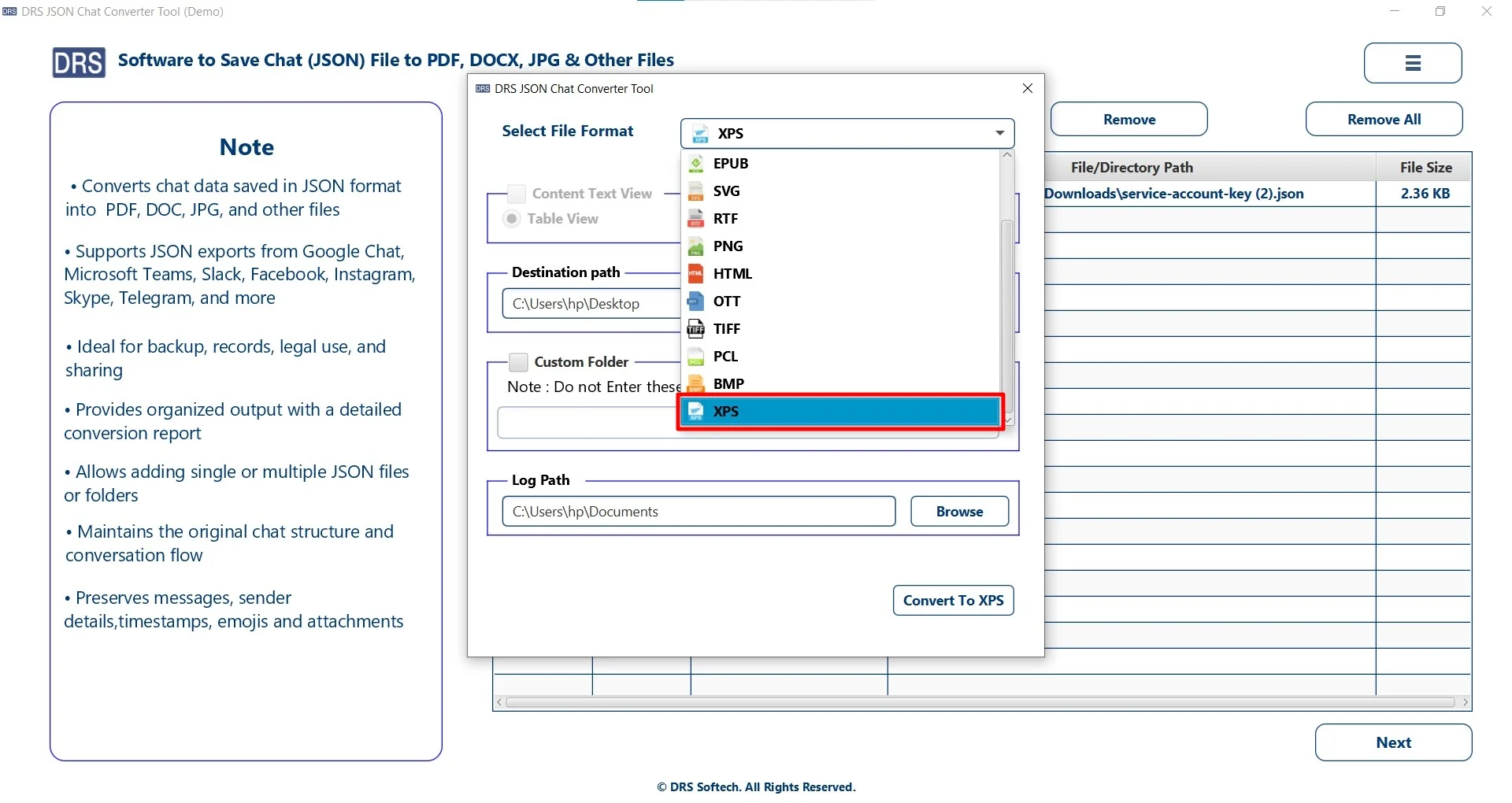
- Finally, apply filters, set the location to save the file, and click Convert to XPS.
Top Features of Using the MigrateEmails Software
- Convert multiple JSON files together without any restrictions.
- Preserves the original structure during conversion.
- It has an easy-to-use interface suitable for all users.
- Users can convert JSON to EPUB and to more formats.
- Saves time and effort with fast processing speed.
A Real-Life Case Study: A Finance Company
Problem: The company needed to convert JSON-based reports into XPS for secure client sharing and printing.
Challenge: The manual methods were inconsistent and required extra formatting work. Also, they are very time-consuming and difficult, as they don’t provide accurate results.
Solution: So, they used the MigrateEmails JSON Converter Tool to convert JSON to XPS.
Result:
- Converted bulk JSON files into XPS quickly.
- Maintained layout consistency.
- Improved secure document sharing workflow.
Final Words
In short, converting JSON to XPS is useful for making structured data readable, printable, and professionally shareable. However, there are manual methods that can work for a few files. But they are not suitable for large-scale conversions. Alternatively, using an automated JSON Converter Tool offers fast conversion to convert JSON file to XPS. Also, you can use a one-time conversion service option for quick results.
Frequently Asked Questions
Q1. What is the fastest way to convert JSON file to XPS?
Ans. The fastest way is to use the MigrateEmails JSON Converter Tool, which allows quick conversion in just a few clicks while preserving formatting and structure.
Q2. Do I need technical skills to export a JSON file to XPS?
Ans. No, you do not need technical skills when using an automated MigrateEmails converter tool. This tool comes with a simple and user-friendly interface suitable for beginners.
Q3. Can I transfer multiple JSON files to XPS at once?
Ans. Yes, the advanced MigrateEmails JSON converter tool supports batch conversion, allowing you to convert multiple JSON files to XPS in a single process and save time.
Q4. Is there any free tool to transfer JSON file to XPS?
Ans. Yes, you can use free methods such as Microsoft XPS Document Writer, browser print options, or online converters. However, these methods may have limitations for bulk files and formatting accuracy.
Q5. Safest way to export a JSON file to XPS?
Ans. The safest way is to use a trusted JSON converter tool, as it keeps your data private and avoids uploading confidential files to online platforms.
Q6. What is the XPS File Format?
Ans. XPS (XML Paper Specification) is a fixed-layout document format developed by Microsoft. It is used to preserve the exact appearance of documents, including text, images, fonts, and page formatting for sharing, printing, and archiving.
About The Author:

I am Neeru Kuchhal, a Technical Content Writer who focuses on turning complex ideas into clear, engaging, and impactful content. I combine creativity with strategy to write blogs, web content, and technical articles that connect with the right audience and support brand goals. I believe great content is not just written. It is thoughtfully created to inform, build trust, and drive action.
Related Post