-
Written By Kiran Sharma
-
Approved By
Vikash Bajpai -
Updated on April 17th, 2026
Ultimate Guide to Convert JSON File to TIFF: Top Solutions
User Query: “I have multiple JSON files containing structured data and reports. I need to convert them into TIFF image format for printing and professional documentation. However, JSON files are not visually readable. Is there a reliable way to convert JSON file to TIFF in bulk without losing quality?”
— Posted by “Robert Davis”
Introduction:- JSON (JavaScript Object Notation) is widely used for storing structured data such as API responses, reports, logs, and chat exports. It is not suitable for direct visual presentation. On the other hand, TIFF (Tagged Image File Format) is an image format known for its high quality. It is commonly used for professional printing, legal records, and scanned image preservation. Since JSON files cannot be directly opened as images, converting JSON to TIFF becomes a practical solution. This guide covers the top methods to transform JSON file to TIFF via manual and the MigrateEmails JSON Converter Solution.
What’s the Point of Turning JSON into TIFF?
Here are various reasons why people want to convert JSON file to TIFF:
- Makes JSON data visually readable and easy to access.
- For creating high-quality image files for printing.
- Ideal for professional archiving and documentation.
- To preserve data clarity with lossless quality.
- It is useful for legal and compliance records.
- Moreover, to support long-term storage needs.
JSON and TIFF: A Comparative Analysis
It is important to know the difference between the two formats before proceeding further.
| Major Factors | JSON File (.json) | TIFF File (.tiff) |
| Type | Structured Data Format | High-Quality Image Format |
| Readability | Machine-readable | Human-readable |
| Structure | Key-value pairs | Visual image layout |
| Compatibility | Requires editors/tools | Supported by many viewers |
| Best Use | APIs & storage | Archiving & printing |
Easy Manual Tips to Convert JSON File to TIFF
If you don’t want to install any external software, you can try using the manual tips. But keep in mind that this method has lots of pitfalls that make this process time-consuming.
Below are the following methods to complete this task:
Method 1: Copy JSON into Word and Save as TIFF
- Firstly, open the JSON file in a text editor.
- Now, copy the content into Word.
- Format the content properly.
- Lastly, save or print as TIFF.
Method 2: Convert JSON to HTML, then TIFF
- Firstly, convert JSON into HTML format.
- Afterwards, open the HTML in the browser.
- Print or export as a TIFF image.
- In the end, save the file.
Pitfalls of the Manual Methods to Convert JSON File to TIFF
- Not suitable for large datasets due to a lack of bulk conversion.
- Requires technical expertise and manual formatting.
- Sometimes the data may not appear structured properly.
- Involves multiple steps, making it time-consuming.
Robust Approach to Convert JSON Data to TIFF Image
The MigrateEmails JSON File Converter Tool is the most reliable approach to convert multiple JSON files simultaneously. It transforms the complete data accurately withzero information leakage. It maintains a high-quality image while preserving readability and the original layout. This software allows users to convert JSON to JPG seamlessly. Additionally, it is designed with a simple and user-friendly interface suitable for everyone.
One-Time Conversion Advantage
If you prefer not to perform the conversion manually, you can opt for a one-time service. Just connect with our support team. They will securely convert JSON to TIFF while maintaining image quality and structure. This option is mostly beneficial for enterprise users or business professionals works with large datasets.
This service offers:
- Complete data accuracy
- End-to-end security with no data loss
-
No technical knowledge required
- A dedicated expert guidance
How to Convert JSON File to TIFF in Simple Steps?
- Firstly, start using the MigrateEmails JSON File Converter Tool.
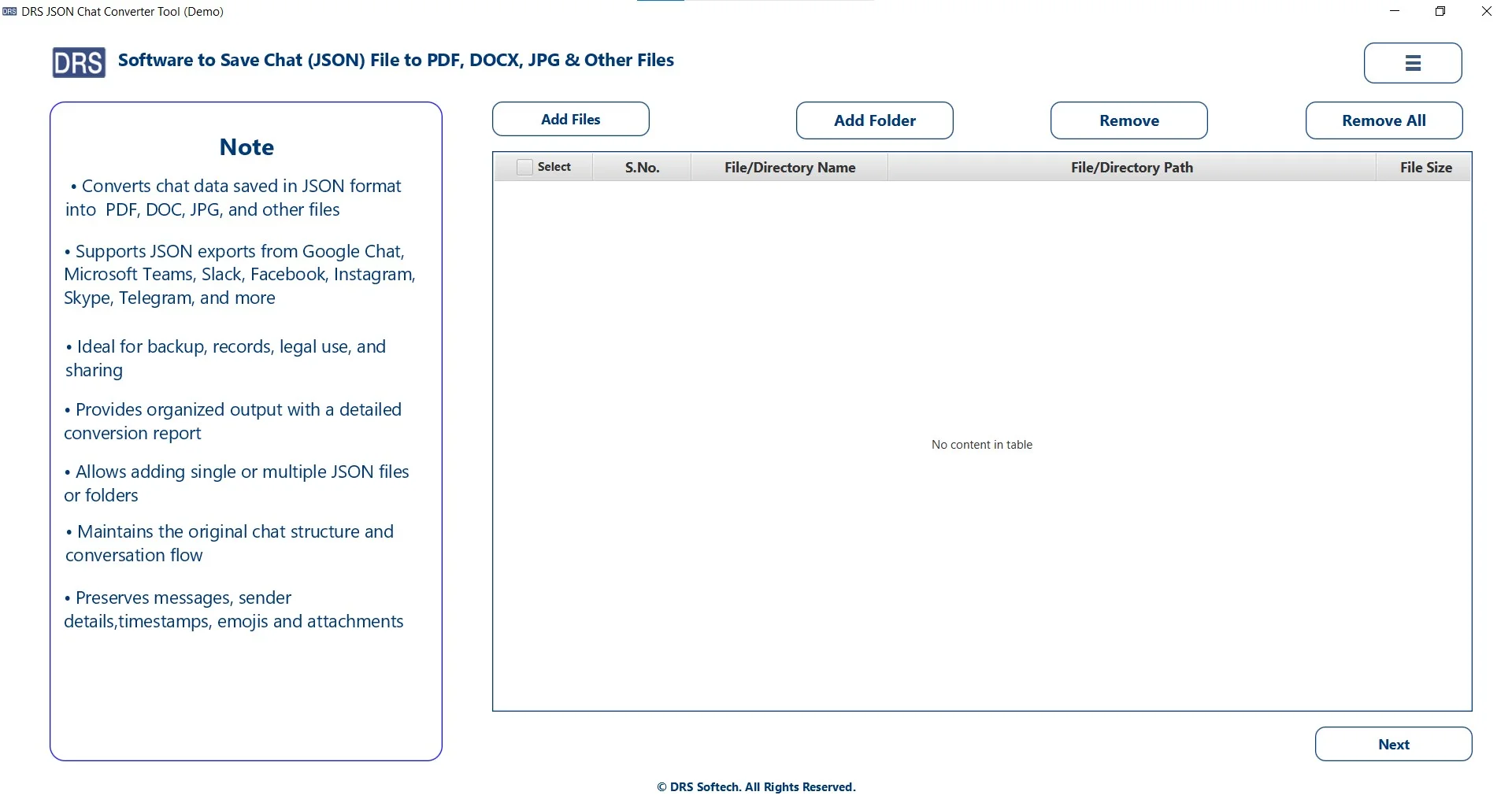
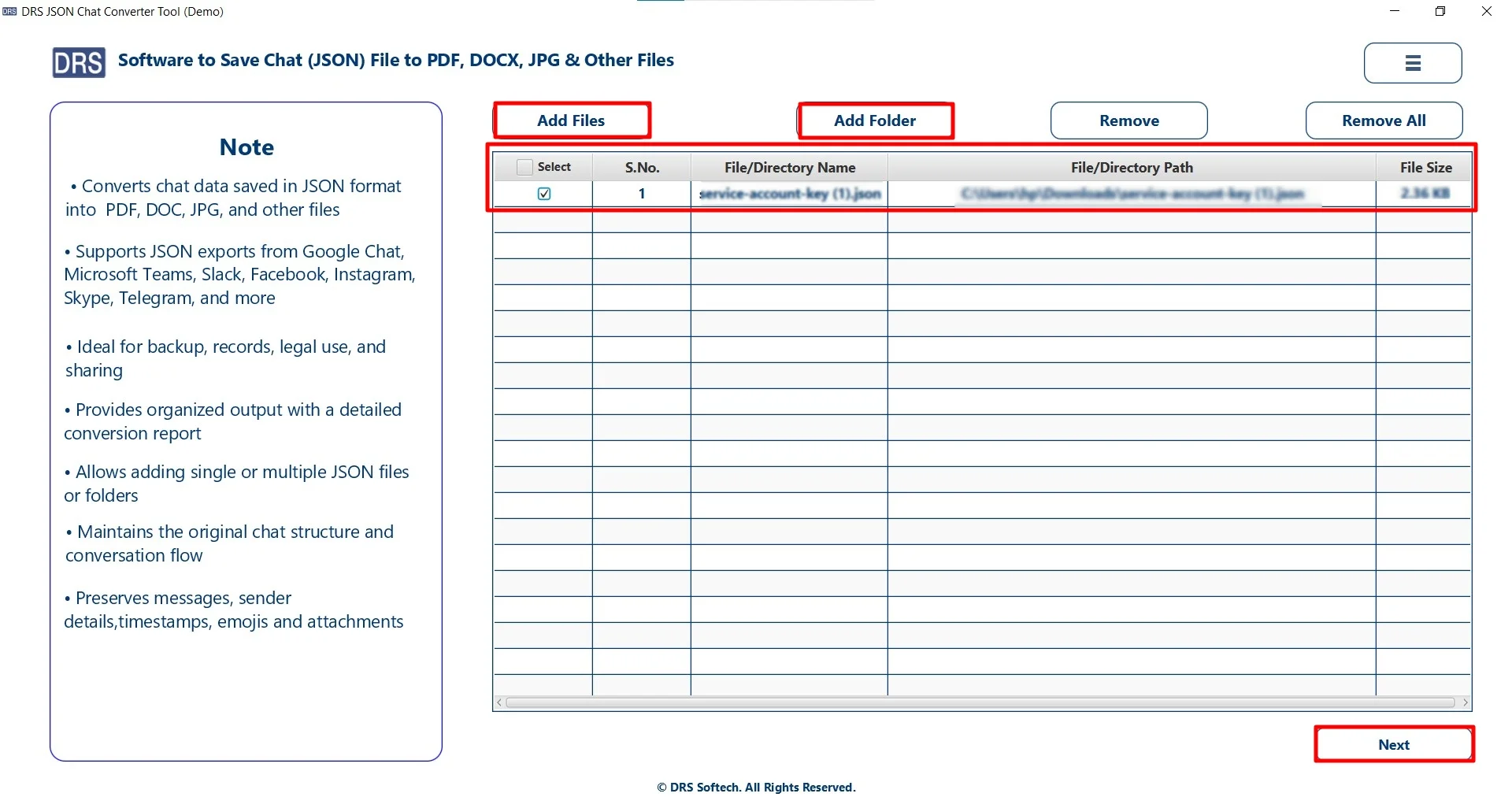
- Now, click Add Files/Folders, submit the files that you want to convert, and click Next.
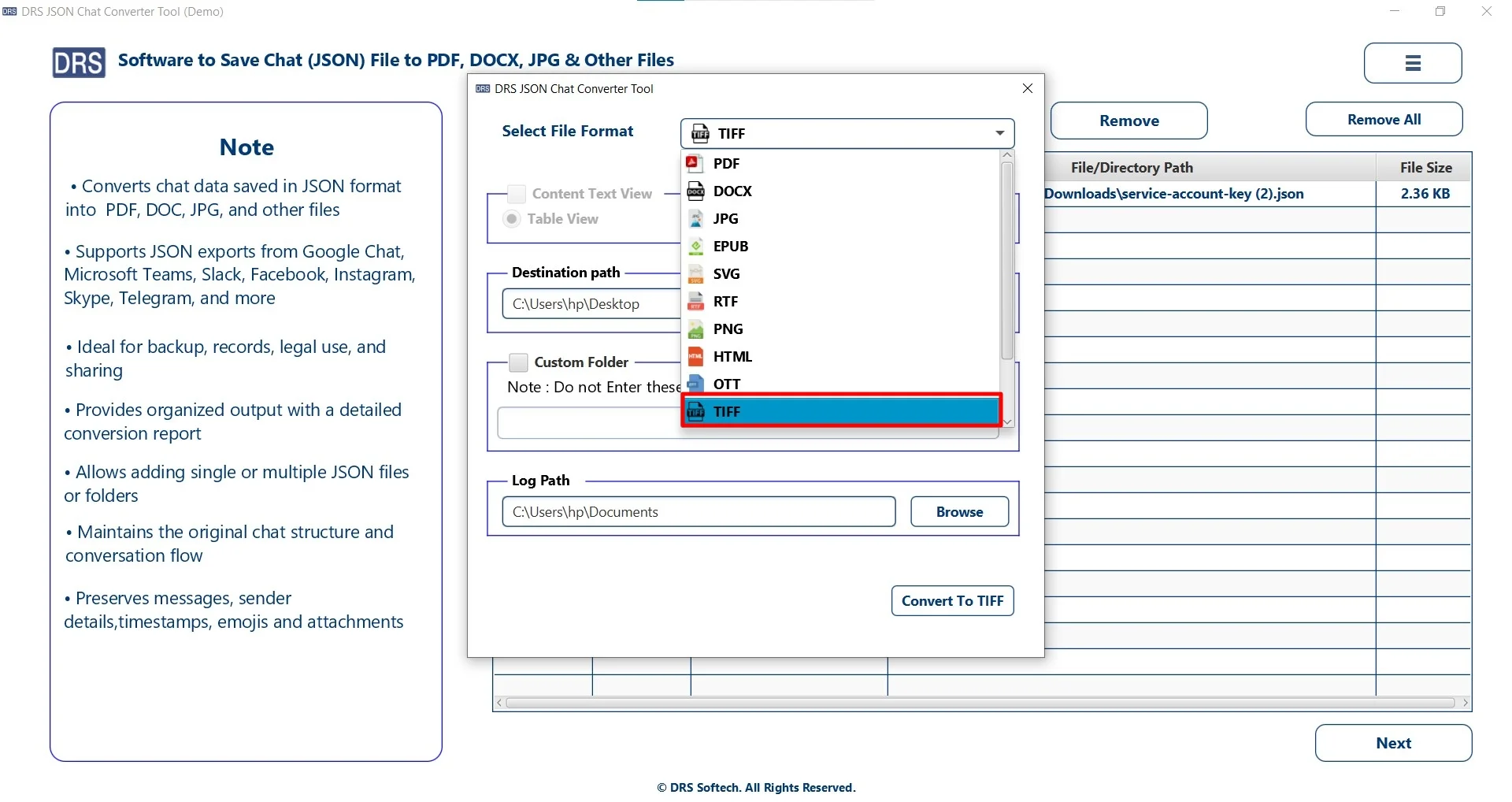
- Furthermore, choose TIFF as the saving image format.
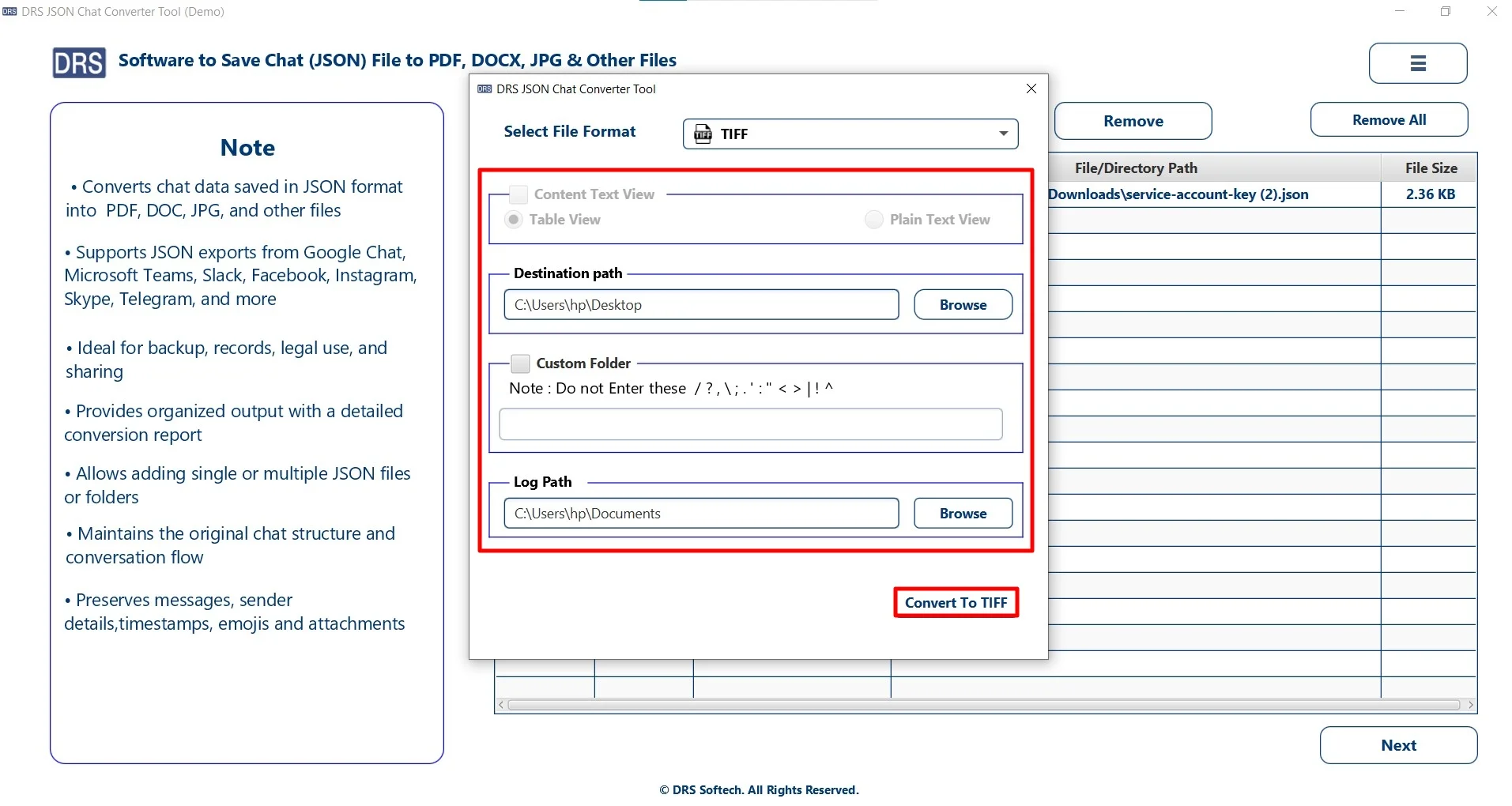
- Finally, apply advanced features, set the path, and press Convert to TIFF to start the conversion.
Why You Should Use MigrateEmails Software?
- Convert multiple JSON files at once without any pitfalls.
- Preserves the original structure during conversion.
- It has an easy-to-use interface suitable for all users.
- Enables users to convert JSON to Word and other formats.
- Also, it saves time and effort with a fast processing speed.
A Real-Life Case Study
The Client: A Legal Consultancy Firm
Problem: They needed to archive JSON-based records in TIFF format for compliance and long-term storage.
Challenge: Manually taking screenshot methods were inconsistent and time-consuming.
Solution: They used the MigrateEmails JSON Converter Tool to change JSON file to TIFF.
Result:
- Converted bulk JSON files into TIFF quickly.
- Maintained image clarity and professional quality.
- Improved document management workflow.
Conclusion
In this blog, we have seen that converting JSON to TIFF is useful for making structured data visual and shareable. While there are manual methods that can work for a few files. But they are not suitable for large-scale or professional use. Using an automated JSON Converter Tool ensures fast, accurate, and secure conversion to convert JSON file to TIFF. Alternatively, you can also opt for a one-time service option for quick migration.
Important Note: Try the tool today and convert your JSON files into TIFF format effortlessly.
Frequently Asked Questions
Q1. Best way to transform JSON file to TIFF?
Ans. The best way is to use a professional MigrateEmails JSON Converter Tool, which offers fast, accurate, and high-quality conversion while preserving the original structure.
Q2. How to convert JSON to TIFF on Windows and Mac?
Ans. You can share JSON to TIFF on both Windows and Mac systems using compatible converter software or online methods that support cross-platform conversion.
Q3. Can I batch change a JSON file to TIFF?
Ans. Yes, the advanced JSON converter tool supports batch conversion, allowing you to convert multiple JSON files to TIFF at once and save time.
Q4. Is it safe to convert JSON to TIFF without formatting?
Ans. Yes, it is safe when using a reliable MigarteEmails tool. This software preserves the original content and structure while converting the file into TIFF format.
Q5. What is the TIFF file format?
Ans. TIFF (Tagged Image File Format) is a high-quality image format widely used for professional printing, document archiving, scanning, and storing detailed images without quality loss.
Q6. Can I convert JSON to TIFF without installing software?
Ans. Yes, you can use online converters without installing software. However, for better security, bulk conversion, and data privacy, desktop software is recommended.
Q7. Does converting JSON to TIFF affect data quality?
Ans. No, when using a trusted MigrateEmails JSON converter tool, converting JSON to TIFF does not affect data quality. TIFF is known for lossless image quality, making it ideal for preserving clarity and detail.
About The Author:

I am Kiran Sharma, a Technical Expert in Content writing. I have technical expertise in the field of Email Backup, Data Recovery, and Email Migration, and resolve technical queries related to Cloud Backup or Email Migration for individuals and businesses.
Related Post