-
Written By Kiran Sharma
-
Approved By
Vikash Bajpai -
Updated on June 22nd, 2026
Migrate Roundcube to Google Workspace Easily: Complete Step-by-Step Guide
User Query: We have over 500 employee mailboxes on Roundcube and need to migrate all of them to Google Workspace within 2 weeks before our new deployment phase begins. Is there a reliable method to migrate Roundcube to Google Workspace without any data loss or prolonged downtime?
Enterprises that run large-scale email infrastructures on Roundcube face limitations in scalability & cross-platform collaboration. Google Workspace provides you with a robust, cloud-native ecosystem featuring enterprise-grade security protocols & high availability architecture that modern organizations demand. As IT teams look to modernize their communication stack, migration has become a strategic priority across industries. In this guide, we will cover effective approaches for migration from Roundcube to Google Workspace. We will also cover the MigrateEmails IMAP Backup Tool for secure transfer.
Quick Answer: Migrate from Roundcube to Google Workspace?
Migration time depends on your total mailbox size, number of user accounts, & network bandwidth availability. Manual migration through the Google Admin Console demands considerable time for enterprise-scale deployments that manage extensive mailbox infrastructures.
The MigrateEmails IMAP Email Backup Solution addresses this by providing bulk mailbox processing, enabling IT administrators to execute large-scale migrations within defined operational timelines.
Key Differences Between Roundcube and Google Workspace
|
Parameter |
Roundcube |
Google Workspace |
|
Platform Type |
Open-source webmail client |
Cloud native enterprise productivity suite |
|
Email Protocol Support |
IMAP and SMTP based |
Proprietary Gmail infrastructure with IMAP/POP3 support |
|
Collaboration Tools |
Limited to basic email functions |
Integrated Meet, Chat, Docs, Sheets, Slides & Drive |
|
Admin Control Panel |
Basic server-side configuration |
Centralized Google Admin Console with granular controls |
|
Data Backup |
Manual backup configuration required |
Automated cloud backup with Vault archiving support |
Manual Approach to Migrate Roundcube to Google Workspace
Google Workspace provides a native Data Migration Service embedded within the Admin Console, enabling IT administrators to execute a structured IMAP-based mailbox transfer. You need to simply follow the steps below to complete the migration with precision.
01: Access the Data Migration Service
- Log in to the Google Admin Console using administrator credentials.
- Navigate to Menu, then Account, then Data Migration.
- Click Set Up Data Migration to initialize the migration workflow.
02: Configure the Source IMAP Endpoint
- Set Migration Source to Other IMAP Server to establish Roundcube as the origin server.
- Select IMAP as the inbound protocol with SSL/TLS encryption enforced on port 993.
- Enter valid Roundcube role account credentials to authenticate and verify the source server connectivity.
- After that, click Start to confirm the endpoint configuration.
03: Define Migration Scope and Data Parameters
- Set the Migration Start Date to determine the data range for mailbox extraction.
- Configure preferences for migrating deleted items, junk mail, and folder-level data based on enterprise policy requirements.
- Click Select Users to advance to the user provisioning stage.
04: Map and Authorize Enterprise User Accounts
- Click Add User to initiate individual mailbox mapping across the organization.
- Enter the source Roundcube email address along with its authenticated credentials.
- Assign the corresponding Google Workspace target address for each provisioned user account.
- Click Start to authorize and trigger per-user migration jobs.
05: Monitor Migration Process and Validate Output
- Track real-time status shifting from Initializing to In Progress within the Admin Console dashboard.
- Now, you need to monitor per-user progress indicators across the migration process.
- Upon completion, simply audit the migration log file to identify & resolve any skipped items or data discrepancies.
Also, explore our comprehensive guide on migrate Roundcube emails to a new server for a structured server-level migration walkthrough.
Limitations of the Manual Method:
- Slow transfer speed for large IMAP mailboxes.
- No support for bulk or parallel mailbox migration.
- Network interruptions risk data inconsistency mid-transfer.
- Custom folder structures may not migrate accurately.
- Moreover, unsuitable for enterprise-scale multi-mailbox deployments.
Simplified Solution to Migrate Roundcube to Google Workspace
The MigrateEmails IMAP Backup Tool is a reliable enterprise-grade solution to transfer Roundcube mailboxes directly to Google Workspace. The tool supports bulk mailbox processing & maintains complete data integrity throughout the migration process. IT administrators can use its advanced date range filter, ensuring precise data extraction. Moreover, a free demo version is available, which allows IT teams to evaluate the tool by migrating up to 50 emails per folder.
Steps to Move Roundcube Emails to Google Workspace:
- Open the above-shared IMAP Migration Tool with administrator privileges.
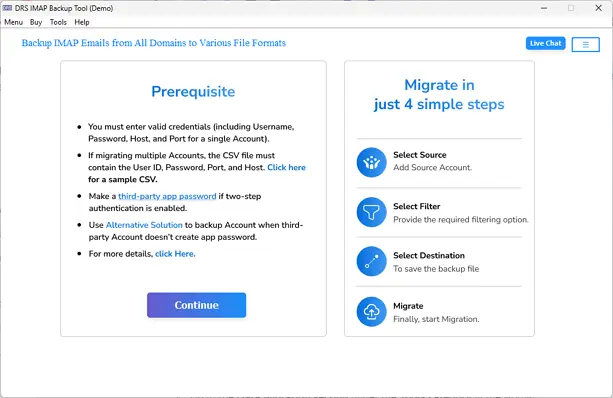
- Enter the Roundcube server address, port, & login credentials to connect.
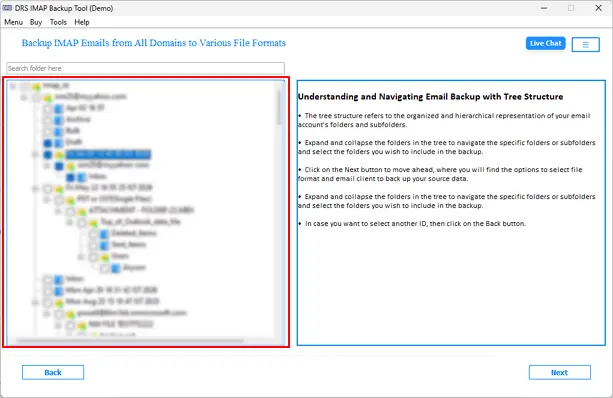
- Access the preview panel and select folders designated for migration.
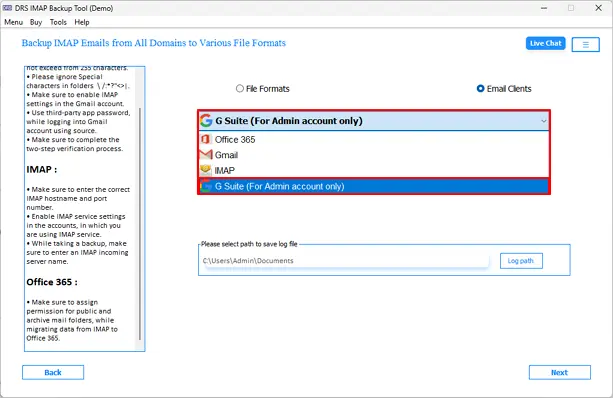
- Navigate to Saving Format and simply select G Suite or Google Workspace.
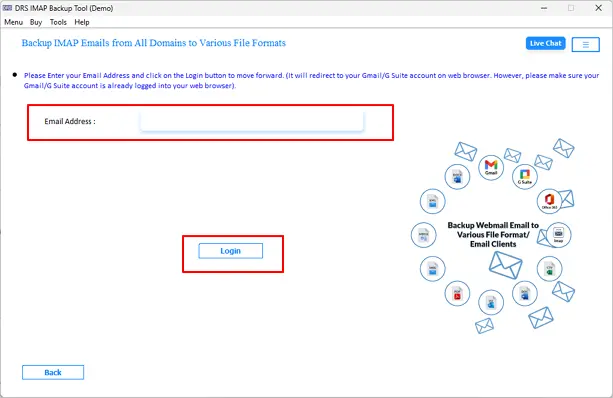
- Input Google Workspace credentials and click Log In to authenticate.
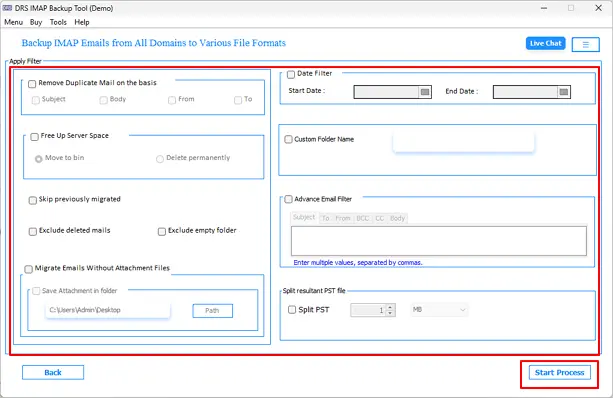
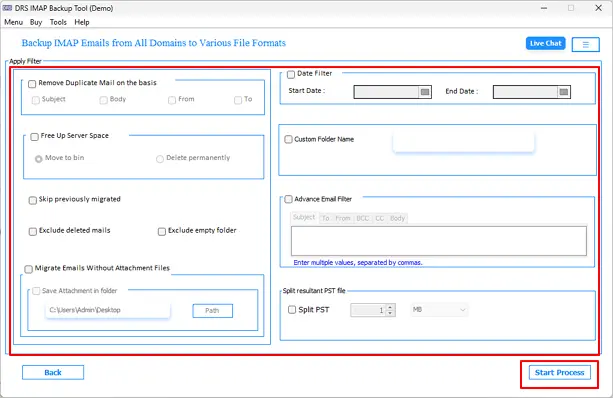
- Set date range and attachment filters as needed >> Start Process to transfer emails from Roundcube to Google Workspace.
What Makes This Tool the Right Choice for Migration?
- Eliminates intermediate file conversion with direct IMAP transfer.
- Skip Previously Migrated option prevents redundant multi-phase processing.
- You can even migrate IMAP Calendar to Office 365 using this same software.
- Preserve complete folder hierarchy and metadata throughout migration.
- Compatible with all major Windows OS versions for broad deployment.
- Intuitive GUI reduces dependency on specialized technical resources.
- Zero risk of data modification or mailbox corruption during migration.
Case Study
Client Background
A large-scale enterprise IT team required a structured and dependable solution to migrate complete Roundcube mailbox data across 500-plus user accounts to Google Workspace ahead of a scheduled infrastructure modernization initiative. The organization needed complete folder hierarchy preservation, metadata integrity, and zero operational disruption throughout the migration execution.
Challenges Faced
- 500-plus user accounts made manual migration operationally impractical.
- Risk of folder structure and metadata loss during IMAP transfer.
- Duplicate emails risked data organization within Google Workspace.
- No mechanism available to track previously migrated mailbox data.
- High attachment volume increased overall migration complexity.
Solution Provided
The IT team deployed the MigrateEmails IMAP Mail Transfer Tool to execute an automated bulk migration to migrate Roundcube email to Google Workspace
ensuring complete data integrity and folder-level accuracy across all provisioned user accounts.
Results Achieved
- 500 plus mailboxes migrated with zero data loss or corruption.
- Folder hierarchy and metadata fully preserved across all accounts.
- Duplicate emails are excluded without any manual intervention.
- Attachment data transferred accurately across all user folders.
End Note
To conclude, we have discussed effective approaches to migrate Roundcube to Google Workspace. Manual migration through the Google Admin Console works for limited-scale deployments, whereas enterprise environments with extensive mailboxes demand a more structured execution approach. The MigrateEmails IMAP Backup Tool provides IT administrators with a scalable and governance-aligned migration pathway. This utility provides bulk processing, advanced filter configuration, folder integrity preservation & complete metadata accuracy across all provisioned user accounts.
Frequently Asked Questions
Q1. Can I migrate multiple Roundcube mailboxes to Google Workspace simultaneously?
Ans. Yes, the MigrateEmails IMAP Mailbox Transfer Software supports bulk mailbox migration, allowing administrators to transfer multiple Roundcube accounts to Google Workspace in a single operation. This feature is particularly beneficial for organizations managing large-scale mailbox deployments.
Q2. Will the migration affect existing email data in Google Workspace?
Ans. No, the migration process transfers Roundcube mailbox data into the target Google Workspace accounts without modifying or deleting existing emails. The tool ensures the integrity of pre-existing mailbox content throughout the migration.
Q3. Is it possible to maintain folder hierarchy during migration?
Ans. Yes, the software preserves the original folder structure during migration. Inbox, Sent Items, Drafts, custom folders, and subfolders are transferred while maintaining their organizational hierarchy.
Q4. Can I migrate Roundcube emails with large attachments?
Ans. Yes, the utility supports the migration of emails containing large attachments. It transfers attachment files along with the associated email messages while preserving their original formatting and metadata.
Q5. Is technical expertise required to migrate Roundcube to Google Workspace?
Ans. No, the tool offers a user-friendly interface designed for both technical and non-technical users. Administrators can perform the migration by following a guided workflow without requiring advanced migration expertise.
Q6. How long does a Roundcube to Google Workspace migration take?
Ans. The migration duration depends on factors such as mailbox size, number of user accounts, server performance, and available network bandwidth. The tool’s bulk processing capabilities help reduce overall migration time for enterprise environments.
Q7. Can I perform selective migration from Roundcube to Google Workspace?
Ans. Yes, the software includes advanced filtering options that allow administrators to migrate specific email data based on date range and other criteria, enabling a more targeted and controlled migration process.
Q8. How can enterprises avoid duplicate emails during Roundcube to Google Workspace migration?
Ans. The tool includes a Skip Previously Migrated feature that helps prevent duplicate email transfers during multiple migration phases. This ensures mailbox consistency and reduces unnecessary data duplication in Google Workspace.
About The Author:

I am Kiran Sharma, a Technical Expert in Content writing. I have technical expertise in the field of Email Backup, Data Recovery, and Email Migration, and resolve technical queries related to Cloud Backup or Email Migration for individuals and businesses.
Related Post