-
Written By Kiran Sharma
-
Approved By
Vikash Bajpai -
Updated on February 10th, 2026
How to Migrate IMAP to Yahoo Mail Account? Easy Method
User Query:-
“I have multiple emails stored on an IMAP server and want to shift them into my Yahoo Mail account. What is the easiest and safest way to migrate IMAP to Yahoo Mail without losing any data?”
“I have multiple emails stored on an IMAP server and want to shift them into my Yahoo Mail account. What is the easiest and safest way to migrate IMAP to Yahoo Mail without losing any data?”
Introduction:- IMAP email accounts are commonly used across different email providers and business environments. However, many users choose switching to Yahoo Mail for its easy-to-use interface, large storage, and easy accessibility. Since Yahoo Mail does not provide a direct option for IMAP migration. Thus users need reliable methods to export IMAP email to Yahoo Mail. This guide explains both manual and professional approaches. Also, covers an automated MigrateEmails IMAP Backup Tool to complete the migration smoothly.
Understanding the Two Platforms (IMAP and Yahoo Mail)
| What Is an IMAP Account? | What Is Yahoo Mail? |
| IMAP is an email protocol that stores emails on a server and coordinates them across devices. It allows users to access the same mailbox from multiple platforms. | Yahoo Mail is a web-based email service that offers large storage, spam protection, and easy access through web and mobile applications. It is widely used for personal and business communication. |
Why Should You Switch Yahoo Emails to IMAP?
There are the following reasons why users choose to migrate IMAP to Yahoo Mail:
- To centralize emails into one Yahoo Mail account.
- Accessing emails easily from any device.
- Reducing dependency on multiple email clients.
- For improving inbox organization.
- Also, to maintain long-term access to important emails.
Manual Working to Transfer IMAP to Yahoo Mail
As there is no direct solution to migrate to Yahoo Mail, you can use the manual method using a Yahoo Mail IMAP access. Therefore, this method is very time-consuming and comes with several disadvantages.
Follow are the step-by-step process:
- Firstly, log in to your Yahoo Mail account.
- Now, go to Settings and More Settings.
- After that, open Mailboxes.
- Then, add your IMAP email account.
- Further, enter IMAP server details and credentials.
- Lastly, allow Yahoo Mail to fetch emails.
Pitfalls to Manually Migrate IMAP to Yahoo Mail
- The manual method has a slow synchronization process.
- It has limited control over folder selection.
- This method is not suitable for large mailboxes.
- There is a possibility of missing emails or folders.
- Moreover, it requires repeated monitoring.
Automated Working to Move IMAP Emails to Yahoo Mail
To get rid of manual limitations, using a verified MigrateEmails IMAP Backup Tool is the most recommended approach.. It helps to migrate IMAP to Google Workspace and other supported email platforms. Some of the key advantages of this software are:
- It saves time and effort.
- Saves multiple IMAP mailboxes simultaneously.
- Simple and user-friendly interface suitable for every user.
- Enables users to export IMAP to MBOX.
- Offers high security and complete data preservation with zero data loss.
- This tool comes with a one-time migration service.
| One-Time Migration Service: Migrate IMAP to Yahoo MailIf you don’t want to handle the conversion by yourself and want to migrate IMAP emails only once, a one-time migration service is available. Share the file with our team and the experts handle the entire process securely without software installation or technical expertise. Also, it offers accuracy and complete data preservation without any loss. |
Step-by-Step Working to Migrate Emails from IMAP to Yahoo Mail
- Firstly, download and launch the MigrateEmails IMAP Backup Tool and click Continue to proceed further.

- Afterwards, enter the IMAP account credentials and click log in.

- Now, expand the tree structure, preview the mailboxes and click Next.

- Then, choose IMAP as the output email platform.
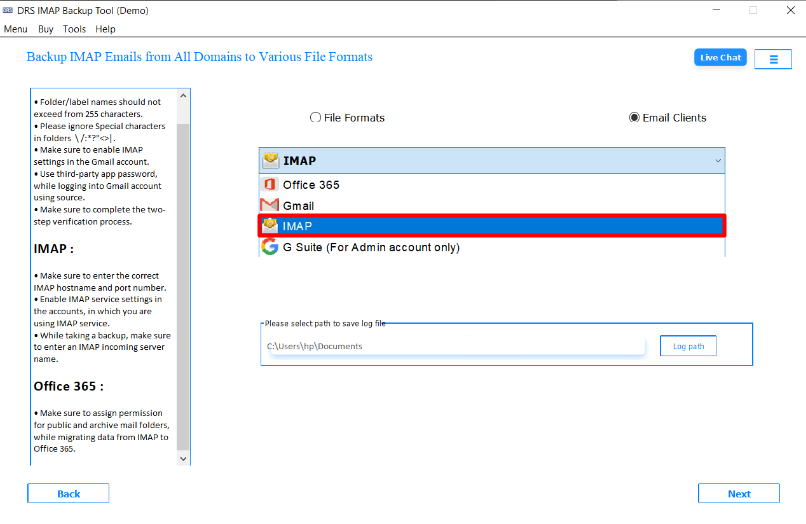
- Furthermore, again enter the IMAP account log in credentials.

- Finally, apply the additional filters and click Start Process to begin the conversion.

| Note: If you want to explore more, you can also check how to export IMAP to PST seamlessly without losing any data. |
| Real-Life Scenario: Migrate Emails from IMAP Account to Yahoo Mail A freelancer used an IMAP-based email account for years and wanted to move all emails into Yahoo Mail for easier access. They used a professional IMAP to Yahoo Mail migration tool to transfer all emails and folders. All emails were migrated successfully into Yahoo Mail with no data loss or folder mismatch. |
Conclusion
To conclude, migrating IMAP emails to Yahoo Mail helps users centralize communication and improve email accessibility. While the manual methods are also available, they may work for small mailboxes. An automated IMAP to Yahoo Mail migration tool provides a faster, safer, and more reliable solution to migrate IMAP to Yahoo Mail. It works for large mailboxes or important email data. Thus, choosing the right method ensures a smooth and error-free migration experience. Moreover, if you face any issues during the conversion process, kindly reach out to ur support team.
Frequently Asked Questions
Q1. Can I move IMAP emails directly to Yahoo Mail?
Ans. Yahoo Mail does not provide a direct option for IMAP migration. However, you can convert IMAP emails to Yahoo Mail either manually using Yahoo Mail IMAP access or by using a verified IMAP backup tool for a complete transfer.
Q2. Does Yahoo Mail support IMAP migration?
Ans. Yahoo Mail supports fetching emails from external IMAP accounts, but this feature has some limitations. For large mailboxes or full folder-level migration, a professional MigrateEmails IMAP backup solution is highly recommended.
Q3. Will my folders be preserved during IMAP to Yahoo migration?
Ans. Yes. When using a professional MigrateEmails IMAP to Yahoo Mail migration tool, your folder structure is preserved. Manual methods may not always retain the exact folder hierarchy.
Q4. Is it safe to migrate IMAP emails to Yahoo Mail?
Ans. Yes, the MigrateEmails IMAP Backup Tool is safe when performed using secure authentication methods. This use encrypted connections to protect your email data during the migration process.
Q5. Can I migrate old and new IMAP emails to Yahoo Mail?
Ans. Yes. You can migrate both existing (old) emails and newly received IMAP emails. Professional IMAP backup tool allows complete mailbox migration, including historical and recent messages.
Q6. Do I need technical skills to migrate IMAP to Yahoo Mail?
Ans. No. Professional IMAP to Yahoo Mail migration tool is designed for non-technical users and provide a simple, step-by-step interface. Manual methods may require basic email configuration knowledge.
About The Author:

I am Kiran Sharma, a Technical Expert in Content writing. I have technical expertise in the field of Email Backup, Data Recovery, and Email Migration, and resolve technical queries related to Cloud Backup or Email Migration for individuals and businesses.
Related Post