-
Written By Kiran Sharma
-
Approved By
Vikash Bajpai -
Updated on January 10th, 2026
Recover Outlook Password: Reset a Forgotten Password Fast
User Query:-
“I forgot my Outlook email password and can’t access important emails. What is the fastest and safest way to recover Outlook Password without losing data?”
“I forgot my Outlook email password and can’t access important emails. What is the fastest and safest way to recover Outlook Password without losing data?”
Introduction:- Forgetting an Outlook password can immediately block access to important data. Since Outlook accounts are linked with Microsoft security systems, password recovery must be done carefully to avoid data risks. This guide explains the manual method and an automated PST Password Remover to reset Outlook password. Additionally, this covers the entire process with 100% accuracy and seamless results, ensuring zero data loss.
Recovering Outlook Password: Why?
Users usually need to recover lost Outlook Mail password for the following reasons:
- Forgotten or misplaced password.
- For account security concerns.
- There is suspicious login activity.
- Device change or system reinstallation.
- Moreover, there is a long inactivity period.
Manual Method to Recover Outlook Password
There is no direct method to reset the Outlook password. That’s why you can use the manual approaches. But this method comes with several disadvantages as well.
Below are the step-by-step instructions to recover the password:
- Firstly, open the Microsoft account recovery page.
- Now, enter your Outlook email address.
- After that, select Forgot Password.
- Verify your identity using your recovery email or phone number.
- Then, enter the verification code.
- Furthermore, create a new strong password.
- Lastly, log in to Outlook with the new password.
Disadvantages of the Manual Method
- Recovery fails if the backup email or phone number is inaccessible.
- The account may get temporarily locked after multiple failed attempts.
- Sometimes the verification can take time.
- It is not helpful if recovery details are outdated.
- Additionally, there is no support for users unsure of security answers.
Professional Method to Recover Outlook Password
If the manual recovery method fails, users can go for a professional Outlook PST Password Remover. This approach helps users to unlock password-protected PST file with complete data preservation. It offers 100% accuracy and keeps the complete data confidential. Moreover, the software has a user-friendly interface suitable for non-tech users as well.
Key Benefits of this Tool to Recover Forgotten Outlook Passwords
- The tool guided identity verification.
- Safe and Microsoft-compliant recovery.
- No data deletion or mailbox loss.
- Helpful for business or critical email accounts.
- Allows users to remove duplicate emails in Outlook.
- Furthermore, it is suitable for non-technical users.
One-Time Outlook Recovery Service Available :-
For users who are unable to reset passwords on their own, a One-Time Outlook Password Recovery Service is available. Just share the file with our experts, and they will assist in verifying ownership and recovering access securely while maintaining full privacy.
For users who are unable to reset passwords on their own, a One-Time Outlook Password Recovery Service is available. Just share the file with our experts, and they will assist in verifying ownership and recovering access securely while maintaining full privacy.
Detailed Working to Recover Outlook Password Using the Tool
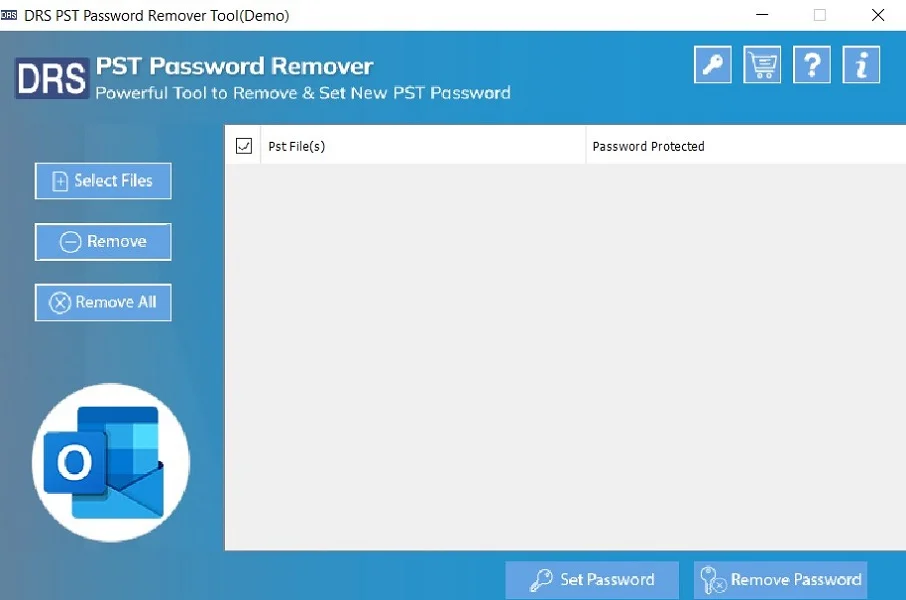
- First of all, launch the Outlook PST Password Remover.
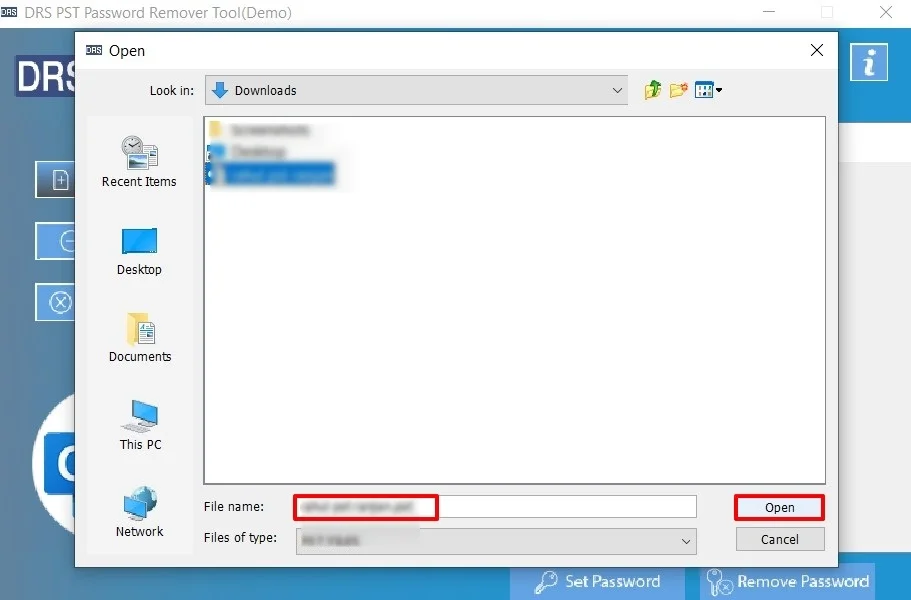
- Further, Select File(s)/Folders, add the file for which you want to recover the password, and click Open.
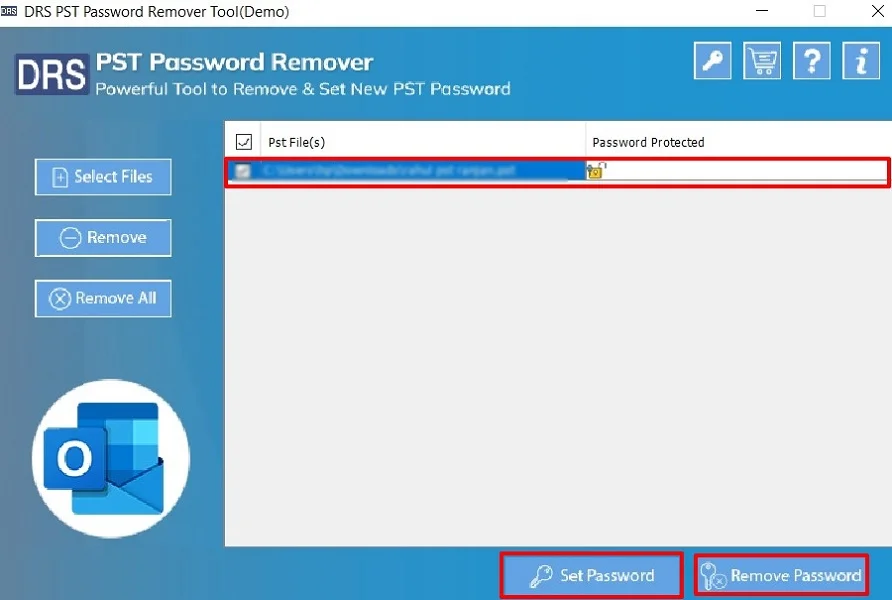
- Finally, choose the file and click either set password to reset or remove password to delete.
Real-Life Scenario:-
A corporate employee forgot their Outlook password after a system upgrade and lost access to important work emails. Manual recovery failed due to an outdated phone number. With the assisted PST password recovery tool, the account was verified and restored the same day without losing any emails.
A corporate employee forgot their Outlook password after a system upgrade and lost access to important work emails. Manual recovery failed due to an outdated phone number. With the assisted PST password recovery tool, the account was verified and restored the same day without losing any emails.
Conclusion
In short, recovering a forgotten Outlook password doesn’t have to be difficult. While the manual recovery method is available, it works for most users. It may fail sometimes if recovery details are outdated. In such cases, a verified Outlook PST password recovery tool provides a safe and reliable option to recover Outlook password. Resetting your Outlook password simply guarantees uninterrupted access and better account security. In case you face any kind of problem, you can opt for a one-time recovery service. Also, feel free to reach our support team.
Frequently Asked Questions
Q.1 Is it possible to recover an Outlook password without resetting it?
Ans. No. For security reasons, Microsoft does not allow users to view or Reset Outlook password on phone. The only official and safe option is to reset the password using Microsoft’s account recovery process.
Q.2 Can someone hack my account while I reset my Outlook password?
Ans. No, as long as you use the official Microsoft password recovery page. Microsoft uses encrypted verification methods such as security codes and identity checks. This keeps your account protected during the reset process.
Q.3 What is the easiest way to recover a lost Outlook mail password?
Ans. The easiest and safest way is to use the “Forgot password” option on the Microsoft account recovery page. If you no longer have access to your recovery email or phone number, assisted recovery support is the best alternative.
About The Author:

I am Kiran Sharma, a Technical Expert in Content writing. I have technical expertise in the field of Email Backup, Data Recovery, and Email Migration, and resolve technical queries related to Cloud Backup or Email Migration for individuals and businesses.
Related Post