-
Written By Kiran Sharma
-
Approved By
Vikash Bajpai -
Updated on May 27th, 2026
How to Convert XML to Word Document (DOC & DOCX)– 2026 Guide
User Query:-“I have around 150 XML files that contain structured business data that need to be converted into Word documents for reporting purposes. Is there a reliable enterprise-grade approach to convert XML to Word while handling large volumes of data without any loss?”
– Sarah Mitchell, United Kingdom
Introduction: XML files are widely used across enterprise systems in order to store & exchange structured data in a standardized & platform-independent format. In contrast, Microsoft Word provides a professional environment that enterprise teams rely on for creating & distributing business-critical documents. Enterprise users and data professionals often find it difficult to present their XML data in a properly structured Word format. In this technical blog, we cover the most effective methods to convert XML to DOCX without data loss. In addition, we will discuss the MigrateEmails XML Converter for secure transfer.
XML vs DOC: Understanding the Core Differences
| Basis | XML Format (Extensible Markup Language) | DOC Format (Document File Format) |
| File Extension | .xml | .doc / .docx |
| File Type | Markup language format | Word processing document |
| Primary Purpose | Stores and exchanges structured data | Creates and presents business documents |
| Readability | Requires technical understanding to read | Easy to read and edit by anyone |
| Data Structure | Hierarchical and tag-based | Linear and paragraph-based |
| Software Support | Web browsers, text editors, XML editors | Microsoft Word, Google Docs, LibreOffice |
| Security | Supports encryption via external tools | Built-in password protection available |
?
How do I convert an XML file to a Word document?
XML files can be opened in Word manually, but formatting issues arise with enterprise-level data. A professional XML to Word Converter Tool that handles bulk conversion efficiently while preserving data structure & content integrity with zero data loss.
Built-in Method to convert XML to DOC
Users can manually convert your XML to DOC using Microsoft Word. This approach works well for individual files & gives users direct control over formatting and layout adjustments during the conversion process. To convert XML data into a structured and easily analyzable spreadsheet format, refer to the guide on convert XML to CSV.
Steps to Convert XML to Word Document Free:
- Launch Microsoft Word on your system >> File >> Open.
- After that, browse & select the XML file to convert and click Open.
- Microsoft Word will load the XML content for review.
- Now, adjust the formatting, headings, and layout as per your requirements.
- Go to File, click Save As, select Word Document (.doc/.docx), and click Save.
Constraints of the Manual XML to DOC Conversion
- Not suitable for bulk conversion of enterprise-level XML files.
- Formatting and data structure may not remain intact after conversion.
- Complex XML files with nested tags often fail to render accurately in Word.
- No automated option available for processing multiple XML files at once.
- Time-consuming for enterprise teams handling large XML data.
- The risk of data inconsistency increases when adjusting formatting manually.
Recommended Way to Convert XML to Word
The MigratesEmails XML Converter Tool is a professional-grade solution for enterprise teams & data professionals who want accurate conversion of XML files into Word format at scale. Moreover, the tool supports both single-file & batch conversion without any file size restrictions, which makes it well-suited for organizations handling large volumes of structured XML data.
A built-in preview panel allows users to verify content before conversion, while advanced filtering options ensure selective and precise output. To export XML files into a secure and universally compatible document format, check our guide on how to convert XML to PDF.
One-Time Conversion Service Option
For enterprise users or individuals who prefer a reliable approach, the MigrateEmails One-Time Conversion Service serves as a convenient alternative. Simply submit your XML files to their technical team and receive properly formatted Word documents in return. The entire process requires no software setup or technical knowledge on your part.
Steps to open XML file in Word:
- Download the above-discussed XML Data Migration Solution.
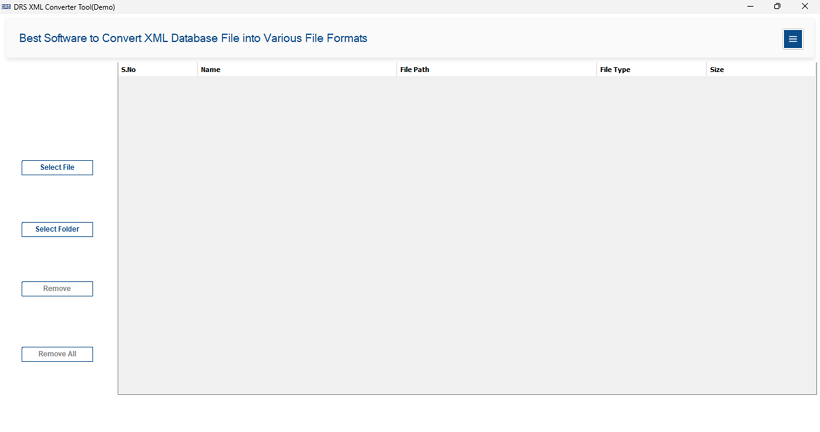
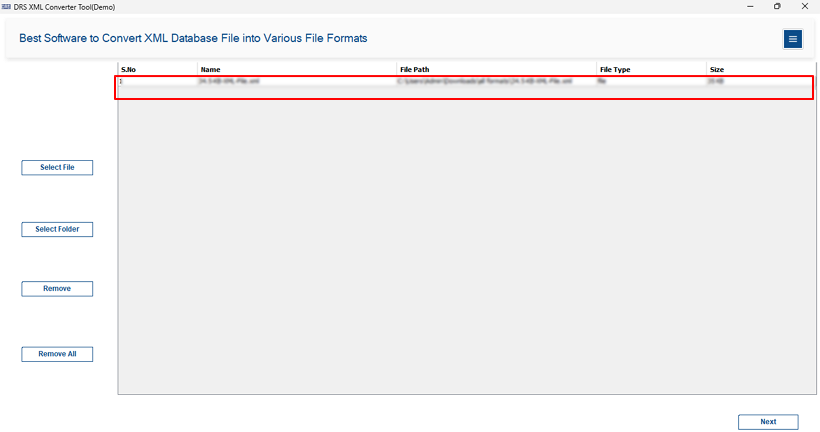
- Use Select Files/Folder to import single or multiple XML files & click Next.
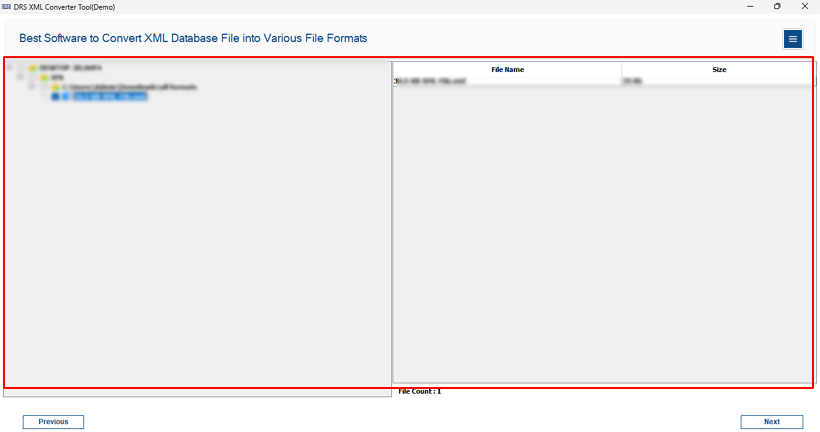
- Expand the tree structure, preview the XML data, and click Next to continue.
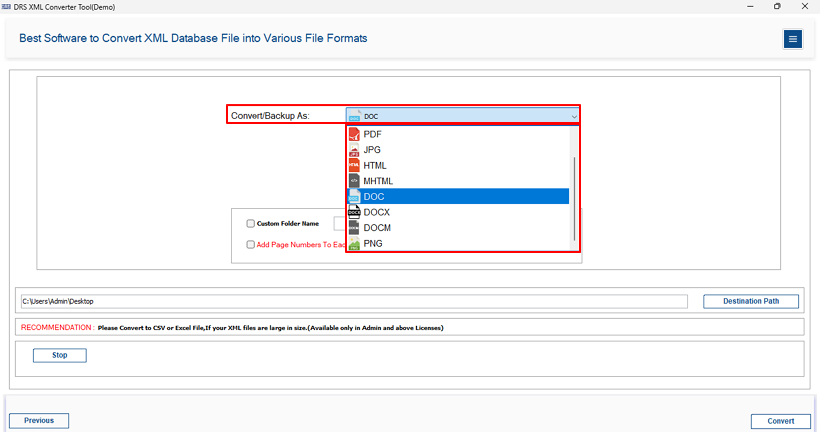
- Choose DOC or DOCX as the desired output format from the saving options.
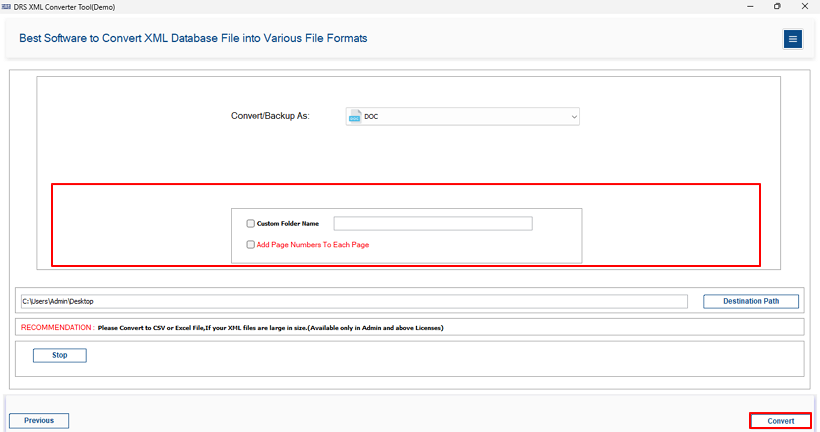
- Use available filter as needed >> Convert to save XML as Word document.
Why Do Enterprise Teams Rely on the XML Converter Tool?
- Convert multiple XML files to Word & a single file without any file size restrictions.
- Built-in preview panel verifies XML content accurately before conversion begins.
- Supports multiple output formats, including DOC, DOCX, PDF, CSV, XLSX, and HTML.
- Advanced filtering options enable selective and precise XML content conversion.
- Custom folder naming keeps converted Word files organized and easy to manage.
Which Method Should You Choose to Convert XML to DOCX?
- Use Microsoft Word Import → if you need quick access to individual XML files without any tool.
- Use the MigrateEmails XML Converter Tool → if you need bulk conversion with complete data integrity, advanced filtering, and accurate formatting preservation throughout the process.
Final Words
In this technical blog, we explored the most effective ways to convert XML to Word documents. While the manual approach using Microsoft Word serves basic conversion needs, it lacks the efficiency & accuracy required for enterprise-level operations involving large XML datasets. The MigrateEmails XML Converter Tool addresses all these limitations by offering advanced filtering, a built-in preview panel, and complete preservation of data structure and formatting. For IT professionals, data analysts, and enterprise teams handling bulk XML data, the automated solution proves far more dependable.
Frequently Asked Questions
Q1. Can an IT administrator convert multiple XML files from different departments to DOC or DOCX format simultaneously in a batch operation?
Ans. Yes, an IT administrator can convert multiple XML files in a single batch process using the MigrateEmails XML Converter Tool. The software supports bulk XML to Word conversion, which allows enterprise teams to process hundreds of XML files at once without manual intervention.
Q2. Does the XML to Word conversion tool preserve complex XML data structures, nested elements, and formatting in the output DOC file?
Ans. Yes, the tool is designed to preserve original XML data integrity during conversion. It accurately maintains complex XML hierarchies, nested elements, tags, attributes, and formatting structures while converting them into properly organized Word documents, ensuring zero data loss throughout the process.
Q3. Is it possible to convert XML files to DOCX format instead of the legacy DOC format for enterprise compliance with modern document standards?
Ans. Yes, the MigrateEmails XML Converter supports both DOC and DOCX output formats. This enables enterprises to choose modern DOCX format for improved compatibility, security, and compliance with current document management standards used across organizations.
Q4. How does the XML to DOC conversion tool ensure data security when handling confidential enterprise XML files containing sensitive business data?
Ans. The tool maintains complete data confidentiality during the conversion process. All XML files are processed locally on the user’s system, which prevents exposure to external servers. This ensures secure handling of sensitive enterprise data and supports internal compliance requirements.
Q5. Can enterprises convert XML files to Word documents without Microsoft Word being installed on the conversion workstation?
Ans. Yes, Microsoft Word installation is not required when using the automated solution. The MigrateEmails XML Converter performs direct XML to DOC/DOCX conversion independently, allowing users to complete the process even on systems where MS Word is unavailable.
Q6. Is it possible to selectively convert specific XML elements or sections to Word document format instead of converting the entire XML file?
Ans. Yes, the software includes advanced filtering features for selective conversion. Users can choose specific XML files, folders, or targeted data sections based on project requirements, making the output more precise and efficient for enterprise workflows.
Q7. How can enterprise teams handle XML files with encoding issues or special characters during conversion to Word document format?
Ans. There are no strict file size limitations in the MigrateEmails XML Converter Tool. It is designed for enterprise-scale operations and can efficiently process large XML datasets as well as multiple files in bulk without impacting conversion performance or output quality.
Q8. What is the maximum XML file size the conversion tool can handle without performance degradation for enterprise-scale datasets?
Ans. There are no strict file size limitations in the MigrateEmails XML Converter Tool. It is designed for enterprise-scale operations and can efficiently process large XML datasets as well as multiple files in bulk without impacting conversion performance or output quality.
About The Author:

I am Kiran Sharma, a Technical Expert in Content writing. I have technical expertise in the field of Email Backup, Data Recovery, and Email Migration, and resolve technical queries related to Cloud Backup or Email Migration for individuals and businesses.
Related Post