-
Written By Kiran Sharma
-
Approved By
Vikash Bajpai -
Updated on April 20th, 2026
Quick Ways to Convert PST File to PDF: Step-by-Step Guide
User Query: I have an Outlook PST file with important emails, and I want to save them as a PDF for sharing and printing. Is there a simple way to convert a PST file to PDF without losing email formatting?
Introduction:- If you want to open or share emails stored in a PST file, but don’t have Outlook on every device? PST files are not easily accessible without Microsoft Outlook, which makes sharing or printing emails difficult. The PDF file format solves this issue by turning emails into a format that can be opened anywhere. This blog explains the best methods to convert PST to PDF without losing any important information. It includes the manual method for a few files and a professional MigrateEmails PST Converter Tool for bulk conversion
Quick Answer: How to Convert PST File to PDF-
You can change PST emails into PDF by using Outlook’s print option or by using a PST converter tool. If you only have a few emails, the manual method is useful. For converting many emails at once, a dedicated tool makes the job much easier.
What are PST and PDF File Formats?
- A PST file is used by Microsoft Outlook to store emails, contacts, calendars, and other mailbox data. It is mainly used for backup and data storage.
- PDF (Portable Document Format) is a file format that displays content the same way on every device. It is commonly used for sharing, printing, and storing documents securely.
Why Convert Outlook PST to PDF?
- Share emails without needing Outlook.
- Original formatting and layout stay intact.
- Useful for printing and legal records.
- Accessible on any device.
- Also, it’s best for long-term storage.
Manual Method to Convert PST File to PDF
If you have Microsoft Outlook installed, you can save emails as PDF files. Here are the steps:
- Open Microsoft Outlook.
- Pick the email you want to convert.
- Click on File and then Print.
- From the printer options, pick Microsoft Print to PDF.
- Choose where you want to save the file.
- Click Save to finish the conversion.
Limitations: Manually Export PST File to PDF
- Converts one email at a time.
- Takes a long time with large PST files.
- Outlook must be installed on your system.
- There is no option for bulk conversion.
- Also, attachments may not be saved properly.
Hassle-Free Solution to Convert PST File to PDF
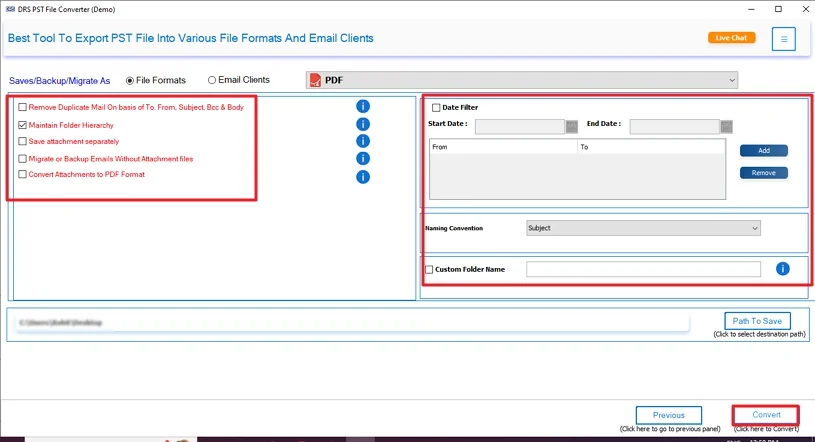
The MigrateEmails PST to PDF Converter is a professional and reliable solution to convert PST files into PDF. It converts multiple PST files at once without any data loss. Offer several advanced features, like Preview, Remove Duplicates, Date Filter, and more. This tool preserves the original email formatting, structure, and metadata. Also, an option to migrate attachments securely. It is compatible with both Windows and Mac versions. Additionally, you can convert PST to ICS and other formats.
Steps to Convert PST File to PDF in Bulk
- Download and install the MigrateEmails PST File Converter.
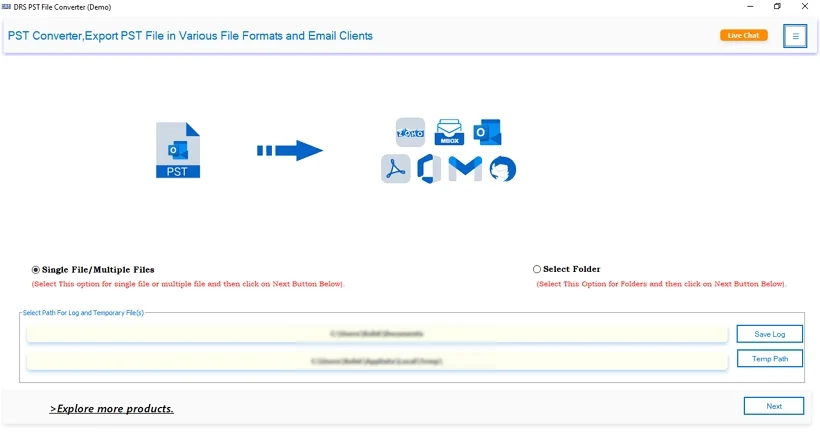
- Choose “Select Files” or “Select Folder” to add your PST files.
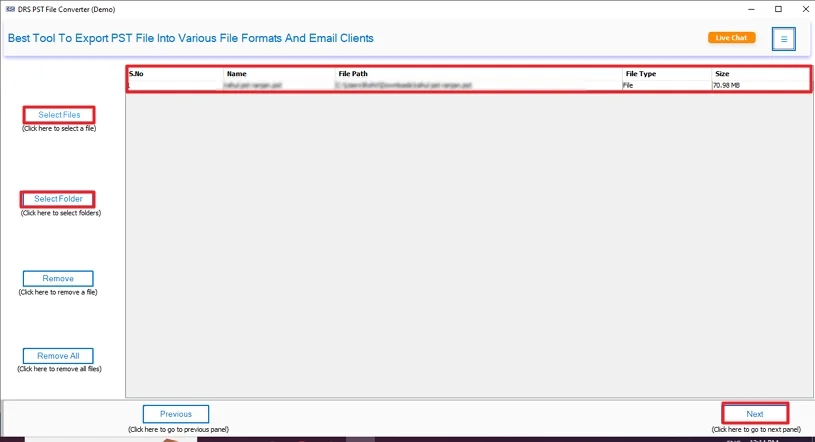
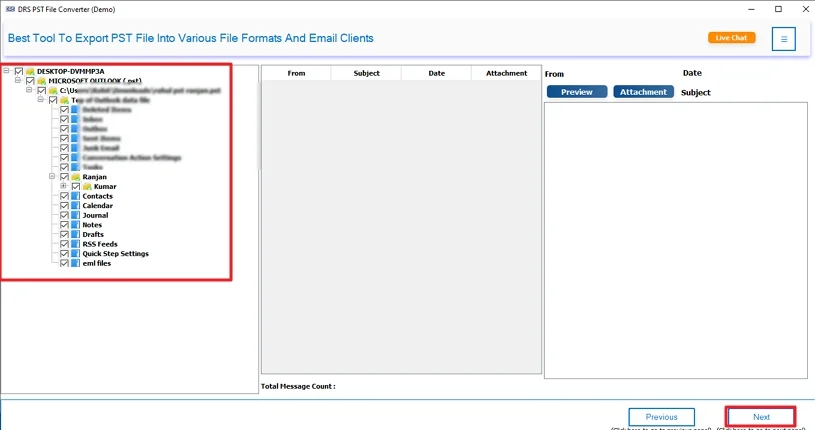
- You can preview and select the PST files to convert. Hit Next.
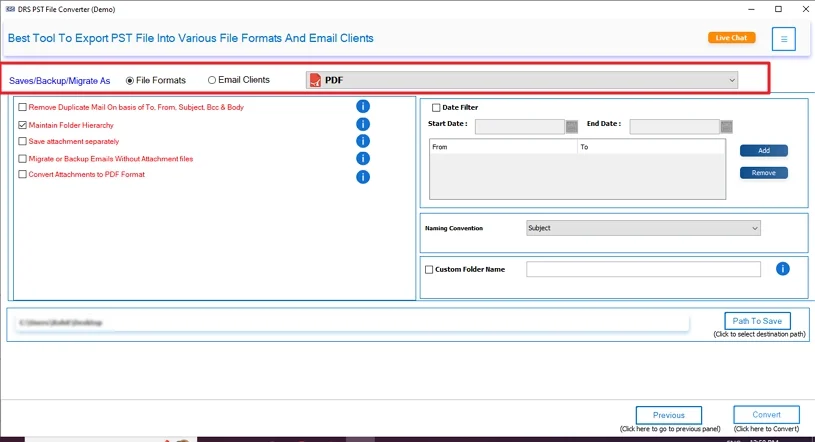
- Choose PDF as the Saving Format from the list.
- Lastly, apply advanced features as per your needs. Click Convert.
Enterprise Use Cases of PST to PDF Conversion Tool
Centralized Email Sharing: In organizations, emails often need to be shared across different teams or departments. Converting PST data to PDF makes it simple to distribute emails without needing Outlook on every system. This tool also converts PST to MBOX and other formats.
Legal and Compliance Requirements: Many businesses need to keep email records for audits, legal cases, or compliance policies. PDF format stores emails in a fixed and secure form that cannot be easily changed. This makes it a good fit for official documentation and record-keeping.
Bulk Printing for Business Needs: Enterprises often need to print large numbers of emails for reporting or documentation. A professional tool lets you convert PST emails to PDF in bulk, making the printing process faster and more organized without touching the original layout.
Long-Term Data Archiving: For long-term storage, companies prefer formats that stay stable over time. PDF files are easy to access and do not rely on Outlook. Businesses can archive large PST files into PDF format for future use without worrying about compatibility issues.
Conclusion
In this complete blog post, we explained two different methods to convert PST file to PDF. The manual method is used to convert a small number of PST files. But it has several limitations. Therefore, it’s best to use the professional tool. It converts multiple PST files simultaneously. At the end, you can also download the free version of this tool to understand its features and performance.
Frequently Asked Questions
Q1. How do I convert a PST File to PDF?
Ans: Yes, it is safe if you use a reliable tool. A good converter keeps the email content and attachments intact during the process. Manual methods may not always include attachments properly.
Q2. Is it safe to export PST to PDF with attachments?
Ans: Yes, it is safe if you use a reliable tool. A good converter keeps the email content and attachments intact during the process. Manual methods may not always include attachments properly.
Q3. Can I convert Outlook PST to PDF at once?
Ans: Yes, but only with a professional tool. The manual method allows you to convert one email at a time. A tool helps you convert multiple PST emails to PDF in a single process.
Q4. Suggest the best tool to change PST to PDF?
Ans: A trusted PST converter tool is the best choice for this task. It allows bulk conversion, keeps the original formatting, and saves attachments along with emails. It also saves time and reduces effort.
Q5. Can I export a PST File to PDF without Microsoft Outlook?
Ans: Yes, you can export PST files to PDF without Outlook by using a professional converter tool. It works independently and does not require Outlook installation.
About The Author:

I am Kiran Sharma, a Technical Expert in Content writing. I have technical expertise in the field of Email Backup, Data Recovery, and Email Migration, and resolve technical queries related to Cloud Backup or Email Migration for individuals and businesses.
Related Post