-
Written By Kiran Sharma
-
Approved By
Vikash Bajpai -
Updated on November 25th, 2025
Convert MSG to MBOX in Bulk Using Simple and Secure Methods
User Query:-
“I have hundreds of MSG files exported from Outlook, and now I need to access them in Thunderbird. How can I convert MSG to MBOX in bulk without losing formatting or attachments?”
“I have hundreds of MSG files exported from Outlook, and now I need to access them in Thunderbird. How can I convert MSG to MBOX in bulk without losing formatting or attachments?”
Introduction: MSG files belong to Microsoft Outlook. On the other hand, MBOX is a universal email storage format supported by various email clients. When users switch platforms, migrate systems, or need cross-client accessibility, converting MSG to MBOX becomes essential. Though this guide explains the manual ways to convert MSG files to MBOX. Also, it explains the MigrateEmails MSG Converter Tool to do the same efficiently.
Comparison: MSG vs MBOX
|
Basic Features |
MSG |
MBOX |
|
File Type |
Single email file |
Mailbox containing multiple emails |
|
Supported By |
MS Outlook, MS Exchange |
Thunderbird, Apple Mail, Opera, Postbox |
|
Attachment Support |
Yes |
Yes |
|
Bulk Storage |
Not supported |
Stores complete folders |
|
Platform |
Windows |
Windows, macOS, Linux |
Why Is There A Need to Convert MSG to MBOX?
- To convert MSG to JPG and other supported file formats.
- Simplifying email management using a mailbox-based format.
- Enables cross-platform access (Windows → Mac/Linux).
- Reducing hundreds of individual MSG files into a single, organized MBOX.
- Also, this conversion enhances compatibility with open-source email clients.
Manual Method to Export MSG in MBOX
There is no direct option to convert MSG files into MBOX format. But still, you can complete the conversion using the manual trick. Also, remember that this method comes with some difficulties and, therefore, consumes a lot of time.
Step-by-Step Process to Transfer MSG files to MBOX
- Firstly, open Thunderbird on your system.
- Now, install ImportExportTools NG (Add-ons → Search → Install).
- After that, create a new folder in Thunderbird to import MSG files.
- Right-click the folder → ImportExportTools NG.
- Choose Import all messages from a directory → Select the folder containing MSG files.
- Lastly, the Thunderbird imports them into the selected mailbox and automatically stores them in MBOX format.
Limitations to Convert MSG to MBOX Manually
- This method does not support large-scale or bulk MSG folders efficiently.
- This may lead to missing metadata, inline images, and formatting issues.
- It requires Thunderbird + add-on installation.
- Though this process is very time-consuming for users with multiple subfolders.
- Unfortunately, it is not suitable if the MSG files are corrupted or inaccessible.
Automated Solution to Convert Outlook MSG to MBOX
For smooth and bulk conversion, using a dedicated MigrateEmails MSG Converter tool is the best option. This solution allows users to convert MSG to PST and other file formats. The highly efficient software ensures 100% accuracy, complete data integrity, and high-end security. Also, it has an advanced feature to convert multiple MSG files simultaneously.
One-Time Service Option:
If you don’t want to handle the conversion manually, the MigrateEmails email conversion service can convert MSG to MBOX securely.
This will be ideal for:
Businesses with large MSG archives | Non-technical users | Time-sensitive migration projects
Procedure to Use the Utility to Convert MSG Files to MBOX
- Firstly, download and install the MigrateEmails MSG Converter Tool → Next.
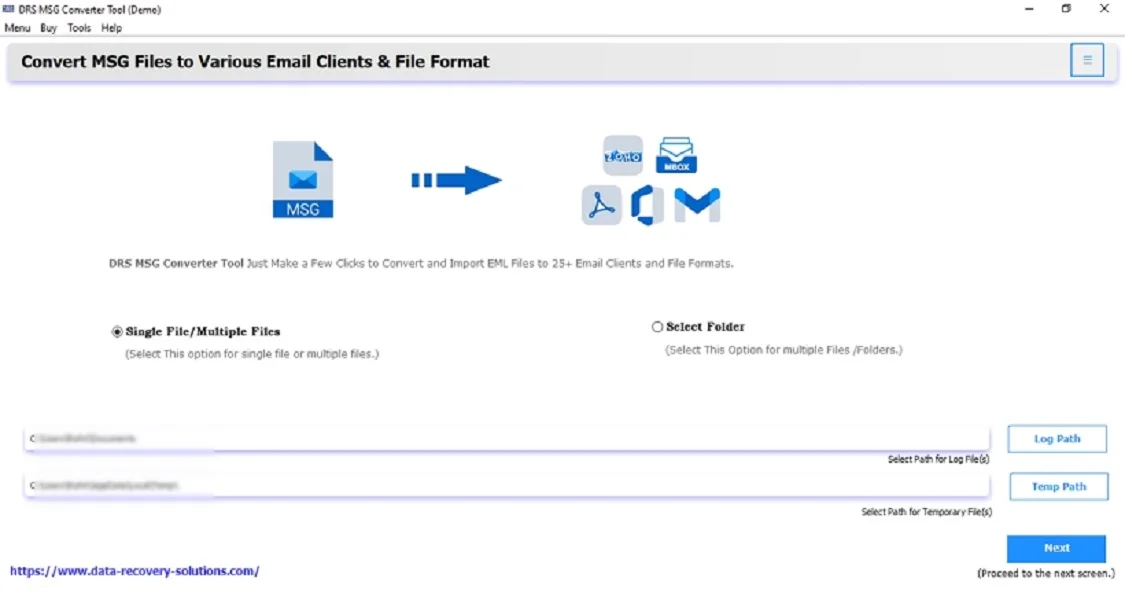
- Now, click Select Files/Folder → Add the MSG files that you want to convert → Next.

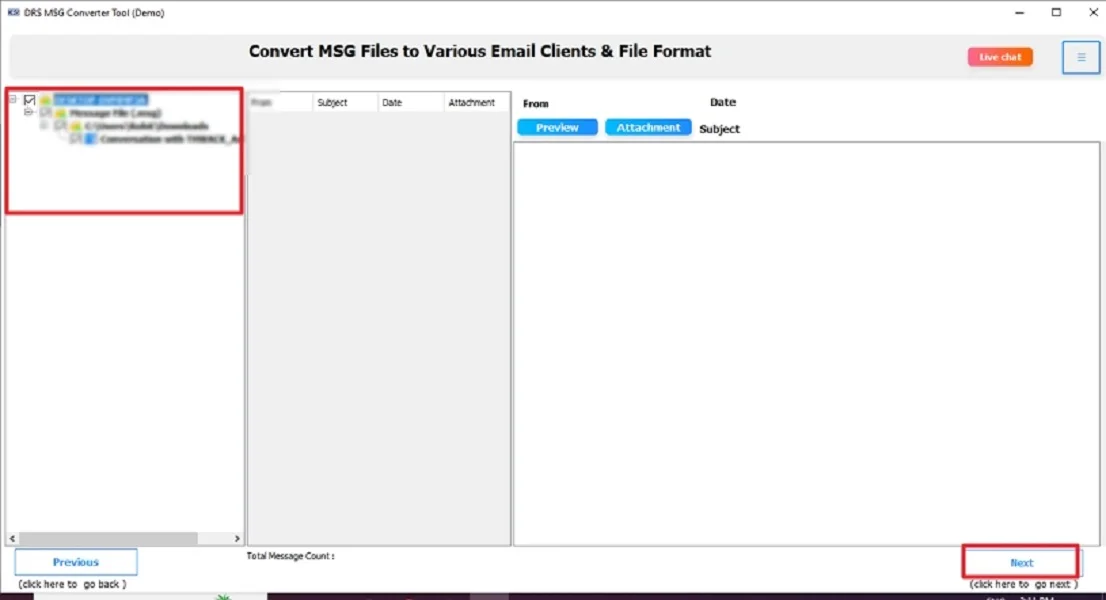
- After that, expand the data structure → Preview emails → Next.
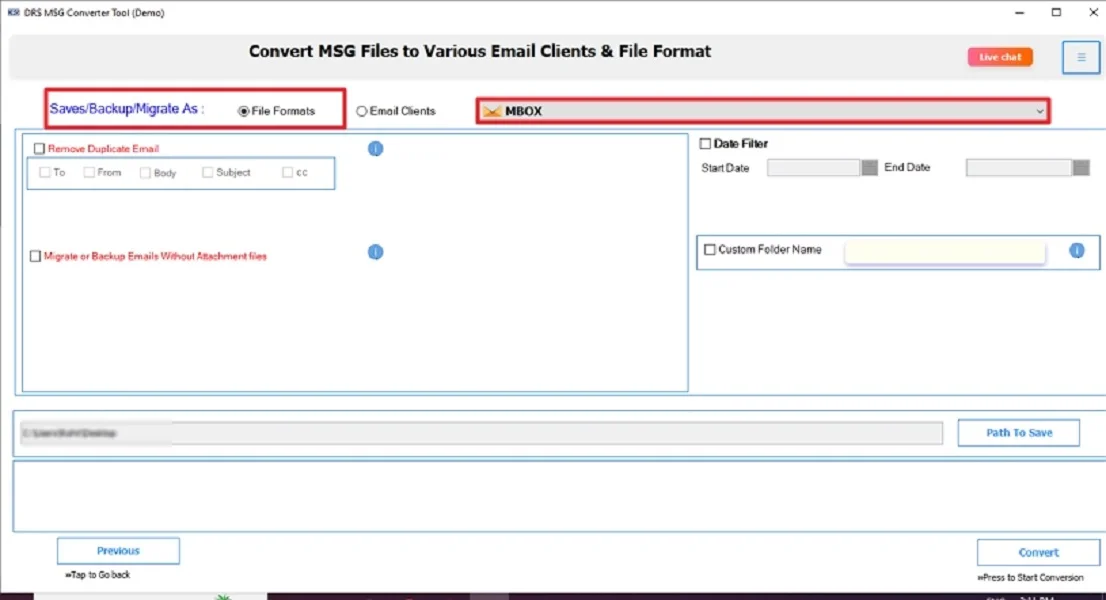
- Choose MBOX as the saving output format.
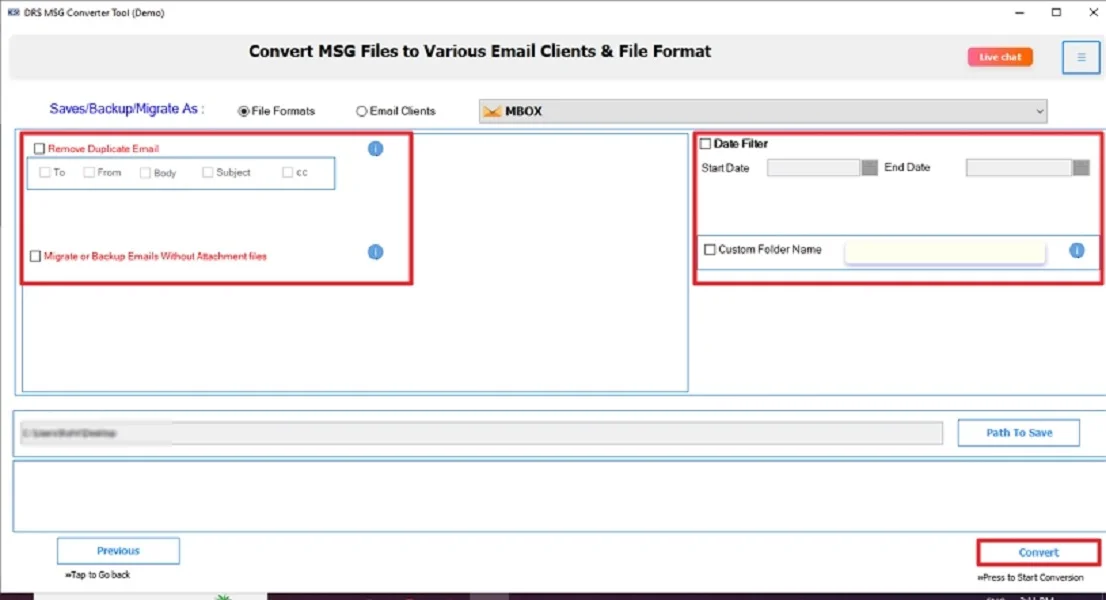
- Lastly, apply the built-in filters → Convert to start the process.
Key Characteristics of the Tool to Convert MSG to MBOX
- This tool has a simple UI for beginners.
- It is a 100% safe conversion with zero data loss.
- Supports bulk and selective MSG file export.
- Has a very high-speed processing engine.
- Compatible with all Windows versions.
- Also, this software generates logs and conversion reports.
Real-World Scenario:
A project coordinator received hundreds of MSG files from a Windows-based client. But her team worked on Mac systems that couldn’t open MSG files. Instead of checking each email manually, she used a MigrateEmails MSG Converter Tool. Through this, she quickly converts all MSG files into a single MBOX file. This allows her team to access everything smoothly with proper formatting and attachments. Moreover, this saves hours of effort and eliminates compatibility issues.
Conclusion
To sum up, converting MSG to MBOX becomes easy when using the right method. While the manual method works for small batches, it’s not suitable for bulk or critical data. A professional MSG Converter ensures accuracy, preserves formatting, and simplifies large migrations. For hassle-free and secure results, the automated solution is strongly recommended to convert MSG to MBOX.
Frequently Asked Questions
Q.1 How Do I Convert MSG to MBOX Format Easily?
Ans. The easiest way is to use a professional MigrateEmails MSG to MBOX converter tool. This supports bulk file processing, preserves formatting, and doesn’t require Outlook or Thunderbird during conversion.
Q.2 Can I Convert MSG Files to MBOX for Free?
Ans. Yes, you can convert MSG to MBOX for free using Thunderbird with the ImportExportTools NG add-on. However, it is not ideal for bulk conversions and may cause missing metadata or formatting issues.
Q.3 Is There a Safe Method to Export MSG in MBOX?
Ans. The safest method is to use an automated MSG Converter. It ensures 100% data integrity, maintains folder structure, and exports emails without any corruption or loss.
Q.4 Can I Transfer MSG Files to MBOX Without Any Technical Skill?
Ans. Yes. A dedicated MigrateEmails tool provides a simple, guided interface, enabling anyone, even non-technical users, to convert MSG Files to MBOX
effortlessly.
About The Author:

I am Kiran Sharma, a Technical Expert in Content writing. I have technical expertise in the field of Email Backup, Data Recovery, and Email Migration, and resolve technical queries related to Cloud Backup or Email Migration for individuals and businesses.
Related Post