-
Written By Kiran Sharma
-
Approved By
Vikash Bajpai -
Updated on January 8th, 2026
Transfer Shaw Email to Gmail Safely – No Email Loss
User Query:-
“I am using a Shaw email account, but I want to move all my emails for better accessibility and security. What is the safest way to transfer Shaw email to Gmail without losing data or attachments?”
“I am using a Shaw email account, but I want to move all my emails for better accessibility and security. What is the safest way to transfer Shaw email to Gmail without losing data or attachments?”
Introduction:- Business professionals use Shaw emails. On the other hand, Gmail is a free email service developed by Google. Many people choose Gmail as it offers advanced features, high security, and easy access across devices. But there is no guarantee that the important data will remain secure. Transferring Shaw emails to Gmail provides better management, long-term reliability, and security as well. This guide covers the manual method to transfer emails from Shaw to Gmail. Moreover, a professional MigrateEmails IMAP Backup Tool for quick results.
Advantages of Migrating Shaw Email to Gmail
There are various reasons why users choose Gmail over Shaw email:
- Accessing emails from anywhere on any device.
- Improved spam filtering and security.
- There is a long-term email reliability.
- Easy integration with Google Workspace tools.
- Also, for secure backup of important email conversations.
Manual Approach to Transfer Shaw Email to Gmail
As there is no direct option to convert it into Gmail. Therefore, you can use the built-in methods to complete the process.
Here is the step-by-step solution:
- Firstly, sign in to your Gmail account.
- Now, go to Settings, see all settings, and Accounts and Import.
- After that, click Import mail and contacts.
- Then, enter your Shaw email address.
- Provide Shaw email login credentials.
- Further, select emails to import.
- Lastly, start the import process.
Limitations: Manually Migrate Emails from Shaw to Gmail
- Not suitable for large mailboxes.
- Attachments may not import correctly.
- No advanced filtering options.
- This process has a slow migration speed.
- Risk of missing emails during sync.
- Also, it requires repeated login verification.
Professional Approach to Transfer Shaw Email to Gmail
To save Shaw Email to Gmail safely, use an automated MigrateEmails IMAP Backup Tool. This solution allows you to migrate IMAP to Google Workspace with complete accuracy. It guarantees the process preserves attachments, metadata, and folder structure during the conversion. The software has a simple and user-friendly interface suitable for non-tech users.
One-Time Migration Service:-
If you do not want to perform the conversion yourself, the MigrateEmails One-Time Shaw to Gmail Migration Service is available. The experts handle the entire conversion process securely without any loss. Additionally, make sure to maintain complete confidentiality and accurate email export.
If you do not want to perform the conversion yourself, the MigrateEmails One-Time Shaw to Gmail Migration Service is available. The experts handle the entire conversion process securely without any loss. Additionally, make sure to maintain complete confidentiality and accurate email export.
How to Transfer Shaw Email to Gmail Through a Verified Tool?
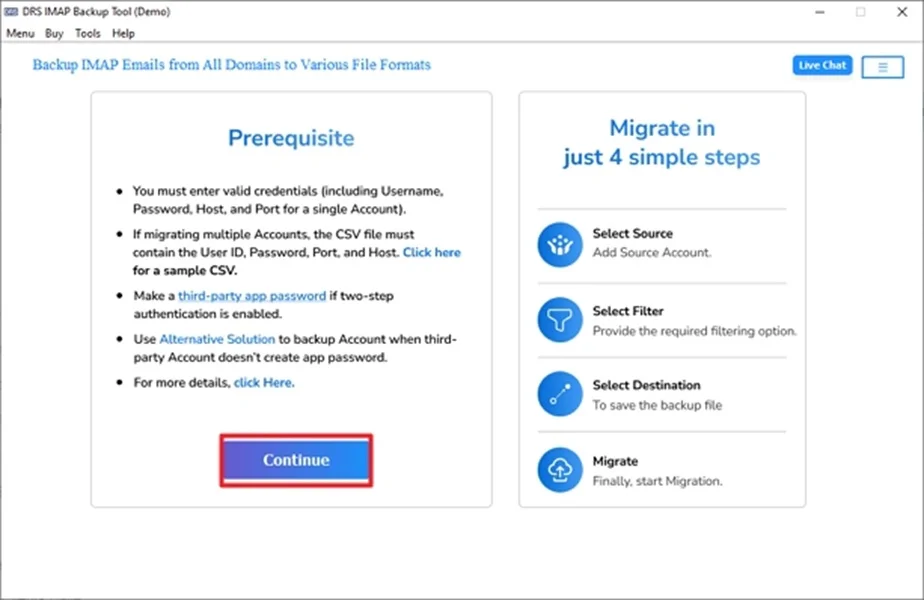
- Firstly, install the MigrateEmails IMAP Backup Tool and click Continue.
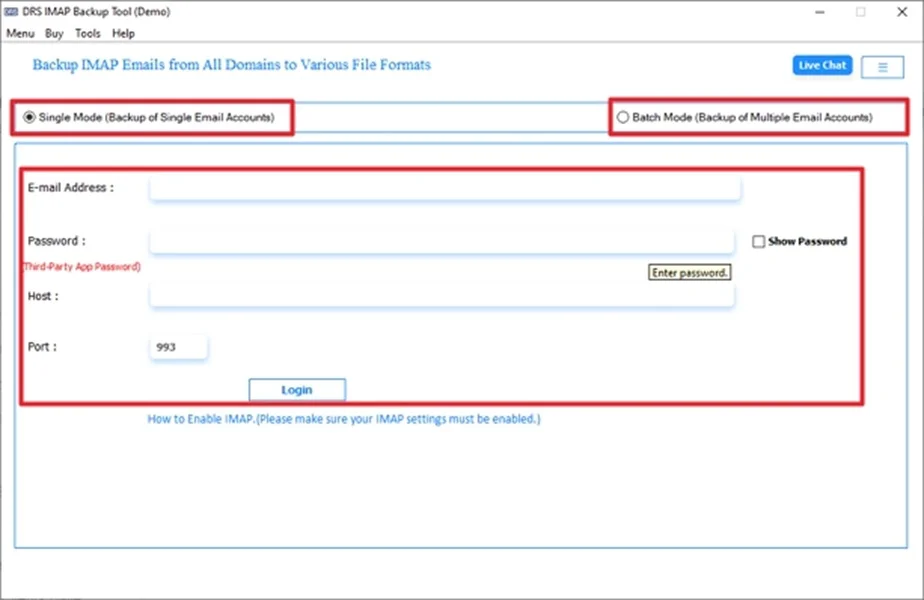
- Now, enter the IMAP account credentials and log in.
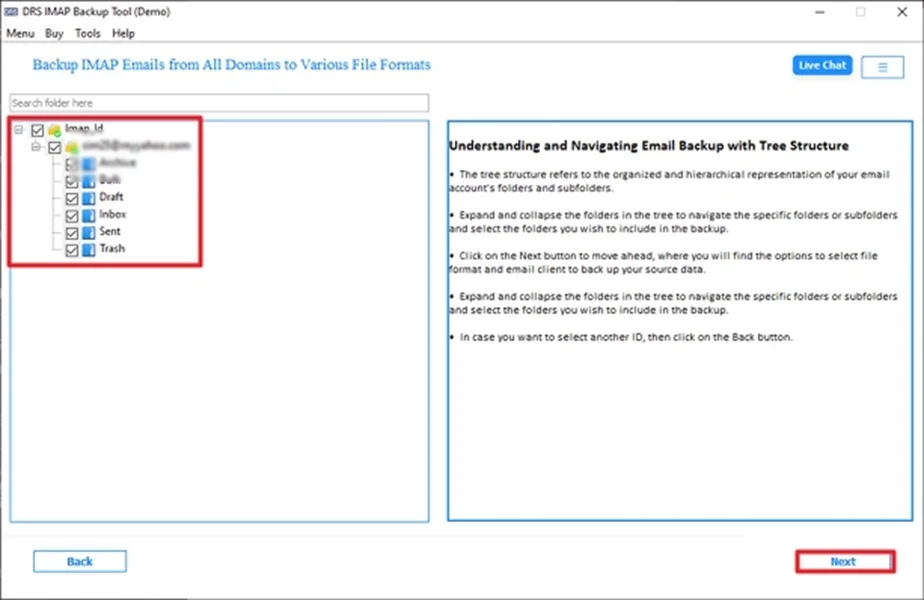
- Afterwards, preview the entire mailbox and click Next.
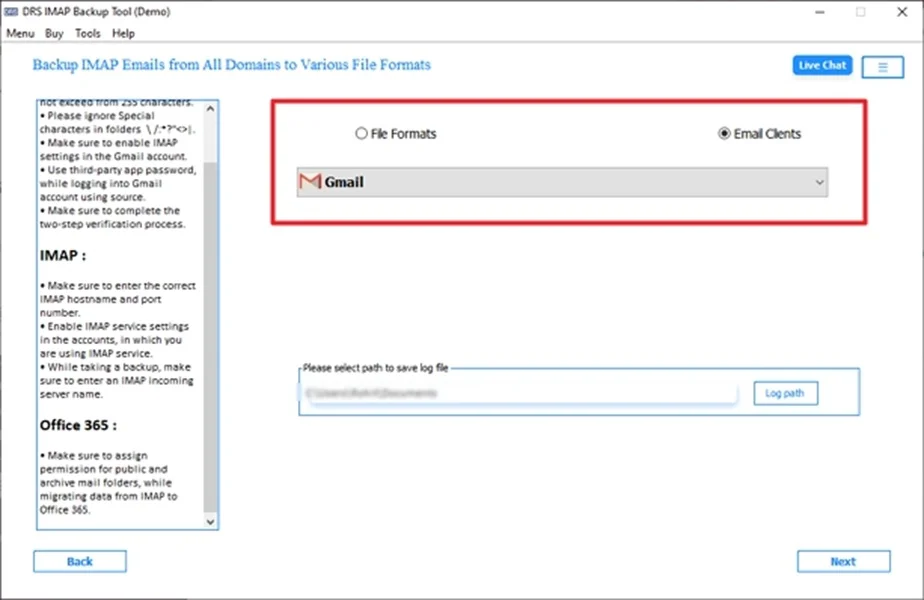
- Furthermore, choose Gmail as the saving email platform.
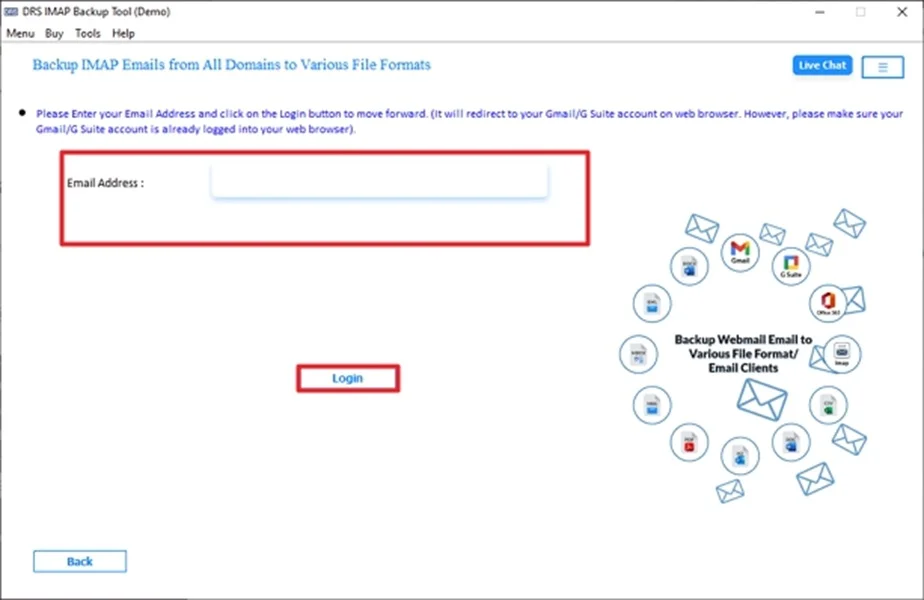
- Then, enter the Gmail account credentials and log in.
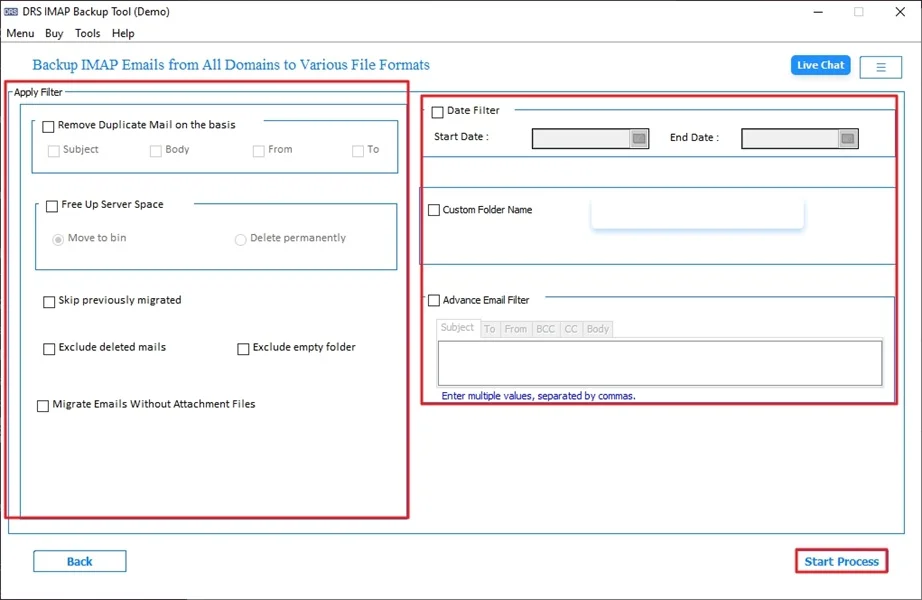
- Finally, apply the built-in features and click Start Process to begin the conversion.
Top Benefits of the Tool to Transfer Shaw Email to Gmail
- Multiple conversions of Shaw emails to Gmail.
- Maintains original folder hierarchy intact.
- Preserves attachments, headers, and timestamps.
- Allows you to migrate emails from IMAP to Zoho Mail.
- There are no technical skills required.
- Moreover, it is compatible with Windows and macOS.
Real-World Scenario:-
A small business owner was moving from Shaw Email to Gmail to manage emails more efficiently. Manual migration was slow and incomplete. By using an automated MigrateEmails IMAP Backup Tool, it convert Shaw Email to Gmail within hours. Additionally, it guarantees the process with complete data preservation.
A small business owner was moving from Shaw Email to Gmail to manage emails more efficiently. Manual migration was slow and incomplete. By using an automated MigrateEmails IMAP Backup Tool, it convert Shaw Email to Gmail within hours. Additionally, it guarantees the process with complete data preservation.
Conclusion
To conclude, migrating Shaw Email to Gmail helps users get better security, accessibility, and email management. While the manual methods are also available, but work for a limited data. As it comes with risks and several limitations. For a fast, secure, and error-free conversion, experts recommend using a professional IMAP backup tool to transfer Shaw Email to Gmail. In addition, you can also use a one-time migration service for a seamless conversion process. Still, if you face any problem, you can connect with our support team without any hesitation.
Frequently Asked Questions
Q.1 What is the easiest way to transfer Shaw Email to Gmail?
Ans. The easiest and most reliable way is to use an automated MigrateEmails IMAP backup tool. It connects both Shaw Email and Gmail accounts directly and converts emails with minimal effort and complete data preservation.
Q.2 Can I transfer emails from Shaw to Gmail without losing data?
Ans. Yes. Data loss can be avoided by using a professional MigrateEmails solution. This preserves emails, attachments, folder structure, and metadata throughout the entire process with zero data loss.
Q.3 Is it possible to bulk migrate emails from Shaw to Gmail?
Ans. Yes. Multiple conversions are supported by the automated IMAP Backup Tool. It allows you to transfer entire Shaw mailboxes or selected folders to Gmail in one process.
Q.4 Can I convert Shaw email to Gmail with attachments?
Ans. Yes. A trusted MigrateEmails IMAP Backup method makes sure all attachments are migrated along with their respective emails without any modification or loss.
About The Author:

I am Kiran Sharma, a Technical Expert in Content writing. I have technical expertise in the field of Email Backup, Data Recovery, and Email Migration, and resolve technical queries related to Cloud Backup or Email Migration for individuals and businesses.
Related Post