-
Written By Neeru Kuchhal
-
Approved By
Vikash Bajpai -
Updated on February 11th, 2026
How to Move IMAP Email to AOL Mail? Best Solutions
User Query:-
“I have emails stored in an IMAP account, and now I want to move them to an AOL Mail account. What is the easiest way to move IMAP email to AOL Mail with zero data loss?”
“I have emails stored in an IMAP account, and now I want to move them to an AOL Mail account. What is the easiest way to move IMAP email to AOL Mail with zero data loss?”
Introduction:- IMAP email accounts are most widely used across email platforms and business services. However, many users prefer to merge their email accounts into AOL Mail for centralized access and easier management. Since AOL Mail does not provide a direct built-in option for IMAP migration, users must depend on manual setup or professional migration solutions. This guide explains the safest manual method and a standard MigrateEmails IMAP Backup Tool to move IMAP to AOL Mail.
Contrast Between the Two Platforms (IMAP & AOL Mail)
| Feature Aspects | IMAP Account | AOL Mail |
| Type | Email protocol | Email service provider |
| Storage | Server-based | Cloud-based |
| Offline Access | Limited | Available via apps |
| Built-in Migration | No | Limited |
| Email Control | Client-based | Web-based interface |
| Integration | Depends on the provider | AOL ecosystem |
What Happens When You Move IMAP Email to AOL Mail?
Below are the reasons why users choose AOL Mail instead of IMAP:
- To centralize multiple email accounts.
- Accessing emails from any device.
- Reducing dependency on old email clients.
- For improving inbox organization.
- Also, to maintain long-term access to emails.
Manual Approach to Transfer Emails from IMAP to AOL Mail
As there is no direct solution to save emails to AOL Mail. Therefore, you can use the manual methods via AOL Mail settings. But don’t forget that this method works only for small datasets.
Below is the step-by-step working:
- Firstly, log in to your AOL Mail account.
- Now, go to Settings → Account Settings.
- After that, choose the option to add another email account.
- Further, enter your IMAP account credentials.
- Lastly, allow AOL to sync emails.
Limitations to Manually Move IMAP Email to AOL Mail
- This is a slow synchronization process.
- Sometimes, it may not transfer all folders.
- It is not ideal for large mailboxes.
- There are limited filtering or selective migration.
- Also, it requires monitoring to ensure complete transfer.
Standard Approach to Migrate IMAP to AOL Mail
To get out of manual limitations, using an automated MigrateEmails IMAP Backup Software is the most recommended option. It removes manual configurations and guarantees the process with complete accuracy. This software helps to export IMAP to PST and other supported file formats.
Some of the key advantages of this tool are:
- Converts multiple mailboxes simultaneously.
- Preserves folder structure and attachments without any loss.
- There is no need for technical expertise.
- Migrate IMAP to Google Workspace and more platforms.
- It offers 100% security and complete data preservation.
Moreover, this tool comes with a one-time conversion service.
Complete Guide to Migrate IMAP Email to AOL Mail Using a Tool
- Firstly, download and install the MigrateEmails IMAP Backup Tool and click continue to proceed.

- Now, click Select File(s)/Folders and log in using the IMAP account credentials.

- Then, drag the tree hierarchy, preview the mailbox, and click Next.

- Afterwards, choose IMAP as the output email platform.
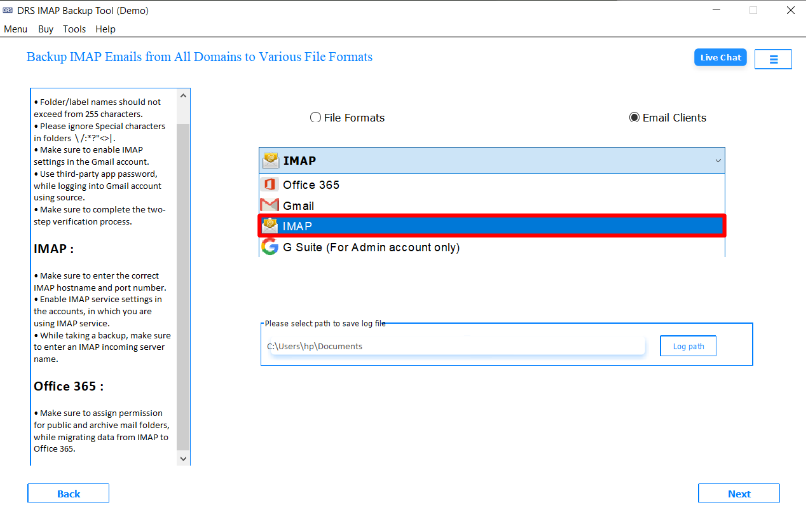
- Furthermore, log in using the AOL Mail account credentials.

- Finally, apply the advanced filters and click Convert to start the process.

| Note: You can also migrate IMAP to Yahoo Mail with zero data loss. |
| Real-Life Scenario Problem: A small business owner had emails stored in an old IMAP-based account and wanted to merge all communication into AOL Mail. Action Taken: They used a professional MigrateEmails IMAP to AOL Mail migration tool to transfer all folders and emails. Outcome: The entire mailbox was successfully migrated to AOL Mail without missing emails or data corruption. |
Conclusion
In short, moving IMAP emails to AOL Mail helps users centralize communication and simplify email management. While manual methods are available, they may work for small mailboxes. A verified IMAP backup tool offers a safer, faster, and more reliable solution to move IMAP Email to AOL Mail. This usually works for large or important email data. You can also complete the process via a one-time conversion service. Thus, choosing the right approach ensures smooth migration without email loss.
Frequently Asked Questions
Q1. Is it possible to move IMAP emails without data loss?
Ans. Yes, it is possible to change IMAP emails without data loss when using a reliable method. An automated IMAP to AOL Mail tool ensures complete transfer of emails, folder structure, metadata, and attachments without missing or corrupting data.
Q2. Can I move IMAP emails in bulk to AOL Mail?
Ans. Yes. A standard MigrateEmails IMAP Backup Tool supports bulk transfer, allowing you to move multiple folders or entire mailboxes from IMAP to AOL Mail in a single process. This is especially helpful for large mailboxes or business accounts.
Q3. Are email attachments transferred during the move?
Ans. Yes. Attachments are transferred along with the emails when using a professional MigrateEmails solution. The tool preserves attachments in their original format without altering or removing them.
Q4. Can I move an IMAP email to a specific folder in AOL Mail?
Ans. Yes. The MigrateEmails IMAP backup tool allows you to select specific folders or choose a destination folder in AOL Mail before starting the migration. This helps maintain proper email organization.
Q5. Will the original email formatting stay the same?
Ans. Yes. A proper IMAP to AOL Mail migration process preserves email formatting, including HTML layout, inline images, timestamps, sender details, and subject lines.
About The Author:

I am Neeru Kuchhal, a Technical Content Writer who focuses on turning complex ideas into clear, engaging, and impactful content. I combine creativity with strategy to write blogs, web content, and technical articles that connect with the right audience and support brand goals. I believe great content is not just written. It is thoughtfully created to inform, build trust, and drive action.
Related Post