-
Written By Kiran Sharma
-
Approved By
Vikash Bajpai -
Updated on November 27th, 2025
Export AOL Email Folders to Hard Drive on Mac and Windows
Eliza’s Query:-
“I want to back up all my AOL email folders to my hard drive for safety. Is there any reliable method to export AOL email folders to Hard Drive with attachments and folder structure intact?”
“I want to back up all my AOL email folders to my hard drive for safety. Is there any reliable method to export AOL email folders to Hard Drive with attachments and folder structure intact?”
Introduction: AOL Mail is a free web-based email service offered by AOL. It allows users to send, receive, organize, and store emails online. AOL users may face account access issues, performance problems, and limited control over their data. Therefore, this guide explains the most effective ways to save AOL Email to Hard Drive. Also, covers the MigrateEmails AOL Backup Tool for seamless backup with full data integrity.
Exploring AOL Mail and the Need for Hard Drive Archiving
|
AOL Mail |
Hard Drive |
|
|
Why Hard Drive Archiving Matters for AOL Users?
The following are the reasons why users often export AOL Email Folders to Hard Drive:
- Safeguards email data from accidental deletion or hacking.
- Enables offline access to important emails at any time.
- Ensures long-term archiving for compliance, business, or personal records.
- Helps to move AOL Emails to iCloud without data loss.
- Protects attachments and folder structure in case of account issues.
User-Driven Approach to Backup AOL Emails to Hard Drive
If you don’t prefer to download any external or third-party software, you can therefore go for the manual conversion. You can convert AOL emails using its built-in features or through IMAP configuration.
Method A. Download Individual Emails (Basic Method)
- Firstly, open AOL Mail in your browser.
- Now, select the email you want to download.
- Click More → Print.
- In the print dialog, choose Save as PDF.
- Lastly, save it to your hard drive.
|
Note: The only limitation of this approach is that it works only for one email at a time. |
Method B. Export via IMAP Using Desktop Email Clients
- Firstly, open Outlook/Thunderbird → Add your AOL Mail using IMAP settings.
- Let all email folders sync.
- Now, export emails using:
Outlook: File → Open & Export → Export to a PST file.
Thunderbird: Right-click folder → Export (using ImportExportTools NG add-on).
- Lastly, save the exported files on your hard drive.
Limitations to Export AOL Email Folders to Hard Drive Manually
- This process cannot export all email folders at once easily.
- It requires lengthy configuration and software installation.
- Sometimes the attachments may not export properly.
- Also, it is very difficult to maintain the folder hierarchy.
- Moreover, there is a risk of missing or partially downloaded emails.
Premium Strategy to Save AOL Email to Computer Hard Drive
To avoid the difficulties arising in the manual conversion, use a dedicated MigrateEmails AOL Backup Tool. This allows the users to migrate AOL to Office 365 with zero data loss. The software is best known due to its advanced features and bulk conversions. Also, this utility ensures 100% accuracy with complete data integrity. Along with this, the tool comes with a one-time backup service that will export AOL Email Folders to Hard Drive automatically.
One-Time Service Option
If you prefer a done-for-you service, MigrateEmails provides an expert migration service. This will export your AOL mailbox directly to the required format or location with full security and no manual effort.
Quick Process to Export AOL Email Folders to Hard Drive Online
- Firstly, download and install the MigrateEmails AOL Backup Tool → Continue to move ahead.
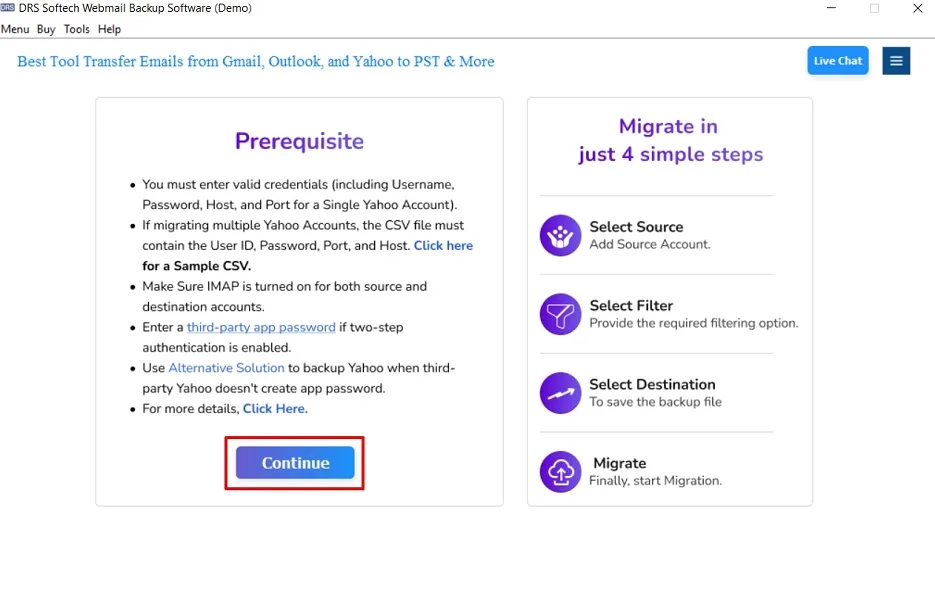
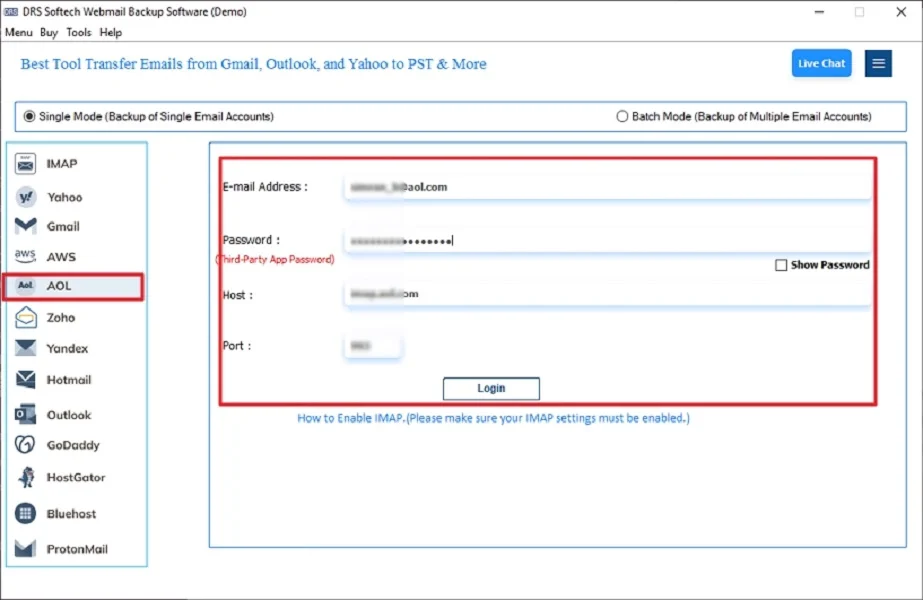
- Now, choose AOL → Login using the AOL Mail credentials.
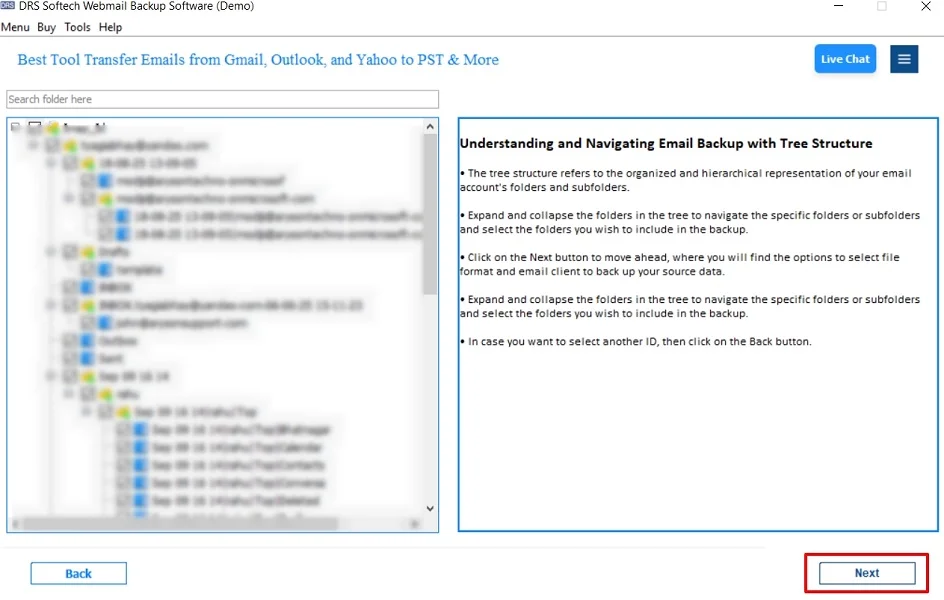
- After that, expand the data structure → Preview the details → Next.
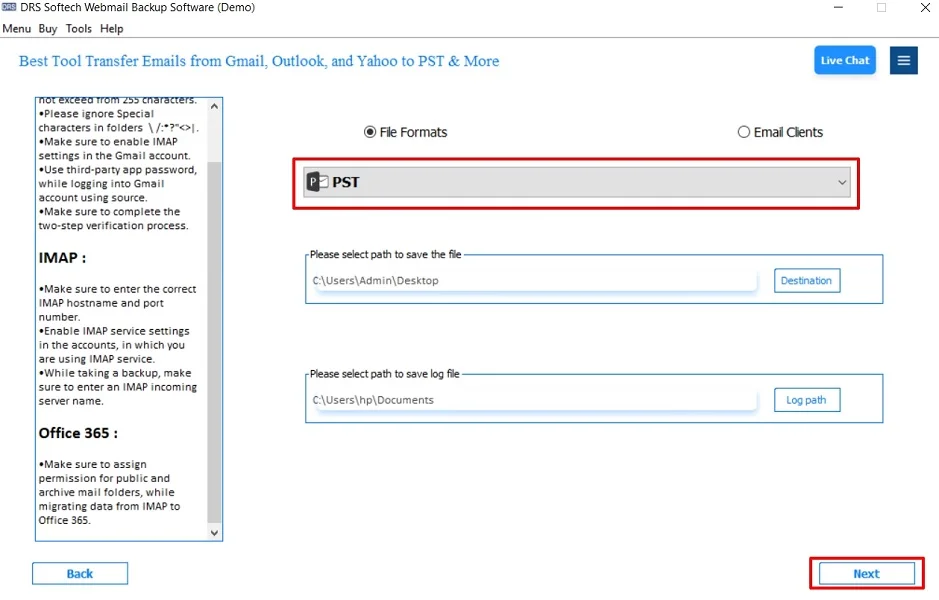
- Choose your preferred export format → Select a destination folder on your hard drive.
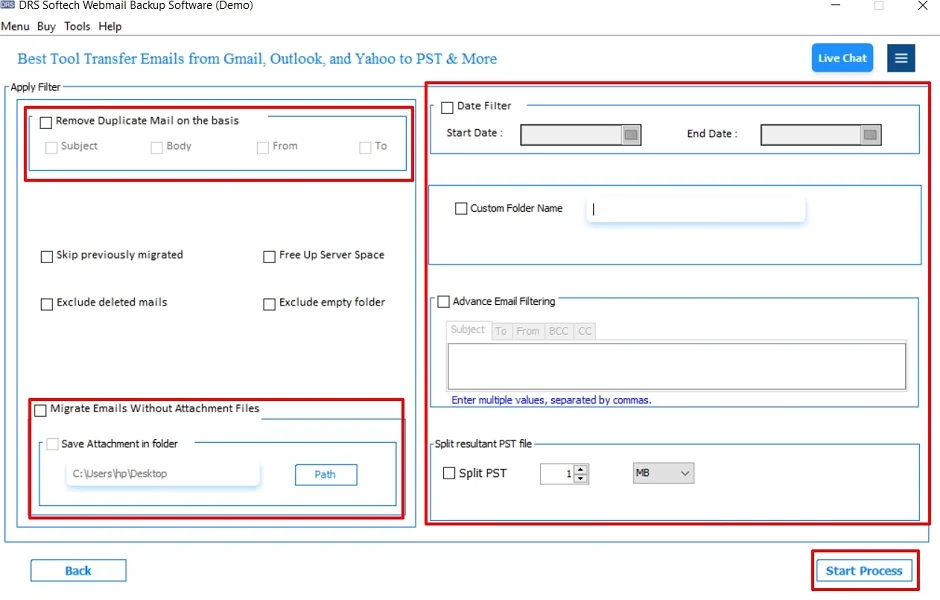
- Apply advanced features and filters as per your needs. Click Convert.
Advantages of the Tool to Export AOL Email Folders to Hard Drive
- Exports all folders at once (Inbox, Sent, Drafts, Spam, Custom folders).
- Preserves attachments, metadata, and hierarchy.
- Allows exporting to multiple file formats.
- Supports bulk downloads without restrictions.
- Also, offers advanced filters (date, folder, sender).
- Moreover, it is 100% secure and reliable.
Real-World Scenario:
A marketing manager wanted to clean up her AOL inbox without losing important client conversations. She used the MigrateEmails AOL backup tool to export all her folders to MBOX format on her hard drive. This ensures a secure offline backup before deleting older emails.
Conclusion
In short, exporting AOL email folders to a hard drive is essential for data security and offline accessibility. While manual methods work for small tasks. Therefore, the professional AOL Backup tool provides a faster, safer, and complete backup solution. This tool is highly recommended, especially to export AOL Email Folders to Hard Drive. Moreover, this conversion ensures complete accuracy with zero data loss.
Frequently Asked Questions
Q1. Which software can export AOL email folders to a hard drive easily?
Ans. The professional MigrateEmails AOL backup utilities allow quick and secure export of AOL emails to multiple file formats and storage locations. Also, this ensures the data without any loss.
Q2. What is the best way to save AOL emails to a hard drive in bulk?
Ans. Using an automated backup tool is the best method because it supports batch export, preserves folder hierarchy, and ensures no data loss during the process.
Q3. How can I backup AOL emails to a hard drive without technical skills?
Ans. A user-friendly AOL email backup tool is an ideal solution. This tool offers a simple interface, one-click login, and easy export options suitable even for non-technical users.
Q4. Can I safely save AOL email to a computer hard drive?
Ans. Yes, you can safely save your AOL emails by using a reliable AOL backup utility that ensures data integrity, encryption, and secure export without altering your original mailbox.
About The Author:

I am Kiran Sharma, a Technical Expert in Content writing. I have technical expertise in the field of Email Backup, Data Recovery, and Email Migration, and resolve technical queries related to Cloud Backup or Email Migration for individuals and businesses.
Related Post