


-
Written By Kiran Sharma
-
Approved By
Vikash Bajpai -
Updated on January 19th, 2026
How to Migrate Exchange to Lotus Notes with Attachments 2026
User Query:-
“I am planning to shift from Microsoft Exchange to IBM Lotus Notes. But I’m worried about losing emails and attachments. What is the safest and easiest way to migrate Exchange to Lotus Notes?”
“I am planning to shift from Microsoft Exchange to IBM Lotus Notes. But I’m worried about losing emails and attachments. What is the safest and easiest way to migrate Exchange to Lotus Notes?”
Introduction:- Microsoft Exchange and IBM Lotus Notes are both powerful professional-grade email platforms. But organizations usually forward between them due to platform changes, cost optimization, or legacy system requirements. However, replace to Lotus Notes migration is difficult because both platforms use different architectures and file formats. That’s why this guide shows how to convert EDB to NSF manually and also using an automated EDB to PST File Converter Tool. This will help you choose the most reliable approach in 2026.
Understanding the Platforms: Exchange vs Lotus Notes
|
Feature Aspect |
Microsoft Exchange |
Lotus Notes |
|
Email Storage |
EDB/Mailboxes |
NSF files |
|
Platform Type |
Server-based |
Client-server based |
|
Attachments |
Fully supported |
Fully supported |
|
Direct Conversion |
Not supported |
Requires conversion |
|
Usage |
Modern enterprises |
Legacy environments |
Why Migrate Exchange to Lotus Notes?
Below are several reasons why users choose Lotus Notes over MS Exchange:
- Continue using the legacy Lotus Notes infrastructure.
- To meet compliance or regulatory requirements.
- Reduce Exchange licensing or server dependency.
- For centralizing emails in NSF format.
- Also, preserves historical mailbox data intact.
Microsoft Exchange to Lotus Notes Migration Manually
There is no direct option to migrate to Lotus Notes. Still, you can proceed with the manual approach. This involves migrating Exchange mailboxes and then converting them into Lotus Notes.
Here’s the step-by-step procedure:
- Firstly, export Exchange mailboxes to PST format.
- Now, install the IBM Lotus Notes client.
- After that, configure user accounts in Lotus Notes.
- Further, use the Lotus Notes Import option to import PST.
- In the end, allow synchronization to complete.
Pitfalls of the Manual Method to Migrate Exchange to Lotus Notes
- Very time-consuming for large mailboxes.
- There is a high risk of attachment loss.
- The folder hierarchy may break.
- It requires advanced technical knowledge.
- Moreover, it is not suitable for bulk or enterprise migration.
Automated Tool to Import Exchange Mailboxes to Lotus Notes
For an accurate conversion, using a professional EDB to PST File Converter Tool is the most recommended option. It directly converts Exchange mailboxes to NSF format while preserving complete mailbox preservation. Therefore, this software converts multiple mailboxes in one go without technical complexity. This saves a lot of time and effort. Additionally, the tool has a user-friendly interface suitable for business-level projects.
One-Time Migration Service Available (Every User):-
If you only need to migrate Exchange to Lotus Notes once, a one-time migration service is available. The certified experts handle the entire migration securely. It guarantees zero data loss and complete confidentiality without any loss.
If you only need to migrate Exchange to Lotus Notes once, a one-time migration service is available. The certified experts handle the entire migration securely. It guarantees zero data loss and complete confidentiality without any loss.
Quick Process to Use the Professional Software
- Firstly, install the EDB to PST File Converter Utility.
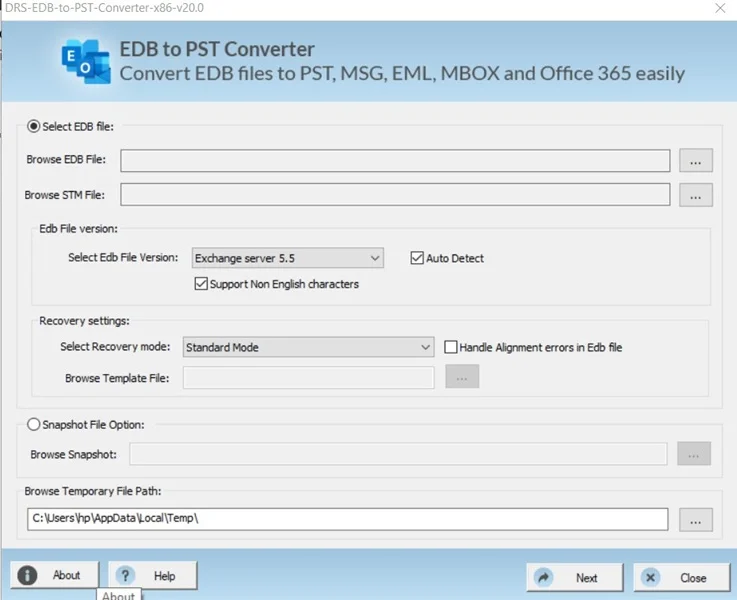
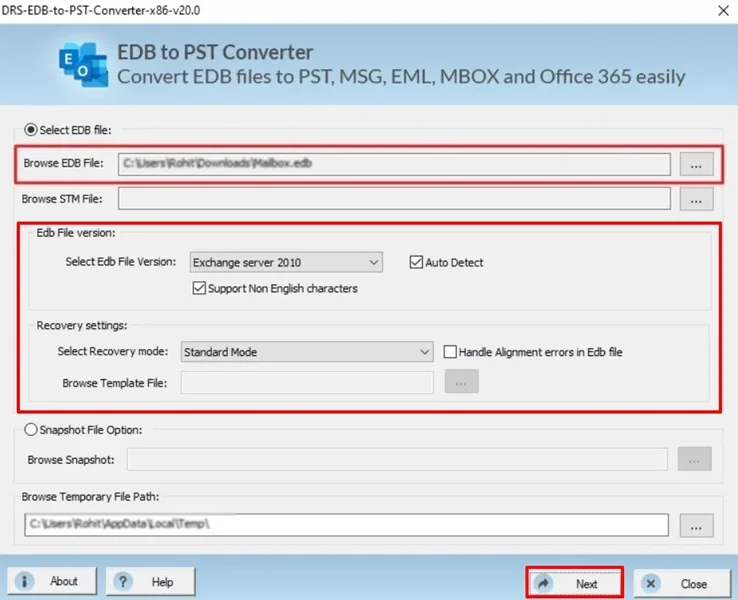
- Then, choose the EDB file that you want to convert, select the EDB version, recovery mode, and click Next.
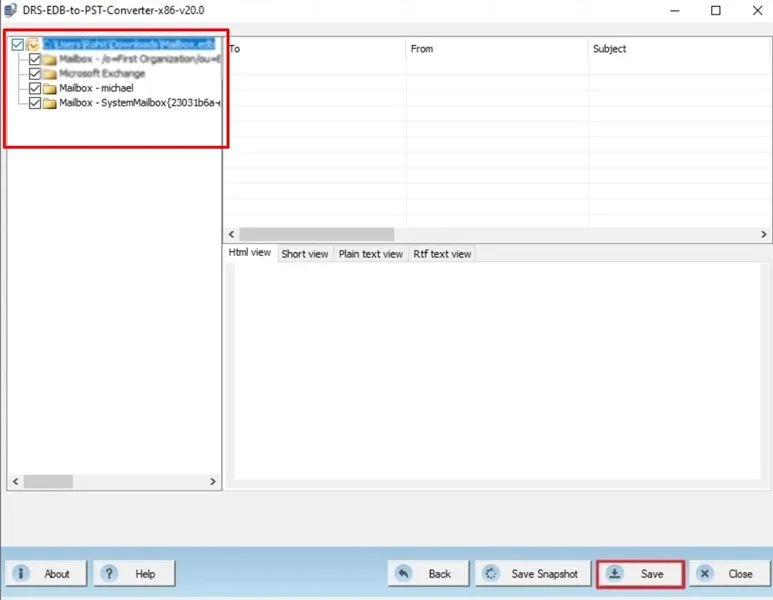
- After that, drag the structure to preview the content and click save.
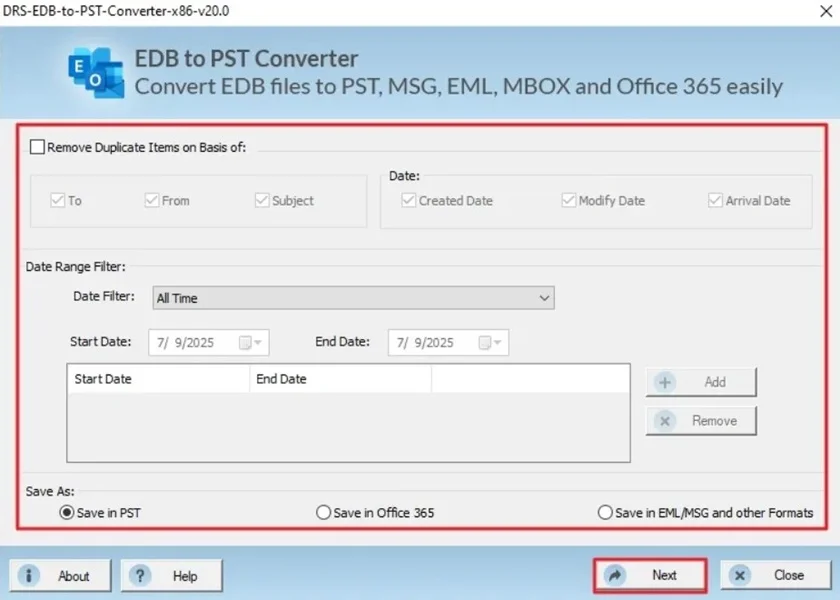
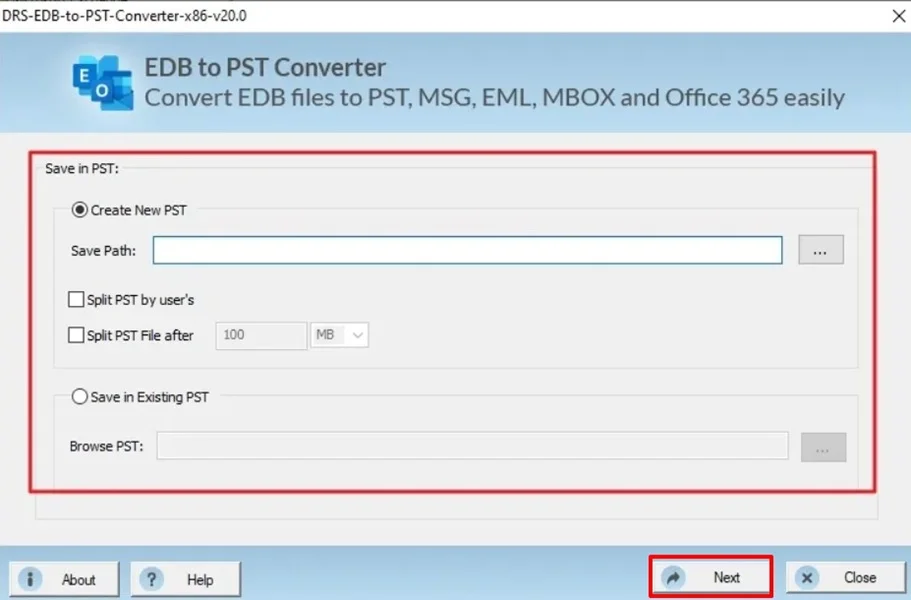
- Now, apply the advanced filters, choose PST as a saving format, and click Next.
- Finally, select the destination path and click Next.
Essential Features of the Tool to Migrate Exchange to Lotus Notes
- There is full attachment preservation.
- Supports Exchange Server & Office 365.
- Maintains folder hierarchy with zero data loss.
- The tool comes with secure data processing.
- Also, it is compatible with large mailboxes.
When to Use Manual and Automated Approaches?
|
Use Manual Method When: |
Use Professional Method When: |
|
|
Real-World Scenario:-
Problem:- A compliance-driven organization needed to move historical Exchange emails to Lotus Notes while retaining all attachments for audit purposes.
Action Taken:- They used a professional Exchange to Lotus Notes migration tool to convert all mailboxes directly into NSF files.
Outcome:- All emails, attachments, and folder structures were migrated successfully, meeting compliance requirements and saving weeks of manual effort.
Conclusion
In short, migrating Exchange to Lotus Notes with attachments is a complex process due to platform incompatibility. While manual methods are available, they are risky and inefficient for large-scale conversions. For a secure process, using an Exchange to Lotus Notes tool is the most reliable solution to migrate Exchange to Lotus Notes. You can also use our one-time conversion service that is suitable for every user, even with a non-tech background as well. At last, if you have any queries regarding the software or process, kindly contact our support team.
Frequently Asked Questions
Q.1 Can I migrate multiple Exchange mailboxes to Lotus Notes in one process?
Ans. Yes, with a professional Exchange to Lotus Notes migration tool, you can migrate multiple Exchange mailboxes in a single process. The tool supports bulk migration while maintaining folder structure and attachments.
Q.2 Is administrator access required to perform EDB to NSF conversion?
Ans. Yes, administrator or delegated access is typically required to extract mailbox data from Exchange EDB files. This ensures secure and authorized migration of mailboxes to Lotus Notes.
Q.3 How does Microsoft Exchange to Lotus Notes migration ensure data integrity?
Ans. The professional migration tool preserves email content, attachments, metadata, and folder hierarchy during conversion. They also perform data validation checks to ensure no emails are missing or altered during the process.
Q.4 Is there a free demo or trial available before purchasing?
Ans. Yes, an automated Exchange to Lotus Notes migration tool offers a demo or trial version. This allows users to evaluate features and verify output accuracy before upgrading to the full version.
About The Author:

I am Kiran Sharma, a Technical Expert in Content writing. I have technical expertise in the field of Email Backup, Data Recovery, and Email Migration, and resolve technical queries related to Cloud Backup or Email Migration for individuals and businesses.
Related Post


