-
Written By Kiran Sharma
-
Approved By
Vikash Bajpai -
Updated on January 8th, 2026
How to Convert IMAP Emails to PDF – Step-by-Step Easy Guide
User Query:-
“I have important emails on my IMAP account. Now, I need to store them as PDF files for legal records and offline access. What is the safest and easiest way to convert IMAP emails to PDF without losing formatting or attachments?”
“I have important emails on my IMAP account. Now, I need to store them as PDF files for legal records and offline access. What is the safest and easiest way to convert IMAP emails to PDF without losing formatting or attachments?”
Introduction:- IMAP emails are mainly used by business professionals for accessing emails from multiple devices. PDF is a Portable Document Format created by Adobe. It is used to display documents reliably in a well-organised format. However, IMAP servers are not designed for long-term offline storage. Converting IMAP emails to PDF provides data security, easy sharing, and long-term accessibility. That’s why this guide explains the manual methods to convert IMAP server emails to PDF. Moreover, highlights an automated MigrateEmails IMAP Backup Tool while keeping data intact.
Exploring IMAP and PDF Formats
Before converting IMAP emails into PDF, let’s first understand the difference between the two formats.
|
Criteria |
IMAP Emails |
PDF Format |
|
Online and server-based |
Offline and portable |
|
Editable |
Non-editable |
|
Risky |
Highly reliable |
|
Limited |
Widely accepted |
Why IMAP Emails Are Converted to PDF Format?
The following are several reasons why users convert IMAP emails to PDF:
- It offers permanent and non-editable records.
- Accepted for legal and compliance documentation.
- Preserves original email layout and metadata intact.
- They are easy to share and archive securely.
- Also, it can be accessed offline on any device.
How to Manually Save IMAP Emails as PDF?
As there is no direct solution to export into PDF. Therefore, you can use the manual conversion for migrating IMAP emails into PDF format. But remember that this method is slow and suitable only for a small number of files.
Set Up Guide to Export IMAP Emails to PDF Manually
- Firstly, log in to your IMAP email account through a web browser or email client.
- Now, open the required email.
- Click Print from the email options.
- Choose Save as PDF as the printer.
- Lastly, select the destination folder and save.
Drawbacks of this Method to Convert IMAP Emails to PDF
- Cannot convert multiple emails at a time.
- Attachments may not save correctly.
- No email filtering or selective export.
- It is very time-consuming for large mailboxes.
- Sometimes, there is a risk of formatting inconsistencies.
Convert IMAP Emails into PDF Format Online Securely
To migrate multiple IMAP emails into PDF without errors, using a verified MigrateEmails IMAP Backup Tool is a reliable option. This automated solution directly saves emails to PDF with complete accuracy. It allows users to migrate IMAP to Google Workspace efficiently. Also, ensures the complete process with high security and zero data loss.
One-Time Conversion Service:-
If you prefer not to install software, a MigrateEmails One-Time Conversion Service is available. The experts securely handle your data and deliver converted PDFs with complete confidentiality and accuracy.
If you prefer not to install software, a MigrateEmails One-Time Conversion Service is available. The experts securely handle your data and deliver converted PDFs with complete confidentiality and accuracy.
Complete Instructions to Convert IMAP Emails to PDF
- Firstly, install the MigrateEmails IMAP Backup Tool and click Continue.
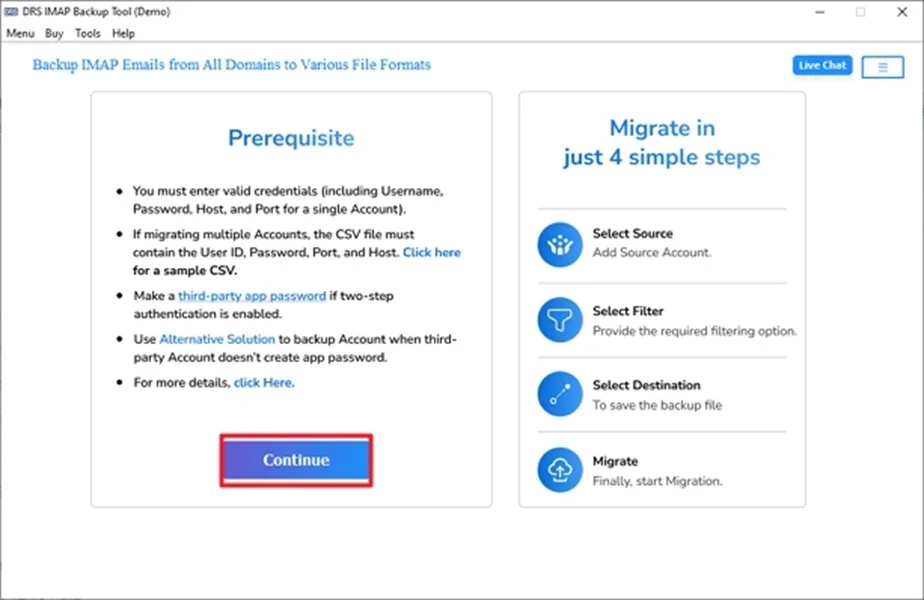
- Now, log in using the IMAP account credentials.
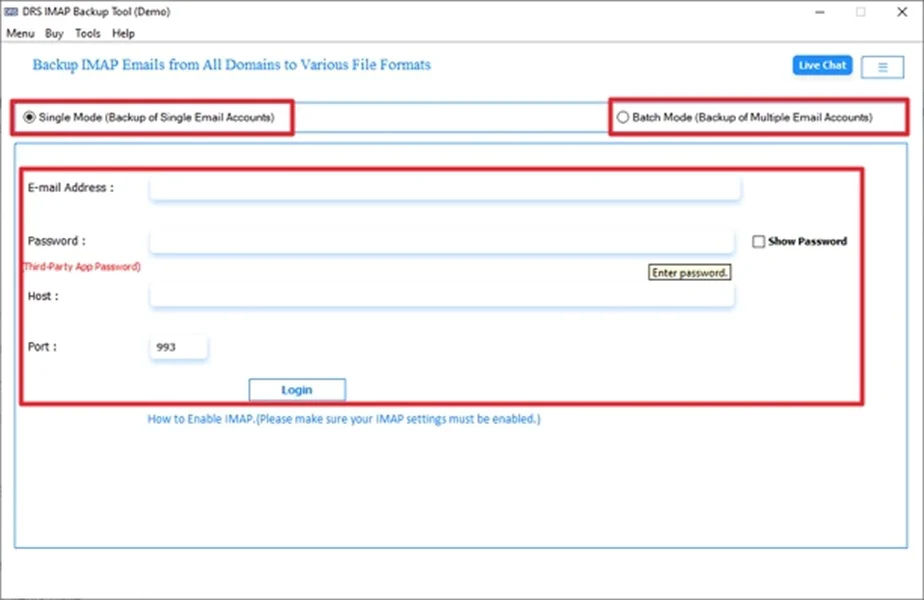
- Further, drag the hierarchy, preview the mailbox, and click Next.
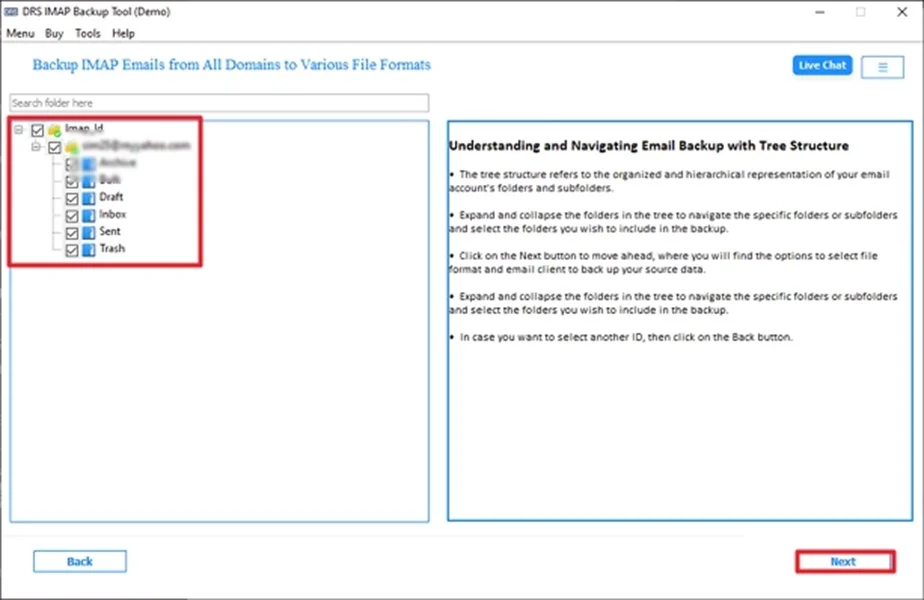
- After that, choose PDF as the output file format.
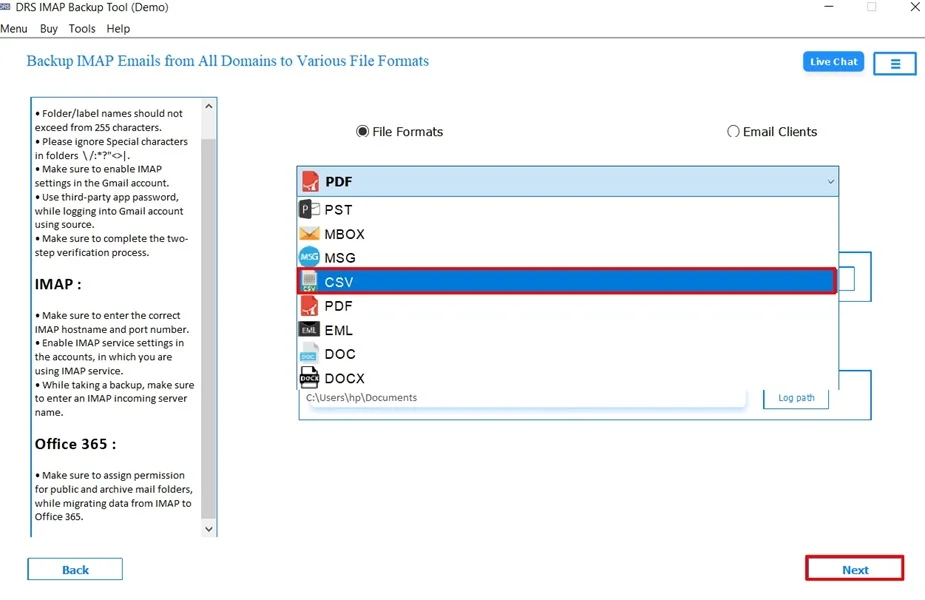
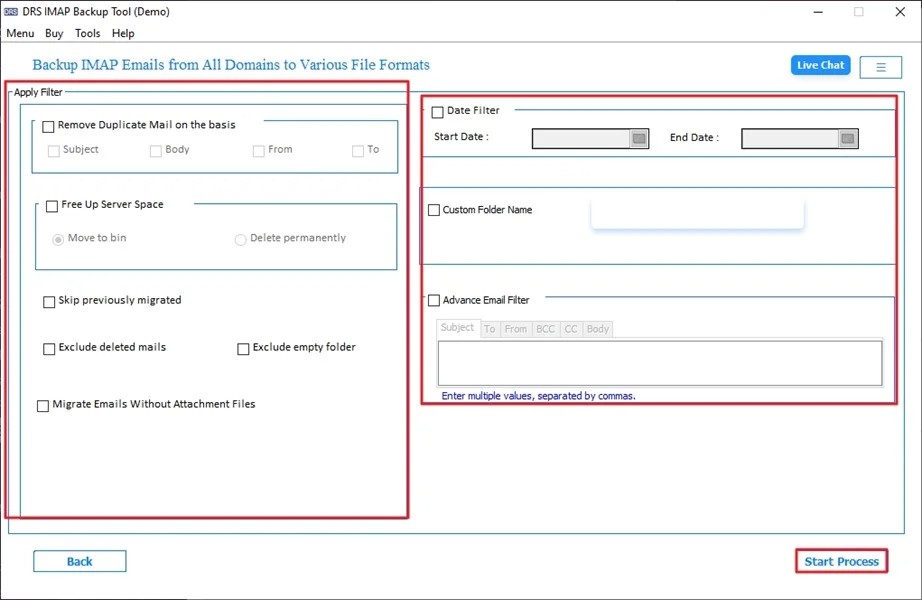
- In the end, apply the filters if needed and click Start Process to begin the conversion.
Advantages of the Tool to Convert IMAP Emails to PDF
- Bulk conversion of IMAP emails to PDF.
- Preserves attachments, headers, and timestamps.
- Maintains original folder hierarchy with no data loss.
- Supports users to migrate emails from IMAP to Zoho Mail.
- Works smoothly on Windows and macOS.
- Additionally, it requires no technical expertise.
Real-Life Example :-
A compliance officer needed to archive years of IMAP emails for audit purposes. Manual saving was not feasible due to volume. Using an automated IMAP backup tool, all emails were converted within hours, attachments preserved, and audit-ready PDFs generated successfully.
A compliance officer needed to archive years of IMAP emails for audit purposes. Manual saving was not feasible due to volume. Using an automated IMAP backup tool, all emails were converted within hours, attachments preserved, and audit-ready PDFs generated successfully.
When Should You Choose Manual and Secure Conversion?
|
Choose Manual Conversion When:
|
Choose Secure Conversion When:
|
Conclusion
In short, migrating IMAP emails into PDF is necessary for better storage, compliance, and offline accessibility. While manual methods are also available, they work for a limited number of files. The automated IMAP backup tool provides high accuracy, speed, and reliability. For error-free and multiple conversions without data loss, this professional approach is highly recommended to convert IMAP emails to PDF. Also, you can use the one-time service for secure conversion with zero loss.
Frequently Asked Questions
Q.1 Is it safe to convert IMAP emails to PDF?
Ans. Yes, it is safe when you use a trusted MigrateEmails IMAP Backup method. The manual method works for a few emails, but for complete security and data integrity, using a professional conversion tool is recommended.
Q.2 Can I convert IMAP server emails to PDF in bulk?
Ans. Yes. Multiple conversions are possible only with automated solutions. The MigrateEmAils IMAP Backup tool can export entire IMAP mailboxes or selected folders to PDF in one go without data loss.
Q.3 How can I save IMAP emails as PDF without technical skills?
Ans. The easiest way is to use an automated IMAP backup tool. It has a simple interface and requires no technical knowledge.
Q.4 Can I export IMAP emails to PDF for free?
Ans. You can export individual emails for free using the print-to-PDF option. However, for multiple exports, folder preservation, and attachment safety, a paid professional tool offers a more reliable solution.
About The Author:

I am Kiran Sharma, a Technical Expert in Content writing. I have technical expertise in the field of Email Backup, Data Recovery, and Email Migration, and resolve technical queries related to Cloud Backup or Email Migration for individuals and businesses.
Related Post