-
Written By Kiran Sharma
-
Approved By
Vikash Bajpai -
Updated on December 27th, 2025
Convert ICS to TXT Format Without Data Loss or Errors
User Query:-
“I have multiple ICS calendar files. I need to convert ICS to TXT without losing any data or errors. What is the safest and most reliable method to do this?”
“I have multiple ICS calendar files. I need to convert ICS to TXT without losing any data or errors. What is the safest and most reliable method to do this?”
Introduction:- ICS files are widely used to store calendar events, appointments, and reminders. A TXT is a file that contains unformatted textual data. It stores only characters without any formatting. However, converting ICS to TXT can help users maintain readable offline copies. This guide explains the manual method to convert ICS File to TXT. Moreover, covers a professional MigrateEmails ICS Converter Tool to do the same efficiently.
Purpose of Converting iCalendar Files to TXT
Users often choose TXT over ICS files for several reasons:
- To maintain a readable, offline calendar record.
- For documentation and reporting purposes.
- Sharing calendar data without needing calendar apps.
- Keeping legal or audit records for various purposes.
- Extracting event details for integration with other systems.
- Also, to back up calendar information in a lightweight format.
Manual Technique to Convert ICS to TXT
The simplest method involves opening ICS files with a text editor and saving them as TXT. This method works for small-scale conversions but has limitations as well.
Steps to Follow the Process Manually
- Firstly, locate the ICS file on your system.
- Right-click and select Open With → Notepad (or any text editor).
- Now, review the ICS content (events, dates, times).
- Click File → Save As and choose TXT format.
- Lastly, name the file and click Save.
Limitations of the Manual Method to Convert iCalendar to TXT
- It is very time-consuming for multiple ICS files.
- There are high chances of format loss or errors.
- No support for attachments or embedded metadata.
- This method is difficult to use to extract structured information.
- Additionally, there is no batch processing option.
An Efficient Tool to Convert ICS to TXT
To safely change multiple ICS files, the MigrateEmails ICS Converter Tool is recommended. This automated solution allows bulk conversion to TXT. The software preserves all calendar data, formatting, and metadata intact with no data loss. Moreover, it can convert ICS to HTML and other supported file formats.
One-Time Migration Service:-
If you prefer not to handle the conversion yourself, MigrateEmails offers a One-Time Conversion Service. The experts securely export ICS to TXT. Also, ensures complete accuracy and privacy.
If you prefer not to handle the conversion yourself, MigrateEmails offers a One-Time Conversion Service. The experts securely export ICS to TXT. Also, ensures complete accuracy and privacy.
Complete Tutorial to Use the MigrateEmails Software
- Firstly, launch the MigrateEmails ICS Converter Tool.
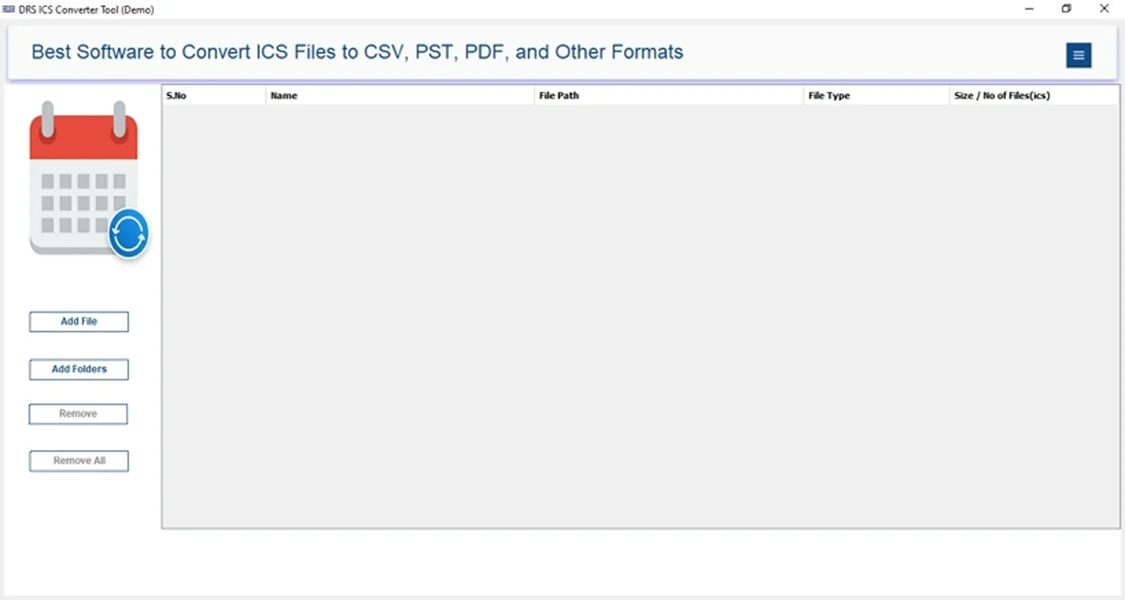
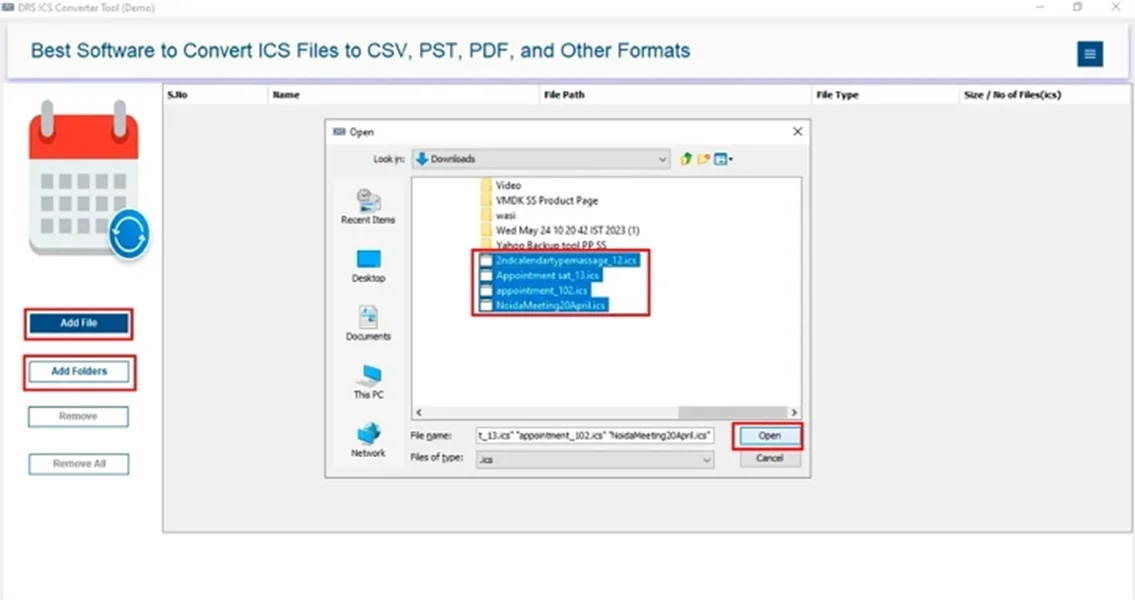
- Now, click Add File(s)/Folders, upload the file, and click Open.
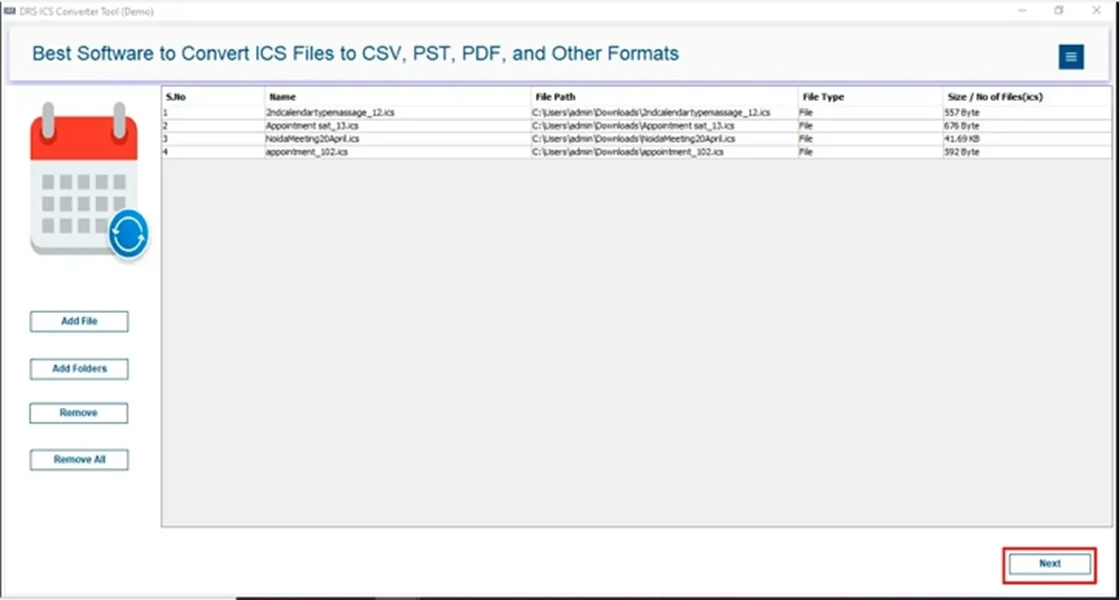
- After that, select the ICS file that you want to convert and click Next.
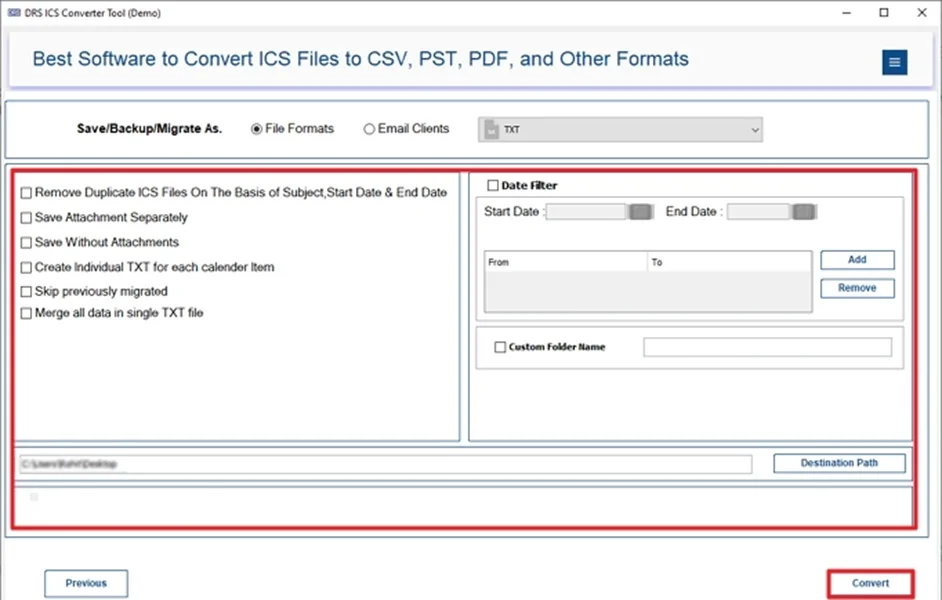
- Subsequently, choose TXT as the saving file format.
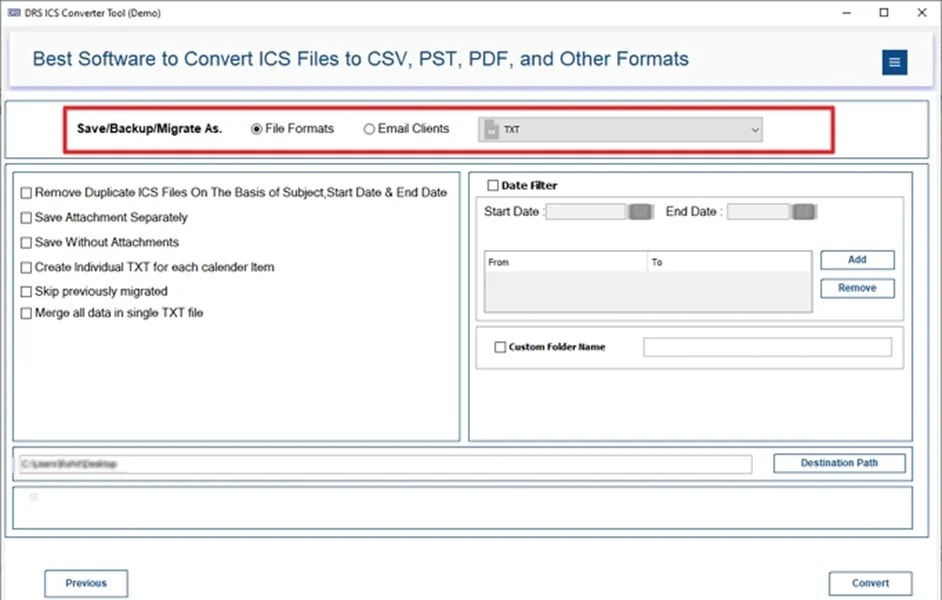
- Finally, apply the filters and click Convert to start the process.
Advantages of the Tool to Convert ICS to TXT
- Allows users to convert ICS to JPG and other formats.
- Preserves all calendar event details (date, time, recurrence).
- Extracts attachments and notes into the TXT format.
- It is compatible with Windows and macOS.
- User-friendly interface suitable for non-technical users.
- Additionally, it reduces the risk of human error and data loss.
Real-Life Example:-
A project manager needed to archive multiple ICS calendar files from past meetings into TXT format for compliance reporting. The automated tool convert ICS Calendar File to TXT Format in minutes without losing event details or notes.
A project manager needed to archive multiple ICS calendar files from past meetings into TXT format for compliance reporting. The automated tool convert ICS Calendar File to TXT Format in minutes without losing event details or notes.
When Should You Use Manual vs Automated Conversion?
|
Use the Manual Method When: |
Use an Automated Method When: |
|
|
Quick Recommendation: Manual conversion is suitable for a small number of files. An automated conversion is the best choice for large-scale, secure, and accurate ICS-to-TXT migration.
Conclusion
In short, converting ICS to TXT is essential for maintaining readable and offline copies of calendar events. While manual methods work for a few files, they are inefficient for large conversions. The ICS Converter Tool provides a secure solution to convert ICS to TXT without losing data. For error-free and hassle-free conversion, using an automated approach is highly recommended.
Frequently Asked Questions
Q.1 Is it safe to convert ICS calendar files to TXT?
Ans. Yes, using a professional MigrateEmails ICS converter tool ensures that all event details, notes, and metadata are preserved during ICS to TXT conversion. This makes the process completely safe and error-free.
Q.2 Can I convert ICS to TXT file without technical skills?
Ans. Absolutely. The automated ICS-to-TXT tool is designed with an intuitive interface. It allows non-technical users to perform conversions in just a few simple steps.
Q.3 How do I convert iCalendar files to TXT in bulk?
Ans. For bulk conversion, an effective MigrateEmails ICS converter tool can process multiple ICS files at once. Also, preserves all data while saving significant time and effort.
Q.4 Which tool can I use to export ICS to TXT easily?
Ans. The MigrateEmails ICS Converter Tool is the recommended solution. It is secure, user-friendly, supports batch conversion, and ensures that no calendar data is lost or altered.
About The Author:

I am Kiran Sharma, a Technical Expert in Content writing. I have technical expertise in the field of Email Backup, Data Recovery, and Email Migration, and resolve technical queries related to Cloud Backup or Email Migration for individuals and businesses.
Related Post