-
Written By Kiran Sharma
-
Approved By
Vikash Bajpai -
Updated on May 5th, 2026
Quickly Convert ICS to JPG Format on Mac and Windows
Michael John’s Query:
“I have multiple ICS calendar files from my Outlook and Apple Calendar. I need to convert them into JPG images so I can share them. What is the easiest way to convert ICS calendar file to JPG format on both Windows and Mac without losing any details?”
“I have multiple ICS calendar files from my Outlook and Apple Calendar. I need to convert them into JPG images so I can share them. What is the easiest way to convert ICS calendar file to JPG format on both Windows and Mac without losing any details?”
Introduction: This situation is quite common. Therefore, ICS (iCalendar) files are widely used to share calendar events across different platforms like MS Outlook, Google Calendar, and Apple Calendar. However, sometimes users need to convert ICS to JPG by using a reliable ICS Converter tool. Though users can save calendar events as images. Also, makes them easier to share on social media, attach to documents, or print without depending on calendar applications. This step-by-step guide explains the conversion process manually & professionally.
Difference Between ICS & JPG
| ICS (iCalendar File) | JPG (Image File) |
|
|
|
|
|
|
|
|
|
|
Reasons to Convert ICS to JPG
The following are several reasons why users prefer converting iCalendar files to image format:
- First, JPG is an image file format supported by all devices at any time.
- Therefore, it is easy to share through email or social platforms.
- Suitable for printing and attaching to reports or presentations.
- Although there is no need to install any external software.
- Provides a quick snapshot of the schedule in a readable format.
How to Manually Convert ICS File to JPG?
If you don’t want to download or install any external or third-party software or tool, you can choose to convert manually. But there is no direct option in most to convert ICS to JPG. However, you can use the Print or Screenshot method on Mac and Windows.
Here are the following steps:
Way 1. On Windows
- Firstly, open the ICS file in Microsoft Outlook.
- Further, go to File → Print and choose a virtual printer (like “Microsoft Print to PDF”).
- Lastly, save the file as PDF → Open the PDF → take a screenshot → save it as JPG.
Way 2. On Mac
- Firstly, import the ICS file into Apple Calendar.
- After that, go to File → Print and select “Save as PDF”.
- Further, open the PDF → Export As → JPG.
Limitations of the Manual Method to Convert iCalendar to JPG
- Firstly, it requires multiple steps to first migrate ICS into PDF and then JPG.
- Though these steps are time-consuming for large numbers of ICS files.
- Also, the quality of the image depends on the screenshot resolution.
- Therefore, these methods are not suitable for users with multiple ICS files.
Automated Solution to Convert ICS to JPG
A professional ICS Converter tool is one of the most reliable & verified solutions for converting ICS files directly into JPG on both Mac and Windows. However, manual ways are also available, but those are time-consuming. On the other hand, the automated tools ensure fast and accurate conversion while keeping all the event details, formatting, and attachments intact. Also, it is compatible when working with multiple files. Additionally, this allows us to convert ICS to MSG as well.

Here’s the detailed guide that contains the step-by-step process to export ICS to JPG:
- First, download and install the ICS Converter Tool.
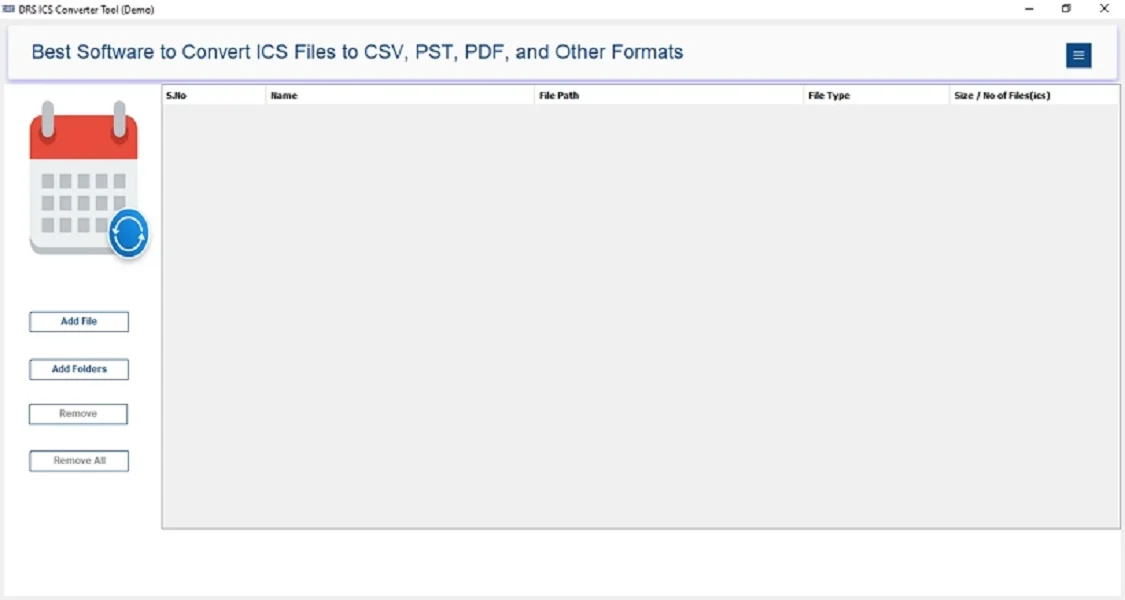
- Further, click on Add file/Folder → choose the ICS file → Open.
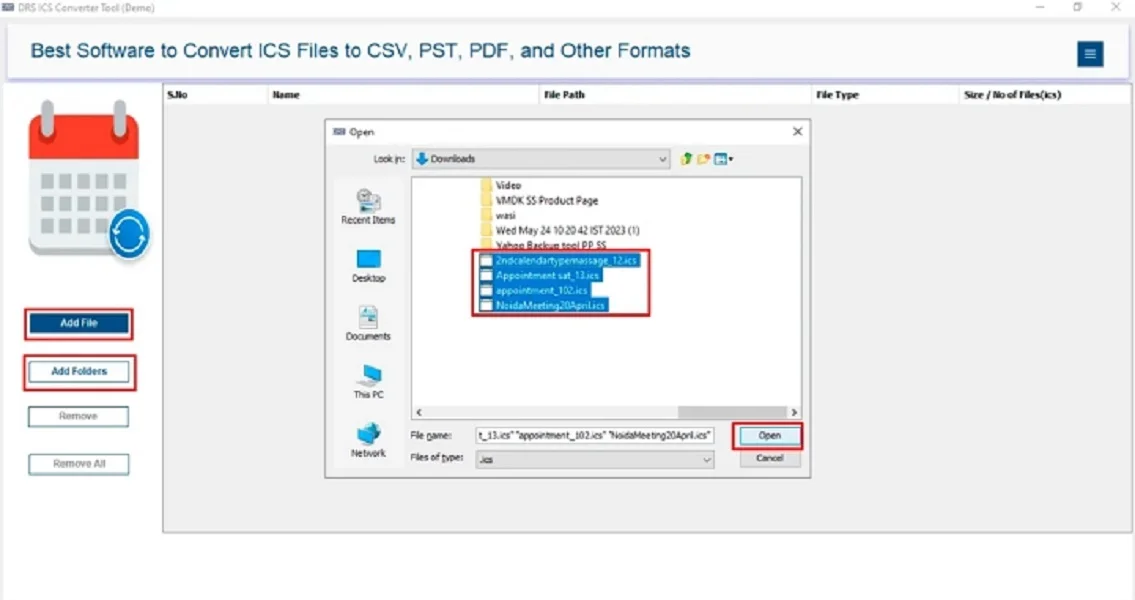
- After that, add the ICS file that you want to convert → Next.
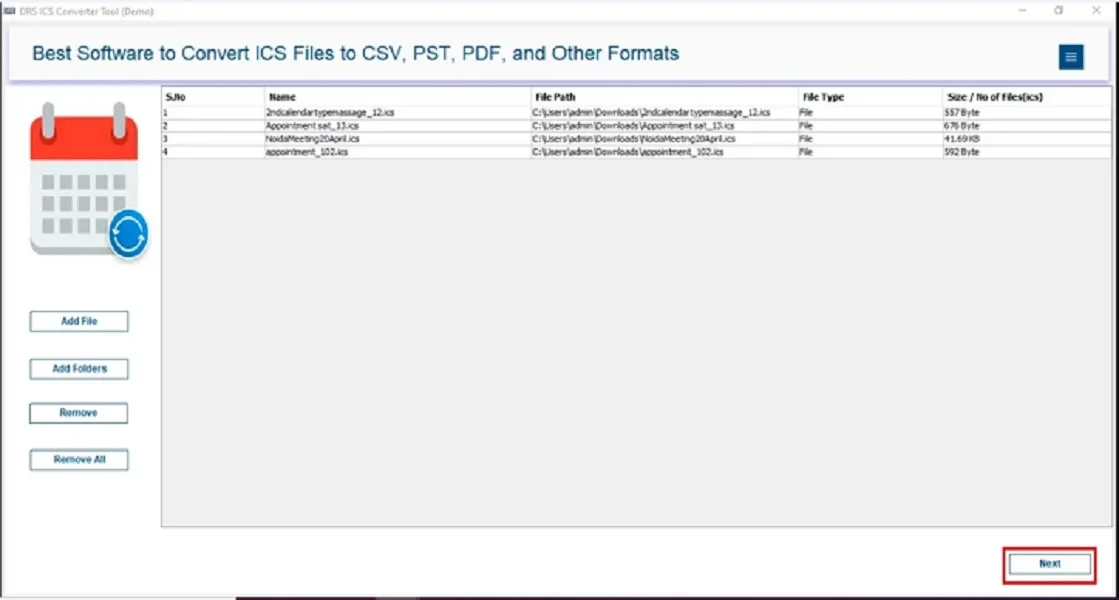
- Subsequently, save the ICS file in the JPG format.
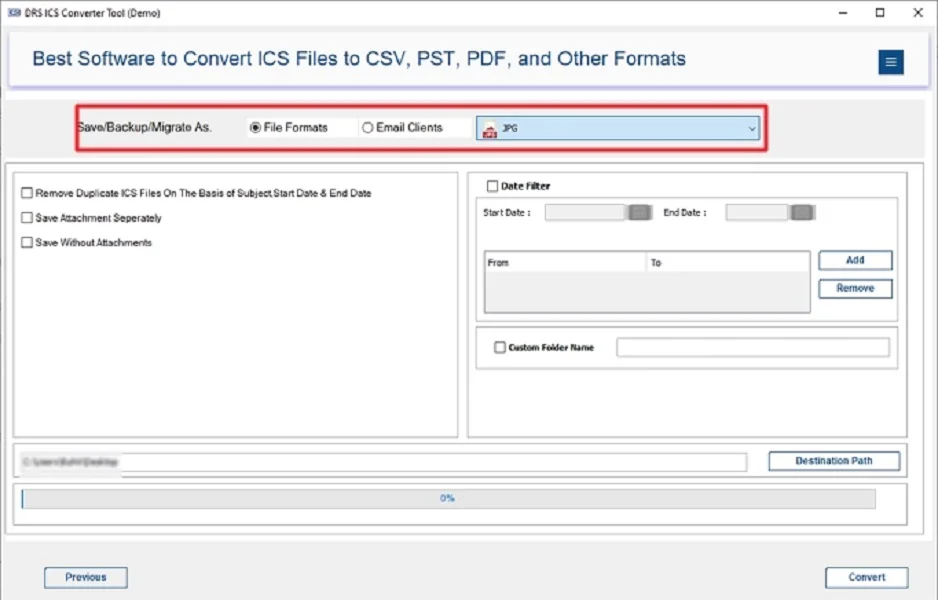
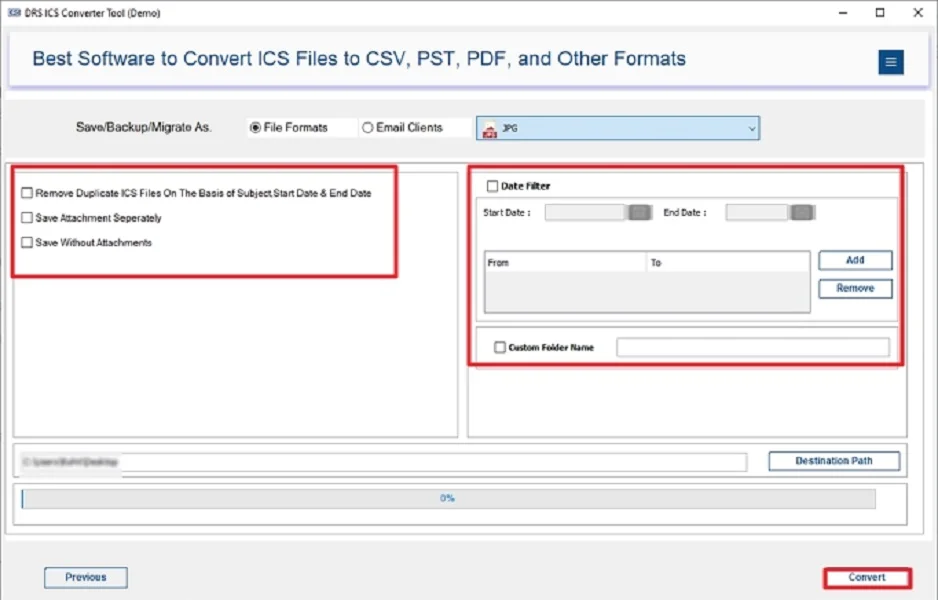
- At last, apply the built-in filters → click Convert to start the process.
Characteristics of an Automated Tool to Convert ICS to JPG
- Converts multiple ICS files to JPG in one go.
- It preserves event details like date, time, location, and notes.
- Also, maintains clarity and formatting of the calendar structure.
- Also, it has the feature to migrate with other file formats, like Convert ICS to EML and other formats.
- Ultimately, it supports both Mac and Windows operating systems.
- It has a user-friendly interface for quick and easy conversion.
Conclusion
In short, converting ICS to JPG format makes calendar events easier to share, print, and use across multiple platforms without needing any external software. While manual methods such as printing and screenshots may work for a few files, they are not efficient for multiple conversions. For a quick, reliable, and professional approach, using an ICS Converter Tool is highly recommended to convert ICS to JPG. It not only saves time & effort but also ensures complete accuracy and readability of your schedules in JPG format.
Frequently Asked Questions
Q1. Which is the Fastest Way to convert ICS to JPG Format?
Ans. MigrateEmails ICS Converter Tool is the fastest way, enabling quick ICS to JPG conversion with accurate results, simple steps, and no manual effort or data loss involved.
Q2. Is it Possible to convert multiple ICS files to JPG at once?
Ans. Yes, MigrateEmails ICS Converter Tool supports batch conversion, allowing users to convert multiple ICS files into JPG format simultaneously with accuracy and without any data loss issues.
Q3. Are there any free tools to convert ICS File to JPG?
Ans. You can use the MigrateEmails ICS Converter Tool. It can convert 10 ICS files per folder. It offers more secure, reliable, and accurate ICS to JPG conversion with better performance and consistent output quality.
Q4. What is an ICS File?
Ans. An ICS file is a calendar format used to store events, schedules, and appointments, commonly supported by Outlook and other calendar applications for sharing and importing data easily.
Q5. Can I open an ICS File directly as a JPG?
Ans. No, ICS files cannot be opened directly as JPG images. You need the MigrateEmails ICS Converter Tool to properly convert ICS files into JPG format without data loss.
Q6. Do I need technical Knowledge to convert ICS to JPG?
Ans. No technical knowledge is required. MigrateEmails ICS Converter Tool provides a user-friendly interface that makes ICS to JPG conversion simple, quick, and accessible for all users.
Q7. Can I convert ICS to JPG on Windows and Mac?
Ans. Yes, MigrateEmails ICS Converter Tool is compatible with both Windows and Mac operating systems, allowing smooth and efficient ICS to JPG conversion on different platforms easily.
Q8. Is batch conversion of ICS files to JPG Possible?
Ans. Yes, MigrateEmails ICS Converter Tool supports batch conversion, enabling users to convert multiple ICS files into JPG format at once, saving time and improving efficiency significantly.
Q9. How can I bulk convert ICS Files to JPG?
Ans. You can bulk convert ICS files using the ICS Converter Tool, which processes multiple files simultaneously and converts them into JPG format quickly and accurately without errors.
Q10. Can ICS files from Outlook be converted to JPG?
Ans. Yes, ICS files exported from Outlook can be easily converted to JPG format using the MigrateEmails ICS Converter Tool while preserving data accuracy, structure, and calendar details safely.
About The Author:

I am Kiran Sharma, a Technical Expert in Content writing. I have technical expertise in the field of Email Backup, Data Recovery, and Email Migration, and resolve technical queries related to Cloud Backup or Email Migration for individuals and businesses.
Related Post