-
Written By Kiran Sharma
-
Approved By
Vikash Bajpai -
Updated on December 26th, 2025
How to Migrate Zoho Mail to iCloud – Easy & Secure Method
Sofia’s Query:-
“I want to migrate my Zoho Mail emails to iCloud Mail. What is the most secure way to migrate Zoho Mail to iCloud without losing details?”
“I want to migrate my Zoho Mail emails to iCloud Mail. What is the most secure way to migrate Zoho Mail to iCloud without losing details?”
Introduction:- Migrating Zoho Mail to iCloud is often required when users switch to different devices. iCloud Mail offers seamless integration. But Zoho Mail does not provide a direct option to export iCloud. As a result, users must rely on manual configuration or a professional solution. This guide explains the manual methods to transfer Zoho Mail to iCloud. Moreover, cover a reliable MigrateEmails Zoho Migration Tool for efficient conversion.
Benefits of Migrating Zoho Mail to iCloud
Users choose to shift from Zoho Mail to iCloud for several reasons:
- To access emails across Apple devices seamlessly.
- Using iCloud’s native Mail app and ecosystem.
- Simplifying email management on macOS and iOS.
- Backing up important Zoho Mail data securely.
- Avoid maintaining multiple email platforms.
- Also, to preserve emails before closing Zoho accounts.
Step-by-Step Method to Migrate Zoho Mail to iCloud
If you don’t want to use any external software, you can either use Apple Mail’s built-in feature. Or you can use manual IMAP setup. However, this method is suitable for small mailboxes.
Process to Move Zoho emails to iCloud Manually
- Firstly, enable IMAP access in Zoho Mail settings.
- Now, generate an app–specific password for iCloud Mail.
- Add both Zoho Mail and iCloud Mail accounts to an email client.
- After that, drag and drop emails from Zoho folders to iCloud folders.
- Lastly, wait for the sync process to complete.
Limitations: Migration from Zoho Mail to iCloud
- This process is very slow for large mailboxes.
- There is a high risk of sync interruption.
- Attachments may fail to upload.
- No bulk or selective migration option.
- It requires a constant internet connection.
- Additionally, there is a need for technical knowledge.
One-Click Solution to Migrate Zoho Mail to iCloud
To avoid manual limitations, the MigrateEmails Zoho Migration Tool is the best solution. It securely migrate from Zoho to Google Workspace. This preserves attachments, folders, and email metadata intact. This approach ensures faster migration with zero data loss. Moreover, this software comes with a free demo version for non-tech users.
One-Time Solution:-
If you do not want to perform the migration yourself, the MigrateEmails One-Time Service is available. The experts securely move Zoho Mail emails to iCloud with attachments. Also, it ensures privacy, accuracy, and zero data loss.
If you do not want to perform the migration yourself, the MigrateEmails One-Time Service is available. The experts securely move Zoho Mail emails to iCloud with attachments. Also, it ensures privacy, accuracy, and zero data loss.
Complete Guide to Use the MigrateEmails Software
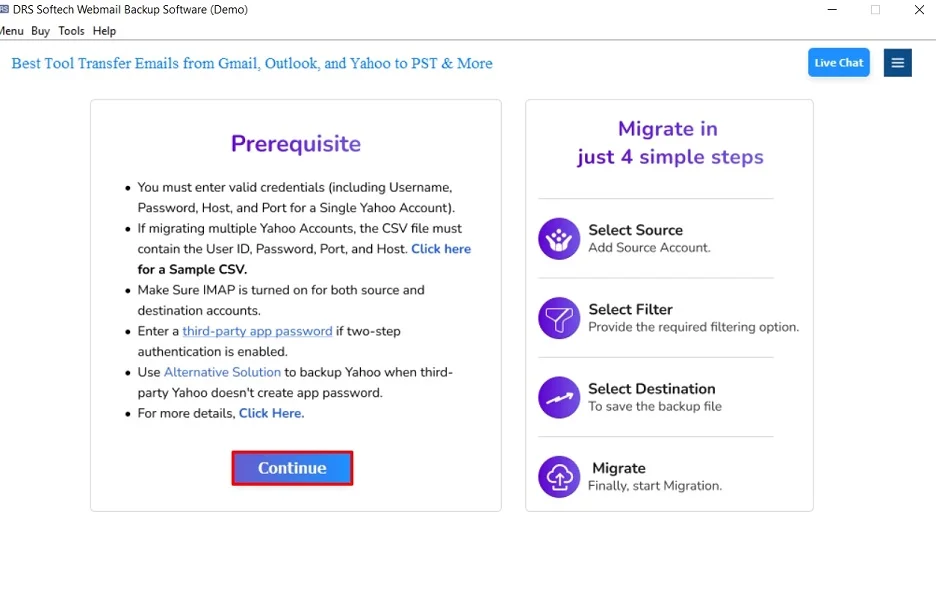
- Firstly, install the MigrateEmails Zoho Migration Tool and click Continue.
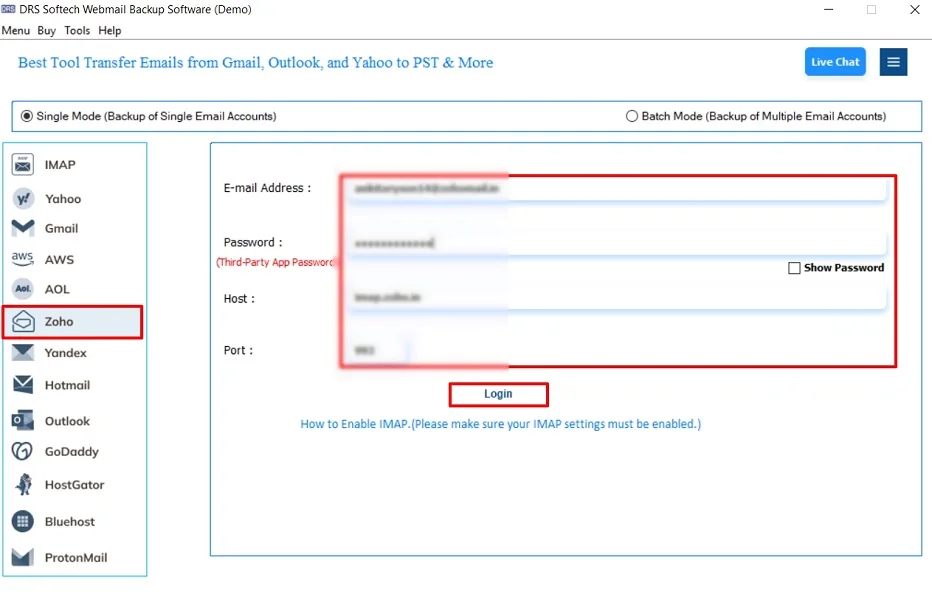
- After that, select Zoho and log in using the Zoho Mail account credentials.
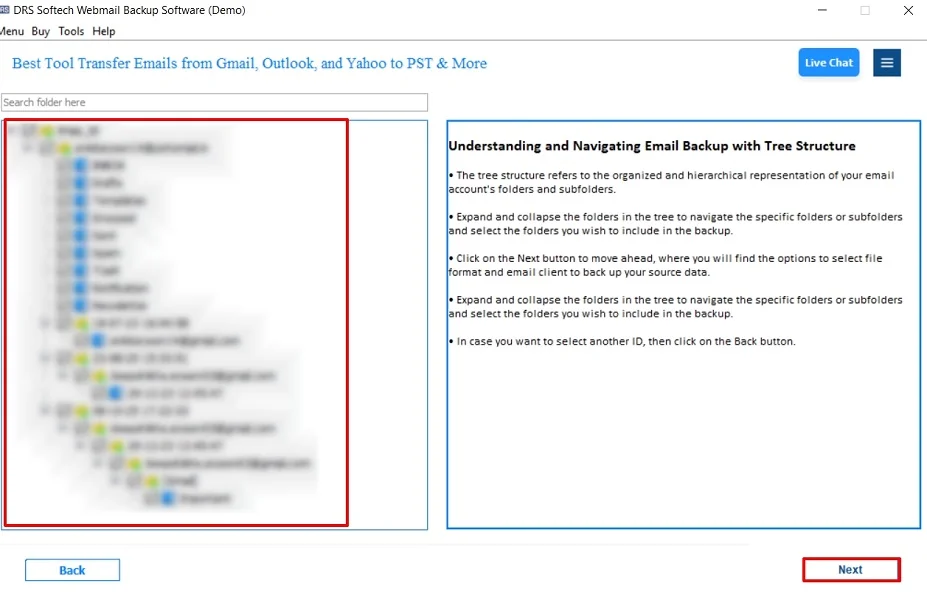
- Now, drag the tree structure, preview the mailbox, and click Next.
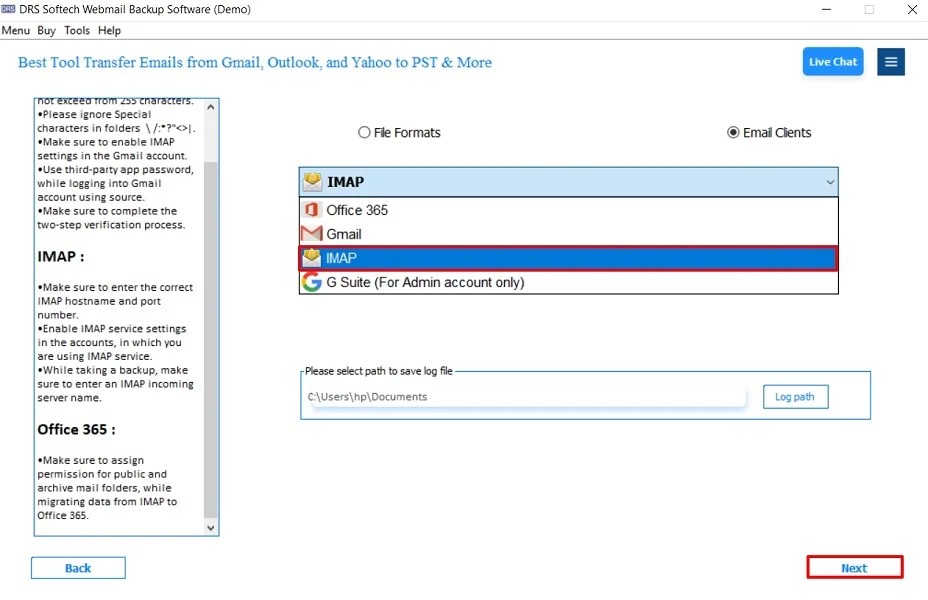
- Further, choose IMAP as the saving output email platform and click Next.
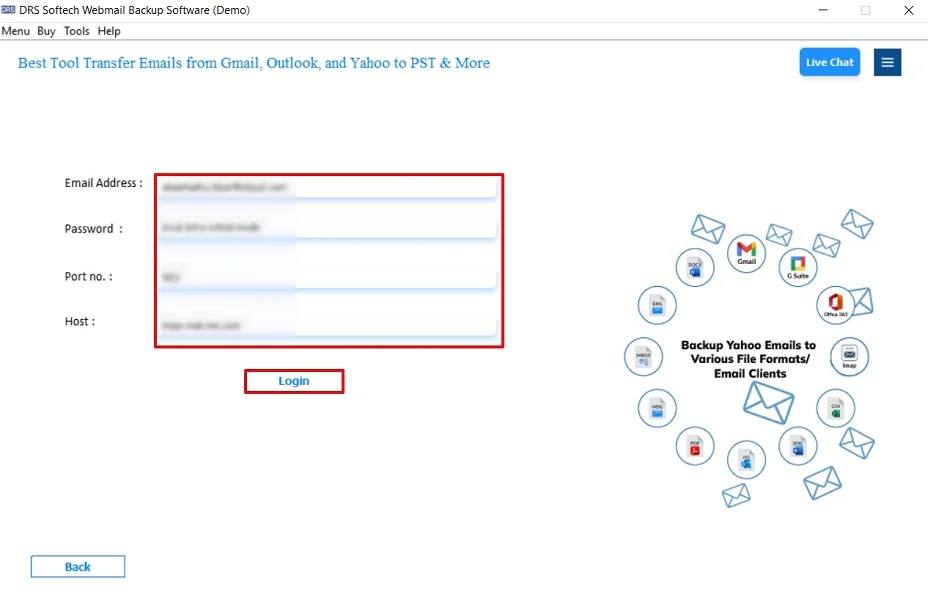
- Then, log in using the IMAP account credentials.
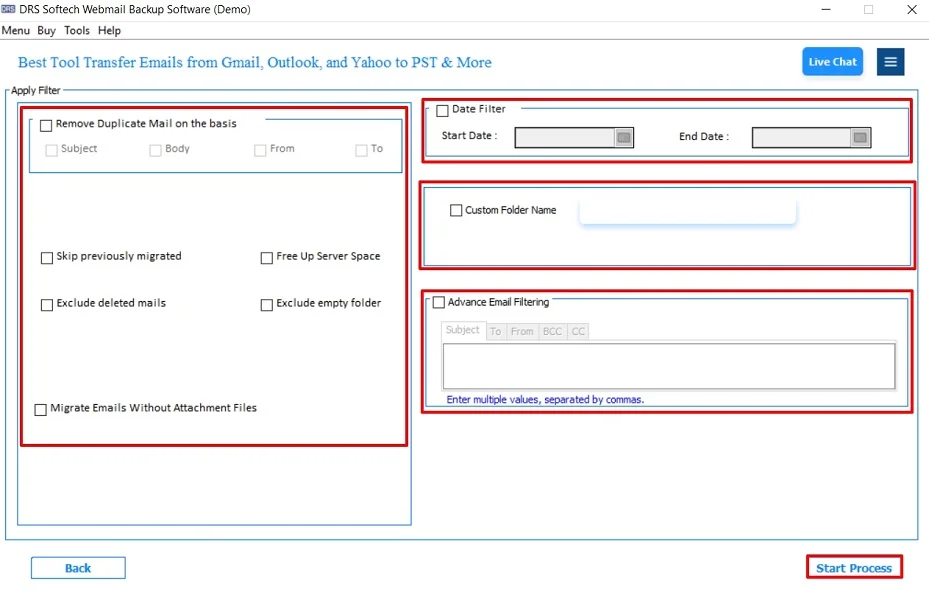
- Finally, apply the filters and click Start Process to begin.
Advantages: Migrate Zoho Mail to iCloud Automatically
- Enables users to migrate Zoho to Yahoo Mail.
- Preserves folder hierarchy and email formatting.
- Supports attachments and metadata with no data loss.
- There are advanced filters for selective migration.
- It is compatible with Windows and macOS.
- Also, the tool is suitable for non-technical users.
Real-Life Scenario:-
A Mac user wanted to move years of business emails from Zoho Mail to iCloud for easier access. Using an automated Zoho migration tool, all emails and attachments were transferred smoothly without manual effort or data loss.
A Mac user wanted to move years of business emails from Zoho Mail to iCloud for easier access. Using an automated Zoho migration tool, all emails and attachments were transferred smoothly without manual effort or data loss.
Manual vs Automated Migration: Which Is Right for You?
Below is a clear breakdown to help you decide the right method.
|
Use the Manual Method When: |
Use an Automated Method When: |
|
|
|
Note: Manual migration is suitable for personal users where speed and automation are not priorities. |
Note: Automated migration is ideal for business professionals who value accuracy, speed, and peace of mind. |
Quick Recommendation: If you are migrating a small mailbox, the manual method can work. For anything beyond that, especially business or bulk migrations, the automated approach is the safest and most efficient choice.
Conclusion
In short, migrating Zoho Mail to iCloud requires a careful and secure approach. While manual IMAP methods work for limited data, they are time-consuming. The Zoho Migration Tool offers an automated way to migrate Zoho Mail to iCloud. This ensures the process without losing data or attachments. For a smooth and hassle-free migration, this method is highly recommended.
Frequently Asked Questions
Q.1 What is the best way to migrate Zoho Mail to iCloud?
Ans. The best way is to use a professional Zoho migration tool. As it ensures data safety, accuracy, and faster results.
Q.2 Can I transfer Zoho Mail to iCloud without data loss?
Ans. Yes, both manual IMAP and professional MigrateEmails Zoho migration tool can migrate emails without data loss. But the tools offer higher reliability.
Q.3 Do I need third-party software to move Zoho emails to iCloud?
Ans. For large mailboxes or multiple accounts, MigrateEmails third-party software is highly recommended to avoid errors and save time.
Q.4 Can I migrate multiple Zoho Mail accounts to iCloud?
Ans. Yes, the professional MigrateEmails tool supports the bulk migration of multiple Zoho Mail accounts to iCloud easily.
About The Author:

I am Kiran Sharma, a Technical Expert in Content writing. I have technical expertise in the field of Email Backup, Data Recovery, and Email Migration, and resolve technical queries related to Cloud Backup or Email Migration for individuals and businesses.
Related Post