-
Written By Kiran Sharma
-
Approved By
Vikash Bajpai -
Updated on November 19th, 2025
Complete Guide to Migrate Thunderbird to Apple Mail
User Query:-
“I am switching to a Mac and want to move all my Thunderbird emails to Apple Mail. What is the best and safest way to migrate Thunderbird to Apple Mail?”
“I am switching to a Mac and want to move all my Thunderbird emails to Apple Mail. What is the best and safest way to migrate Thunderbird to Apple Mail?”
Introduction: When users move from Windows to macOS, one of the biggest concerns is their email data. However, Thunderbird stores emails in MBOX format. On the other hand, Apple Mail also supports MBOX, but does not directly read the internal folder structure. Because of this, many users find it confusing to move their email files. Therefore, this guide explains the complete process to import Thunderbird to Mac Mail safely. You will learn the manual methods and the MigrateEmails Thunderbird Backup Tool for secure transfer.
What You Need to Know Before Migrating?
Before proceeding further, keep the following points in mind:
- Firstly, Thunderbird stores emails in MBOX format (without extension).
- Apple Mail also supports MBOX, so the migration is possible.
- The folder names, attachments, and email formatting must stay intact during conversion.
- Therefore, the large mailboxes may take extra time to migrate manually.
Manual Method to Migrate Thunderbird to Apple Mail
This method works, but only when working with limited files. Also, remember that this process comes with several drawbacks. So follow the steps one by one.
Step 1. Find Thunderbird MBOX Files
- Firstly, open Thunderbird.
- Now, go to Help → More Troubleshooting Information.
- Under Profile Folder, click Open Folder.
- After that, go to Mail → Local Folders or the account folder.
- You will see files with no extensions (Inbox, Sent, Drafts). These are your MBOX files.
Step 2. Copy MBOX Files to Your Mac
- Further, transfer the MBOX files using a USB drive, external hard disk, or cloud storage.
Step 3: Import MBOX Files into Apple Mail
- Now, open Apple Mail.
- Go to File → Import Mailboxes.
- Subsequently, choose Files in MBOX format → click Continue.
- In the next panel, browse to the MBOX file you copied and import it.
- Finally, Apple Mail will save the imported mailbox under a folder called “Import” in the left sidebar.
Drawbacks to Migrate Thunderbird to Apple Mail
While the manual process works, it has several drawbacks:
- Sometimes, large MBOX files may fail to import.
- Thunderbird’s subfolders may not appear correctly in Apple Mail.
- Also, attachments may not load in some cases.
- Unfortunately, it is very time-consuming for users with multiple accounts.
Export Emails from Thunderbird to Apple Mail Automatically
Many users and IT experts prefer using an automated tool because it guarantees a smooth migration. The MigrateEmails Thunderbird Backup Tool is highly recommended for saving Thunderbird to Apple Mail. Also, this process allows users to import Emails from Thunderbird to Gmail. Moreover, this utility guarantees 100% security and data integrity with zero data loss.
Why Choose This Tool to Migrate Thunderbird to Apple Mail?
- This tool enables users to migrate Thunderbird Emails to Yahoo Mail.
- Also, preserves folder structure, formatting, and attachments.
- Therefore, it supports large MBOX files without corruption.
- Batch conversion for multiple Thunderbird accounts.
- Moreover, it is simple and user-friendly for beginners.
Utility to Transfer Thunderbird Emails to Apple Mail (Quick Steps)
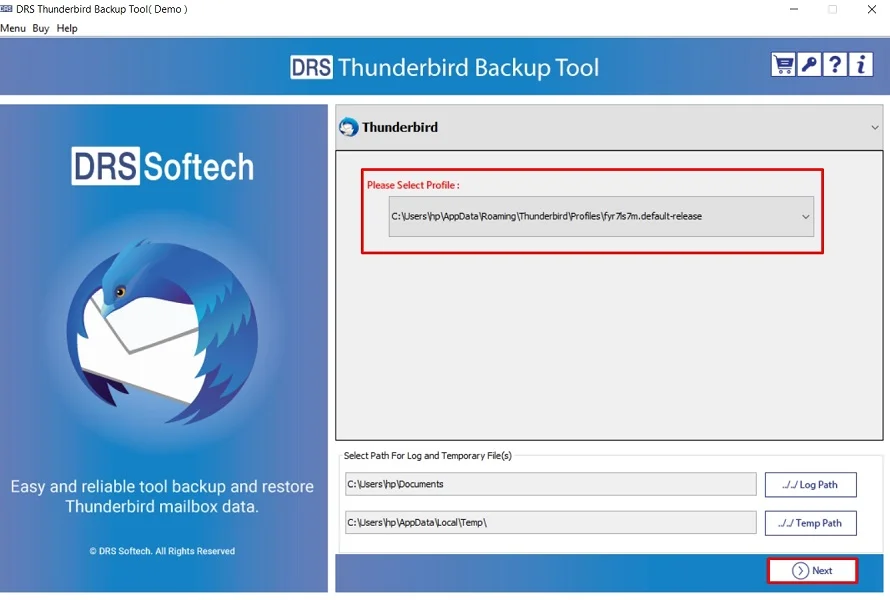
- Firstly, download and install the MigrateEmails Thunderbird Backup tool → Choose the desired profile → Next.
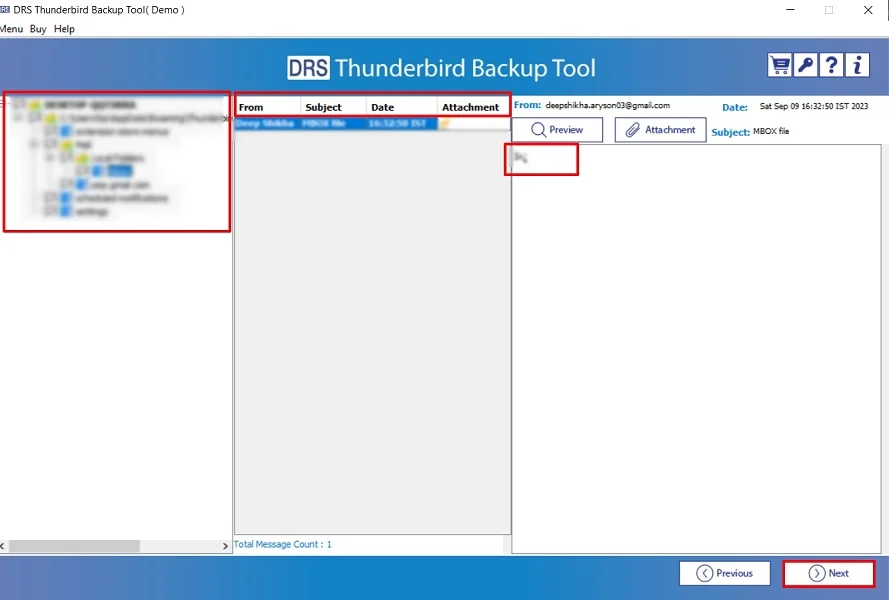
- After that, expand the tree-like data structure → Preview to verify the details → Next.
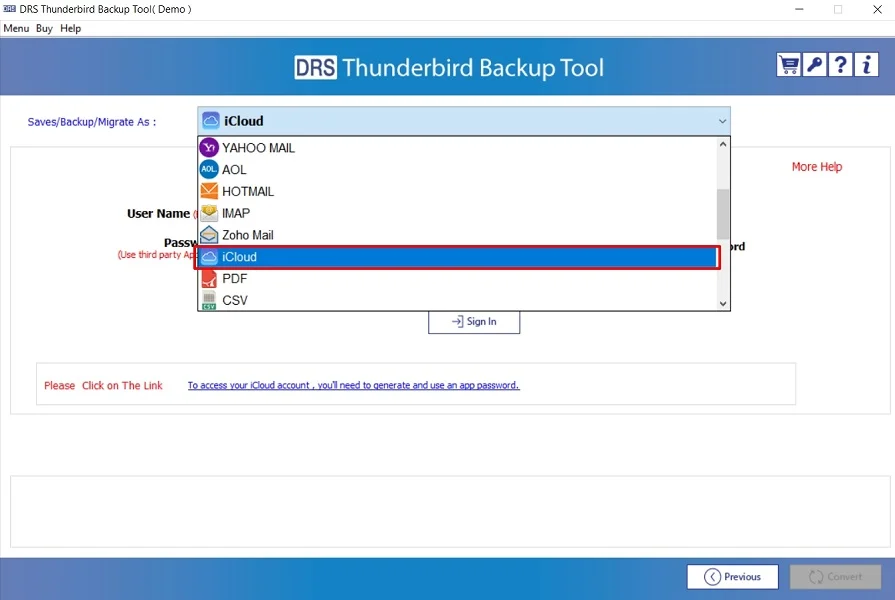
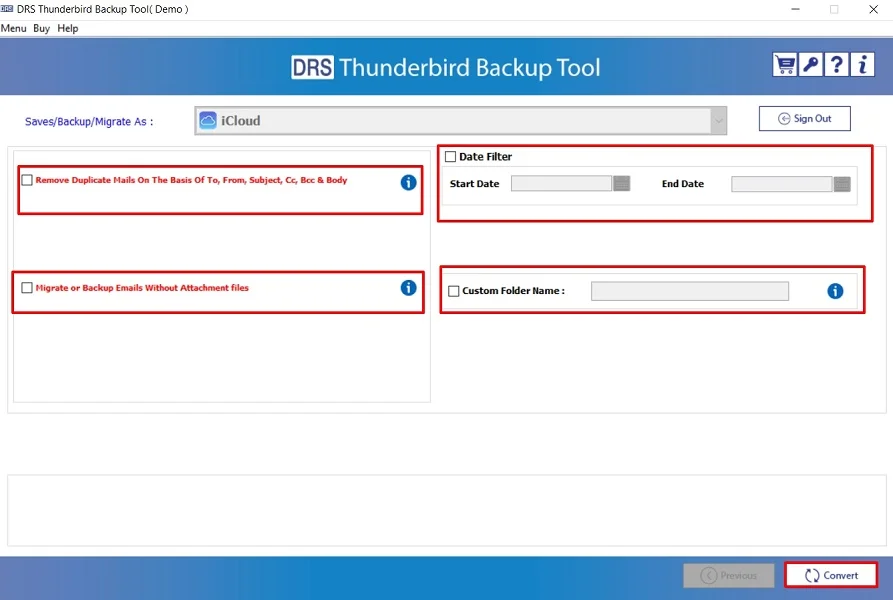
- Subsequently, choose iCloud as the saving file format.
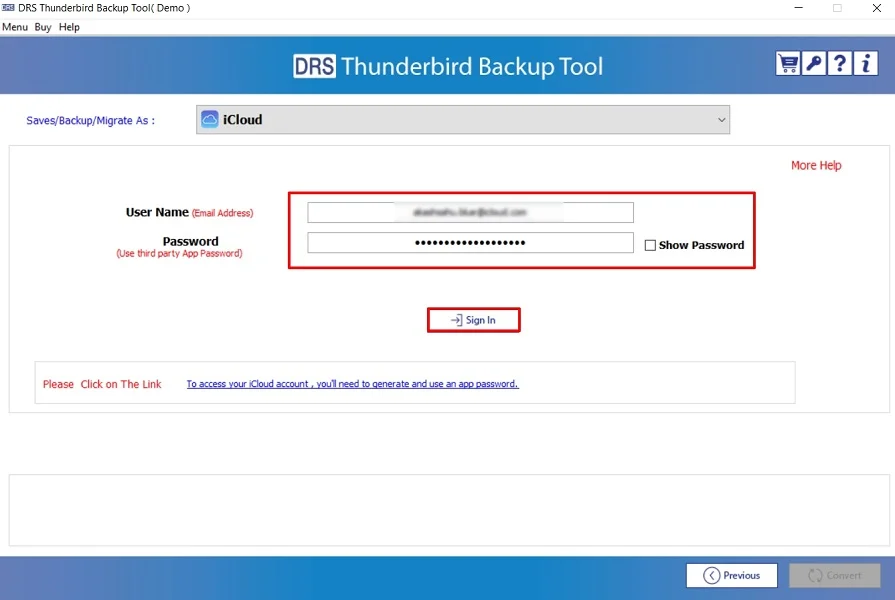
- Further, sign in using the iCloud credentials.
- Finally, apply the advanced filters → Convert to start the process.
One-Time Data Backup Service:
If you don’t want to handle the migration yourself, MigrateEmails also provides a one-time service option. Therefore, you can securely share your files, and the team will convert them to Apple Mail without any data loss. This is ideal for busy users or large mailboxes.
Real-Life Scenario:
David moved from Windows to a Mac, his Thunderbird folders didn’t import correctly into Apple Mail. Using the MigrateEmails Thunderbird Backup Tool, he transferred all emails and attachments accurately in one go. This makes the conversion smooth and hassle-free.
Conclusion
In short, migrating from Thunderbird to Apple Mail is possible through both manual and automated methods. While the manual process works for smaller mailboxes, it may cause issues with large data. Therefore, the highly recommended Thunderbird Backup tool is to migrate Thunderbird to Apple Mail. This offers a more reliable conversion with complete accuracy. If you want an error-free migration, an automated method, or the one-time service option is the best choice.
Frequently Asked Questions
Q.1 How can I migrate Thunderbird to Apple Mail without losing attachments?
Ans. You can safely migrate your Thunderbird to Apple Mail online by exporting the MBOX files and importing them into Apple Mail. For 100% attachment safety, a professional MigrateEmails Thunderbird Backup Tool ensures every email and attachment is transferred correctly.
Q.2 Can I import Thunderbird to Mac Mail without losing any data?
Ans. Yes. Apple Mail supports the MBOX format, so you can import your data manually. But for large mailboxes or multiple folders, using the MigrateEmails tool is the safest way to prevent missing emails or broken folders.
Q.3 Is there a risk-free method to move emails from Thunderbird to Apple Mail?
Ans. The most reliable and risk-free method is using a reliable MigrateEmails backup tool. It preserves folder structure, formatting, attachments, and metadata intact during the migration.
Q.4 Can I transfer my Thunderbird emails to Apple Mail without technical knowledge?
Ans. Yes. A dedicated utility makes the process easy for beginners. Just add your Thunderbird MBOX files, choose MBOX format for Apple Mail, and convert. The rest of the process is automatic.
About The Author:

I am Kiran Sharma, a Technical Expert in Content writing. I have technical expertise in the field of Email Backup, Data Recovery, and Email Migration, and resolve technical queries related to Cloud Backup or Email Migration for individuals and businesses.
Related Post