-
Written By Kiran Sharma
-
Approved By
Vikash Bajpai -
Updated on January 3rd, 2026
How to Import VCF to Yahoo Mail Easily (Step-by-Step Guide)
User Query:-
“I have multiple VCF contact files stored on my system. Now, I want to add them to my Yahoo Mail contacts. I am not a technical user. What is the easiest and safest way to import VCF to Yahoo Mail without losing contact details?”
“I have multiple VCF contact files stored on my system. Now, I want to add them to my Yahoo Mail contacts. I am not a technical user. What is the easiest and safest way to import VCF to Yahoo Mail without losing contact details?”
Introduction:- VCF (vCard) files are widely used to store contact information and other personal details. Yahoo Mail allows users to manage contacts online. This makes them accessible across different devices. Importing VCF files helps centralize contact data and prevents accidental contact loss. Therefore, this guide explains the manual method to import VCF Contacts to Yahoo Mail. Also, explains how to use the MigrateEmails VCF to CSV Converter Tool securely.
An Introduction to VCF and Yahoo Mail
VCF (vCard File Format):
- It is also known as vCard, and is a standard file format used to store contact information.
- VCF files are commonly used to share contacts between devices, email services, and contact management applications.
Yahoo Mail:
- Yahoo Mail is a popular web-based email service provided by Yahoo.
- It includes a built-in Contacts feature that allows users to store, manage, and organize contact information online.
- Yahoo Mail contacts can be accessed from any device with an internet connection, making it easy to keep contact details safe and up to date.
DIY Method to Import VCF to Yahoo Mail
If you don’t want to install external software, you can use the manual approach. Yahoo Mail provides a built-in option to save contacts from a VCF file. This method is suitable for small contact lists.
Follow These Steps to Import VCF File to Yahoo Mail Manually
- Firstly, log in to your Yahoo Mail account.
- Now, click on the Contacts icon.
- Then, select Import Contacts.
- After that, choose vCard (VCF file).
- Browse and select the VCF file from your system.
- Lastly, click Import to complete the process.
Limitations of this Method to Import VCF to Yahoo Mail
- It is not suitable for large or multiple VCF files.
- No advanced duplicate contact handling.
- There is limited control over contact fields.
- The manual method has no preview option before import.
- Moreover, it is very time-consuming for repeated imports.
Automated Method to Transfer VCF Contacts to Yahoo Mail
To import multiple VCF files without errors or duplicates, using a MigrateEmails VCF Converter Tool is a must. It helps users manage, organize, and prepare VCF files efficiently. This automated approach reduces effort, ensures accuracy, and is ideal for non-technical users. Additionally, this software allows users to convert VCF to PDF with zero data loss.
One-Time Service Option:-
If you do not want to perform the process yourself, MigrateEmails offers a One-Time Contact Import Service. Their experts securely import VCF to Yahoo Mail. This maintains complete privacy and data accuracy.
If you do not want to perform the process yourself, MigrateEmails offers a One-Time Contact Import Service. Their experts securely import VCF to Yahoo Mail. This maintains complete privacy and data accuracy.
Step-by-Step Guide to Use the MigrateEmails Utility
- Firstly, install the MigrateEmails VCF to CSV Converter Tool.
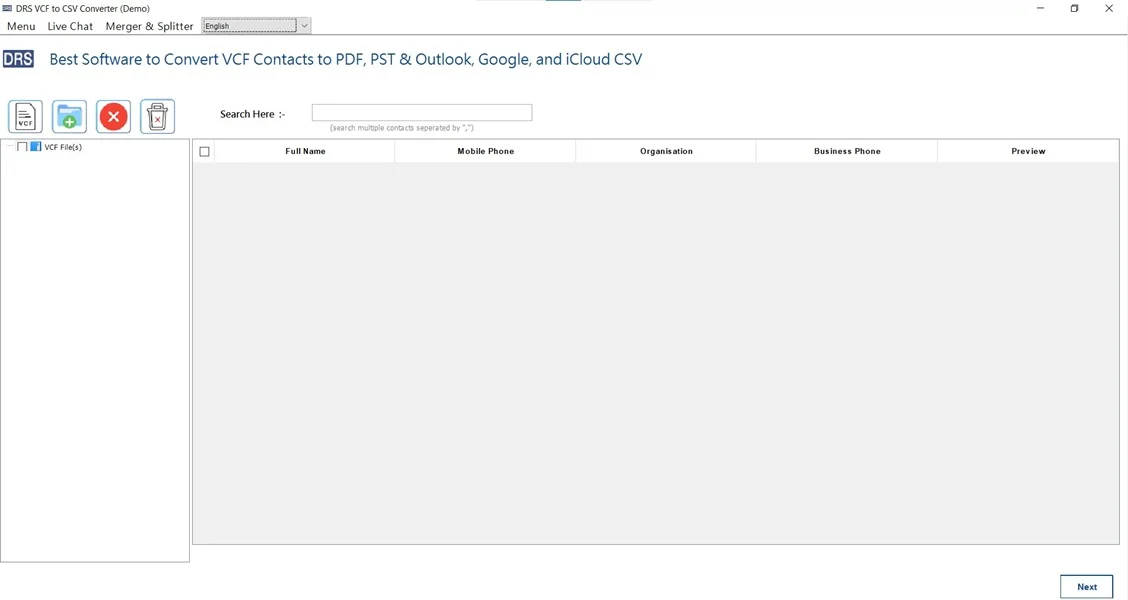
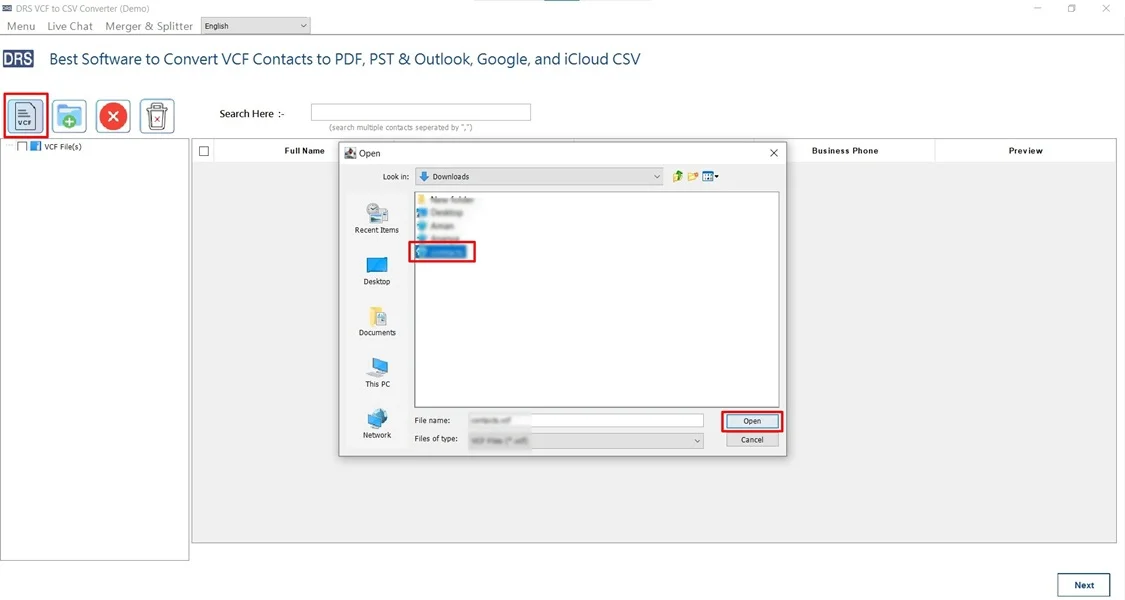
- Now, select VCF and add the VCF file that you want to convert → Open.
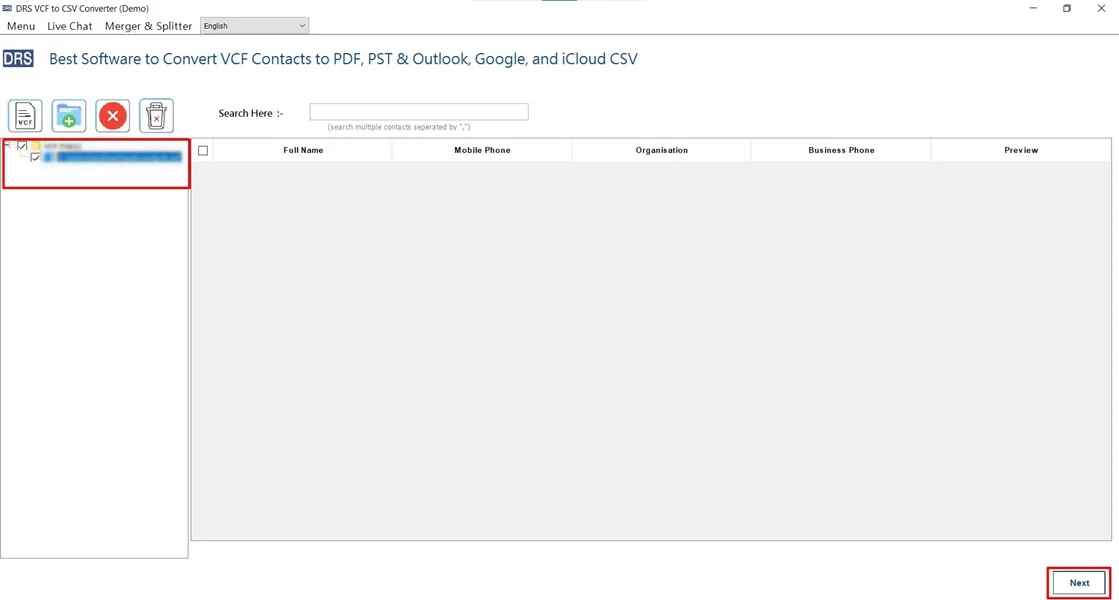
- Further, drag the structure, preview the mailbox, and click Next.
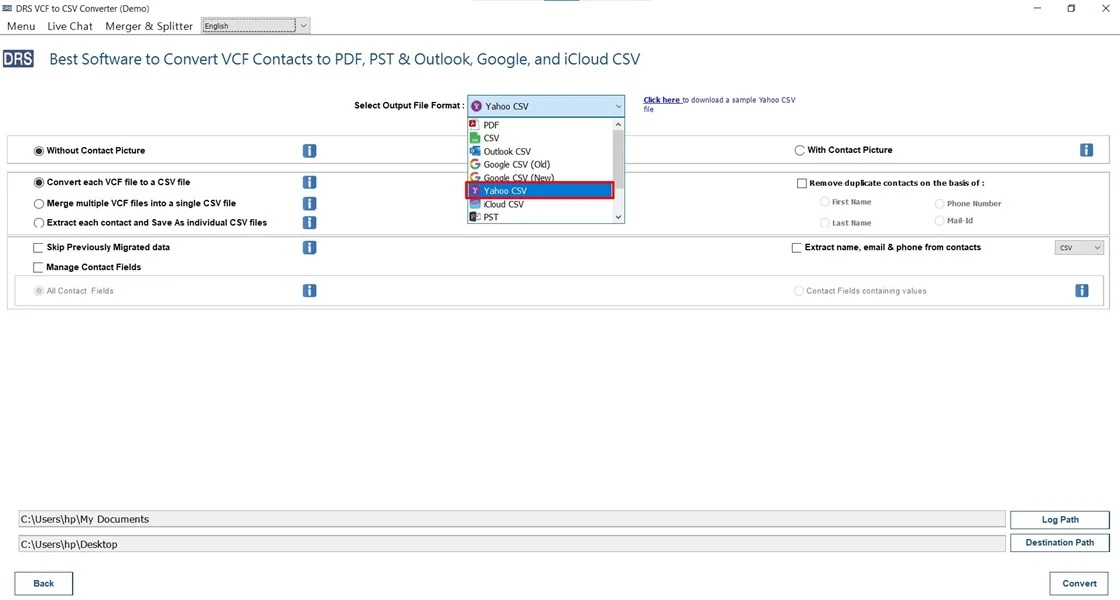
- After that, choose Yahoo CSV as the saving output format.
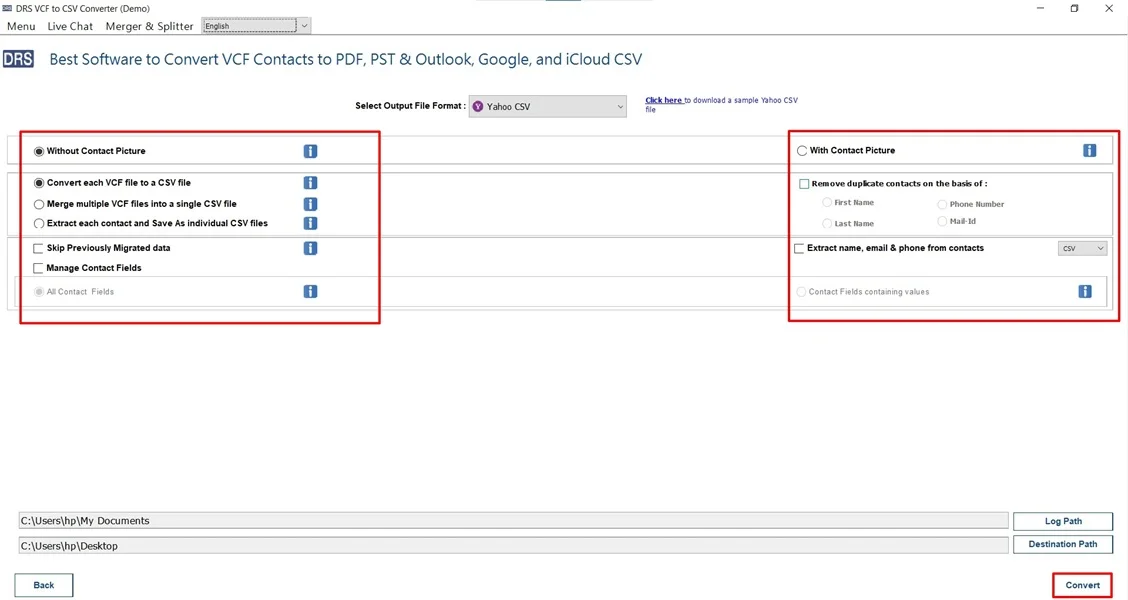
- Finally, apply the filters and click Convert to begin.
Major Benefits of the Tool to Import VCF to Yahoo Mail
- Supports users to convert VCF to Word.
- Preserves all contact fields accurately.
- Prevents duplicate contact creation.
- It has a simple and user-friendly interface.
- The tool saves time and manual effort.
- Also, it is suitable for beginners and professionals.
Real-Life Example:-
A user switched from an old mobile phone to Yahoo Mail for contact management and had hundreds of VCF files. Using an automated solution, they successfully import multiple VCF files to Yahoo Mail without duplicates or missing details.
A user switched from an old mobile phone to Yahoo Mail for contact management and had hundreds of VCF files. Using an automated solution, they successfully import multiple VCF files to Yahoo Mail without duplicates or missing details.
When Should You Use a Manual vs an Automated Approach?
Use the Manual Import Method When:
- You have a small number of VCF contacts to import.
- Contact details are simple and limited.
- You want a free, one-time import.
- Duplicate contacts are not a major concern.
- You are comfortable using Yahoo Mail’s built-in import option.
Use the Automated Import Method When:
- You need to import multiple or bulk VCF files.
- Preserving all contact fields and formatting is important.
- You want to avoid duplicates and missing data.
- You have no technical knowledge and prefer a guided process.
- You need a fast, accurate, and reliable contact import.
Conclusion
To conclude, importing VCF files to Yahoo Mail is essential for effective contact management and secure backup. While the manual method works for a small number of contacts, it has limitations for bulk imports. For an easy, error-free, and beginner-friendly experience, experts recommend using an automated VCF to CSV Converter to import VCF to Yahoo Mail. This ensures accurate contact import with minimal effort and zero data loss.
Frequently Asked Questions
Q.1 Can I import VCF to Yahoo Mail without technical knowledge?
Ans. Yes. Yahoo Mail provides a simple built-in import option for VCF files. The automated VCF to CSV Converter makes the process even easier. Both methods can be used comfortably by non-technical users.
Q.2 Is it possible to import VCF contacts to Yahoo Mail without losing data?
Ans. Yes. When the VCF file is properly formatted, Yahoo Mail imports contacts safely. For bulk or complex VCF files, using a professional MigrateEmails VCF converter tool ensures all contact fields are preserved without data loss.
Q.3 How do I import a VCF file to Yahoo Mail in bulk?
Ans. To import VCF files in bulk, it is recommended to use an automated VCF converter or a contact management tool. These tools allow you to add multiple VCF files at once and import them accurately into Yahoo Mail.
Q.4 Can I transfer VCF contacts to Yahoo Mail without paying any fee?
Ans. Yes. Yahoo Mail allows free manual import of VCF files. However, this method has limitations for bulk imports. Paid tools are optional and are mainly used for large contact lists or advanced features.
About The Author:

I am Kiran Sharma, a Technical Expert in Content writing. I have technical expertise in the field of Email Backup, Data Recovery, and Email Migration, and resolve technical queries related to Cloud Backup or Email Migration for individuals and businesses.
Related Post