-
Written By Kiran Sharma
-
Approved By
Vikash Bajpai -
Updated on March 16th, 2026
How to Import IMAP Email to Gmail Easily in 2026
Sophia’s Query:-
“My email has been running on an IMAP setup provided by my company’s hosting provider. Recently, our team decided to move to Gmail because it is easy to manage with Google Workspace tools. Now I need to import all my emails from the IMAP account into Gmail. The problem is that I have thousands of emails with attachments and organized folders. I’m worried about losing data or mixing up folders during the process. What is the safest and simplest way to import IMAP email to Gmail?”
“My email has been running on an IMAP setup provided by my company’s hosting provider. Recently, our team decided to move to Gmail because it is easy to manage with Google Workspace tools. Now I need to import all my emails from the IMAP account into Gmail. The problem is that I have thousands of emails with attachments and organized folders. I’m worried about losing data or mixing up folders during the process. What is the safest and simplest way to import IMAP email to Gmail?”
Introduction:- Many users and businesses store their emails in accounts that use the IMAP protocol. Over time, they decided to move to Gmail because it offers a reliable search and strong integration with Google services. However, transferring emails from an IMAP account to Gmail is not that easy. People frequently worry about losing attachments, missing folders, or ending up with duplicate messages. That’s why it’s important to understand how to transfer IMAP email to Gmail using the manual and MigrateEmails IMAP Backup Tool.
IMAP vs Gmail: Which One Is Different and Why?
| Highlighting Features | IMAP | Gmail |
| Definition | IMAP is an email protocol used to access and manage emails stored on a mail server. | Gmail is a cloud-based email service provided by Google. |
| Purpose | Allows users to connect email clients to a mail server. | Provides a complete email platform for sending, receiving, and managing emails online. |
| Accessibility | Accessible through email applications. | Accessible through a web browser. |
| Storage | Storage depends on the email service provider. | Uses Google account storage, which can be expanded with Google One plans. |
| Setup Requirements | Requires server details | Only requires a Google account |
| Best Use Case | Users with custom domain emails or hosted mail services. | Individuals and businesses are looking for a cloud-based email system with collaboration tools. |
Why Import IMAP Email to Gmail? Top Reasons Explained
- Gmail offers a clean and easy-to-use interface.
- Emails can be accessed from any device or browser.
- Integration with Google Drive, Calendar, and Meet.
- Strong search capabilities for finding old messages.
- Moreover, for better long-term email management.
Because of these benefits, many individuals and businesses eventually decide to shift their old IMAP emails to Gmail.
Real-Life Example:-
A small business that has been using email accounts from a web hosting provider for years. Each employee has an IMAP mailbox containing thousands of emails related to clients, invoices, and project discussions.
Later, the company switched to Google Workspace to simplify collaboration and communication. Now the IT manager must import IMAP email to Gmail. So employees can continue accessing past conversations.
If the migration is not done carefully, some messages might be missed, attachments could fail to upload, or folders might become disorganized.
Manual Methods to Migrate IMAP Email to Gmail
As there is no exact solution to convert IMAP into Gmail. Thus, Gmail provides a built-in option to complete this task using Mail Fetcher. Although useful, this method still has a number of limitations.
Simple Procedure to Complete This Task
- Firstly, log in to your Gmail account.
- Now, click the Settings icon and open See All Settings.
- After that, go to the Accounts and Import tab.
- Click Add a mail account under “Check mail from other accounts.”
- Further, enter your IMAP email address.
- Provide the IMAP server details and password.
- Choose import options such as labeling or leaving messages on the server.
- Lastly, start the import process.
Gmail will begin fetching emails from the IMAP server and adding them to your Gmail mailbox.
Major Drawbacks to Manually Import IMAP Email to Gmail
- Importing large mailboxes can take many hours or days.
- Folder structure may not transfer exactly.
- Limited control over the migration process.
- Some hosting providers block frequent IMAP access.
- Troubleshooting errors can be difficult for non-technical users.
Exclusive Method to Migrate IMAP to Gmail
To reduce the risk involved in the manual method, it is highly preferred to use the MigrateEmails IMAP Backup Tool. As this solution converts multiple emails together instead of one-by-one. It also helps to export IMAP email to CSV and other formats as well. Along with the file formats, this tool supports a wide range of email platforms as well. Additionally, it is designed with a smooth interface that preserves the important details without losing anything.
How You Can Benefit from the Tool to Import IMAP Email to Gmail?
- It connects securely to the IMAP server.
- Transfers emails while maintaining folder hierarchy.
- Preserves attachments, timestamps, and sender details.
- Allows users to migrate emails from IMAP to Zoho Mail.
This method helps simplify the process when dealing with large mailboxes.
Complete Manual for Migrating IMAP Email to Gmail
- Firstly, start getting the MigrateEmails IMAP Backup Tool and click Continue to move.

- Select the Single or Batch Mode and authenticate using the IMAP account details.

- Expand and verify the complete hierarchy, and hit Next to move ahead.

- Choose Gmail as the saving email platform, save the file, and tap Next.
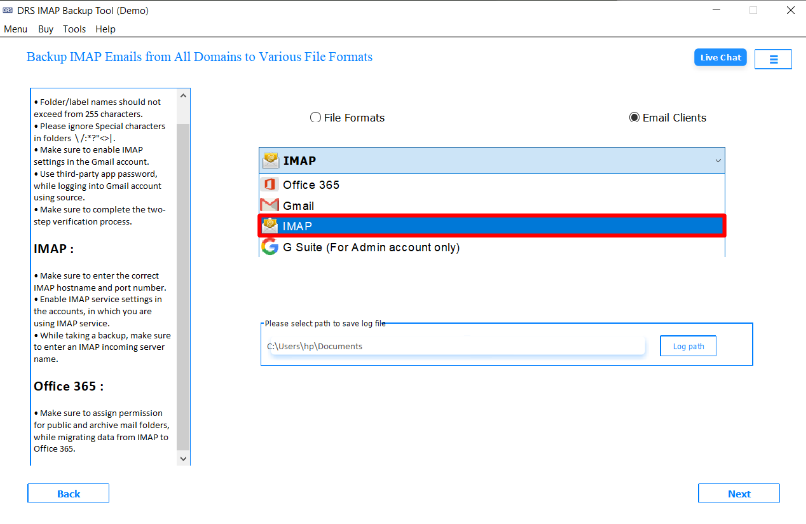
- After that, sign in using the Gmail account credentials.

- Finally, set the filters according to your requirements and start the process.

Want to Explore More? You can therefore learn how to convert IMAP to MSG with no information leakage.
Conclusion
In short, converting IMAP emails into Gmail is a common step for users who want a more flexible experience. However, the manual process can become slow or complicated for large mailboxes. Using the automated IMAP Backup Tool is the best approach to import IMAP email to Gmail. As a result, by confirming that data is handled carefully, users can shift their emails to Gmail without losing details. Also, in case you face any kind of queries, you can directly get connected with our support team.
Frequently Asked Questions
Q1. Can Gmail import emails from any IMAP email account?
Ans. Yes, Gmail can import emails from most IMAP-supported accounts. You just need the correct IMAP server details, email address, and password. Some providers may require additional security settings, such as enabling “less secure apps” or creating an app-specific password.
Q2. Is it safe to import IMAP emails into Gmail?
Ans. Yes, it is safe when using Gmail’s official settings or a trusted IMAP migration tool. The import process copies emails to Gmail without altering or deleting the original messages on the IMAP server.
Q3. Will importing IMAP emails delete them from the original account?
Ans. No, importing IMAP emails into Gmail only copies the emails. Your original mailbox remains intact unless you manually delete messages from the source account.
Q4. How long does it take to import IMAP emails to Gmail?
Ans. The duration depends on mailbox size, internet speed, and server responsiveness. Small accounts may take a few minutes, while large mailboxes with thousands of emails and attachments can take several hours or more.
Q5. Can I import folders from IMAP email into Gmail?
Ans. Yes, Gmail can import folders from an IMAP account. Imported folders are usually converted into Gmail labels, preserving the structure so you can organize emails similarly to the original account.
Q6. Is there a limit to importing emails into Gmail?
Ans. There is no strict limit on the number of emails, but the import is constrained by your Gmail storage quota. If your mailbox exceeds the available space, you may need to free up space or upgrade your Google storage plan before completing the import.
About The Author:

I am Kiran Sharma, a Technical Expert in Content writing. I have technical expertise in the field of Email Backup, Data Recovery, and Email Migration, and resolve technical queries related to Cloud Backup or Email Migration for individuals and businesses.
Related Post