-
Written By Kiran Sharma
-
Approved By
Vikash Bajpai -
Updated on January 23rd, 2026
Convert Excel XLS to vCard (VCF) – Quick Contact Export
User Query:-
“I have an Excel (XLS) file containing hundreds of contacts, and I want to save it into vCard (VCF) format. So I can import the contacts into my phone or email account. What is the easiest and safest way to convert excel to vCard without losing contact details?”
“I have an Excel (XLS) file containing hundreds of contacts, and I want to save it into vCard (VCF) format. So I can import the contacts into my phone or email account. What is the easiest and safest way to convert excel to vCard without losing contact details?”
Introduction:- Excel files are widely used to store contact information such as names, phone numbers, email addresses, and company details. However, Excel files cannot be directly converted into contact applications like Android, iPhone, Gmail, or Outlook. To make contacts compatible, users need to convert excel file to vCard format. In this guide, you will learn the manual methods to complete the process. Also, this guide covers an automated DRS Excel to vCard Converter Tool.
Understanding the Formats: Excel XLS and vCard (VCF)
|
What Is an Excel XLS File? |
What Is a vCard (VCF) File? |
|
An Excel XLS file is a spreadsheet format used to store structured data in rows and columns. It is commonly used to manage contact lists but is not supported directly by contact management platforms. |
vCard (VCF) is a standard contact file format used by smartphones, email services, and address book applications. It allows easy import and sharing of contact details across devices and platforms. |
Exploring the Need to Convert Excel to vCard
Below are the reasons why users prefer vCard over Excel:
- Import contacts into mobile phones and email services.
- It can share contacts easily across platforms.
- Ensure compatibility across different platforms.
- This can maintain organized contact data.
- Also, it can save time during multiple contact migrations.
Manual Workflow to Export Excel Files to vCard
As there are no direct solutions to transfer Excel files into vCard format. Therefore, you can use the manual methods. But remember that this method is very time-consuming and works for small files.
Step-by-Step Manual Process
Step 1. Prepare the Excel File
- Firstly, open the Excel XLS file.
- Ensure columns are properly labeled (Name, Phone, Email, etc.).
- Now, save the file as CSV (Comma Separated Values)
Step 2. Import CSV and Export as vCard
- After that, import the CSV file into an email client (such as Outlook or Gmail).
- Lastly, export contacts as vCard (VCF).
Limitations to Manually Convert Excel to vCard
- Complex and time-consuming process.
- High risk of incorrect field mapping.
- It is not suitable for large Excel files.
- No support for bulk VCF generation.
- Moreover, it requires technical understanding.
Trusted Workflow to Convert Excel Contacts to vCard
A professional DRS Excel to vCard Converter Tool offers a reliable way to shift XLS files into VCF format. The tool automatically guarantees accurate conversion without manual effort. It converts multiple files simultaneously with zero data loss. In addition, this software has a user-friendly interface suitable for non-tech users. This tool comes with a one-time migration service for every user.
One-Time Migration Service (Hassle-Free):-
If you only need to convert Excel to vCard format once, our One-Time Conversion Service is the perfect solution. Instead of downloading and learning new software, simply upload your file, and our experts will handle the conversion for you. The process is quick, secure, and completed with guaranteed accuracy.
Professional Guide to Move Excel to vCard Using the Tool
- Firstly, install the DRS Excel to vCard Converter Tool.
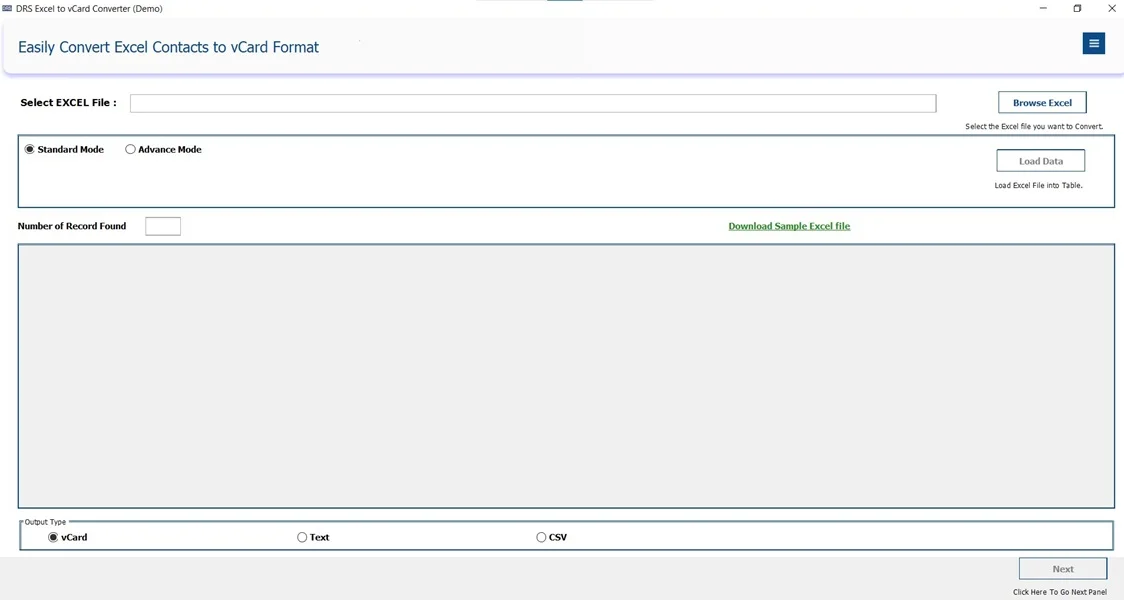
- Now, browse the Excel file, upload the data, and choose vCard as the output file.
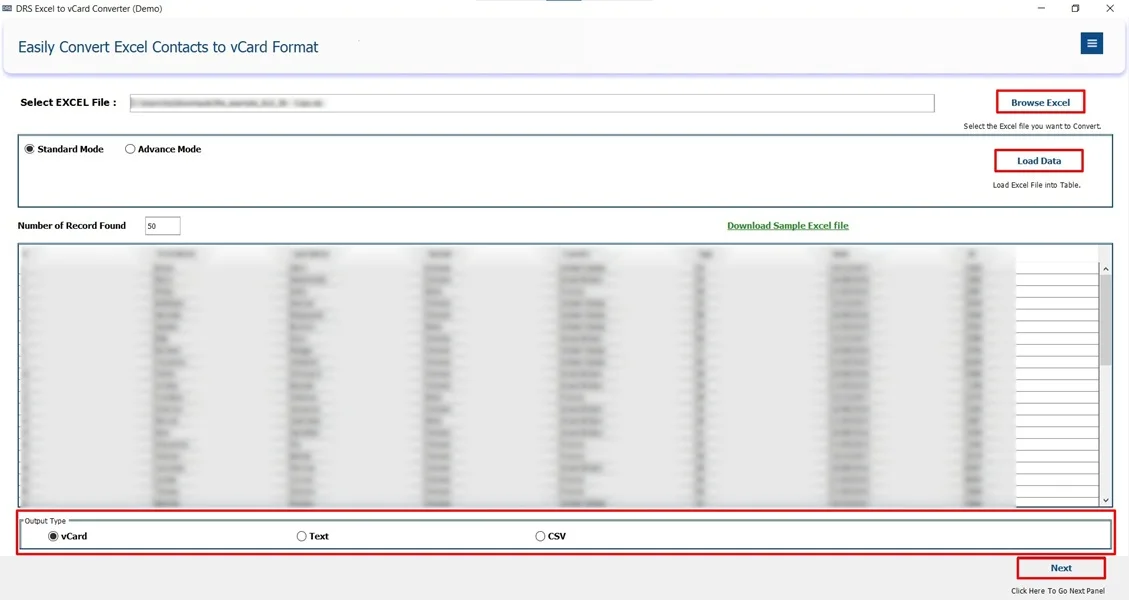
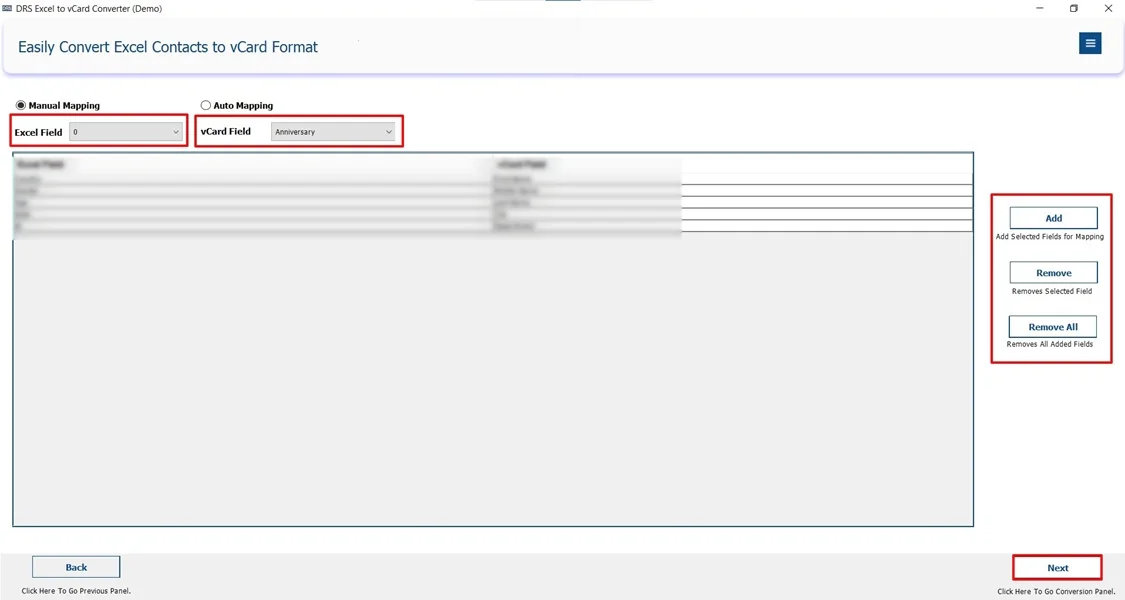
- After that, add, remove, or remove all data manually, and click Next.
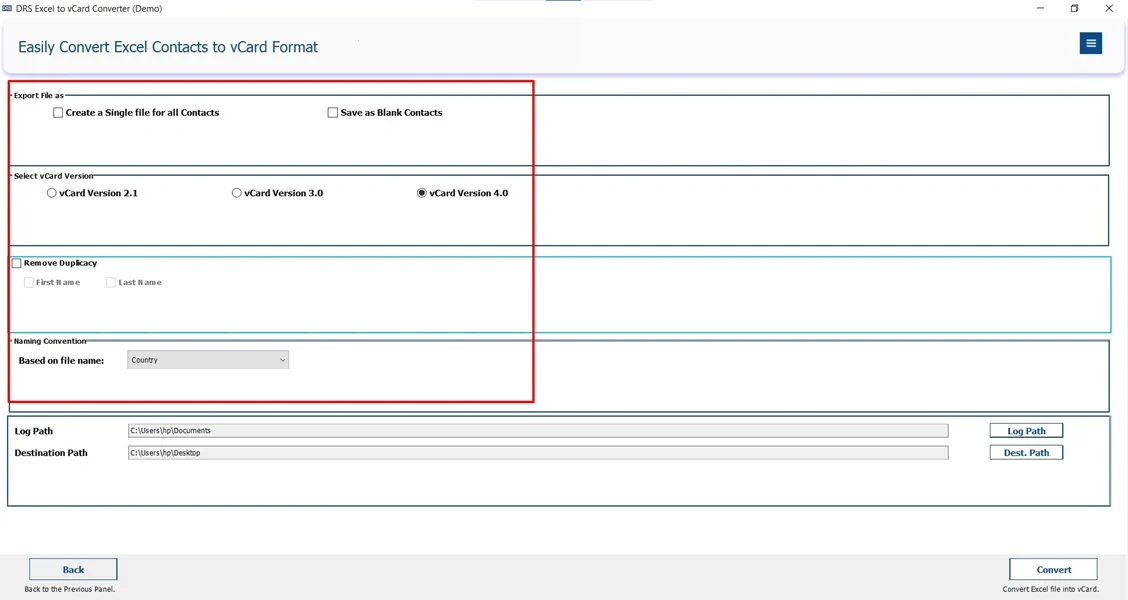
- Further, apply the built–in filters if required and click Next.
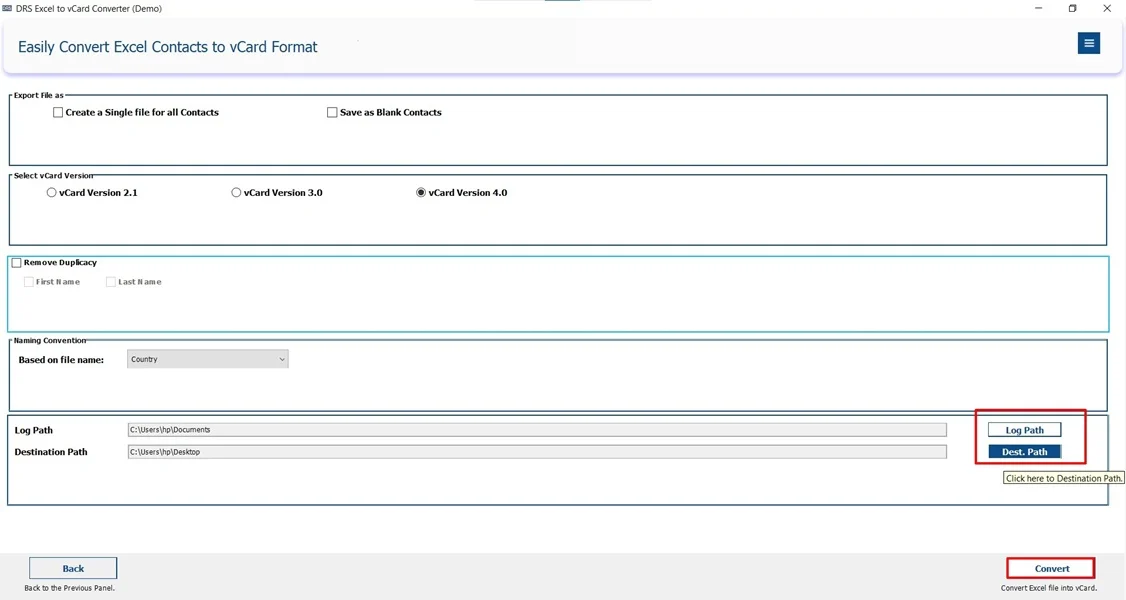
- Finally, enter the log path and destination path to save the file and click Convert to start the process.
Key Advantages of the Tool to Convert Excel to vCard
- It supports XLS and XLSX files.
- Works with bulk contact conversion.
- vCard 2.1, 3.0, and 4.0 support.
- The tool has a user-friendly interface.
- Furthermore, it comes with a free demo service.
Real-Life Example:-
Problem:-
An HR manager was responsible for maintaining a comprehensive list of employee contacts in an Excel (XLS) file. However, the team needed to access these contacts on their mobile devices for easier communication and collaboration. Manually entering each contact was time-consuming.
Solution:-
The HR manager decided to use a professional Excel to vCard converter tool to streamline the process.
Outcome:
Efficiency: The entire process took just a few minutes, saving hours of manual data entry.
Accuracy: All contact details were transferred without missing information or formatting errors.
Compatibility: The VCF file worked seamlessly across all devices, offering everyone to have access to the updated contacts.
Scalability: The tool handled multiple contacts effortlessly. This makes it ideal for large employee databases.
Conclusion
To conclude, converting Excel XLS files to vCard (VCF) format is essential for seamless contact transfer across devices and platforms. While manual methods are also available, they may work for small datasets. Professional Excel to vCard converter tools provide a faster, safer, and more accurate solution to convert Excel to vCard. It mainly works for multiple contact conversions. Thus, choosing the right method offers data accuracy and saves valuable time.
Frequently Asked Questions
Q.1 Which is the best tool to convert Excel to vCard?
Ans. The best tool is a professional Excel to vCard Converter, as it directly converts XLS or XLSX files into vCard (VCF) format while preserving all contact details, field structure, and formatting.
Q.2 Can I convert Excel to vCard without losing contact data?
Ans. Yes, you can save Excel to vCard without data loss by using a reliable DRS XLS to VCF converter tool. It ensures accurate field mapping and preserves names, phone numbers, email addresses, and other contact details throughout the conversion process.
Q.3 Can I convert Excel contacts to vCard without any technical skills
Ans. Yes, the professional Excel to vCard converter tool is designed for non-technical users. They offer a simple, step-by-step interface that allows you to convert Excel contacts to vCard with just a few clicks.
Q.4 Can I convert multiple Excel contacts to a single vCard file?
Ans. Yes, a professional tool allows you to convert multiple Excel contacts into a single vCard (VCF) file or generate separate vCard files for each contact, based on your requirement.
About The Author:

I am Kiran Sharma, a Technical Expert in Content writing. I have technical expertise in the field of Email Backup, Data Recovery, and Email Migration, and resolve technical queries related to Cloud Backup or Email Migration for individuals and businesses.
Related Post