-
Written By Kiran Sharma
-
Approved By
Vikash Bajpai -
Updated on November 18th, 2025
Fast & Easy Way to Export Thunderbird Emails to EML
User Query:-
“I want to migrate the selected emails from my Thunderbird profile to another email client for easy accessibility. How can I quickly export Thunderbird to EML without any loss?”
“I want to migrate the selected emails from my Thunderbird profile to another email client for easy accessibility. How can I quickly export Thunderbird to EML without any loss?”
Introduction: Exporting Thunderbird emails to EML format is a common requirement for users. However, Thunderbird stores emails in MBOX format. On the other side, EML files store individual emails with complete data. This makes them ideal for sharing or archiving. This guide explains the simple manual method. Also, help in learning the MigrateEmails Thunderbird Backup tool to convert Thunderbird to EML.
Understanding: Thunderbird vs EML
|
Thunderbird |
EML |
|
|
Why Export Thunderbird to EML?
- To import emails from Thunderbird to Gmail or other email clients.
- Create portable email backups.
- Moreover, mainly for forensic analysis or legal documentation.
- Also, this conversion can share individual emails quickly.
- Additionally, to preserve formatting and metadata intact with zero data loss.
Free Process to Export Thunderbird Emails to EML
You can follow the manual procedure if you don’t want to depend on third-party software. But remember this manual process converts limited EML files and also comes with some limitations. Let’s follow the step-by-step process to convert from Thunderbird to EML.
Method 1: Using Thunderbird’s Built-in “Save As”
- Firstly, install Mozilla Thunderbird.
- Now, open the folder (Inbox, Sent, etc.).
- After that, select one/multiple emails.
- Right-click → Choose Save As.
- Further, select the destination folder.
- Emails are saved individually in .eml format.
Method 2: Using ImportExportTools NG Add-on
- Firstly, install ImportExportTools NG from Thunderbird Add-ons.
- Now, restart Thunderbird.
- Right-click the folder → ImportExportTools NG.
- Subsequently, select Export folder → EML format.
- Lastly, choose location → save.
Limitations of the Manual Method to Export Thunderbird to EML
- This process cannot export entire profiles at once.
- The large-scale conversions consume a lot of time.
- Sometimes there is a risk of missing metadata or timestamps.
- Also, it requires add-ons (not suitable for enterprise users).
- Therefore, this method is not ideal for corrupted or complex mailboxes.
Secured Approach to Export Emails from Thunderbird to EML
The MigrateEmails Thunderbird Backup Tool is the most efficient solution. This process enables users to migrate Thunderbird Emails to Yahoo Mail effortlessly. Also, the tool guarantees 100% accuracy and high-end security with zero data loss. Therefore, keeps the metadata, structure, and formatting intact. Moreover, this utility converts multiple EML files simultaneously with just a few clicks.
Why Choose This Tool to Export Thunderbird to EML?
- This method exports thousands of emails in one go.
- Also, it preserves folder structure, metadata & attachments intact.
- It supports all Thunderbird profiles & MBOX files.
- There are no add-ons or manual steps needed.
- Therefore, it works on both Windows & Mac.
- Additionally, it has a beginner and user-friendly interface.
One-Time Service Option:
If you prefer not to handle the migration yourself, MigrateEmails also offers a one-time email conversion service. Here, experts will securely convert Thunderbird to EML with 100% accuracy and zero data loss.
Step-by-Step Guide (Quick Recap)
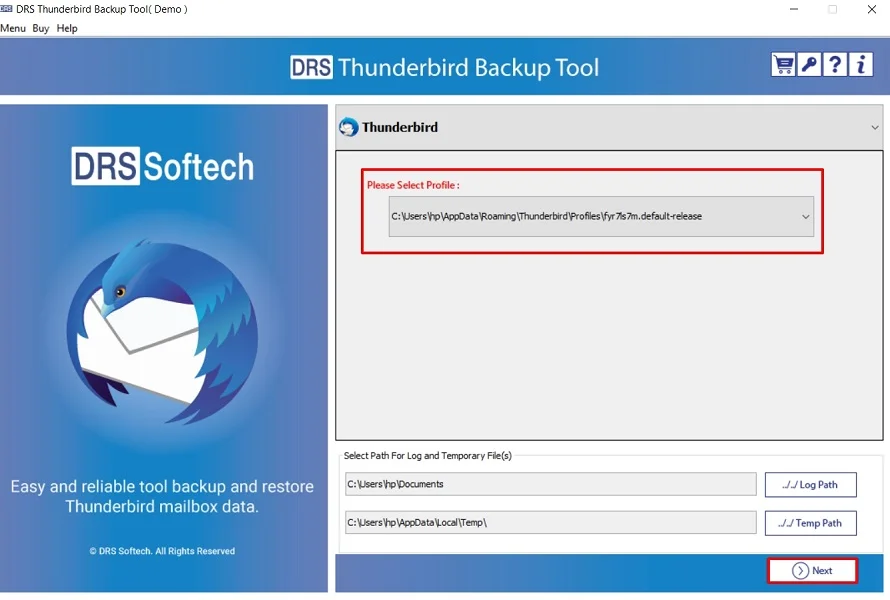
- Firstly, download and install the MigrateEmails Thunderbird Backup tool → Choose the desired profile → Next.
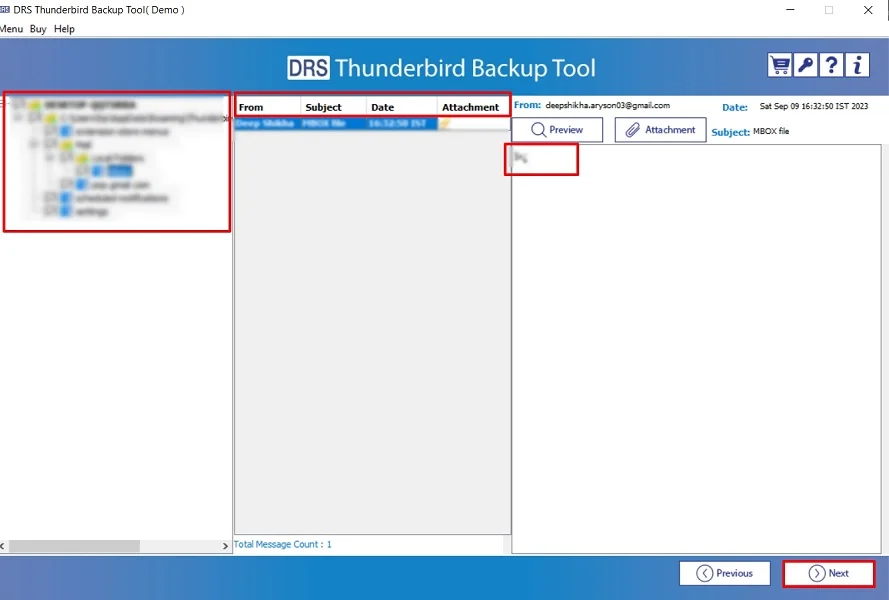
- After that, expand the tree like data structure → Preview to verify the details → Next.
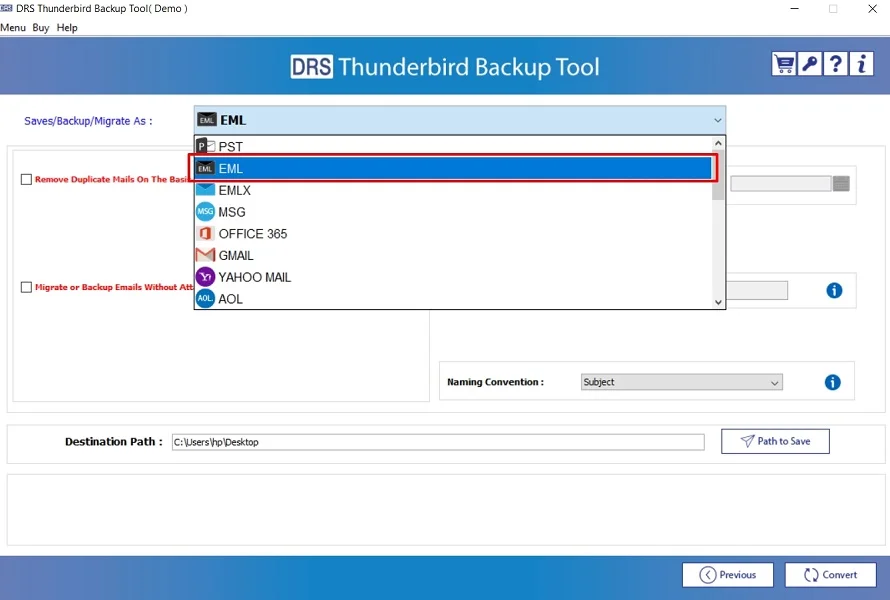
- Subsequently, choose the EML as the saving file format.
- Finally, apply the advanced filters → Convert to start the process.
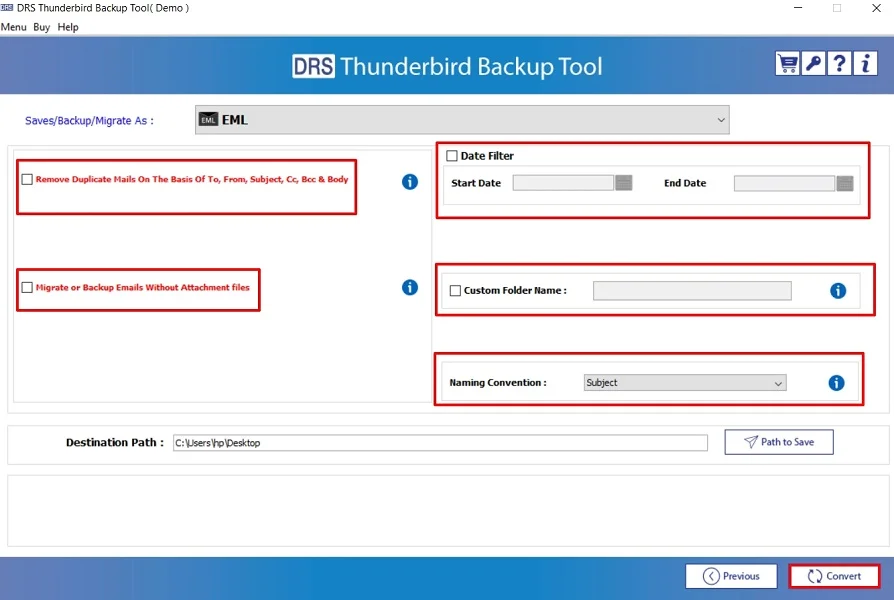
Real-World Scenario:
A digital marketing professional needed to share specific client emails with different team members. They use Apple Mail. Therefore, using the MigrateEmails Thunderbird Backup Tool allowed easy sharing and cross-platform readability without sending entire mailboxes.
Final Thoughts
To sum up, exporting Thunderbird emails to EML ensures portability, compatibility, and long-term data safety, while manual methods work for small jobs. But they are limited and have several disadvantages. Instead, the professional tool provides a faster, safer, and error-free experience. Especially for multiple conversions. Also, it guarantees the highly recommended tool to export Thunderbird to EML with complete accuracy.
Frequently Asked Questions
Q.1 What is the best and easiest tool to export Thunderbird emails to EML format?
Ans. The MigrateEmails Thunderbird backup tool is the best solution to export Thunderbird Emails to EML. Also, it supports auto-detection of Thunderbird profiles. Therefore, it preserves folder hierarchy and allows multiple conversions with complete data integrity.
Q.2 Can I safely convert Thunderbird emails to EML format?
Ans. Yes. Using a professional MigrateEmails tool ensures a 100% safe conversion with no risk of data corruption. Moreover, the automated method maintains email headers, formatting, and folder structure intact.
Q.3 Can I export Thunderbird emails to EML without any technical skills?
Ans. Absolutely. The reliable utility is designed for all users with technical and non-technical backgrounds. The interface is simple, requiring only a few clicks to load Thunderbird data and convert from Thunderbird to EML.
Q.4 How can I convert multiple Thunderbird emails to EML at once?
Ans. To convert multiple emails in bulk, use the batch export feature of the MigrateEmails Thunderbird Backup Software. It allows exporting entire folders or profiles to EML in one go. Also, it saves time and eliminates manual effort.
About The Author:

I am Kiran Sharma, a Technical Expert in Content writing. I have technical expertise in the field of Email Backup, Data Recovery, and Email Migration, and resolve technical queries related to Cloud Backup or Email Migration for individuals and businesses.
Related Post