-
Written By Kiran Sharma
-
Approved By
Vikash Bajpai -
Updated on December 24th, 2025
Import Yahoo Mail to Thunderbird – Easy & Secure Guide
User Query:-
“I want to forward my Yahoo Mail emails into Thunderbird. What is the easiest and safest way to import Yahoo Mail to Thunderbird without any loss?”
“I want to forward my Yahoo Mail emails into Thunderbird. What is the easiest and safest way to import Yahoo Mail to Thunderbird without any loss?”
Introduction:- Saving Yahoo Mail to Thunderbird enables offline backups. Thunderbird is a free desktop email client. Yahoo Mail is a web-based email platform. However, migrating from a web-based platform to a desktop client can be challenging. Although IMAP configuration can help. But it often leads to sync issues and data inconsistencies. Still, this guide explains the manual way to export Yahoo Emails to Thunderbird. Additionally, it covers an expert MigrateEmails Yahoo Backup Tool to do the same securely.
Key Reasons to Choose Thunderbird Over Yahoo Mail
- To access emails offline.
- Creating a local backup of Yahoo Mail.
- Managing multiple email accounts in one place.
- Preserves important emails and attachments.
- Avoiding dependency on web-based access.
- Also, to organize emails with advanced Thunderbird features.
Manual Setup to Import Yahoo Mail to Thunderbird
Thunderbird supports IMAP configuration. This can be used to set up Yahoo Mail manually. The manual method is suitable only for small mailboxes and is very time-consuming.
Process to Transfer Yahoo Mail to Thunderbird Manually
- Firstly, open Mozilla Thunderbird.
- Now, click Add Mail Account.
- Enter your Yahoo email address and password.
- Choose IMAP as the account type.
- Then, allow Thunderbird to sync Yahoo folders.
- Lastly, wait for emails to download locally.
Limitations to Manually Add Yahoo Mail to Thunderbird
- It consists of slow syncing for large mailboxes.
- This process requires a Yahoo App Password.
- Attachments may not download properly.
- There is a risk of missing or duplicate emails.
- The manual method has no selective export options.
- Moreover, it depends on continuous internet connectivity.
Standard Tool to Import Yahoo Mail to Thunderbird
To avoid manual issues, the MigrateEmails Yahoo Backup Tool provides a secure solution. It allows users to export Yahoo Mail to Word with no data loss. This ensures the process while preserving attachments, folders, and metadata. The tool has the capacity to restore multiple emails simultaneously. Also, it guarantees 100% accuracy and complete data integrity.
One-Time Backup Service:-
If you prefer expert assistance, the MigrateEmails One-Time Backup Service is available. The professionals securely move Yahoo Mail emails to Thunderbird online. Additionally, they ensure complete privacy and data integrity.
If you prefer expert assistance, the MigrateEmails One-Time Backup Service is available. The professionals securely move Yahoo Mail emails to Thunderbird online. Additionally, they ensure complete privacy and data integrity.
Verified Guide to Use the MigrateEmails Software
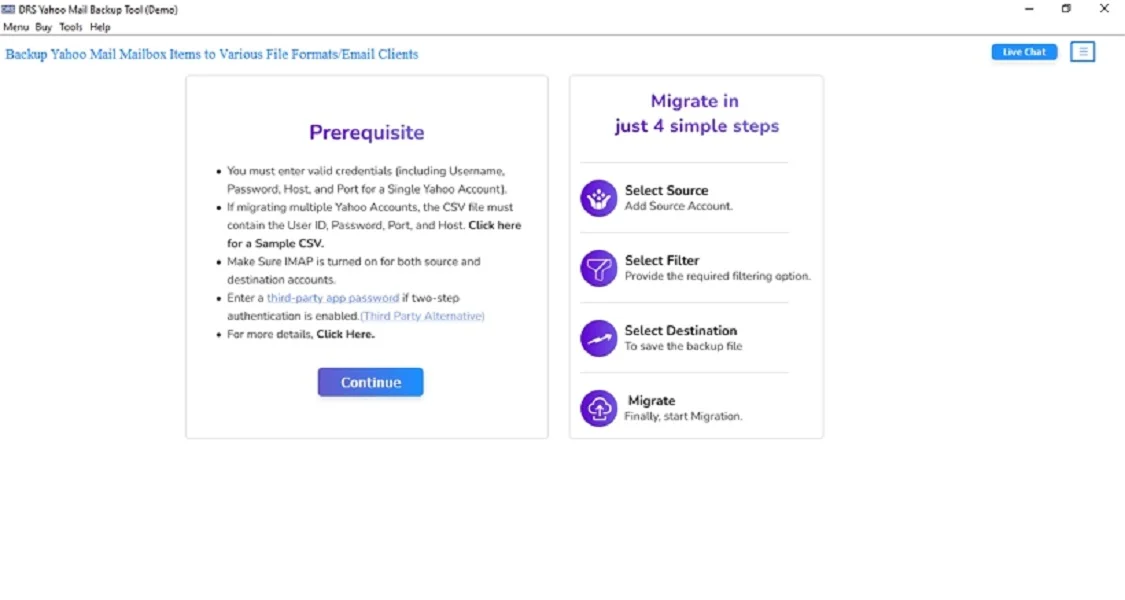
- Firstly, download the MigrateEmails Yahoo Backup Tool and click Continue.
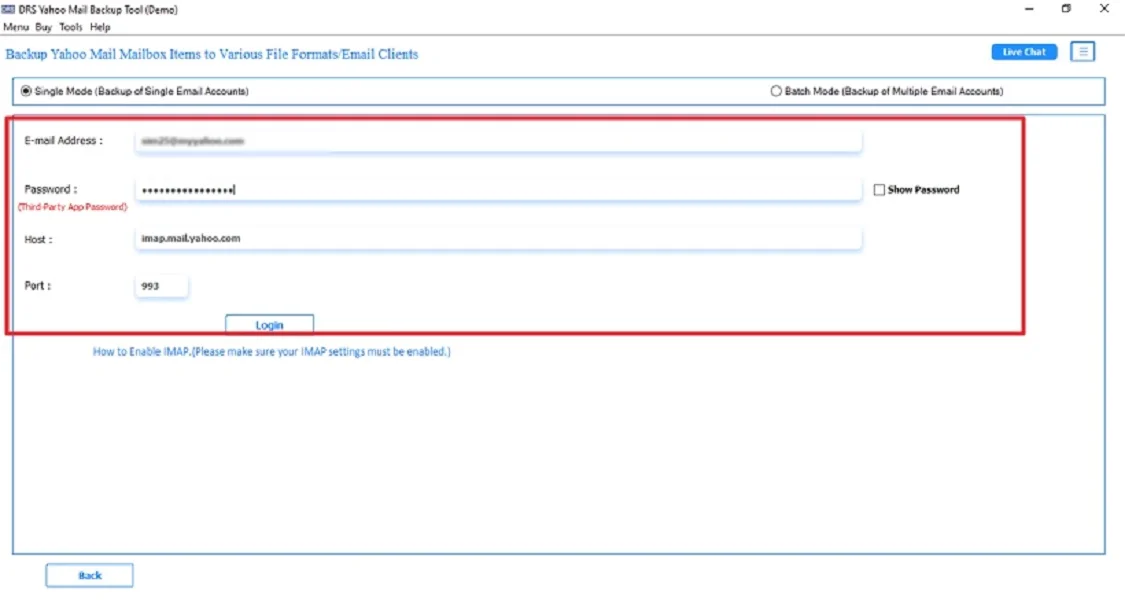
- After that, log in using the Yahoo Mail account credentials.
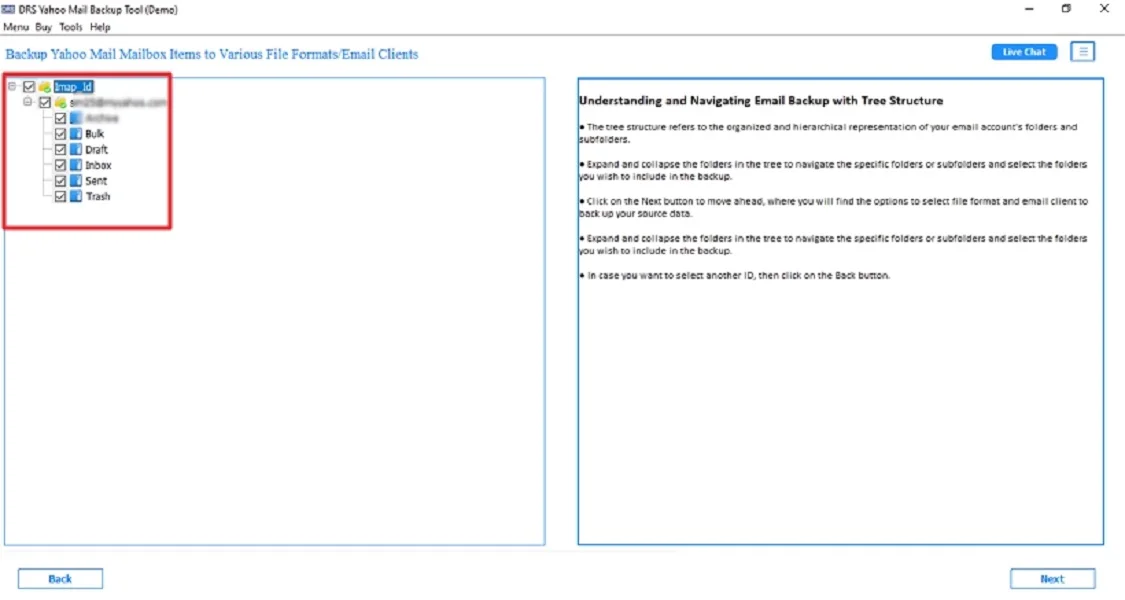
- Further, drag the data and preview the mailbox → Next.
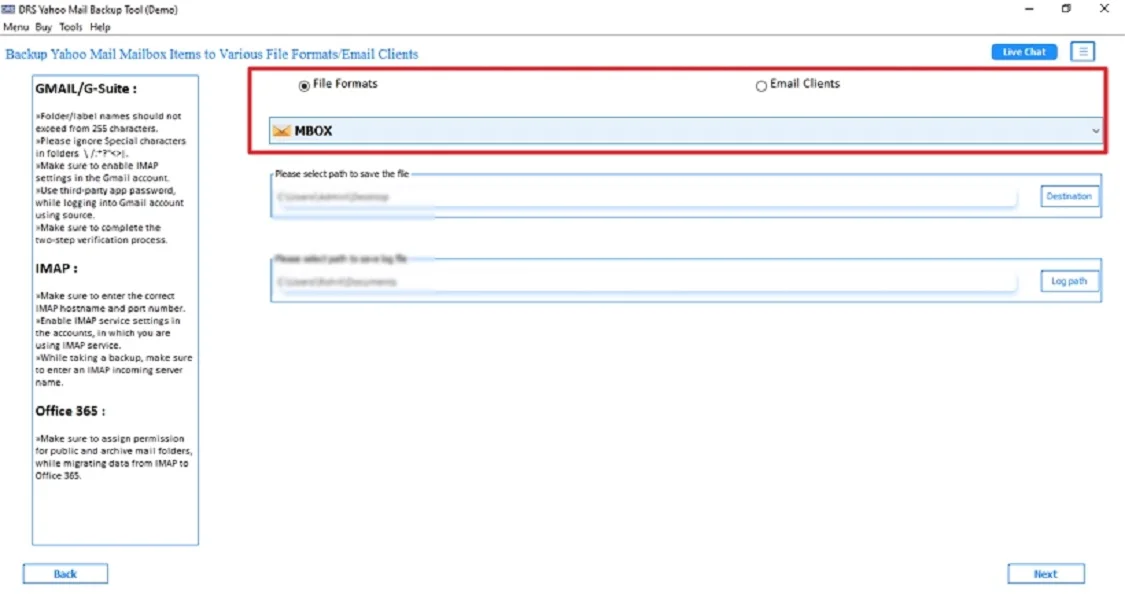
- Subsequently, choose MBOX as the saving file format. (As Thunderbird supports the MBOX file directly.)
- Finally, apply the advanced filters if needed and click Start Process to begin.

Benefits of Using the Tool to Import Yahoo Mail to Thunderbird
- It helps to export Yahoo Mail to MSG and other file formats.
- Preserves folder hierarchy and email formatting.
- The tool has advanced filters for selective migration.
- Works on previous and latest versions of Windows and macOS.
- Also, it is suitable for non-technical users.
When Should You Choose Manual vs Automated Conversion?
Choosing the right method depends on the size of your mailbox, technical expertise, etc.
| Choose the Manual Method When: | Choose the Automated Method When: |
|
|
Note: Manual conversion is suitable for limited use. An automated solution is the best choice for bulk, accurate, and secure conversion.
Real-Life Example:-
A consultant needed offline access to years of Yahoo emails for documentation. Using an automated MigrateEmails Yahoo backup tool, they converted all Yahoo Mail data into Thunderbird with attachments preserved, saving time and avoiding manual errors.
A consultant needed offline access to years of Yahoo emails for documentation. Using an automated MigrateEmails Yahoo backup tool, they converted all Yahoo Mail data into Thunderbird with attachments preserved, saving time and avoiding manual errors.
Conclusion
In short, importing Yahoo Mail to Thunderbird is an effective way to manage emails offline. While manual IMAP configuration works for limited data. It often causes syncing issues and data loss risks. The Yahoo Backup Tool offers a reliable solution to import Yahoo Mail to Thunderbird effortlessly. For accurate and stress-free migration, this approach is highly recommended.
Frequently Asked Questions
Q.1 Is it possible to import Yahoo Mail to Thunderbird without data loss?
Ans. Yes, you can shift Yahoo Mail to Thunderbird without data loss by using a reliable MigrateEmails Yahoo backup tool. This preserves email content, attachments, folders, and metadata.
Q.2 How do I export Yahoo emails to Thunderbird easily without any technical knowledge?
Ans. The easiest way is to use an automated Yahoo backup tool with a user-friendly interface that requires only login credentials and completes the process in simple steps.
Q.3 Can I transfer Yahoo Mail emails to Thunderbird in bulk at once?
Ans. Yes, the advanced MigrateEmails Yahoo backup tool support bulk transfer. This allows you to import entire Yahoo mailboxes or selected folders into Thunderbird in a single operation.
About The Author:

I am Kiran Sharma, a Technical Expert in Content writing. I have technical expertise in the field of Email Backup, Data Recovery, and Email Migration, and resolve technical queries related to Cloud Backup or Email Migration for individuals and businesses.
Related Post