-
Written By Kiran Sharma
-
Updated on December 13th, 2025
Thunderbird Not Responding on Windows? Fix It Fast
User Query:-
“My Mozilla Thunderbird email client keeps freezing or showing Thunderbird not responding on Windows. How can I fix this issue quickly without losing my emails or settings?”
“My Mozilla Thunderbird email client keeps freezing or showing Thunderbird not responding on Windows. How can I fix this issue quickly without losing my emails or settings?”
Introduction:- Mozilla Thunderbird is a widely used desktop email client. But Windows users often face issues where Thunderbird becomes slow, freezes, or stops responding entirely. This problem usually occurs due to large mailboxes, corrupted profiles, add-on conflicts, or system resource limitations. In this guide, we will learn why Mozilla Thunderbird not responding on Windows. Also, covers how to fix it using manual troubleshooting steps. Additionally, this blog explains how to use a professional MigrateEmails Thunderbird Backup Tool to avoid data loss.
Common Reasons: Why Thunderbird Not Responding?
The following are the common reasons:
- Large Thunderbird mailbox files can cause performance issues.
- A corrupted Thunderbird profile may lead to crashes or freezing.
- Outdated or conflicting add-ons can disrupt functionality.
- Antivirus or firewall interference may block Thunderbird processes.
- An outdated Thunderbird version can cause stability issues.
- Low system memory or disk space can slow down Thunderbird.
The purpose of Fixing Thunderbird is Not Working Issue
Users look for a quick fix because:
- Thunderbird freezes during startup or email syncing.
- The application crashes while opening folders or searching emails.
- Therefore, the large mailboxes slow down performance.
- Also, the important emails become inaccessible.
- Work productivity is affected due to repeated hangs.
Thunderbird Not Responding: Manual Approaches to Fix This
If you don’t want to install any external software, you can go for a manual workflow. Follow the troubleshooting steps below one by one.
Step1. Restart Thunderbird in Safe Mode
- Press Windows + R, type thunderbird –safe–mode, and press Enter.
- Now, click Continue in Safe Mode.
- If Thunderbird works fine, disable unnecessary add-ons.
Step2. Disable Add-ons Manually
- Then, open Thunderbird.
- Go to Tools → Add–ons and Themes.
- Disable all add-ons.
- Restart Thunderbird and check performance.
Step3. Compact Thunderbird Folders
- After that, open Thunderbird.
- Right–click on the email account.
- Select Compact.
- This removes deleted email traces and reduces file size.
Step4. Repair Thunderbird Folders
- Further, right–click the affected mailbox folder.
- Click Properties → Repair Folder.
- Wait for Thunderbird to rebuild the folder index.
Step5. Update Thunderbird
- Lastly, open Thunderbird.
- Go to Help → About Thunderbird.
- Install the latest available updates.
- Restart the application.
Limitations of the Manual Process to Thunderbird Not Responding
- This process does not permanently fix corruption issues.
- It is very time-consuming for large mailboxes.
- There is a risk of data loss if profiles are severely damaged.
- Moreover, it requires repeated troubleshooting.
- It is not effective if MBOX files are corrupted.
Thunderbird Failed to Connect: Advanced Method To Solve
If Thunderbird still does not respond after manual fixes, the issue may be corrupted MBOX files. In such cases, using a professional MigrateEmails Thunderbird Backup Tool is the safest solution. It allows users to backup Thunderbird Emails to External Hard Drive. Moreover, this software ensures complete data preservation with zero loss.
One-Time Service Option:-
If you don’t want to troubleshoot or use software yourself, you can opt for a One-Time Thunderbird Repair Service. The experts will analyze the issue, recover your emails securely, and restore mailbox access using the MigrateEmails Thunderbird Backup Tool without risking data loss.
If you don’t want to troubleshoot or use software yourself, you can opt for a One-Time Thunderbird Repair Service. The experts will analyze the issue, recover your emails securely, and restore mailbox access using the MigrateEmails Thunderbird Backup Tool without risking data loss.
Instant Solution to Thunderbird Not Responding
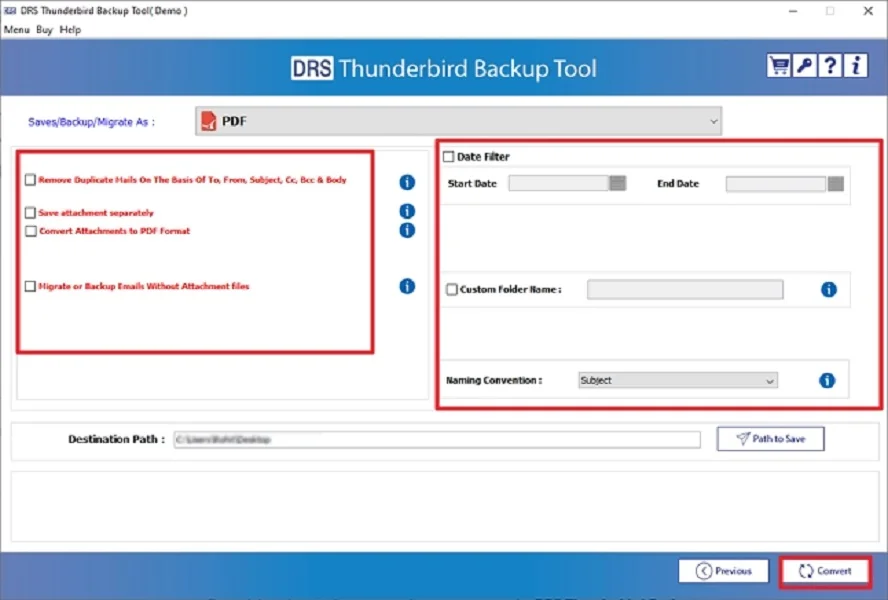
- Firstly, launch the MigrateEmails Thunderbird Backup Software.
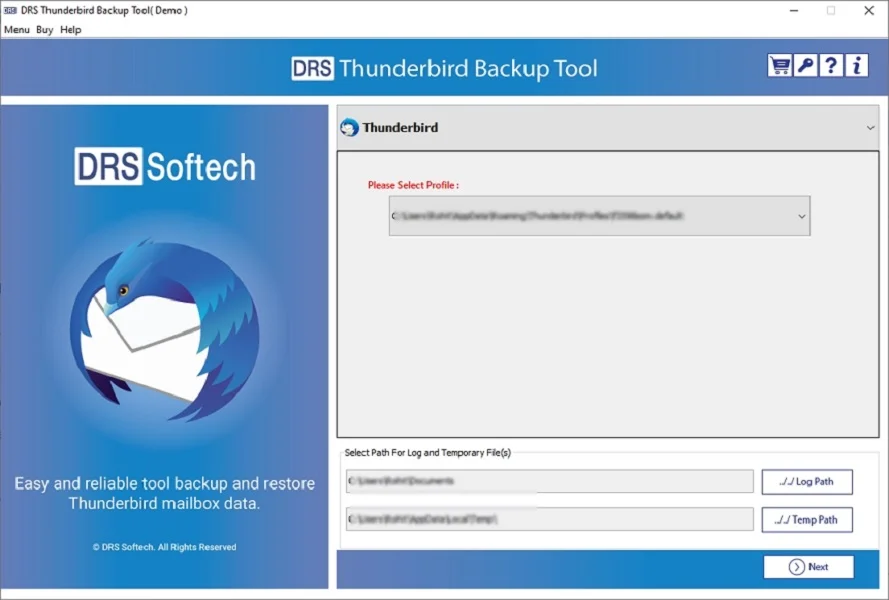
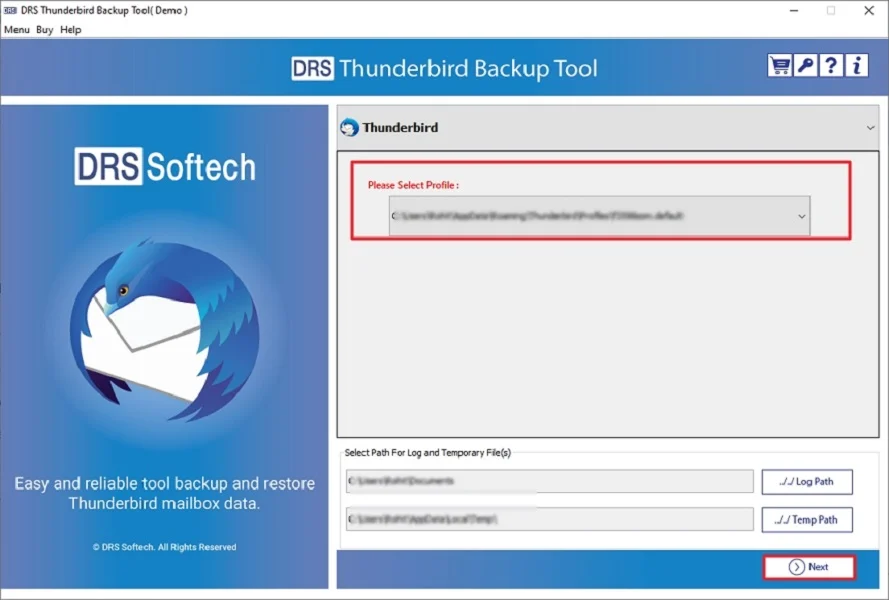
- Now, select the Thunderbird profile via which you want to convert → Next.
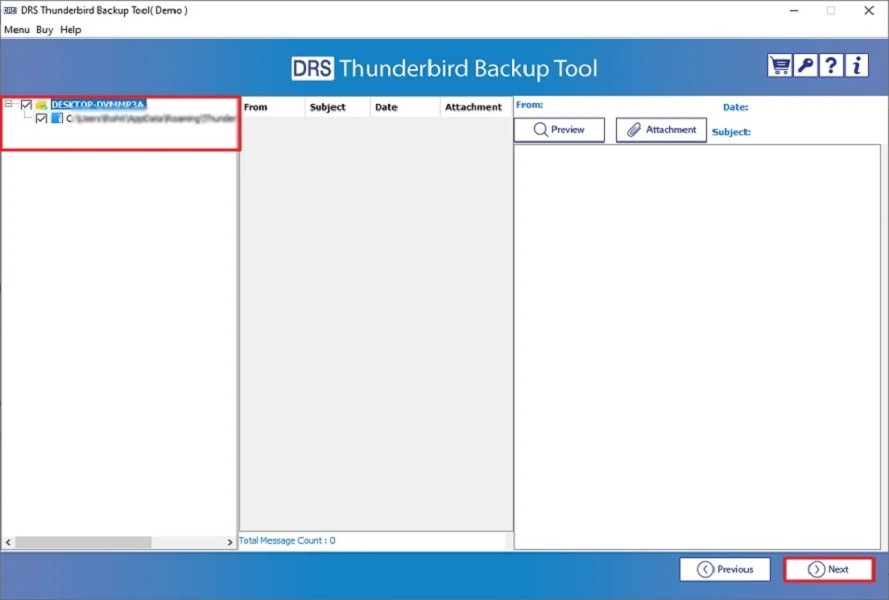
- Preview to verify the entire mailbox items → Next.
- After that, save Thunderbird in PDF format. (You can choose either file format or email client according to your choice.)
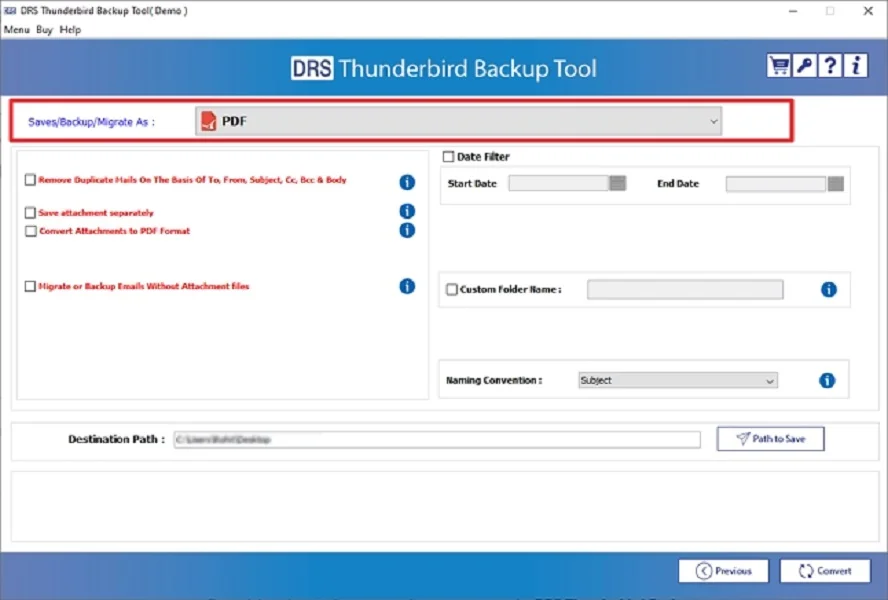
- Finally, apply the built-in filters (if needed) and click Convert to begin.
Benefits of the Tool to Thunderbird Not Responding
- It repairs corrupted Thunderbird MBOX files.
- Recover emails, attachments, and folder structure.
- Export Thunderbird Contacts to Outlook, or other formats.
- Prevent application freezes caused by damaged files.
- Also, it works smoothly on all Windows versions.
Real-Life Example:-
A corporate user with a 20GB Thunderbird mailbox faced frequent freezes during startup. Manual fixes failed repeatedly, and Thunderbird not working after update. Using a professional repair tool, the corrupted mailbox was repaired, emails were recovered, and Thunderbird started working normally again, without any data loss.
A corporate user with a 20GB Thunderbird mailbox faced frequent freezes during startup. Manual fixes failed repeatedly, and Thunderbird not working after update. Using a professional repair tool, the corrupted mailbox was repaired, emails were recovered, and Thunderbird started working normally again, without any data loss.
Conclusion
In short, Thunderbird Not Responding on Windows is a common issue caused by corrupted mailboxes or outdated software. While manual fixes work for minor issues, they may not resolve deep corruption problems. For a permanent solution, experts recommend using a professional Thunderbird repair tool to restore email access safely and efficiently. Also, this automated tool ensures the process with complete data preservation.
Frequently Asked Questions
Q.1 Why is Thunderbird not responding on Windows 10 or Windows 11?
Ans. Thunderbird may stop responding due to oversized mailbox files, a corrupted profile, outdated add-ons, insufficient system resources, or conflicts with antivirus or firewall software.
Q.2 How to fix Mozilla Thunderbird not responding issue without losing emails?
Ans. You can fix the issue safely by starting Thunderbird in Safe Mode, repairing the profile, disabling problematic add-ons, compacting folders, or creating a new profile after backing up your data.
Q.3 Can I fix Thunderbird not working issue without technical knowledge?
Ans. Yes, basic fixes such as updating Thunderbird, restarting in Safe Mode, disabling add-ons, or using a professional MigrateEmails Thunderbird repair tool can resolve the issue without requiring technical expertise.
About The Author:

I am Kiran Sharma, a Technical Expert in Content writing. I have technical expertise in the field of Email Backup, Data Recovery, and Email Migration, and resolve technical queries related to Cloud Backup or Email Migration for individuals and businesses.
Related Post