-
Written By Kiran Sharma
-
Approved By
Vikash Bajpai -
Updated on January 5th, 2026
How to Import vCard Contacts to iCloud on Mac & Windows
David’s Query:-
“I have VCF contact files saved on my Mac/Windows system and want to import them into iCloud Contacts. But I don’t have technical knowledge. What is the easiest and safest way to import vCard Contacts to iCloud without losing any contact details?”
“I have VCF contact files saved on my Mac/Windows system and want to import them into iCloud Contacts. But I don’t have technical knowledge. What is the easiest and safest way to import vCard Contacts to iCloud without losing any contact details?”
Introduction:- vCard files are commonly used to store contact information such as names, phone numbers, email addresses, and addresses. iCloud Contacts helps users securely store and sync contacts across Apple devices and access them from Windows browsers. However, merging vCard contacts into iCloud ensures centralized contact management, better accessibility, and secure cloud backup. This guide explains the manual methods to convert VCF Files to iCloud Contacts. Also, covers an automated MigrateEmails VCF to CSV Converter Tool.
Manual Approach for Converting vCard Contacts into iCloud
Don’t prefer to download the external software? You can therefore choose the manual technique. Apple provides a built-in option to import vCard files directly into iCloud Contacts. Therefore, this method is suitable for a limited number of contacts.
Steps to Manually Import vCard Contacts to iCloud
- Firstly, open a web browser and sign in to iCloud.
- Log in using your Apple ID credentials.
- Now, click on Contacts.
- Select the Settings (gear icon) in the bottom-left corner.
- After that, choose Import vCard.
- Browse and select the VCF file from your Mac or Windows system.
- Finally, click Open to start the import.
Pitfalls of this Method to Import Contacts from vCard to iCloud
- Not suitable for bulk or multiple VCF files.
- No option to preview contacts before import.
- Sometimes, duplicate contacts may occur.
- There is limited control over contact fields.
- Moreover, it is time-consuming for large contact lists.
Advanced Approach to Import vCard Contacts to iCloud
To import multiple vCard files simultaneously, using a professional MigrateEmails VCF Converter Tool is recommended. It helps users organize, manage, and prepare vCard files efficiently before importing them into iCloud Contacts. This automated method simplifies the process and is ideal for non-technical users. Furthermore, it allows users to import VCF to Yahoo Mail with zero data loss. The software includes some of the key benefits as follows:
- Completes the process with full data preservation.
- Ensures accuracy, privacy, and high-end security.
- Highly suitable for users with a non-tech background.
- Converts multiple files simultaneously without any loss.
- Allows users to import VCF to Google Contacts and more.
One-Time Conversion Service :-
If you prefer not to perform the task yourself, MigrateEmails offers a One-Time Contact Migration Service. Connect with our team. The experts securely import vCard Contacts to iCloud while ensuring complete data accuracy. We prioritize your privacy, handling your data with the highest security standards. This service saves your time and effort, providing a seamless migration experience without the need for technical expertise.
If you prefer not to perform the task yourself, MigrateEmails offers a One-Time Contact Migration Service. Connect with our team. The experts securely import vCard Contacts to iCloud while ensuring complete data accuracy. We prioritize your privacy, handling your data with the highest security standards. This service saves your time and effort, providing a seamless migration experience without the need for technical expertise.
Detailed Guide to Upload vCard File to iCloud
- Firstly, launch the MigrateEmails VCF to CSV Migrator Software.
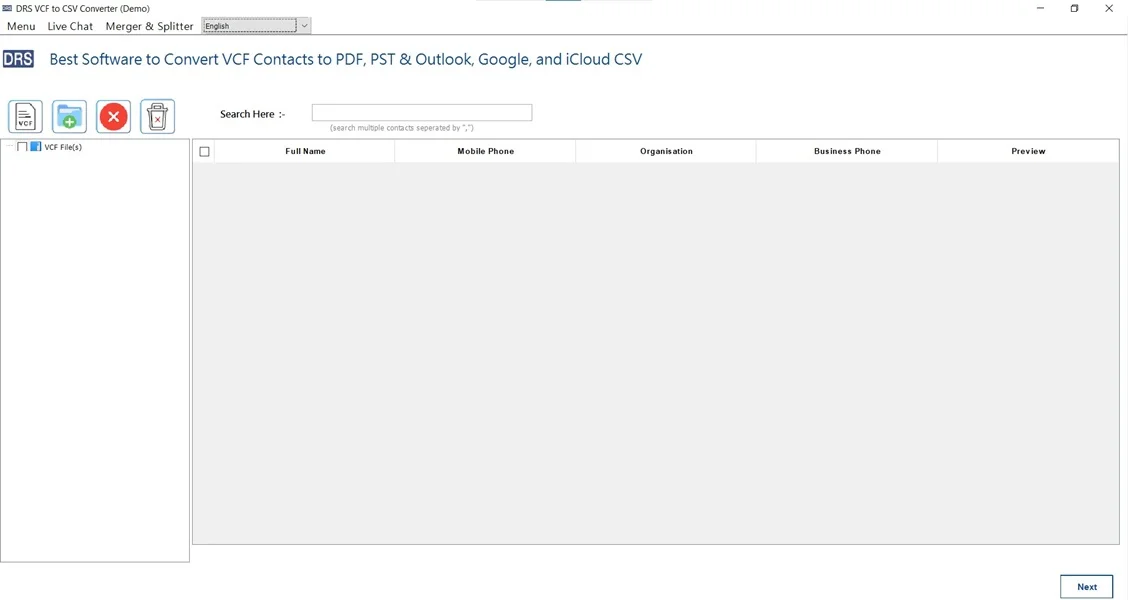
- Further, select VCF, upload the VCF file that you want to convert, and click Next.
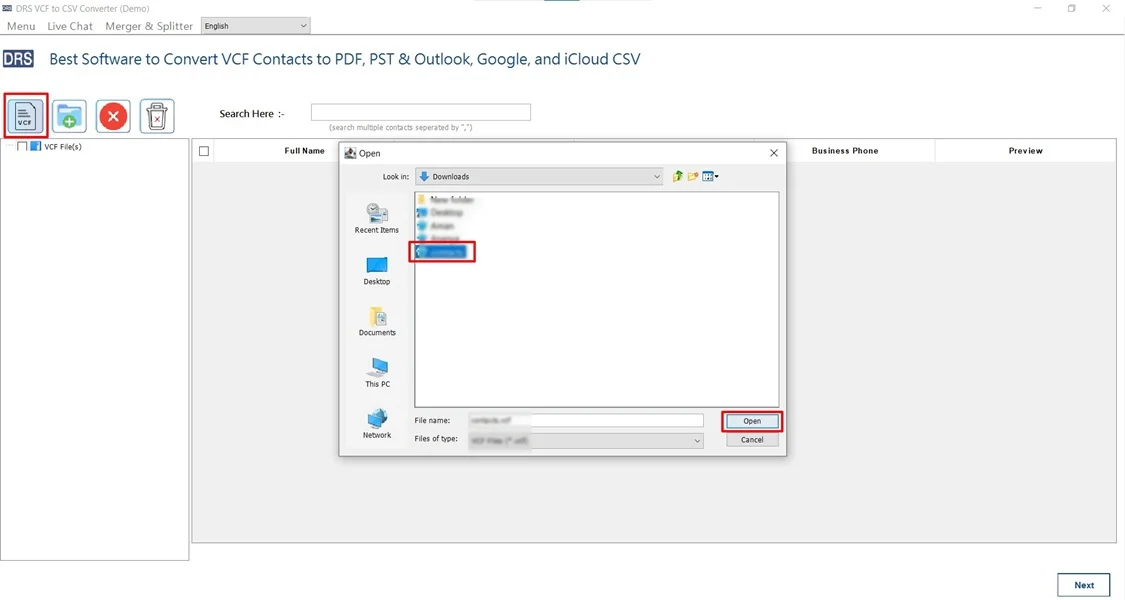
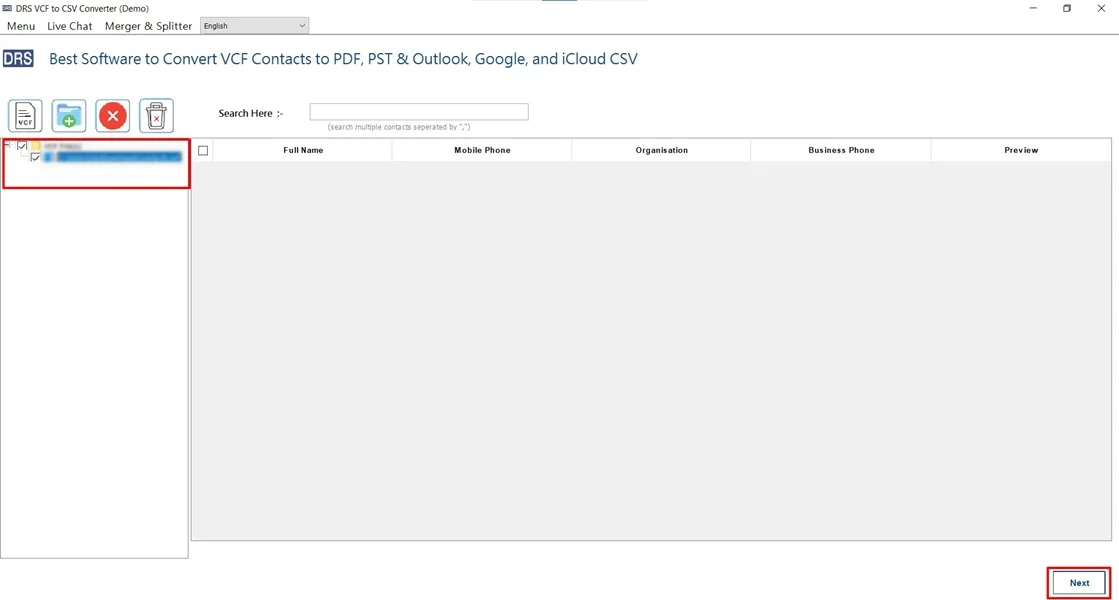
- After that, drag the tree hierarchy, preview the details, and click Next.
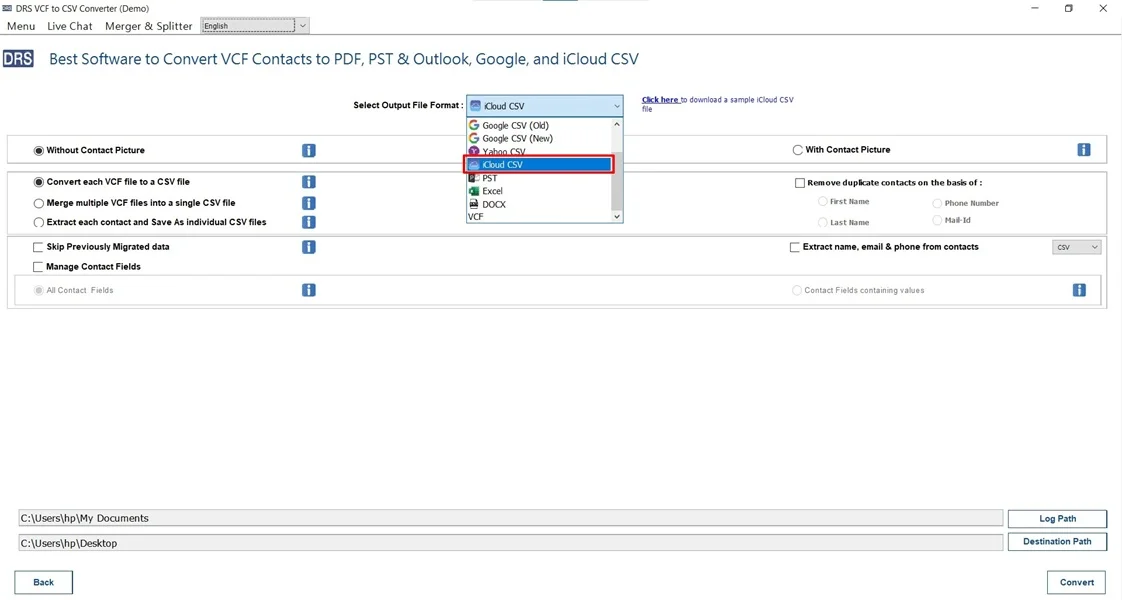
- Now, choose iCloud CSV as the saving output format.
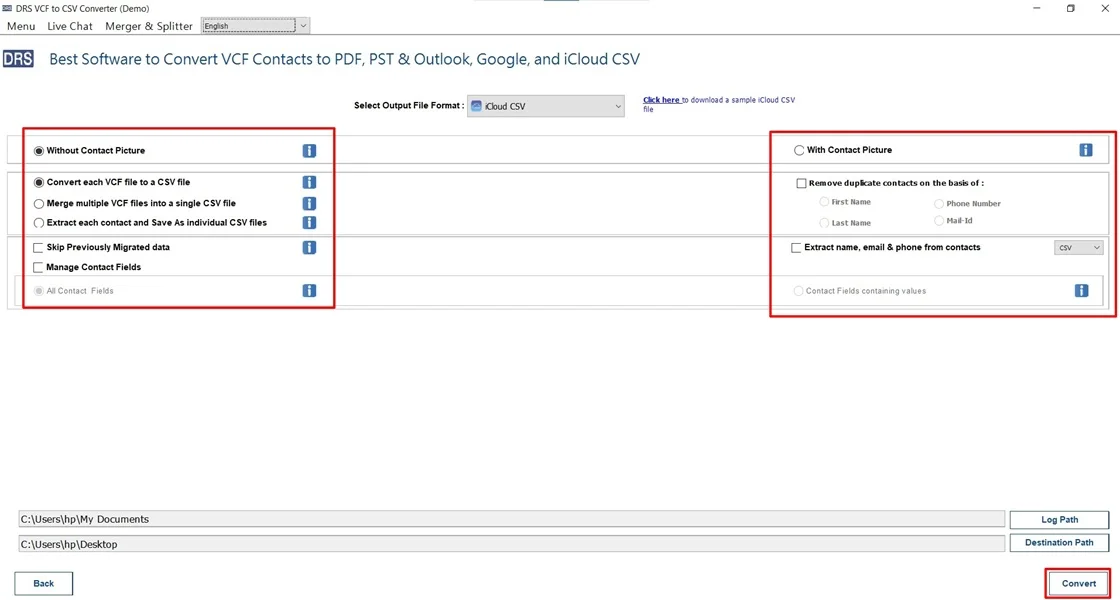
- In the end, apply the built-in filters and click Convert to begin.
Use Case Scenarios
Below are some real-world situations where the MigrateEmails VCF Converter Tool is useful.
| Switching from Apple to Other Platforms
Users moving from iPhone, iPad, or Mac may have contacts stored as vCard (VCF) files. Using VCF Converter allows easy import into other platforms like Gmail, Outlook, or Android devices. |
Recovering Contacts from Backup Files
If contacts are backed up in VCF format due to accidental deletion or device issues, using a migrateEmails vCard Converter provides an easy way to restore and manage contacts across multiple platforms. |
Managing Contacts in Spreadsheets/CRM Systems
Professionals who need to organize, analyze, or update contact lists in bulk can convert vCard files through a VCF Converter for easy editing in Excel, Google Sheets, or CRM tools. |
| Migrating Contacts from iCloud to Email Clients
When switching from iCloud to services like Gmail, Yahoo, or corporate email systems, exporting vCard contacts with the help of MigrateEmails VCF Converter helps centralize and organize contacts for seamless migration. |
Corporate or Business Contact Migration
Companies storing client or employee contacts in vCard format use it for integration with business systems, email campaigns, or team collaboration platforms. This can be done using the MigrateEmails VCF to CSV Converter utility. |
Exporting Contacts from Desktop Email Clients
Users exporting contacts from Outlook, Thunderbird, or other email software often get VCF files. The VCF Converter allows smoother import into modern tools and systems without manual re-entry. |
Manual vs Advanced Approach Comparison Table
| Aspects | Manual Approach | Advanced Approach |
| Ease of Use | Simple but repetitive | Very easy and guided |
| Multiple Conversion | Not supported | Supported |
| Data Accuracy | Moderate | High |
| Time Consumption | High for multiple contacts | Fast and efficient |
| Technical Skills Required | Basic | None |
Conclusion
To sum up, importing vCard contacts to iCloud is essential for secure contact management and synchronization across devices. While the manual method works for small contact lists, it has limitations. For a fast, accurate, and beginner-friendly experience, experts recommend using VCF to CSV Converter. Also, a one-time professional service to import vCard Contacts to iCloud while ensuring error-free conversion without data loss.
Frequently Asked Questions
Q.1 Can I import multiple vCard files into iCloud at once?
Ans. iCloud’s manual import option supports limited uploads. To import multiple vCard files at once without errors or duplicates, using an automated MigrateEmails vCard conversion tool is the most reliable approach.
Q.2 How can I safely convert VCF files to iCloud contacts without data loss?
Ans. To ensure data safety, always verify the VCF file format and take a backup of existing contacts. For complete accuracy and zero data loss, a professional MigrateEmails VCF to CSV Converter tool is recommended.
Q.3 Can I import contacts from vCard to iCloud without technical skills?
Ans. Yes. Both iCloud’s built-in import option and the professional MigrateEmails tool is designed to be user-friendly. As it allows non-technical users to import vCard contacts easily.
Q.4 Which is the best tool to upload a vCard file to iCloud?
Ans. A dedicated and trusted MigrateEmails vCard conversion tool is the best option. It supports bulk imports, preserves all contact fields, and ensures secure, error-free contact upload to iCloud.
About The Author:

I am Kiran Sharma, a Technical Expert in Content writing. I have technical expertise in the field of Email Backup, Data Recovery, and Email Migration, and resolve technical queries related to Cloud Backup or Email Migration for individuals and businesses.
Related Post