-
Written By Kiran Sharma
-
Approved By
Vikash Bajpai -
Updated on January 6th, 2026
Convert VCF to CSV: Step-by-Step Manual & Automated Guide
User Query:-
Contacts saved in VCF (vCard) format are compatible with phones and email apps. But they become difficult to manage when you need to upload them to Excel or databases that only accept CSV files. This raises a common question: How do I convert VCF to CSV without compromising contact data?
Contacts saved in VCF (vCard) format are compatible with phones and email apps. But they become difficult to manage when you need to upload them to Excel or databases that only accept CSV files. This raises a common question: How do I convert VCF to CSV without compromising contact data?
Introduction:- VCF (vCard) files are widely used for storing contact information. But they are not always compatible with spreadsheets, CRM tools, or bulk contact management systems. CSV format, on the other hand, is universally supported and easy to edit. This blog explains how to convert VCF file to CSV manually. Moreover, highlights a MigrateEmails VCF to CSV Converter Tool to complete the process with no data loss.
Understanding VCF & CSV Formats
Before deep diving into the conversion process, let’s understand the two formats properly.
|
Major Aspects |
VCF (vCard) |
CSV |
|
Storing contacts |
Managing contacts |
|
Limited |
Easy (Excel/Sheets) |
|
Weak |
Strong |
|
Email & mobile apps |
Databases & spreadsheets |
Top Reasons Why Users Convert VCF to CSV
- To upload contacts into CRM software.
- For cleaning, editing, or organizing contact lists.
- Merging multiple contact files into one sheet.
- Sharing contacts in a universally accepted format.
- Also, to avoid compatibility issues with business tools.
Manual Conversion to Change VCF to CSV
If you are facing difficulty using any external software, you can therefore move forward using the manual path. But remember that this method only works with a limited number of files.
How Manual Conversion Usually Works
- Firstly, import the VCF file into an email client or contact manager.
- Export contacts again by selecting CSV as the output format.
- Lastly, open the exported file in Excel to review data.
Why is This Method Not Ideal to Convert VCF to CSV?
- Not suitable for large or multiple VCF files.
- Risk of data mismatch or missing fields.
- It is time-consuming for bulk conversion.
- Requires technical understanding of contact fields.
- No advanced filtering or selective conversion.
Automated Conversion to Export vCard Contacts to CSV
An automated MigrateEmails VCF to CSV Converter is designed specifically to read VCF contact structures. It ensures the conversion without requiring external software or technical knowledge. The tool allows users to import vCard contacts to iCloud with zero data loss. Additionally, this guarantees 100% accuracy and complete data preservation with high security.
Why It’s Better to Convert VCF to CSV Using the Tool
- Converts single or multiple VCF files instantly.
- Preserves names, phone numbers, emails, and addresses.
- Saves time during large-scale conversions.
- Ensures produces clean, structured CSV output.
Choosing the Reliable Conversion: Manual or Automated?
|
Go with Manual Conversion if: |
Go with the Automated Conversion if: |
|
|
Practical Use Case: Problem & Solution
|
Scenario:- An HR team received employee contact details in multiple VCF files from different devices. Their internal system only accepted CSV uploads. Action Taken:-They used an automated MigrateEmails VCF to CSV Converter to combine all VCF files into one CSV file. Outcome:- It convert VCF to CSV successfully, saving days of manual work and avoiding data mismatch. |
How does the Automated Conversion Work?
- Firstly, launch the MigrateEmails VCF to CSV Converter Tool.
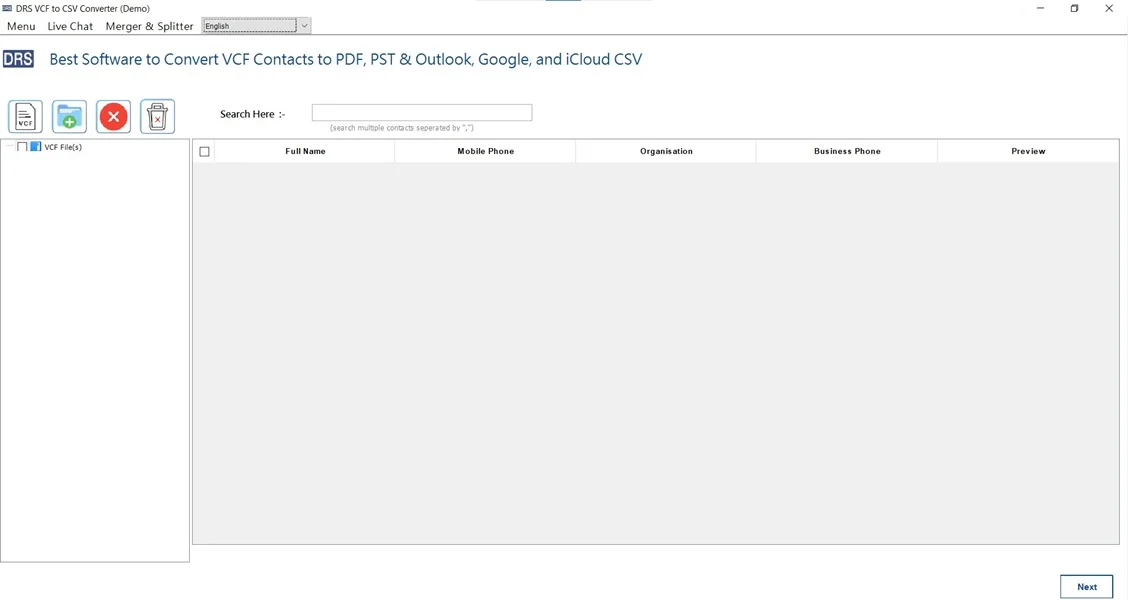
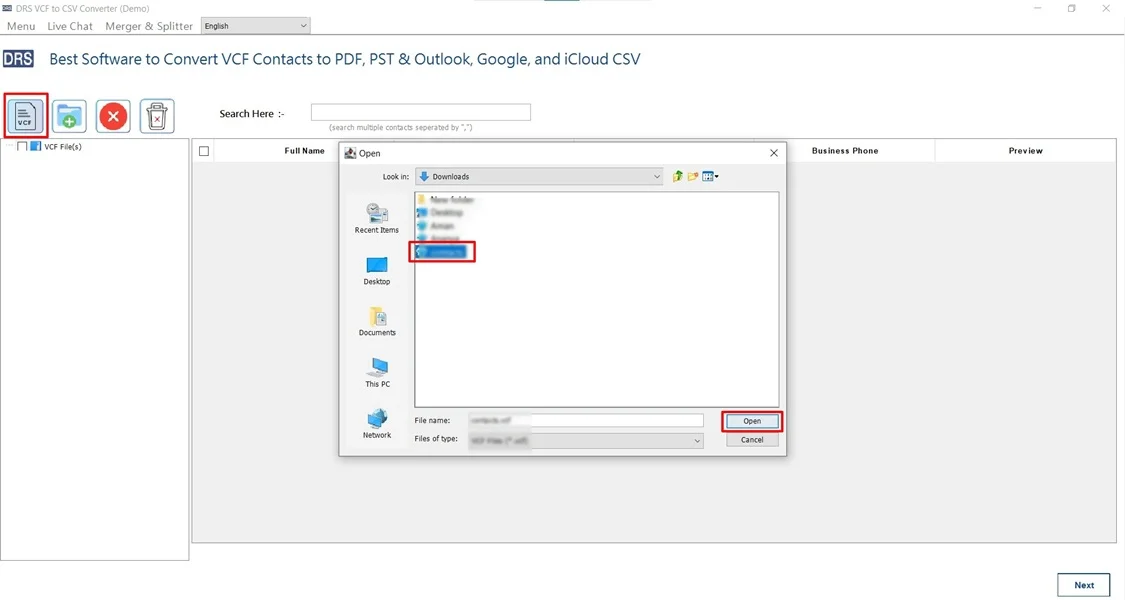
- Now, click VCF, upload the VCF file that you want to convert, and click Open.
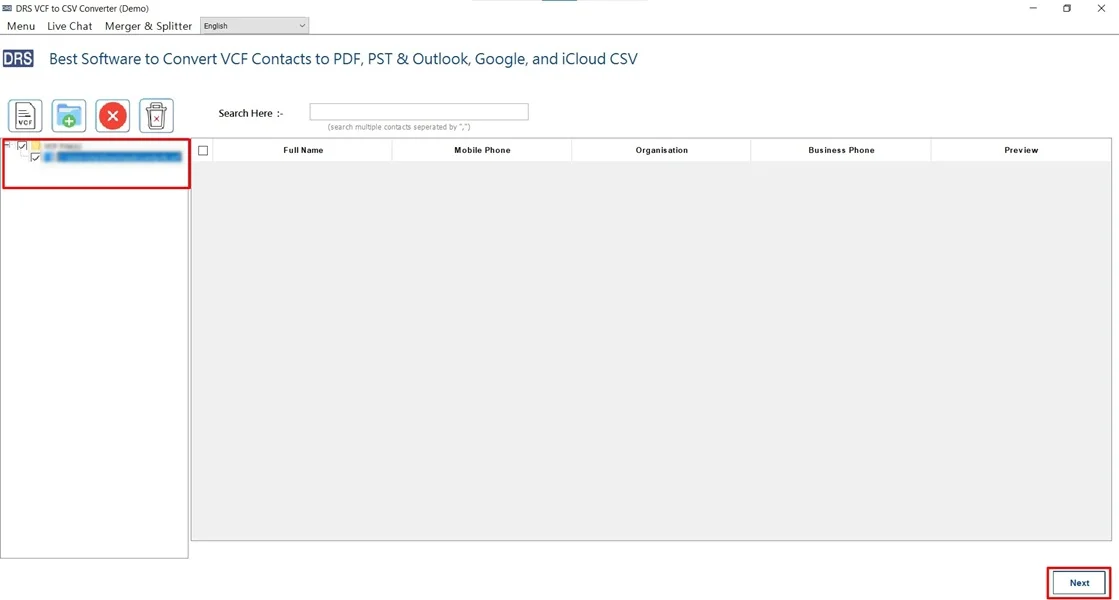
- After that, expand the data structure, preview the details, and click Next.
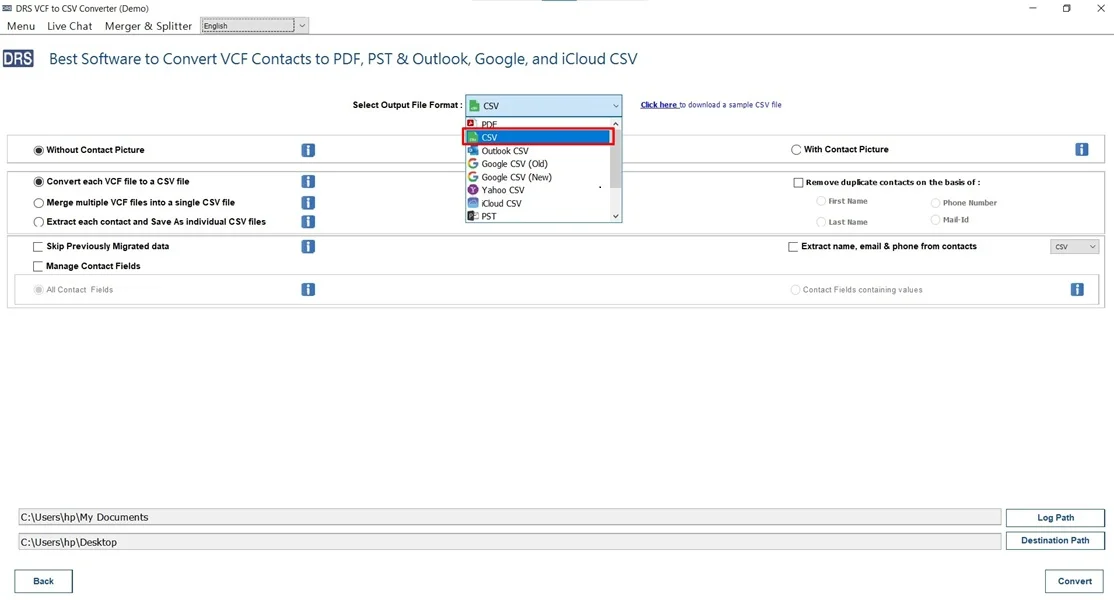
- Further, choose CSV as the saving output format.
- Finally, apply the filters and click Convert to begin the conversion.

Alternative Option: One-Time Conversion Service:-
For users who don’t want to install software, a one-time conversion service can convert VCF to CSV file securely. Also, it ensures the conversion without losing any details.
For users who don’t want to install software, a one-time conversion service can convert VCF to CSV file securely. Also, it ensures the conversion without losing any details.
Core Capabilities of a Verified Converter
- It supports multiple conversions simultaneously.
- Ensures the process with complete field preservation.
- Allows duplicate contact handling efficiently.
- This tool works on Windows and macOS.
- Enables users to import VCF to Yahoo Mail.
- Furthermore, it has a simple, non-technical interface.
Conclusion
In short, VCF files are perfect for storing contacts, but CSV files are far better for managing and analyzing them. While manual methods may work for small tasks, the automated VCF Converter to convert VCF to CSV provides reliability, speed, and accuracy, especially for business or bulk needs. Therefore, if your goal is error-free conversion with minimal effort, this utility is the most dependable choice.
Frequently Asked Questions
Q.1 Which is the best tool to convert VCF to CSV efficiently?
Ans. The best tool to save VCF to CSV efficiently is a professional VCF to CSV converter that supports multiple conversions. It preserves all contact fields (name, phone, email, address, etc.), and offers preview options. This tool is designed for fast processing, accurate field mapping, and error-free results, making it ideal for both personal and business use.
Q.2 Is it safe to convert a VCF file to CSV without data loss?
Ans. Yes, it is completely safe to convert vCard to CSV with Attachment when using a reliable MigrateEmails vcf converter. This maintains data integrity by accurately converting all contact attributes. However, manual or free methods may sometimes skip fields or rearrange data, increasing the risk of partial data loss.
Q.3 What is the difference between free and paid methods to change VCF to CSV?
Ans. The key differences between free and paid methods include:
Free methods are suitable for small files but often have limitations such as file size restrictions, missing contact fields, and no technical support.
Paid tools support bulk conversion, advanced field mapping, higher accuracy, faster performance, and dedicated customer support. They are best for professional and enterprise-level usage.
Q.4 Can I convert multiple VCF files to CSV at once?
Ans. Yes, you can migrate multiple VCF files to CSV at once by using an automated VCF to CSV conversion tool. These tools allow you to add multiple vCard files or folders and convert them in a single process, saving time and ensuring consistent output without manual effort.
About The Author:

I am Kiran Sharma, a Technical Expert in Content writing. I have technical expertise in the field of Email Backup, Data Recovery, and Email Migration, and resolve technical queries related to Cloud Backup or Email Migration for individuals and businesses.
Related Post