-
Written By Kiran Sharma
-
Approved By
Vikash Bajpai -
Updated on January 10th, 2026
Convert OST to PST Safely in 5 Minutes: 2026 Update Tutorial
User Query:-
“I have Outlook OST files, and I can’t open them due to profile or server issues. I need to convert OST to PST quickly without losing emails or attachments. What is the safest way to do this in 2026?”
“I have Outlook OST files, and I can’t open them due to profile or server issues. I need to convert OST to PST quickly without losing emails or attachments. What is the safest way to do this in 2026?”
Introduction:- Offline Storage Table files are created when Outlook works in Exchange, Office 365, or IMAP mode. These files depend heavily on the original Outlook profile and server connection. If the account is deleted, corrupted, or inaccessible, OST files become unusable. Converting them into PST allows users to regain access to emails, contacts, calendars, and attachments safely. This guide explains the manual and the MigrateEmails OST to PST Converter to export OST file to PST without data loss.
What are the Reasons Behind Converting OST to PST?
The following are several reasons users prefer to convert OST to PST:
- Accessing mailbox data without Exchange dependency.
- Recover emails from orphaned or inaccessible OST files.
- For creating portable Outlook backups.
- Migrate mailboxes to new systems or accounts.
- Moreover, to prevent permanent data loss.
Manual Method to Convert Outlook OST File to PST
There is no direct solution to shift OST files into PST. That’s why there are manual workarounds. You can use the manual method, but it is slow and suitable with a limited number of OST files.
Steps to Follow the Manual Workflow
- Firstly, open Outlook connected to the original Exchange or IMAP account.
- Now, go to file, then click open & export, and click import/export.
- After that, select export to a file.
- Choose Outlook Data File (.pst).
- Furthermore, select the mailbox folders.
- Choose the destination location to save the file.
- At last, complete the conversion process.
Limitations of the Manual Method to Convert OST to PST
- Works only if the Outlook profile and server are active.
- It cannot convert orphaned OST files.
- Time-consuming for large mailboxes.
- There is a risk of incomplete exports.
- No selective recovery options.
- Also, it is not suitable for corrupted OST files.
Advanced Technique to Convert OST File to PST
To migrate OST to PST within minutes and without server dependency, use a MigrateEmails OST to PST Converter Tool. This automated solution extracts mailbox data directly from OST files and converts it into PST format. You can also convert OST to ICS using this software. It offers the process with complete accuracy and high-end security. In addition, it converts multiple OST files simultaneously with no data loss.
Major Benefits of the Tool to Convert OST to PST
- Converts inaccessible OST files.
- Preserves folder structure and metadata.
- Supports multiple OST file conversions.
- Works without Outlook profile dependency.
- It is compatible with Windows systems.
- Enables users to convert OST to PDF efficiently.
- User-friendly interface for non-technical users.
One-Time OST to PST Conversion Service :-
If you don’t want to use software yourself, a One-Time OST Conversion Service is available. Connect with our team. The certified experts securely convert OST to PST without Outlook. Also, maintains the conversion with full data confidentiality and integrity.
If you don’t want to use software yourself, a One-Time OST Conversion Service is available. Connect with our team. The certified experts securely convert OST to PST without Outlook. Also, maintains the conversion with full data confidentiality and integrity.
Quick Steps to Use the Automatic Software
- Firstly, download and install the MigrateEmails OST to PST Converter.
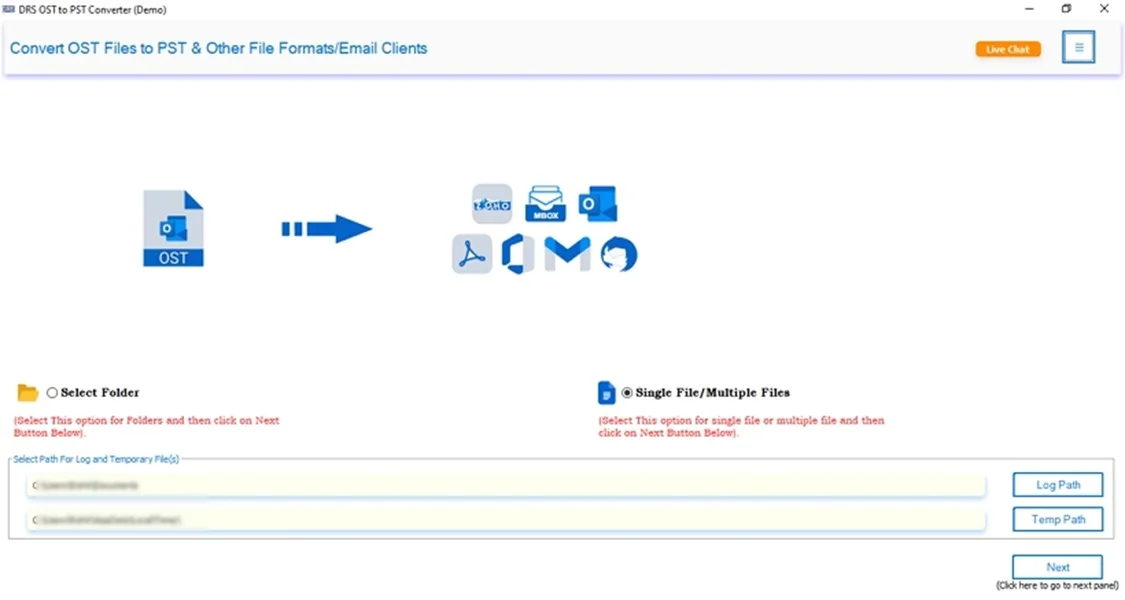
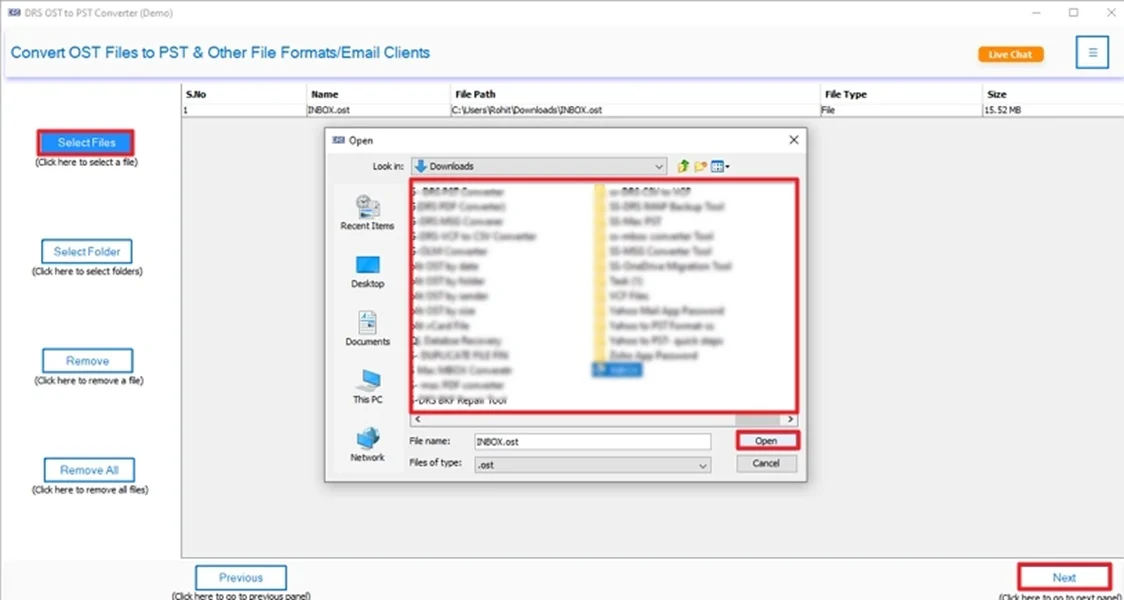
- Now, select file(s)/folders, add the OST file that you want to convert, and click Next.
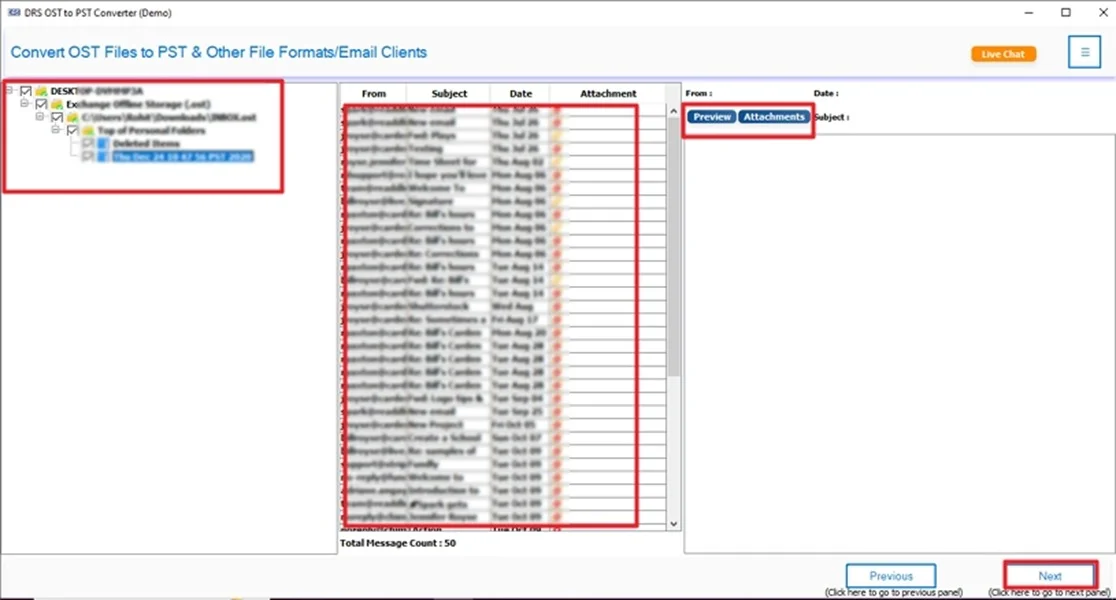
- After that, preview the entire mailbox data and click Next.
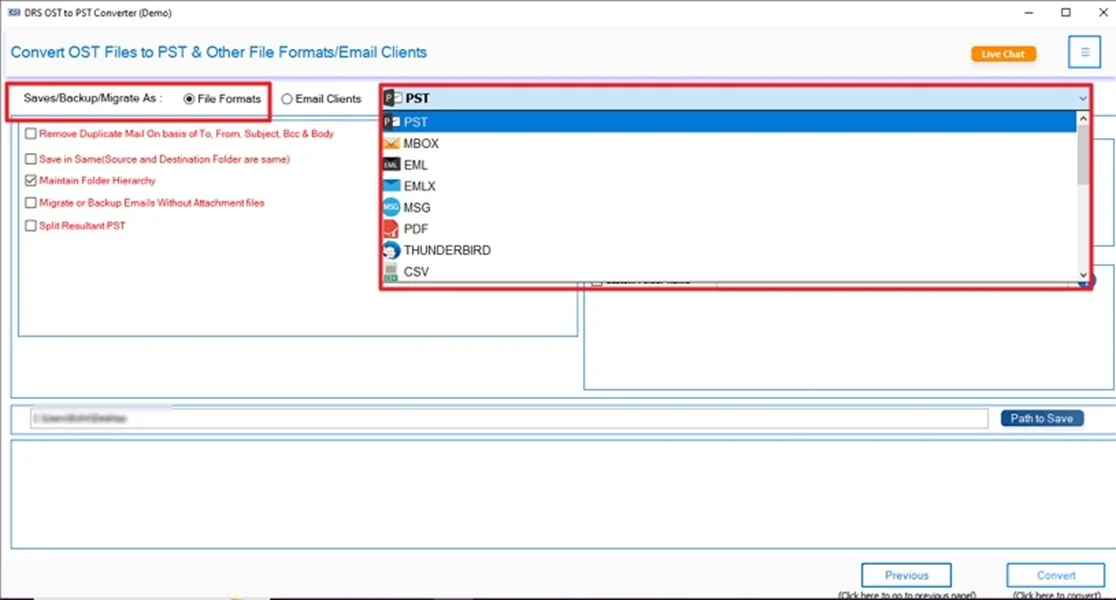
- Further, choose PST as the saving output format.
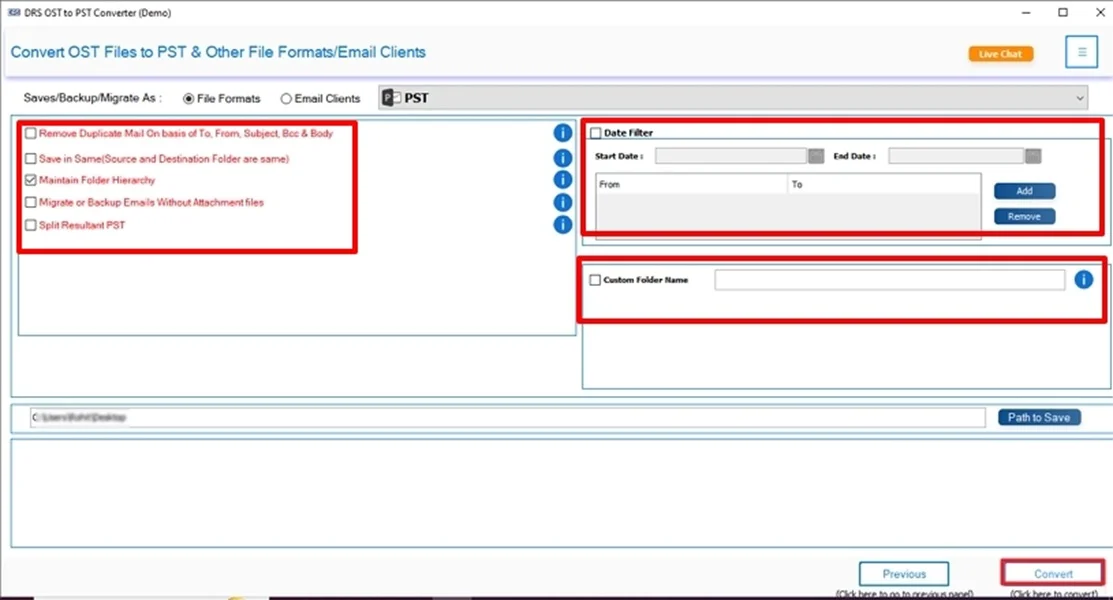
- Finally, apply the filters and start the conversion process.
Real-Life Example:-
An IT administrator lost access to an employee’s Exchange account after resignation. The mailbox existed only as an OST file. Using an automated OST to PST tool, the admin converted the OST within minutes and restored all emails and attachments without server access.
An IT administrator lost access to an employee’s Exchange account after resignation. The mailbox existed only as an OST file. Using an automated OST to PST tool, the admin converted the OST within minutes and restored all emails and attachments without server access.
Conclusion
In short, migrating OST to PST is essential when Outlook profiles become inaccessible or when Exchange servers are unavailable. While the manual method works only in limited situations, it fails for corrupted OST files. For a fast, secure, and error-free solution to convert OST to PST in 2026. The experts recommend using a verified OST to PST converter. Also, you can opt for a one-time service for seamless conversion.
Frequently Asked Questions
Q.1 How can I convert an OST file to PST for free?
Ans. You can save an OST file to PST for free using Outlook’s built-in Export option, but only if the original Outlook profile and server connection are still active. This method is suitable for small mailboxes and basic needs, but does not support orphaned OST files.
Q.2 Why do I need to export the OST file to PST in Outlook?
Ans. Exporting OST to PST allows you to access your mailbox data without depending on the Exchange or IMAP server. PST files are portable, easy to back up, and can be opened in Outlook anytime. This makes them ideal for data recovery and migration.
Q.3 Is it safe to convert an Outlook OST file to PST without data loss?
Ans. Yes, it is safe when you use a reliable MigrateEmails OST to PST converter method. Manual conversion works in limited cases, while a professional tool is designed to preserve emails, attachments, folder structure, and metadata without data loss.
Q.4 Can I convert multiple OST files to PST in bulk at the same time?
Ans. Multiple conversions are not supported by Outlook’s manual method. To convert multiple OST files simultaneously, an automated OST to PST conversion tool is the most efficient and secure option.
About The Author:

I am Kiran Sharma, a Technical Expert in Content writing. I have technical expertise in the field of Email Backup, Data Recovery, and Email Migration, and resolve technical queries related to Cloud Backup or Email Migration for individuals and businesses.
Related Post