-
Written By Kiran Sharma
-
Approved By
Vikash Bajpai -
Updated on December 15th, 2025
Import AOL Emails to Thunderbird on Mac & Windows
Annie’s Query:-
“How can I import AOL Emails to Thunderbird on Mac and Windows without losing data or technical complications?”
“How can I import AOL Emails to Thunderbird on Mac and Windows without losing data or technical complications?”
Introduction:- Mozilla Thunderbird is a popular desktop email client. AOL Mail remains widely used for business communication. Many users want to export AOL Email to Thunderbird to create local backups or manage multiple email accounts. Therefore, this guide explains the manual workaround to perform the conversion. Also, covers the professional MigrateEmails AOL Backup Tool for both Mac and Windows systems.
Comparison Between AOL Mail and Thunderbird
|
Key Aspects |
AOL Mail |
Thunderbird |
|
Web-based email service |
Desktop email client |
|
Accessible via a web browser |
Installed on Windows, Mac, Linux |
|
Cloud-based |
Local-system storage |
|
No direct backup feature |
Allows local backups |
|
Managed by AOL |
User-controlled security settings |
|
Casual and web-based email use |
Professional and multi-account management |
Importance of Importing AOL Emails into Thunderbird
The following are the top several reasons why users prefer to import AOL Emails to Thunderbird:
- To access AOL emails offline.
- Create a local backup of important mail.
- Managing multiple accounts in one interface.
- Avoid dependency on webmail access.
- Additionally, improve email organization and searchability.
Traditional Method to Import AOL Mail to Thunderbird
Thunderbird supports AOL Mail using the IMAP protocol, allowing users to sync emails directly. But remember that this process comes with several limitations. Also, it is very slow when working with limited files.
Steps to Import AOL Emails Manually
- Firstly, open Mozilla Thunderbird on your Mac or Windows system.
- Now, click Add Mail Account and enter your AOL email address.
- Then, generate an App Password from AOL Account Security.
- Use the app password while configuring the account.
- Select IMAP as the account type.
- Lastly, complete the setup and allow Thunderbird to sync emails.
Limitations to Import AOL Emails to Thunderbird
- This process requires app-specific password configuration.
- There is slow syncing for large mailboxes.
- No selective email export.
- There is a risk of duplicate emails.
- Attachments may not sync properly.
- Moreover, there is no offline backup file created.
Quick Solution to Transfer emails from AOL to Thunderbird
For users with large mailboxes or non-technical backgrounds, a professional MigrateEmails AOL Backup tool offers a safer solution. The tool directly connects to AOL Mail and imports into Thunderbird without manual configuration. This software enables users to convert AOL Emails to PDF and more. Also, the tool can convert multiple emails simultaneously with zero data loss.
One-Time Service Option:- If you prefer not to install software, a one-time migration service is available. The experts securely import AOL Emails to Thunderbird on Mac or Windows. This ensures complete data integrity with zero effort from your side.
Step-by-Step Guide Using the Automated Tool
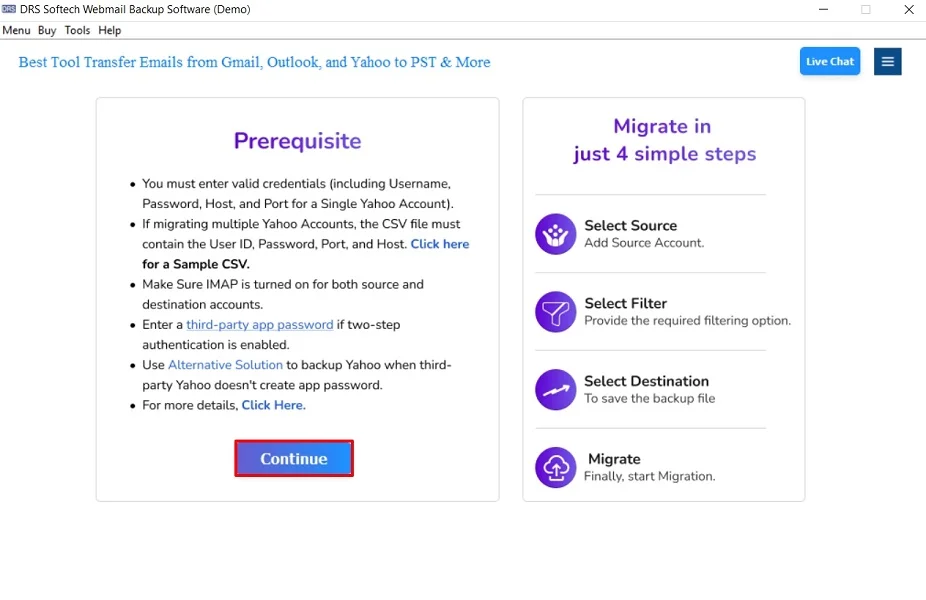
- Firstly, download and install the MigrateEmails AOL Backup Software and click Continue to proceed.
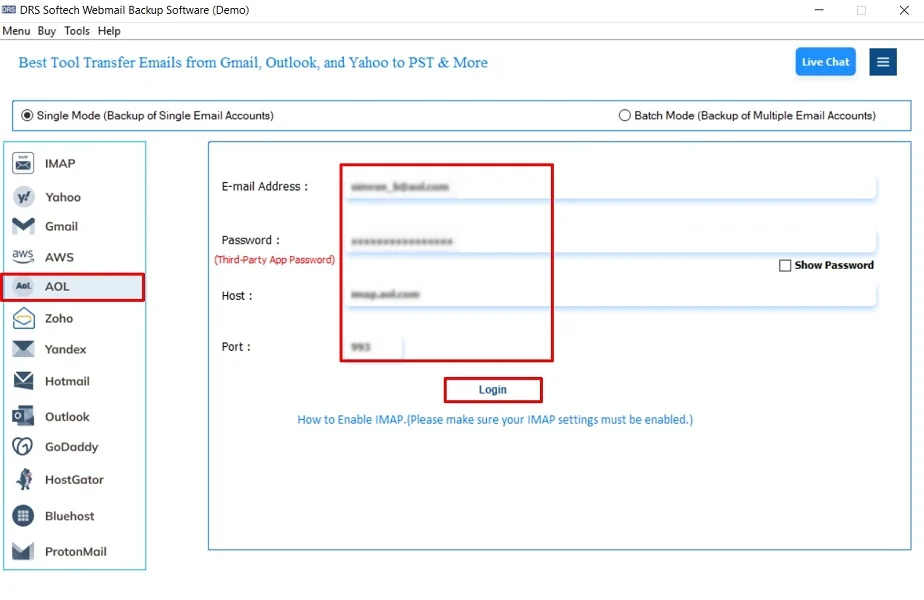
- Now, choose AOL and log in using the AOL Mail Account credentials.
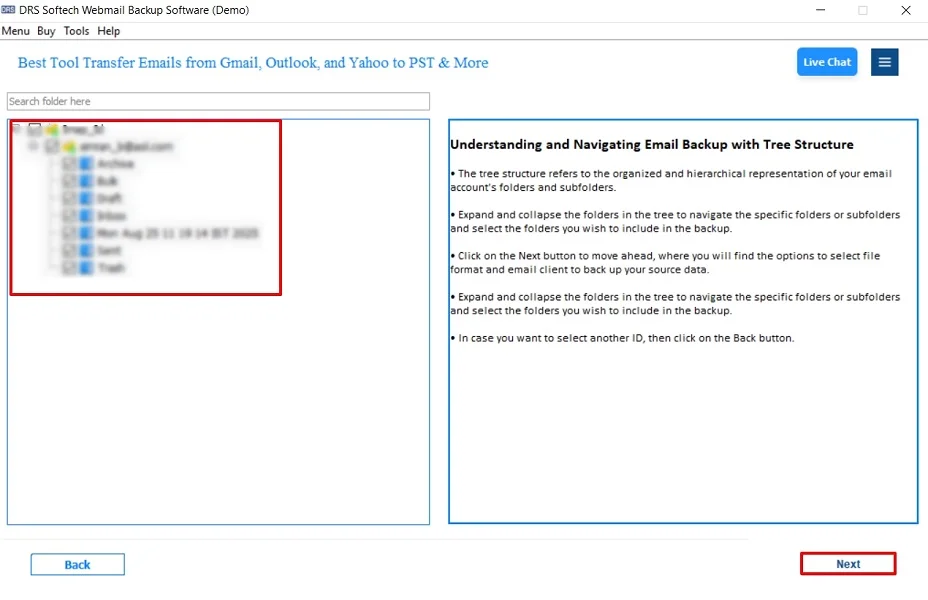
- Further, drag the data structure and click Next.
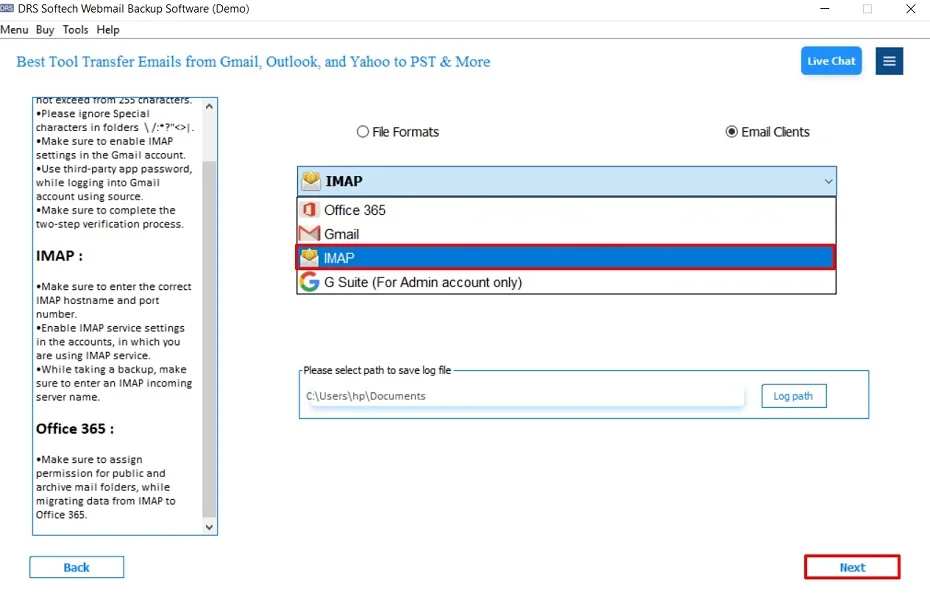
- After that, choose IMAP as the saving email client and click Next.
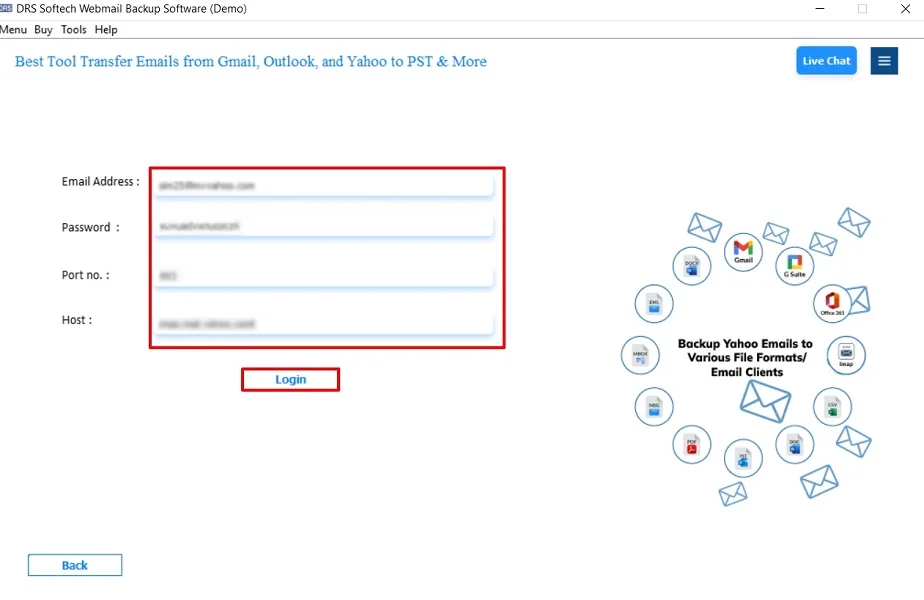
- Then, log in using the IMAP Account credentials.
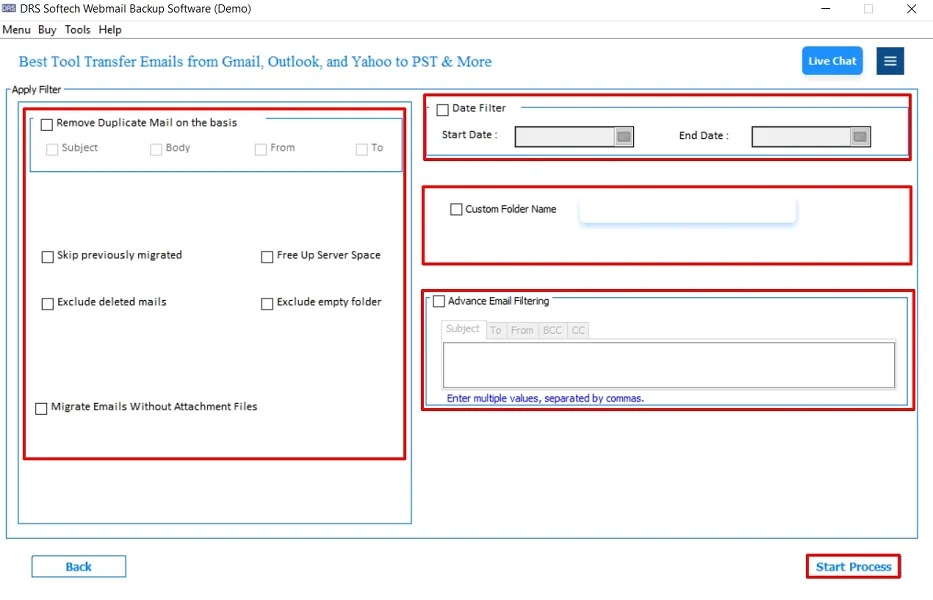
- Finally, apply the additional filters and click Start Process to begin.
Characteristics of the Tool to Import AOL Emails to Thunderbird
- There is no IMAP configuration required.
- Preserves folder structure and metadata intact.
- Supports users to export AOL Email Folders to Hard Drive.
- The tool avoids duplication and sync errors.
- This software has a user-friendly interface.
- Also, it supports Mac and Windows OS.
Real-Life Example:- A small business owner using AOL Mail wanted offline access to client emails for compliance purposes. Using the professional AOL Backup tool, all emails were imported into Thunderbird within minutes, including attachments and folder structure..
Conclusion
To sum up, importing AOL emails to Thunderbird on Mac and Windows can be done manually using IMAP. Unfortunately, it comes with limitations such as slow syncing and configuration issues. For a faster, safer, and hassle-free experience, using a professional AOL backup tool is the most reliable solution to import AOL Emails to Thunderbird. As it ensures the complete process with data preservation and high-end security.
Frequently Asked Questions
Q.1 What is the best tool to import AOL emails into Thunderbird?
Ans. A professional AOL backup tool is the best option. It allows direct import of AOL emails into Thunderbird while preserving folders, attachments, and email metadata.
Q.2 Is it safe to import AOL Mail to Thunderbird?
Ans. Yes, importing AOL Mail to Thunderbird is safe when done using a trusted automated MigrateEmails tool. As it ensures secure authentication and prevents data loss or duplication.
Q.3 Can I transfer emails from AOL to Thunderbird without any technical skills?
Ans. Yes, automated MigrateEmails AOL Backup tool is designed with a user-friendly interface. This allows non-technical users to export AOL Email to Thunderbird easily.
Q.4 Can I export AOL emails to Thunderbird in bulk?
Ans. Yes, advanced tools support bulk conversion of AOL emails to Thunderbird. Moreover, it enables users to migrate large mailboxes in a single process without affecting data integrity.
About The Author:

I am Kiran Sharma, a Technical Expert in Content writing. I have technical expertise in the field of Email Backup, Data Recovery, and Email Migration, and resolve technical queries related to Cloud Backup or Email Migration for individuals and businesses.
Related Post