-
Written By Kiran Sharma
-
Approved By
Vikash Bajpai -
Updated on May 13th, 2026
Convert OLM to MBOX: Easy and Best Methods in 2026
Alex Query:-
“I have my old emails saved in OLM format from Microsoft Outlook for Mac. But now I want to open them in an MBOX-supported email client like Mozilla Thunderbird. How can I convert OLM files to MBOX without losing any emails or attachments?”
“I have my old emails saved in OLM format from Microsoft Outlook for Mac. But now I want to open them in an MBOX-supported email client like Mozilla Thunderbird. How can I convert OLM files to MBOX without losing any emails or attachments?”
Introduction: When people move from a Mac email setup to a more flexible setup, they often get stuck with OLM files. These files only work in Outlook for Mac. Most other email apps use MBOX files, such as Thunderbird or Apple Mail. So the usual goal is to convert OLM to MBOX without losing emails or attachments. This blog walks you through the best manual and professional MigrateEmails OLM Converter methods to export OLM files to MBOX, ensuring enterprise-grade, zero data loss results every time.
What are OLM and MBOX File Formats?
Before you jump into converting anything, take a minute to see what these formats are about. It makes things a lot clearer.
| File Type | What It Means |
| OLM (Outlook for Mac) | This is a file type used by Outlook on Mac. It keeps your emails, contacts, calendars, & tasks in one place. The catch? It doesn’t really work with most non-Microsoft email apps. |
| MBOX (Mailbox) | A more flexible format that a lot of email clients support. It is mainly used to store multiple emails in a single text file. You’ll see it used in apps like Thunderbird, Apple Mail, & others. |
Why Convert OLM File to MBOX?
There are a couple of clear reasons to switch from OLM to MBOX:
- You can open your emails in apps like Evolution or Mozilla Thunderbird
- And moving data across different platforms becomes much simpler.
- Keep a backup of your Outlook for Mac mailbox without losing emails or attachments.
- Put all your emails into one MBOX file, so it’s easier to handle.
- Make sure your emails stay accessible in the long run since MBOX isn’t tied to one company.
Method 01: Conventional Ways to Convert OLM to MBOX
There is no single built-in option to do this conversion, but users can use Outlook for Mac and Thunderbird. Below is the most commonly used free approach:
Manual Steps to Export OLM to MBOX:
- First, open Microsoft Outlook for Mac and check that all your emails are there.
- Next, add an IMAP email account (like Gmail) to use as a middle step.
- Then, create a new folder in that IMAP account and move your OLM emails into it. Give it some time to sync.
- After that, open Mozilla Thunderbird and add the same IMAP account there.
- Once done, wait for Thunderbird to sync all the emails and folders.
- Finally, right-click the folder, use ImportExportTools NG, and export it as an MBOX file to your system.
Shortcomings: Change OLM to MBOX
- Takes time, especially if you have a lot of emails.
- Too many steps, easy to get confused or miss something.
- You need a stable internet connection the whole time
- Chances of missing emails or attachments if sync fails
- Folder structure can get messy in some cases.
- Not ideal if you’re dealing with large or multiple mailboxes
Method 02: Smart Choice to Convert OLM to MBOX
MigrateEmails OLM Converter Tool is a simple and reliable option to convert OLM files to MBOX in bulk. It keeps your data intact during the process, so nothing gets changed or lost. There’s no file size limit, and it runs smoothly on both Windows and Mac. You can also use it to convert OLM to PDF and other formats like CSV, MSG, PST, PDF, and more.
Quick Steps to Convert OLM to MBOX on Mac:
- Download and install the OLM Converter on your system.
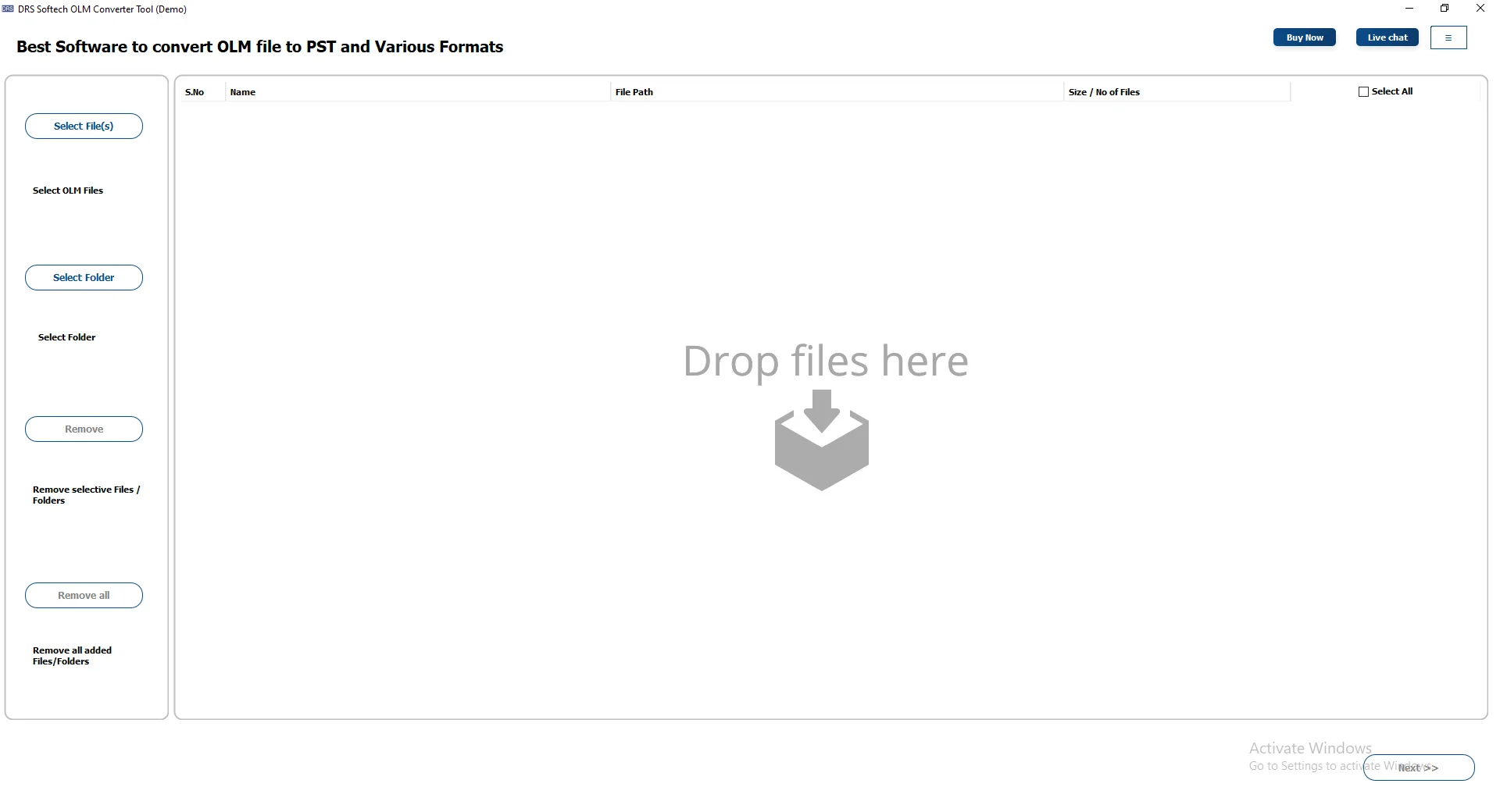
- After that, click Select Files/Select Folder to load the OLM files. Click Next.
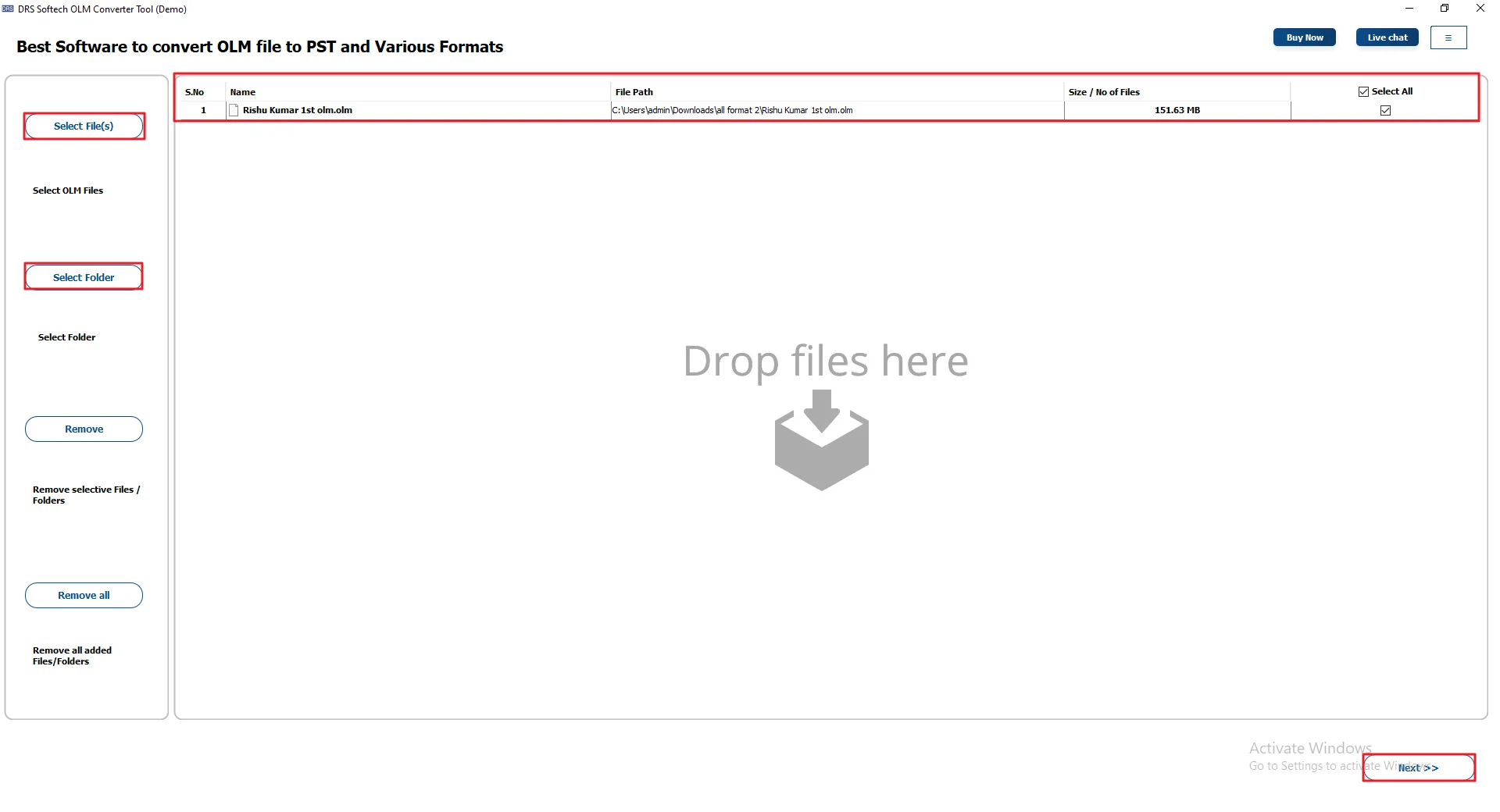
- Then, expand the tree structure >> Preview & select the files >> Next.
- Now, select MBOX as a file format from the list of options.
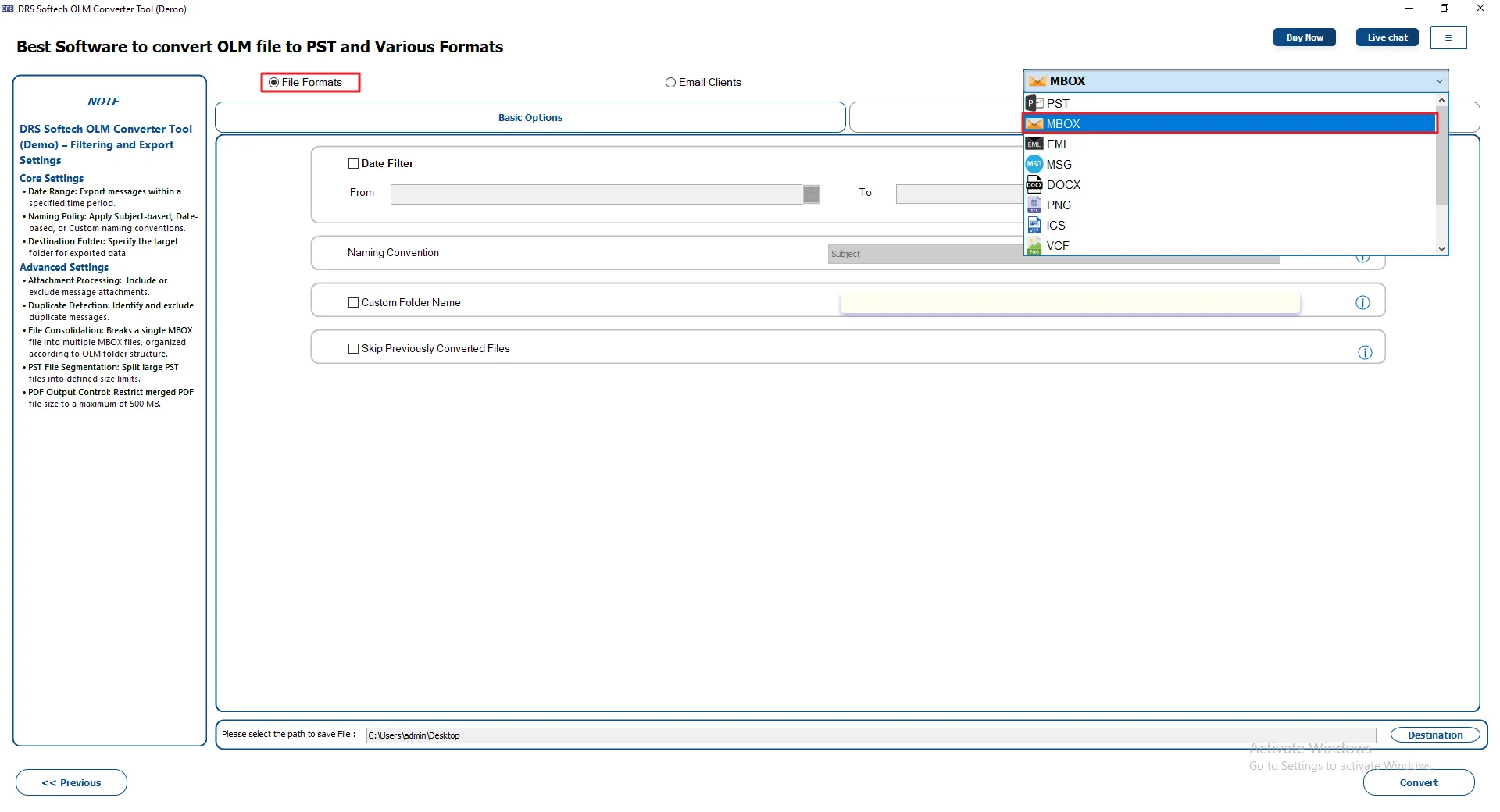
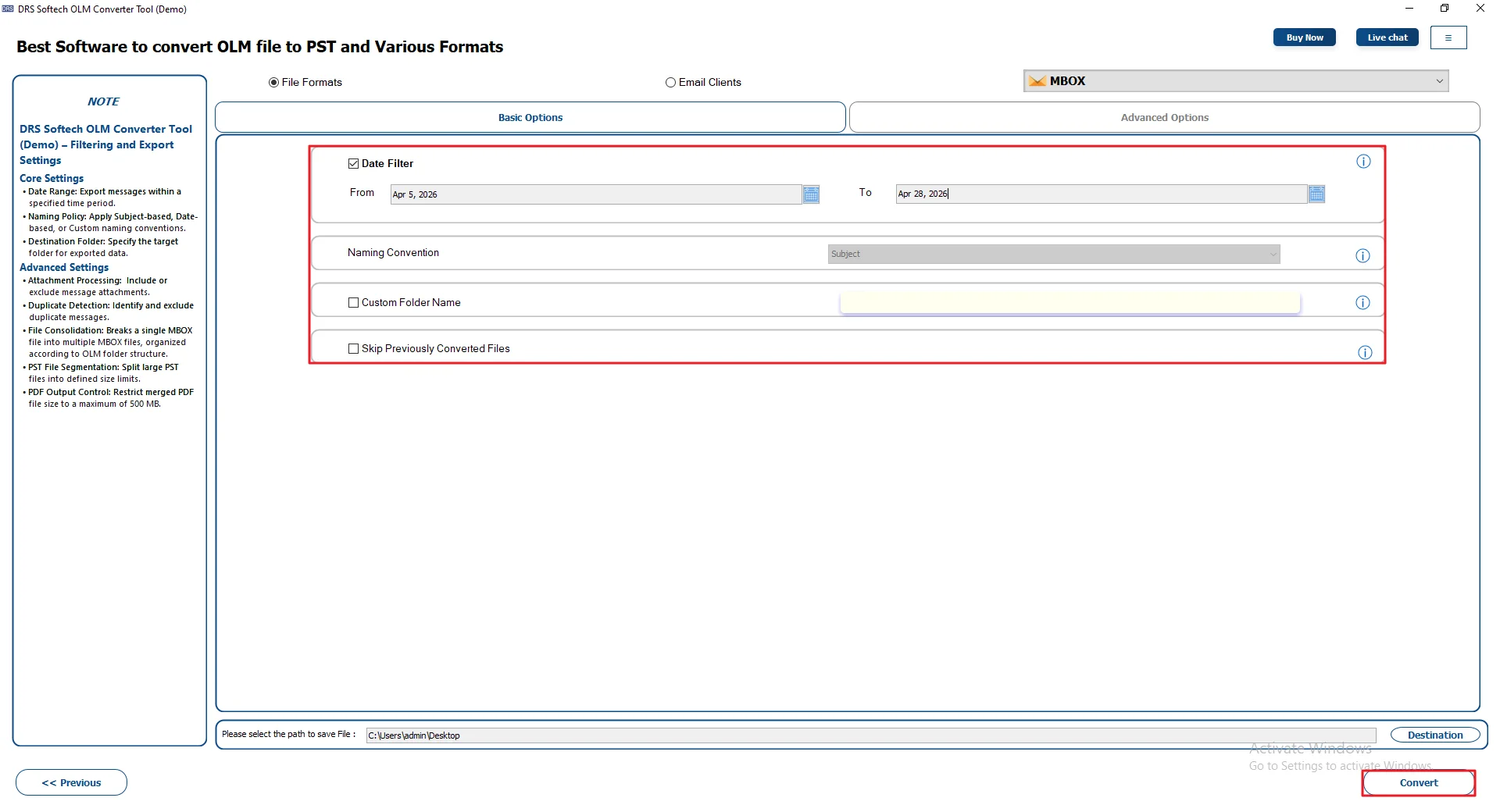
- Lastly, apply filters or features if needed and press Convert.
Real-Life Scenario:
A mid-sized law firm in the US had years of client emails stored in OLM files from their Mac setup. When they moved to Mozilla Thunderbird, they needed to convert their data to MBOX without risking any sensitive information. Along with emails, they also wanted to convert OLM to ICS to keep their calendar data accessible.
They used the MigrateEmails OLM Converter Tool to handle the job. Their IT team converted over 200,000 emails from multiple OLM files in one go. The tool kept all emails, attachments, and details exactly as they were. After finishing the process, the legal team accessed all their old emails in Mozilla Thunderbird right away, with nothing missing.
Why Choose a Professional Converter Tool?
- Convert OLM to MSG and other formats like PST, MBOX, EML, and PDF.
- Gives you an option to skip duplicate emails.
- You can check your data before starting the conversion.
- Choose whether to keep attachments or not.
- Filter emails by date if you don’t need everything.
- The interface is simple and easy to use.
Conclusion
In this guide, we looked at two ways to convert OLM to MBOX. The manual way is okay if you just have a few emails. But it takes time and doesn’t always work well with large data. An automated tool is quicker. It also keeps things more accurate. Your emails and attachments usually stay safe. So it really depends on what you want. Pick the option that feels easier and works best for your setup.
Frequently Asked Questions
Q1. Which is the best method to convert OLM to MBOX?
Ans. It depends on your data size. The manual method can work for small mailboxes, but it takes time and effort. For larger data, using a tool like the MigrateEmails OLM Converter Tool is usually easier and more reliable.
Q2. Can I convert OLM to MBOX directly?
Ans. No, there’s no direct option in Microsoft Outlook for Mac to do this. You’ll need to use a workaround like IMAP or Thunderbird, or go with a conversion tool to simplify the process.
Q3. Are there any free ways to convert OLM file to MBOX?
Ans. Yes, you can try a manual method using Mozilla Thunderbird and IMAP. It’s free, but it can be slow and a bit tricky, especially if you have a lot of emails.
Q4. Is it safe to use third-party tools to export OLM to MBOX?
Ans. Yes, as long as you use a trusted tool. The MigrateEmails OLM Converter Tool is designed to keep your emails, attachments, and folders intact during the process. Still, keeping a backup is always a good idea.
Q5. Quickest method to convert OLM to MBOX?
Ans. The fastest way is to use an automated tool. Manual methods involve multiple steps and syncing, which can take time. A tool like the MigrateEmails OLM Converter Tool can complete the process much quicker.
Q6. Can I convert selective emails from OLM to MBOX?
Ans. Yes, but it’s easier with a tool. Manual methods don’t give much control, while the MigrateEmails OLM Converter Tool lets you pick specific emails or folders before converting.
Q7. What is OLM File Converter?
Ans. It’s a tool that helps you convert OLM files into other formats like MBOX, PST, or EML. Since OLM files only work with Outlook for Mac, these tools make it easier to access your emails in other email clients.
Q8. How can I convert OLM File to MBOX without Data loss?
Ans. To avoid losing data, you need a reliable method. Manual ways can sometimes miss emails if something goes wrong. Using the MigrateEmails OLM Converter Tool is a safer option, as it keeps your emails, attachments, and folder structure intact.
About The Author:

I am Kiran Sharma, a Technical Expert in Content writing. I have technical expertise in the field of Email Backup, Data Recovery, and Email Migration, and resolve technical queries related to Cloud Backup or Email Migration for individuals and businesses.
Related Post