-
Written By Neeru Kuchhal
-
Approved By
Vikash Bajpai -
Updated on February 25th, 2026
How to Convert EMLX Files to CSV? Quick Guide
Adam’s Query:-
“I have many EMLX files transferred from Apple Mail and need to shift them into CSV format for various purposes. What is the easiest and most accurate way to convert EMLX to CSV?”
“I have many EMLX files transferred from Apple Mail and need to shift them into CSV format for various purposes. What is the easiest and most accurate way to convert EMLX to CSV?”
Introduction:- An EMLX file is an email file used by Apple Mail. However, these files can’t open easily on Windows without any external software. CSV file on the other hand, are most commonly used for managing data and storing important details. For removing and analyzing the data, we needed to shift the EMLX file into CSV format. This blog will explain both the manual and the professional solutions to convert EMLX files to CSV without any loss. Moreover, if you want an instant solution, using a dedicated MigrateEmails EMLX Converter Tool is highly recommended.
Understanding the Two Formats (EMLX & CSV)
Before starting the conversion process, let’s understand the difference between the two formats.
|
EMLX Format |
CSV Format |
|
|
Benefits of Converting EMLX Files to CSV Format
There are the following main reasons why users want to convert EMLX to CSV:
- Extracting the email data for reporting.
- Analyzing the sender and subject information.
- Importing email records into CRM systems.
- To maintain the structured email logs.
- Also, for simplifying bulk data processing.
Hand-Driven Approach to Import EMLX Emails to CSV
As there is no straightforward method to transfer EMLX into CSV, you can use the manual workaround. This method is suitable only for small files. Hence, it comes with several limitations.
Step-by-Step Manual Solution
- Firstly, open EMLX files in Apple Mail.
- Copy required email details (Sender, Subject, Date, etc.).
- Paste the data into Microsoft Excel.
- After that, arrange the data into columns.
- Lastly, save the file as CSV.
Limitations of the Manual Method to Convert EMLX to CSV
- This process is extremely time-consuming.
- Sometimes there is a high risk of human error.
- There is no support for multiple conversions.
- Attachments cannot be exported in CSV.
- Additionally, it is not suitable for large datasets.
Verified Approach to Save EMLX as CSV
To overcome the hand-driven limitations, using an automated MigrateEmails EMLX File Converter is the most reliable method. This method converts multiple EMLX files simultaneously with no information leakage. It helps to convert EMLX files to MBOX and other file formats as well. Therefore, this software offers a process with complete data integrity, end-to-end encryption, and error-free conversion. Also, it comes with a one-time conversion service suitable for even non-tech users.
One-Time Conversion Service to Convert EMLX to CSV
If you do not want to install software yourself, you can opt for a One-Time EMLX to CSV Conversion Service. Just connect and share your EMLX file with our team. They will complete the process on your behalf using a highly efficient EMLX Converter. It offers the complete process with zero data loss and high security. Moreover, this service is ideal for users who need a quick and professional conversion without using the software.
Complete Guide to Using a Specialized MigrateEmails Utility
- Firstly, install the MigrateEmails EMLX File Converter Tool and click Next to move ahead.
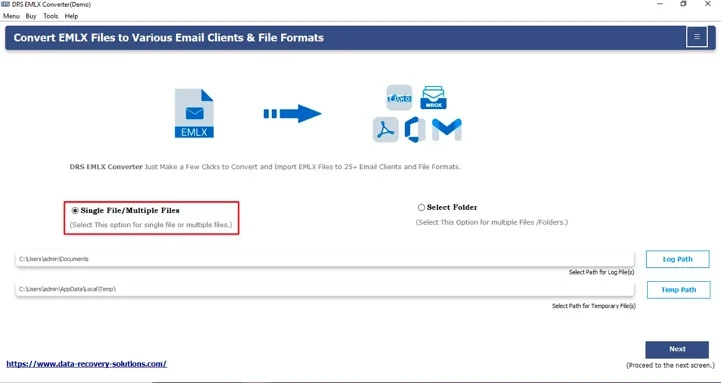
- Click Select File(s)/Folders, upload the EMLX file that you want to convert, and click Next.
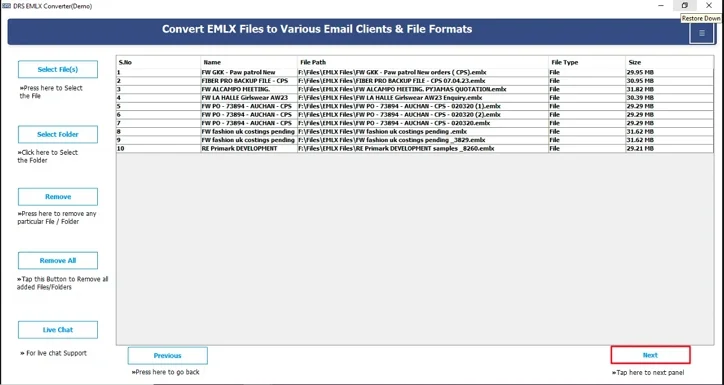
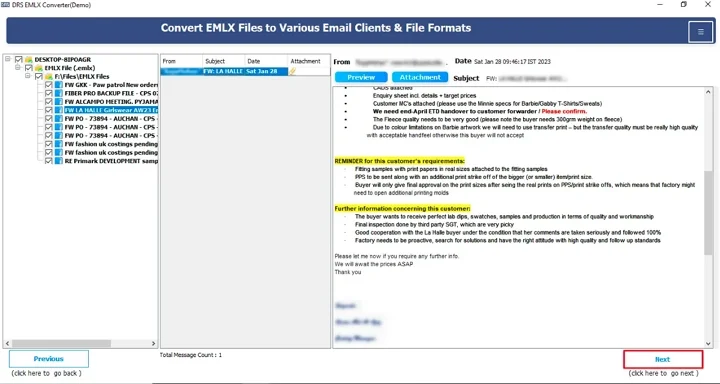
- Expand the tree structure, preview the mailbox, and click Next.
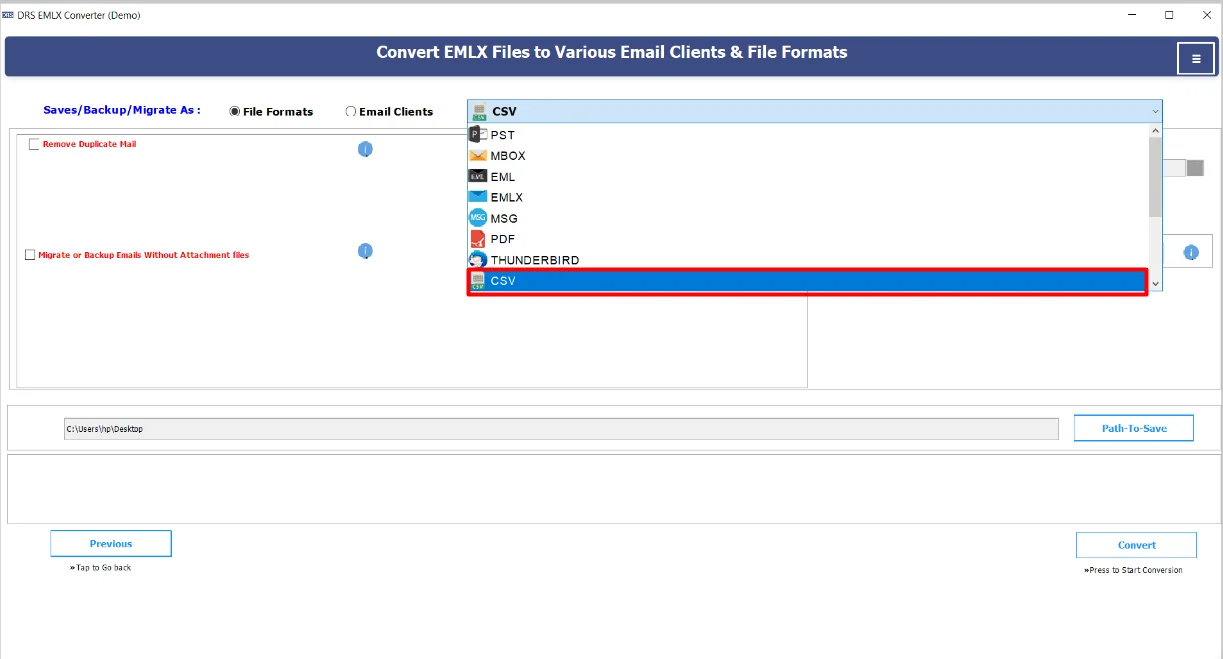
- Further, choose CSV as the saving file format.
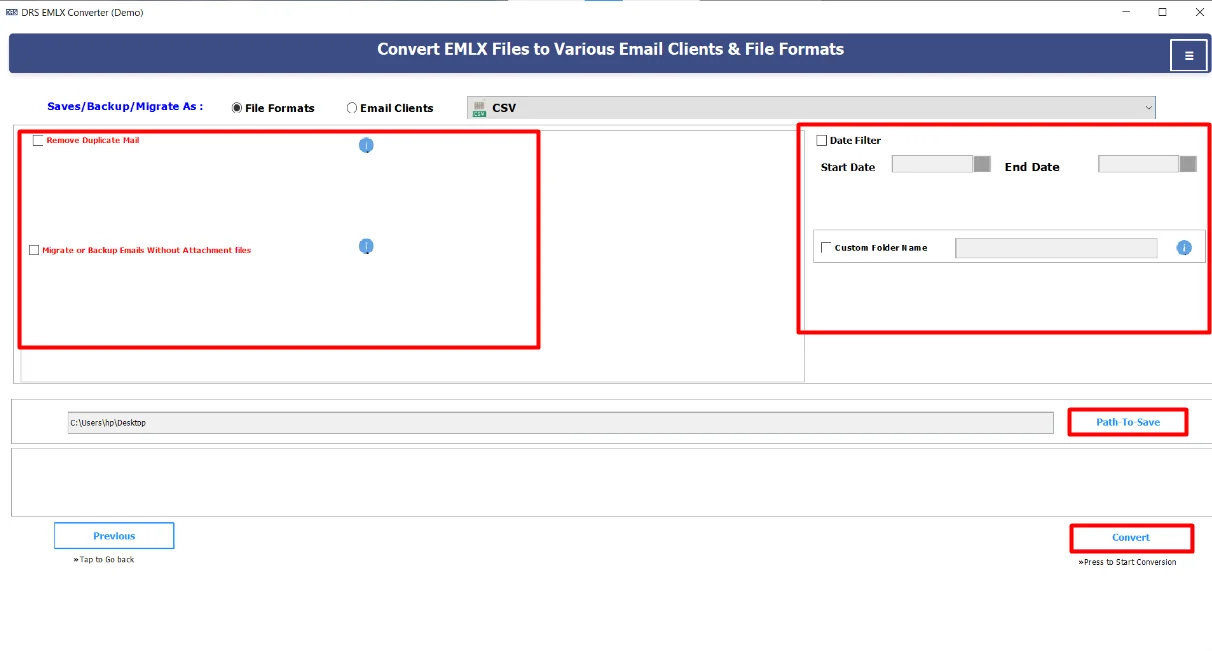
- In the end, apply filters, choose the destination to save the file, and click Convert to start the process.
Real-Life Scenario:-
A compliance team needed to analyze thousands of archived Apple Mail messages to prepare a communication report. They used an EMLX to CSV converter tool to remove sender, recipient, subject, and timestamp data from an EMLX file into a CSV file. The team successfully imported the CSV file into Excel, generated reports quickly, and saved hours of manual data entry.
Note: You can also convert EMLX to PST and many other supported file formats via MigrateEmails EMLX Converter.
A compliance team needed to analyze thousands of archived Apple Mail messages to prepare a communication report. They used an EMLX to CSV converter tool to remove sender, recipient, subject, and timestamp data from an EMLX file into a CSV file. The team successfully imported the CSV file into Excel, generated reports quickly, and saved hours of manual data entry.
Note: You can also convert EMLX to PST and many other supported file formats via MigrateEmails EMLX Converter.
Explore More: Convert EMLX to MSG seamlessly without any loss.
Conclusion
In short, converting EMLX files to CSV manually is possible. But it is suitable only for a small number of emails. Also, it becomes difficult for large datasets. The safest and most efficient way to convert EMLX to CSV is by using a specialized EMLX converter tool. This guarantees accurate, structured, and multiple data exports. Thus, choosing the right and appropriate method helps save time and gives reliable results. Moreover, if you find any queries regarding the tool or process, feel free to contact our support team.
Frequently Asked Questions
Q1. Is there a free demo available for testing the conversion?
Ans. Yes, the MigarteEmails EMLX to CSV converter tool offers a free demo version. The demo typically allows you to preview email data and convert a limited number of files so you can evaluate the software before purchasing.
Q2. Can I convert multiple EMLX files at once?
Ans. Yes, the advanced EMLX to CSV converter tool supports bulk conversion. You can add multiple EMLX files or an entire folder and convert them into a single or multiple CSV files in one process.
Q3. Can I convert EMLX emails without attachments?
Ans. Yes, since CSV files store structured text data, attachments are not included in the CSV output. The MigrateEmails tool allows you to extract only email fields, such as sender, recipient, subject, date, and message body, without including attachments
Q4. Is the software compatible with all versions of Windows?
Ans. An automated MigrateEmails EMLX to CSV conversion tool is compatible with major Windows versions, including Windows 11, 10, 8, and 7. Always check the system requirements of the specific software before installation.
Q5. Can I choose where to save converted CSV files?
Ans. Yes, during the conversion process, you can select the destination folder where the converted CSV files will be saved. This allows you to organize your output files according to your project or reporting needs.
About The Author:

I am Neeru Kuchhal, a Technical Content Writer who focuses on turning complex ideas into clear, engaging, and impactful content. I combine creativity with strategy to write blogs, web content, and technical articles that connect with the right audience and support brand goals. I believe great content is not just written. It is thoughtfully created to inform, build trust, and drive action.
Related Post