-
Written By Neeru Kuchhal
-
Approved By
Vikash Bajpai -
Updated on January 16th, 2026
Convert EML to DOC or DOCX in MS Word: Bulk & Secure Method
User Query:-
“I have many EML email files that contain important attachments. But I need to save them in DOC or DOCX format so they can be edited and stored easily in MS Word. How can I convert EML to DOC securely without data loss?”
“I have many EML email files that contain important attachments. But I need to save them in DOC or DOCX format so they can be edited and stored easily in MS Word. How can I convert EML to DOC securely without data loss?”
Introduction:- EML files are widely used to store email messages and attachments. However, EML files are not suitable for documentation, editing, or sharing with non-technical users. Converting EML to DOC or DOCX allows users to open emails directly in Microsoft Word. This makes them easy to edit, archive, print, and present in a professional format. In this guide, you’ll learn manual and automated methods. If you want an instant solution, the MigrateEmails EML Converter Tool is highly reliable to convert EML file to DOC.
Comparison of EML and DOC/DOCX File Formats
Before starting the conversion, let’s understand the difference between the two formats.
|
Feature Aspects |
EML File |
DOC/DOCX File |
|
Email storage |
Document editing |
|
Limited |
Fully editable |
|
Yes (email-based) |
Yes (document-based) |
|
Difficult |
Easy |
|
No |
Yes |
Why Should You Convert EML to DOC Format?
The following are the reasons why users prefer Doc/Docx over EML format:
- Easily edit and format emails in MS Word.
- Share emails as professional documents.
- Printing and archiving emails for legal or compliance needs.
- Combining multiple emails into a project or client reports.
- Also, long-term storage in a universally accepted format.
How to Manually Export EML Files into DOC?
There are no direct options to migrate EML files. You can, therefore, convert a small number of EML files manually using MS Word. But this method is very slow and time-consuming as well.
Below is the Step-by-Step Manual Guide
- Firstly, open Microsoft Word.
- Now, go to the file and click open.
- Then, browse and select the EML file.
- Word will open the email content.
- After that, click File and tap Save As.
- Further, choose DOC or DOCX as the file format.
- Lastly, save the file to your system.
Limitations of the Manual Method to Convert EML to DOC
- Not suitable for bulk EML files.
- Attachments are not preserved properly.
- Sometimes, the formatting may change.
- Time-consuming for large datasets.
- Moreover, it requires MS Word installation.
Specialized Tool to Change EML to DOC (Recommended)
To get out of the manual limitations, an automated MigrateEmails EML Converter Tool is the most reliable option. A professional tool offers 100% data accuracy and maintains email formatting. It supports multiple conversions without technical expertise. The software helps users convert EML to MSG with zero data loss. Furthermore, this tool comes with a one-time conversion service for efficient and secure conversion.
One-Time Conversion Service :-
If you don’t want to install software, a one-time conversion service is also available. Connect with our team and submit your EML files. Our experts will convert them into DOC or DOCX format securely and deliver the files within a short turnaround time.
If you don’t want to install software, a one-time conversion service is also available. Connect with our team and submit your EML files. Our experts will convert them into DOC or DOCX format securely and deliver the files within a short turnaround time.
Complete Usage Guide for the Tool to Convert EML to DOC
- Firstly, download and install the MigrateEmails EML Converter Tool and click Next to proceed.
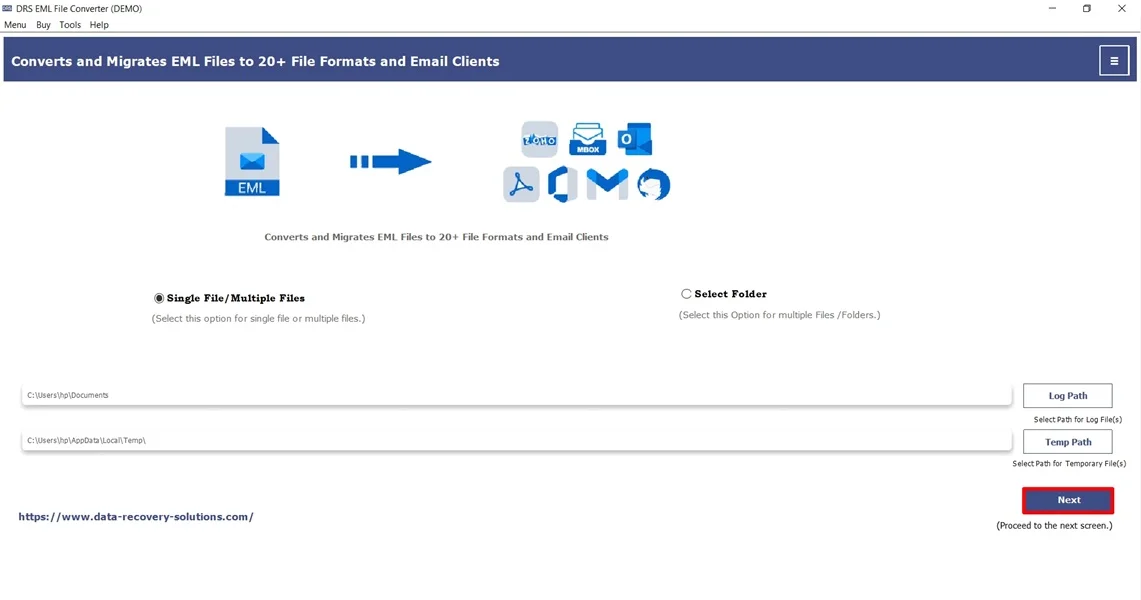
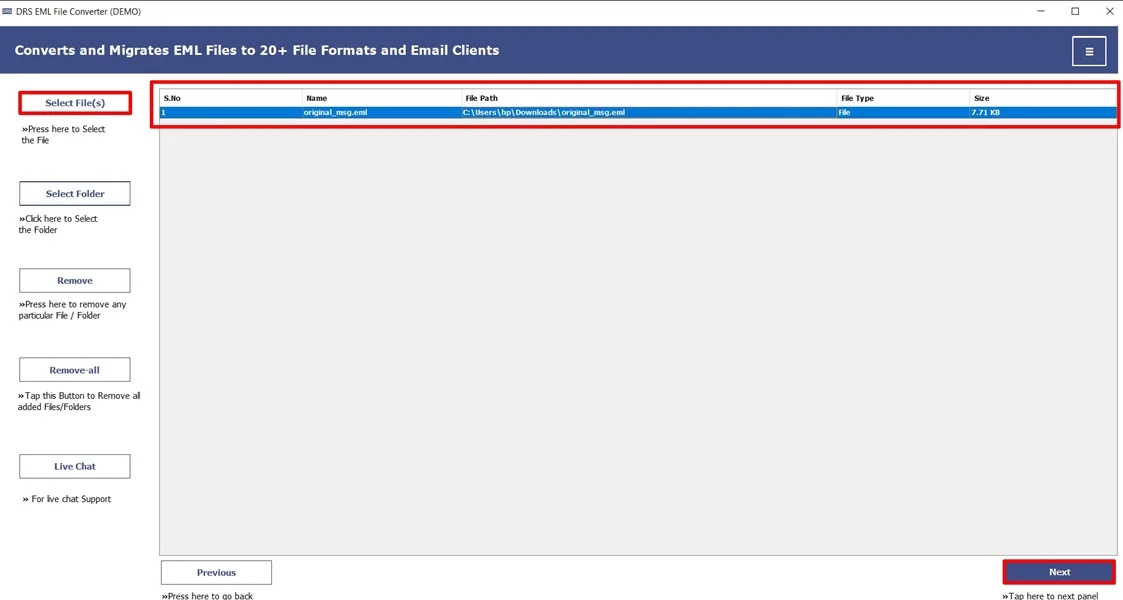
- Now, Select File(s)/Folders, open the EML file that you want to convert, and click Next.
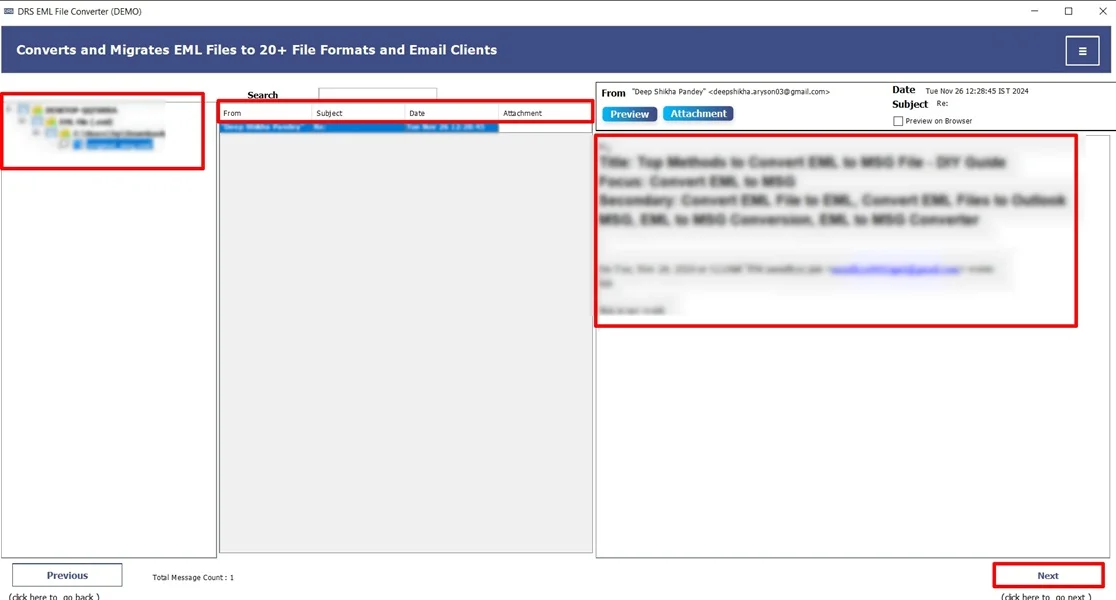
- Afterwards, preview the entire mailbox and click Next.
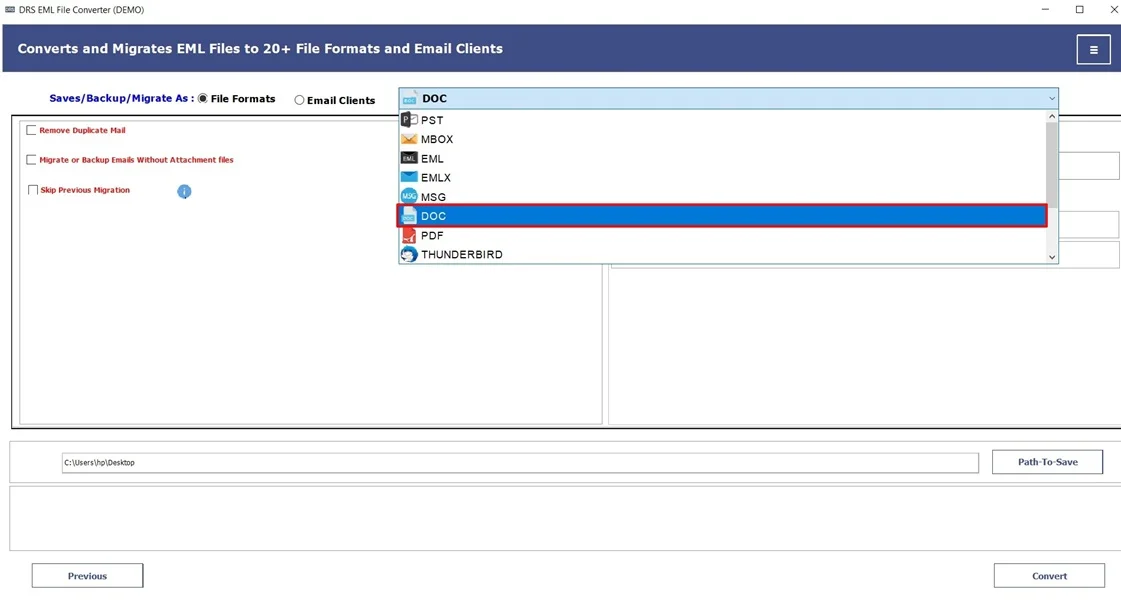
- Furthermore, choose DOC as the saving file format.
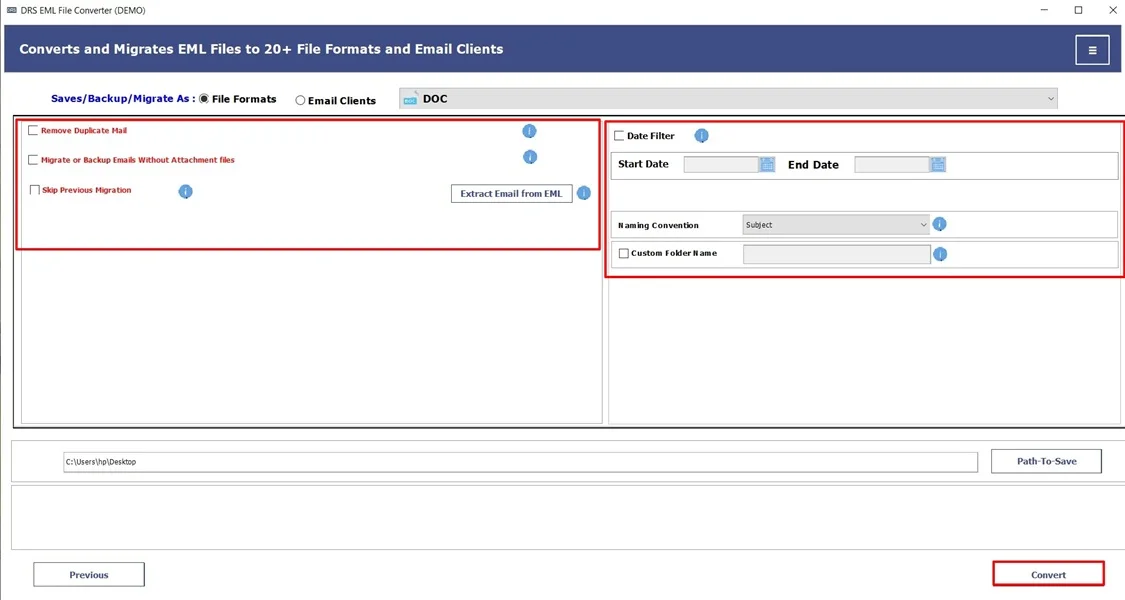
- Finally, apply the filters and click Convert to start the conversion.
Key Features of the Tool to Convert EML to DOC
- Allows users to convert EML to EMLX.
- Supports all major email clients and file formats.
- Preserves attachments and formatting with no data loss.
- Works on Windows systems effectively.
- Additionally, it has a user-friendly interface for non-tech users.
Real-Life Example:-
A legal professional received hundreds of emails in EML format that needed to be submitted in DOC/DOCX for official review. Manually converting each file caused formatting issues and wasted time. Using a professional EML to DOC converter, they open EML file in DOC format while preserving content and email details, saving time and offering accuracy.
A legal professional received hundreds of emails in EML format that needed to be submitted in DOC/DOCX for official review. Manually converting each file caused formatting issues and wasted time. Using a professional EML to DOC converter, they open EML file in DOC format while preserving content and email details, saving time and offering accuracy.
Conclusion
In short, converting EML to DOC or DOCX makes email data more accessible, editable, and professional. While the manual method is also available, it works for a few files. It is not practical for multiple conversions. For a secure, fast, and error-free experience, use a professional EML Converter Tool to convert EML to DOC. You can also go for a one-time service, which is the smartest approach. This guarantees data integrity, time efficiency, and complete preservation during the conversion process.
Frequently Asked Questions
Q.1 How can I convert EML to DOC format?
Ans. You can shift EML to DOC format manually. However, this method is suitable only for a small number of files. For multiple conversions and better accuracy, using a professional MigrateEmails EML Converter Tool is highly recommended.
Q.2 What is the best enterprise solution to convert EML files to DOC format?
Ans. The best enterprise solution is a dedicated EML converter tool that supports multiple processing. It preserves email formatting and attachments and offers complete data integrity. This tool is designed for business environments and large-scale email conversions.
Q.3 What is the most reliable way to export EML files into DOC format without data loss?
Ans. An automated EML converter tool is the most reliable way to save EML files to DOC format without data loss. This tool maintains original email structure, metadata, and message content accurately during conversion.
Q.4 Which professional tool handles bulk EML to DOC tasks?
Ans. A bulk EML to DOC/DOCX converter tool is specifically built to handle large volumes of EML files efficiently. It allows users to convert multiple EML files at once while preserving formatting, attachments, and folder hierarchy. This makes it ideal for enterprise and legal use cases.
About The Author:

I am Neeru Kuchhal, a Technical Content Writer who focuses on turning complex ideas into clear, engaging, and impactful content. I combine creativity with strategy to write blogs, web content, and technical articles that connect with the right audience and support brand goals. I believe great content is not just written. It is thoughtfully created to inform, build trust, and drive action.
Related Post