-
Written By Kiran Sharma
-
Approved By
Vikash Bajpai -
Updated on December 1st, 2025
Best Error-Free Method to Backup OneDrive to External Drive
User Query:-
“I want to back up all my OneDrive files to a hard drive for safety purposes. What is the best and error-free method to backup OneDrive to external drive without data loss?”
“I want to back up all my OneDrive files to a hard drive for safety purposes. What is the best and error-free method to backup OneDrive to external drive without data loss?”
Introduction: OneDrive is one of the most widely used cloud storage platforms for storing data. However, relying solely on cloud storage risks data loss due to deletions, account issues, syncing problems, or ransomware. Backing up OneDrive to a drive adds security, offline access, and long-term protection. This guide explains manual methods for backing files from OneDrive to external drive. Moreover, it introduces the OneDrive Migration Tool for a complete, automated, and error-free backup process.
Why External Drive Backup Is Essential for OneDrive Users?
Users often want to back up OneDrive data locally for several reasons:
- To maintain an offline copy for emergencies and disasters.
- For security against ransomware or unauthorized access.
- Storing a large amount of data on physical storage instead of the cloud.
- To free up OneDrive space while keeping files safe.
- Also, for easier file sharing and physical portability.
- Moreover, it is necessary to create long-term archives for important business or personal data.
DIY Technique to Backup OneDrive to External Drive
OneDrive offers a simple download option that allows users to save files manually. However, the process can be slow and not suitable for large data volumes. Still, you can follow the steps below to take a basic backup.
Manual Guide to Transfer Files from OneDrive to External Drive
- Firstly, open your web browser → Go to OneDrive.com.
- Now, sign in using your OneDrive/Microsoft account.
- After that, select the files or folders you want to download.
- Then, click on Download.
- The downloaded ZIP file will appear on your computer.
- Further, extract the ZIP file.
- Lastly, copy the extracted files and paste them into your external hard drive.
Limitations to Backup OneDrive to External Drive Manually
- Downloading large data takes excessive time.
- Sometimes it fails frequently for huge folders or thousands of files.
- ZIP downloads may become corrupt.
- There is no option for incremental backup.
- Folder structure may change after extraction.
- Also, it requires constant monitoring and manual effort.
Utility to Backup Data from OneDrive to External Drive
For a complete, automated, and error-free backup, the OneDrive Backup Tool is highly recommended. This professional software allows you to securely download OneDrive data in a structured format. Therefore, it ensures complete data preservation and supports bulk backup. Also, it works efficiently for business and personal users.
One-Time Service Option:
If you don’t prefer doing the backup manually or using software, provide a One-Time Data Backup Service.
The expert team securely backs up your entire OneDrive data to your external drive with complete privacy and zero data modification.
Instant Process to Backup OneDrive to External Drive
- Firstly, download and install the OneDrive Backup Software → Next.
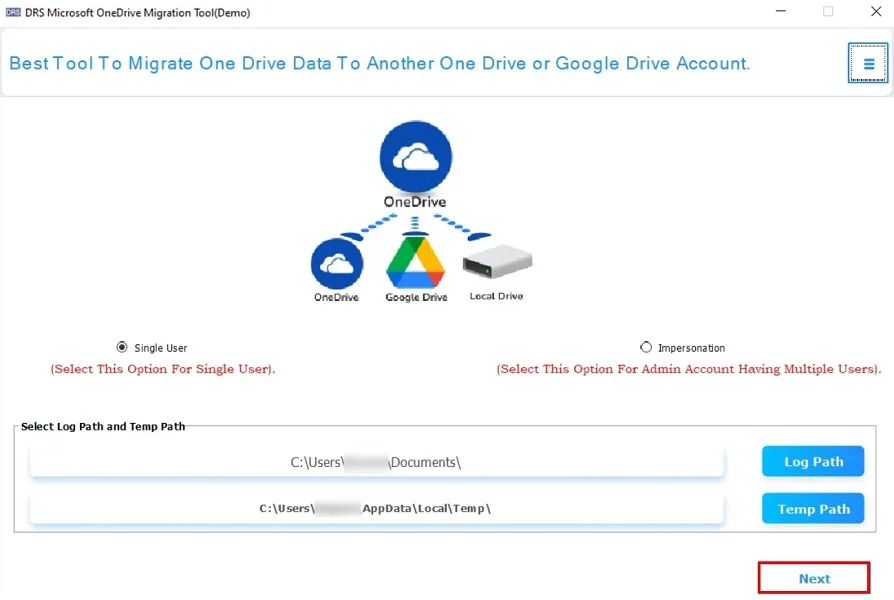
- Now, choose your OneDrive Account via which you want to log in.
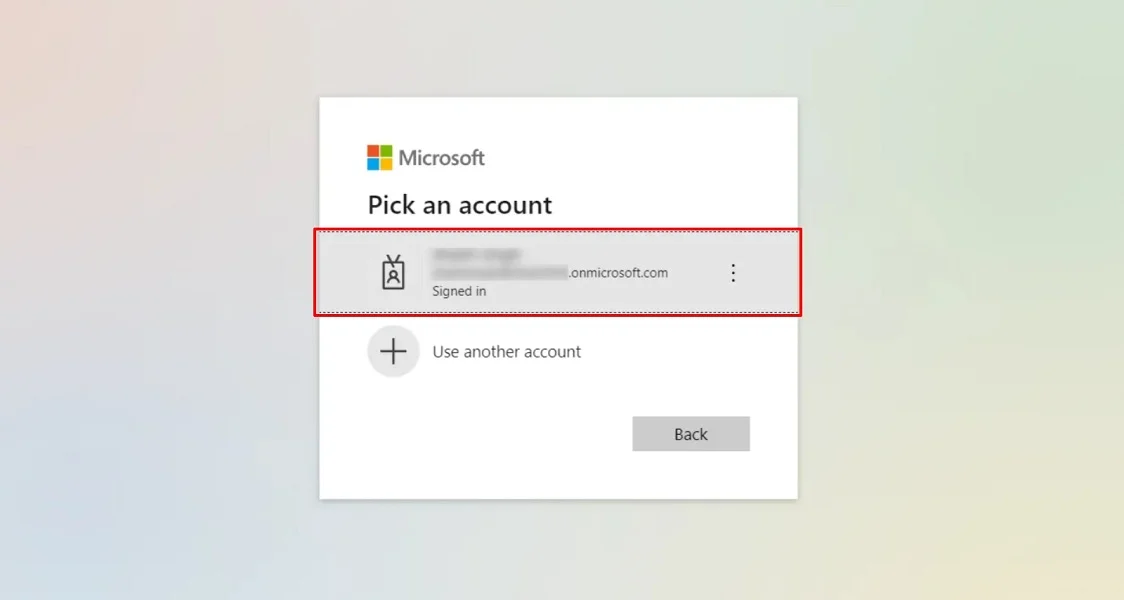
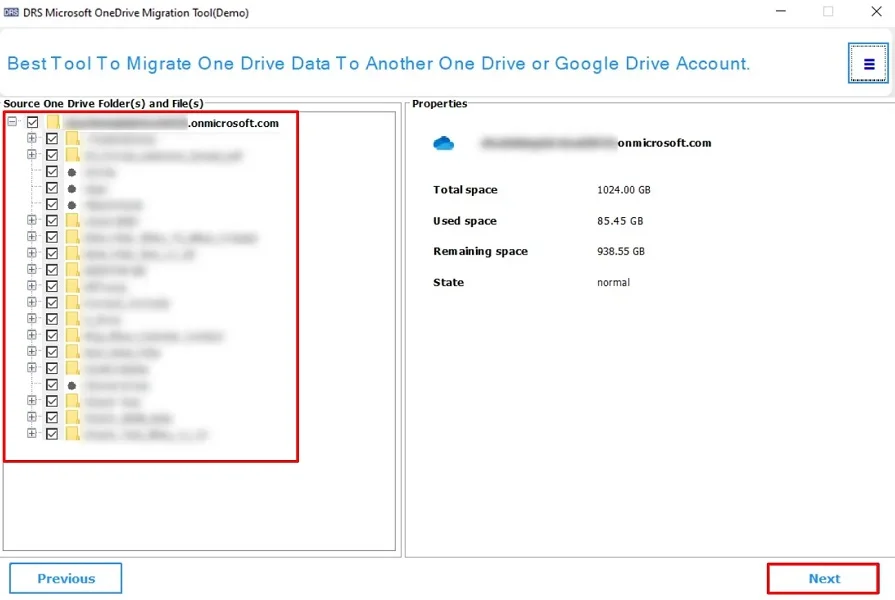
- After that, verify → select the file that you want to migrate.
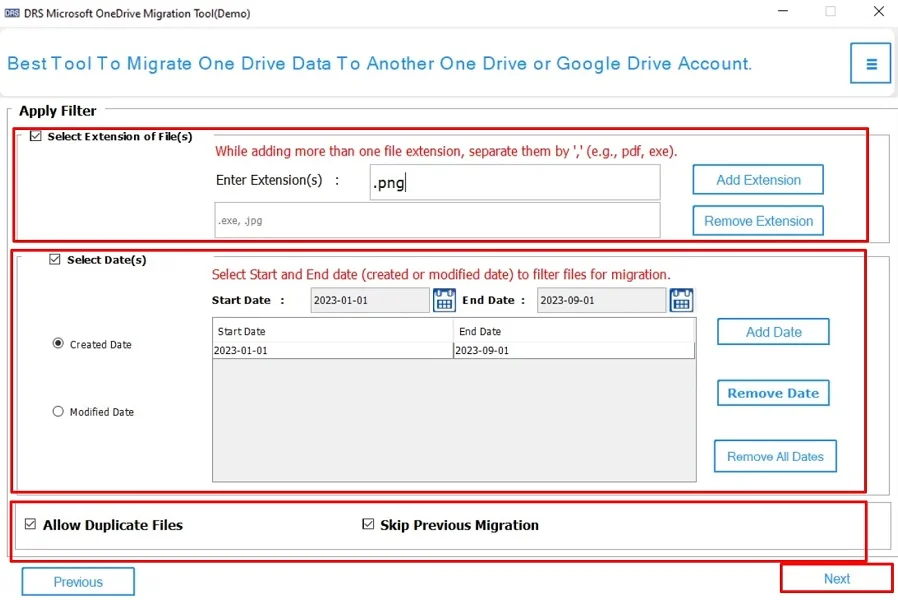
- Then, apply the advanced filters (if necessary) → Next.
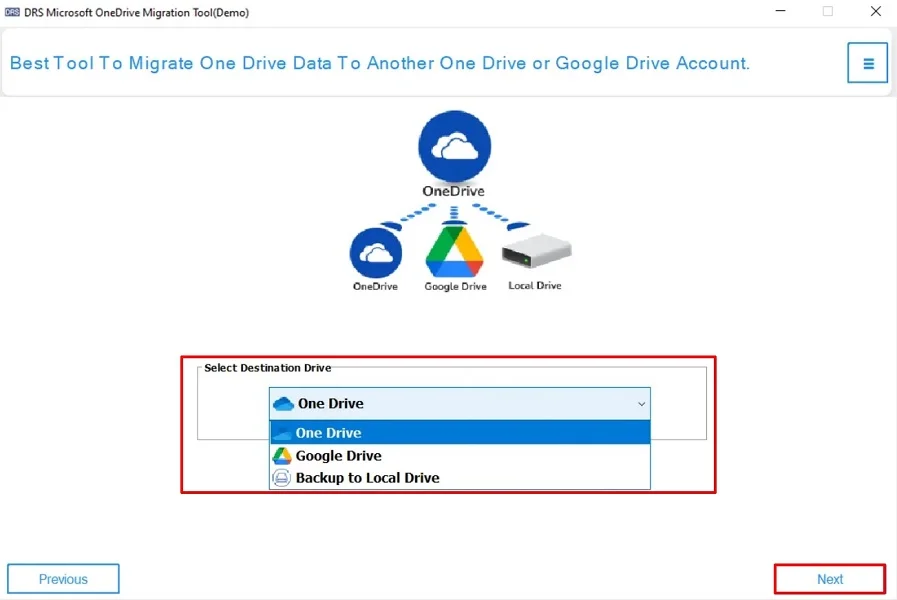
- Finally, select the destination Google Drive to keep your OneDrive data → Next, to start the process.
Major Benefits to Backup OneDrive to External Drive via Software
- Supports bulk backup of all OneDrive files at once.
- Preserves the complete folder hierarchy and metadata intact.
- Offers selective file backup using advanced filters.
- Allows downloading data in multiple formats.
- As it turns out, there is no risk of corruption, data loss, or duplicate files.
- Works smoothly on both Windows and Mac systems.
- Also, the tool has a simple user interface designed for all skill levels.
Real-Life Example:
A freelance designer stored over 200GB of project files on OneDrive.
Due to storage limitations and fear of account locking, they used the automated OneDrive Backup Tool. Therefore, this securely saves all files to a 2TB external drive. The tool preserved folder structures and ensured that no file was missed, saving time and effort.
Conclusion
To conclude, backing up OneDrive to an external hard drive is essential for offline storage and long-term security. However, the manual downloads work for small data sizes but are unreliable for major backups due to corruption. For an efficient, error-free, and automated backup experience, experts recommend the OneDrive Email Migration Tool. It supports bulk backup without any risk of data loss. Moreover, this process to backup OneDrive to external drive ensures every detail is intact during the backup.
Frequently Asked Questions
Q.1 Is there a reliable tool to backup OneDrive data to an external drive?
Ans. Yes. The OneDrive Backup Tool is one of the most reliable solutions to securely backing files from OneDrive to external drive. As it ensures complete data integrity, it maintains folder structure. Also, it supports bulk backup without any errors.
Q.2 Is there any free method for backing up files from OneDrive to an external drive?
Ans. Yes, you can manually download files from OneDrive and transfer them to your external drive. However, this method is slow, may fail for large data, and does not support selective or automated backup.
Q.3 Can I transfer files from OneDrive to an external drive without any technical skills?
Ans. Absolutely. Using the automated OneDrive Backup Tool, even non-technical users can easily transfer files from OneDrive to external drive. Moreover, the software provides a straightforward interface designed for all experience levels.
Q.4 Is it safe to backup data from OneDrive to an external drive?
Ans. Yes, backing up OneDrive data to an external drive is completely safe. It adds an extra layer of protection and ensures that your important files remain accessible even if the cloud account faces issues.
About The Author:

I am Kiran Sharma, a Technical Expert in Content writing. I have technical expertise in the field of Email Backup, Data Recovery, and Email Migration, and resolve technical queries related to Cloud Backup or Email Migration for individuals and businesses.
Related Post