-
Written By Kiran Sharma
-
Updated on December 8th, 2025
Migrate Yahoo Mail to AOL Mail: Tech Approach
User Query:-
“I am planning to switch from Yahoo Mail to AOL, but I don’t want any data loss during conversion. What is the safest and most reliable way to migrate Yahoo Mail to AOL?”
“I am planning to switch from Yahoo Mail to AOL, but I don’t want any data loss during conversion. What is the safest and most reliable way to migrate Yahoo Mail to AOL?”
Introduction:- Yahoo Mail and AOL Mail are two well-known email services. This provides cloud-based access and strong spam protection. However, users often shift from Yahoo to AOL due to better email organization or smoother integration. Migrating manually can be slow and risky, especially when transferring large mailboxes. This blog explains the manual steps to migrate from Yahoo Mail to AOL. Also, covers an advanced professional MigrateEmails Yahoo Backup Tool with complete data preservation.
Yahoo Mail vs AOL Mail: Key Differences
|
Key Aspects |
Yahoo Mail |
AOL Mail |
|
Storage |
1 TB |
Unlimited |
|
Security |
Good |
Strong with enhanced spam filters |
|
Sync |
IMAP/POP |
IMAP/POP |
|
Interface |
Modern |
Simple & user-friendly |
|
Best for |
General emailing |
Secure personal/professional use |
Why Users Prefer Migrating Yahoo Mail to AOL?
The following are some key reasons why users mostly choose to migrate Yahoo Mail to AOL:
- AOL offers faster email loading and fewer ads.
- Comes with stronger spam filtering and malware protection.
- Provides better compatibility with mobile and desktop mail clients.
- Also, easy inbox organization and custom filters.
- Moreover, some users prefer AOL’s cleaner layout and traditional interface.
Manual Guide to Migrate Emails from Yahoo to AOL
This method is best when working with limited email files, and if you don’t want to install external software. You can go ahead with this manual guide.
Step-by-Step Process to Use the Manual Guide
- Firstly, open AOL Mail and sign in.
- Now, click Settings → More Settings → Mailboxes.
- Then, select Add Mail Account.
- After that, choose Yahoo from the service list.
- Enter your Yahoo email address and app password.
- Further, grant permission for AOL to access your Yahoo mailbox.
- AOL will start syncing Yahoo messages automatically.
- Once synced, your Yahoo emails appear in AOL folders.
Limitations to Migrate Yahoo Mail to AOL Manually
- This process requires the creation of a Yahoo App Password.
- Syncing is slow for large mailboxes.
- There is a risk of partial migration if the connection resets.
- Sometimes, the folder structure may not remain identical.
- Also, attachments may fail to load during heavy sync.
- Moreover, there is no selective export.
Automated Software to Convert Yahoo Mail to AOL
To get out of the manual restrictions, you can use the MigrateEmails Yahoo Backup Tool. This tool saves the emails automatically instead of downloading any external software. It enables users to export Yahoo Mail to EML and other supported file formats. Also, the efficient tool ensures the metadata and structured formatting are intact with zero data loss. Moreover, it can work with multiple emails simultaneously.
One-Time Migration Service Available :-
If you prefer not to use a tool, you can opt for a one-time migration service. Here, experts migrate Yahoo Mail to AOL without any loss.
Some of the benefits include:
- No technical skills required.
- Guaranteed safe and complete migration.
- Experts handle large mailboxes securely.
- No manual setup or IMAP configuration.
Quick Steps to Move Yahoo Mail Data to AOL Account
- Firstly, launch the MigrateEmails Yahoo Backup Tool → Continue.
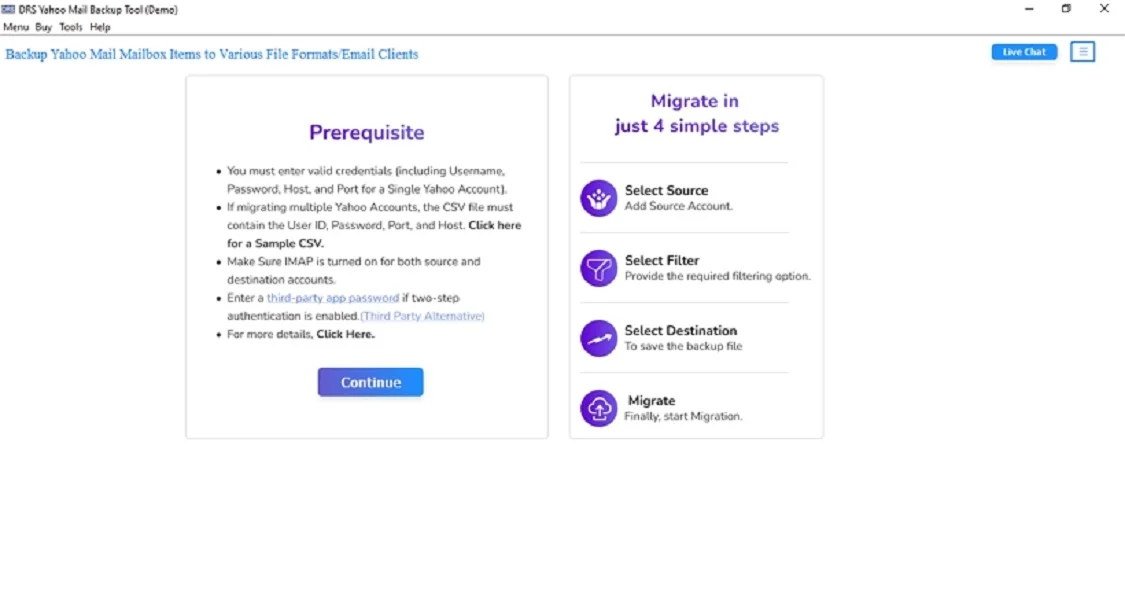
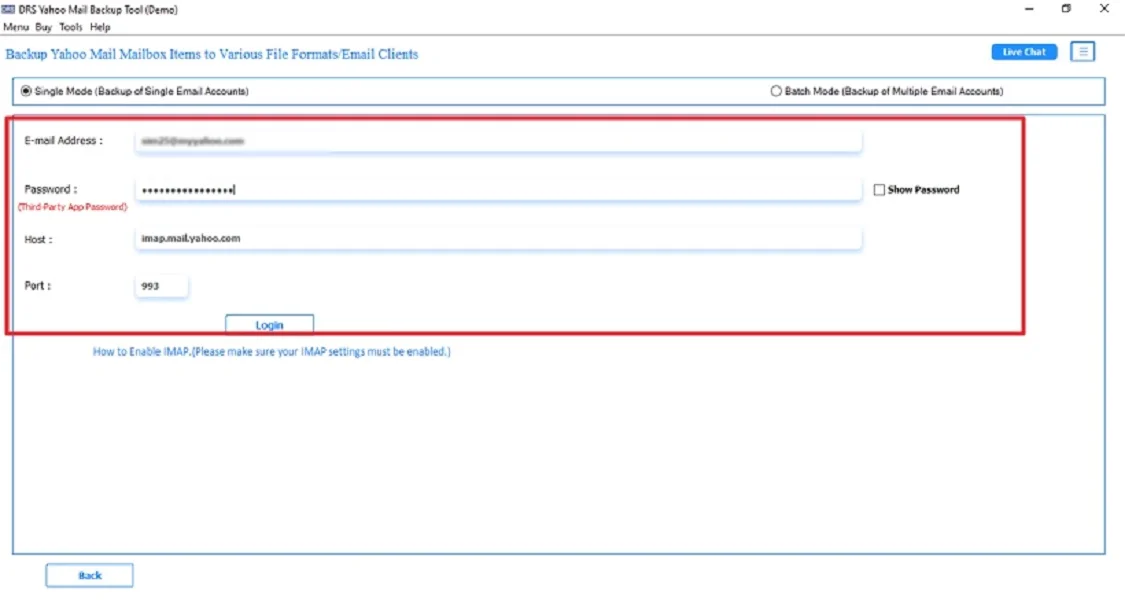
- Now, log in using the Yahoo Mail Account credentials.
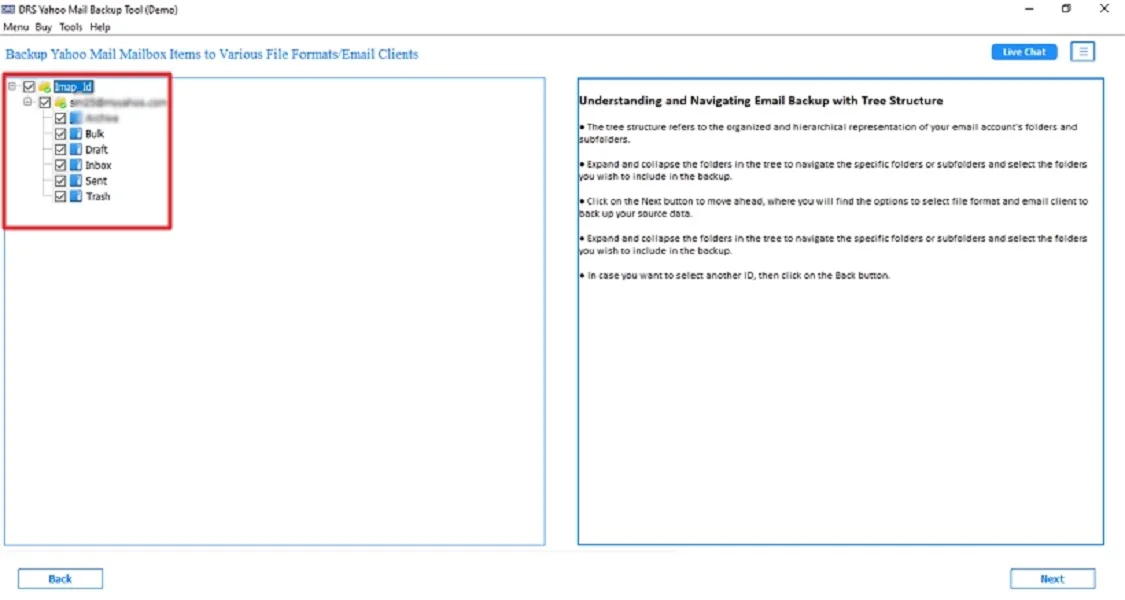
- Further, expand the tree structure → Verify the mailbox → Next.
- After that, choose IMAP as the saving email client → Next.
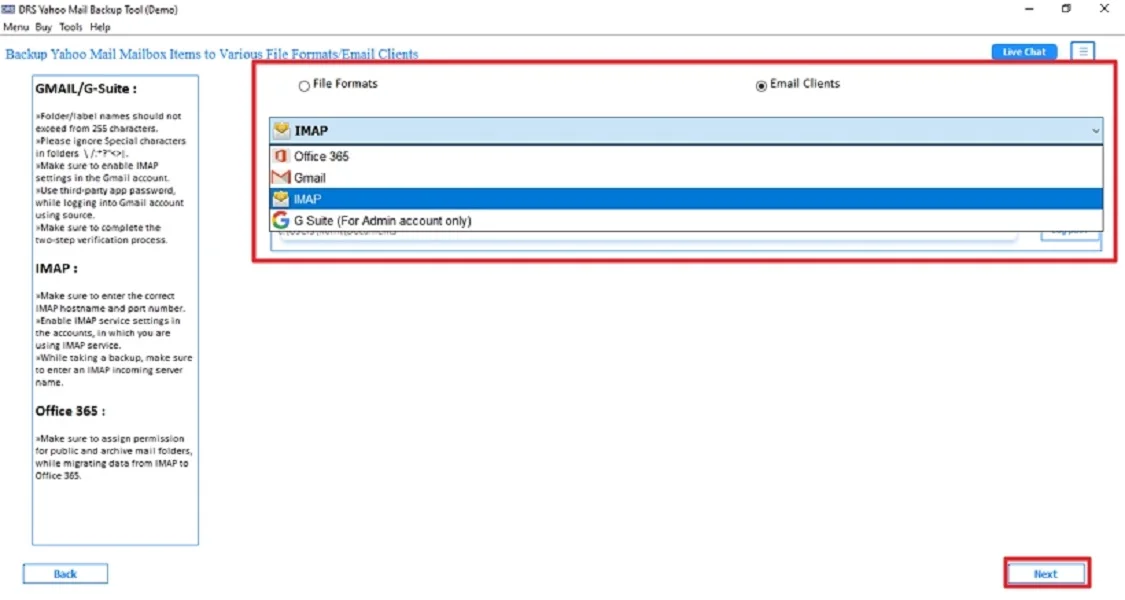
- Subsequently, log in using the AOL Mail Account credentials.

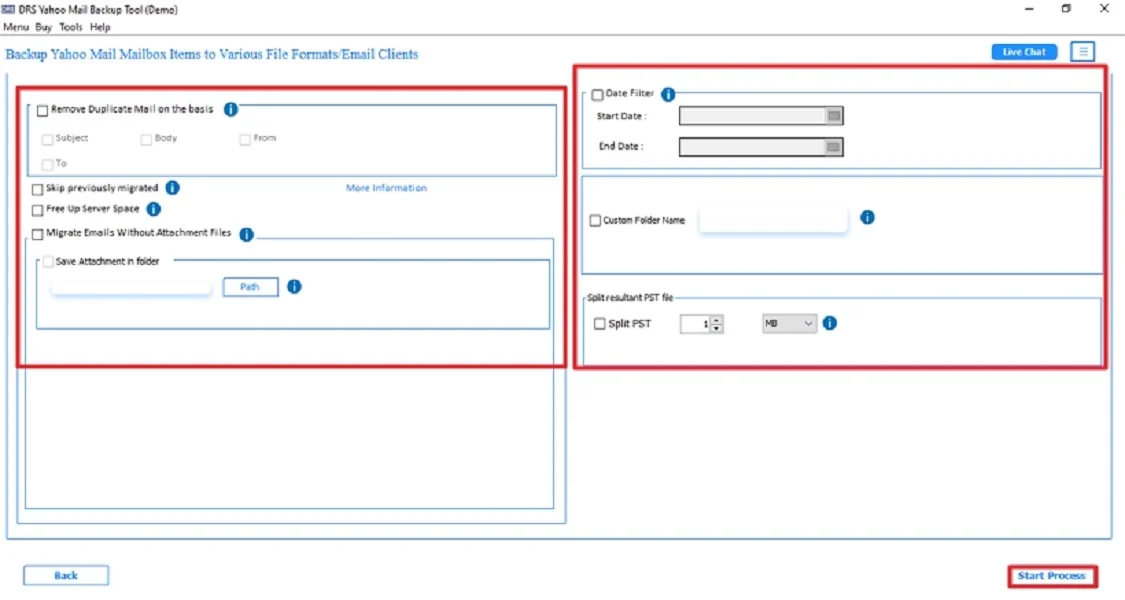
- Finally, use the advanced filters → click Start Process to begin.
Key Features to Migrate Yahoo Mail to AOL Using the Software
- The tool can directly move Yahoo to AOL.
- 100% data integrity, no corruption or missing emails.
- Supports users to export Yahoo to CSV and more.
- There are advanced filters for specific folders or date ranges.
- Therefore, it maintains attachments, HTML formatting, inline images, etc.
- The process is fast, reliable, and easy to use for all users.
- Moreover, it works on all versions of Windows OS.
Real-World Scenario:
John, a business user, had more than 45 GB of Yahoo data.
Using the manual AOL sync method repeatedly failed, causing missing folders and errors.
He switched to the professional tool, and the complete migration was done in one attempt, with zero data loss and all attachments preserved.
This ensured a seamless transition to AOL for his daily workflow.
Conclusion
To sum up, migrating Yahoo Mail to AOL may seem challenging, but with the right method, it becomes secure. While the manual option works for small mailboxes, it comes with several limitations. For a quick, error-free, and professional migration, using a dedicated Yahoo Backup tool is the best choice. Whether you are a professional, this approach to migrate Yahoo Mail to AOL ensures complete data integrity and a smooth transition to AOL Mail.
Frequently Asked Questions
Q.1 How to migrate Yahoo Mail to AOL without data corruption?
Ans. The safest way to change Yahoo Mail to AOL without any data corruption is by using a MigrateEmails Yahoo Backup Tool. It transfers your emails using secure API authentication. Also, it preserves formatting, metadata, attachments, and folder hierarchy. However, the manual IMAP syncing can work, but it may lead to incomplete or inconsistent results in large mailboxes.
Q.2 Can I transfer Yahoo Mail attachments to AOL without errors?
Ans. Yes. If you use an advanced Yahoo Backup tool. It automatically migrate from Yahoo Mail to AOL without errors. Manual methods may skip or break attachments during heavy sync, especially for large or old messages.
Q.3 Can I migrate emails from Yahoo to AOL without knowing any technical steps?
Ans. Absolutely. You can use a non-technical automated migration tool or opt for a one-time done-for-you service. Where experts shift Emails from Yahoo to AOL on your behalf. This requires no technical knowledge, no IMAP configuration, and no troubleshooting.
Q.4 What is the best way to convert Yahoo Mail to AOL in bulk?
Ans. The best and most efficient way to move Yahoo emails to AOL in bulk is by using a dedicated Yahoo Backup utility. It supports large mailboxes, multiple folders, and complete bulk transfers while maintaining data accuracy, attachments, and folder structure. Manual syncing may fail during bulk transfers or long migrations.
About The Author:

I am Kiran Sharma, a Technical Expert in Content writing. I have technical expertise in the field of Email Backup, Data Recovery, and Email Migration, and resolve technical queries related to Cloud Backup or Email Migration for individuals and businesses.
Related Post