-
Written By Kiran Sharma
-
Approved By
Vikash Bajpai -
Updated on December 19th, 2025
How to Migrate AOL Emails to Zoho Mail Step by Step
User Query:-
“I want to shift all my AOL emails to Zoho Mail. What is the step-by-step method to migrate AOL Emails to Zoho Mail safely without losing emails or attachments?”
“I want to shift all my AOL emails to Zoho Mail. What is the step-by-step method to migrate AOL Emails to Zoho Mail safely without losing emails or attachments?”
Introduction:- Migrating AOL emails to Zoho Mail is common for improved security and email management. However, AOL does not provide a direct migration option to Zoho Mail. As a result, users often face challenges such as data loss, missing attachments, etc. Therefore, this guide explains the manual ways to add AOL Email to Zoho Mail step by step. Also, covers the MigrateEmails AOL Backup Software to do the same seamlessly.
Comparison Between AOL Mail and Zoho Mail
Before the conversion process, you must understand the concept of AOL Mail and Zoho Mail.
|
Basic Criteria |
AOL Mail |
Zoho Mail |
|
Free web-based email service by AOL/Yahoo |
Email service by Zoho for individuals and businesses |
|
Very large (often up to 1 TB) for free |
Typically 5 GB per user on free/basic plans |
|
Supported for email clients |
Supported; can be used with third-party |
|
Standard spam/virus protection, TLS/HTTPS |
Advanced security: encryption, S/MIME, spam filters, 2FA, compliance features |
|
Simple, straightforward, classic webmail |
Business-oriented with more tools and customization |
Why Migrate AOL Emails to Zoho Mail?
Below are the main reasons why users choose to forward AOL Emails to Zoho Mail:
- To use a professional and ad-free email platform.
- For better email security and admin control.
- Managing business emails under Zoho Workplace.
- Preserves important AOL email data before account inactivity.
- Centralizing emails, contacts, calendars, and other details.
- Moreover, to improve collaboration with Zoho apps.
Manual Approach to Export AOL emails to Zoho Mail.
Zoho Mail allows IMAP-based migration. This can be used to move AOL emails manually. This method is suitable only for small mailboxes and requires technical configuration.
Manual Steps to Migrate AOL Emails to Zoho Mail
- Firstly, log in to Zoho Mail Admin Console.
- Then, go to Data Migration and Add Migration.
- Select IMAP Migration as the migration type.
- Now, enter AOL IMAP server details and credentials.
- Map AOL users with Zoho Mail accounts.
- Lastly, start the migration process and wait for completion.
Limitations of the Manual Methods: Migrate Emails from AOL to Zoho Mail
- This process has a Complex IMAP configuration.
- There is a high risk of sync errors for large mailboxes.
- It has a slow migration speed.
- Attachments may not migrate properly.
- The manual method requires technical knowledge.
- Additionally, it has no advanced filtering or duplicate control.
Recommended Approach to Migrate AOL Emails to Zoho Mail
To avoid manual complications, the MigrateEmails AOL Backup Tool is the reliable solution. The tool securely helps to import AOL Emails to Thunderbird with zero data loss. This automated approach is ideal for users who want an accurate migration. Moreover, it ensures the metadata, formatting, and structure are intact with complete security.
One-Time Migration Service Option:-
If you prefer expert assistance, the MigrateEmails One-Time Migration Service is available. Their professionals securely add AOL Email to Zoho Mail. While ensuring confidentiality, accuracy, and zero data loss.
If you prefer expert assistance, the MigrateEmails One-Time Migration Service is available. Their professionals securely add AOL Email to Zoho Mail. While ensuring confidentiality, accuracy, and zero data loss.
Step-by-Step Automated Guide to Use the Software
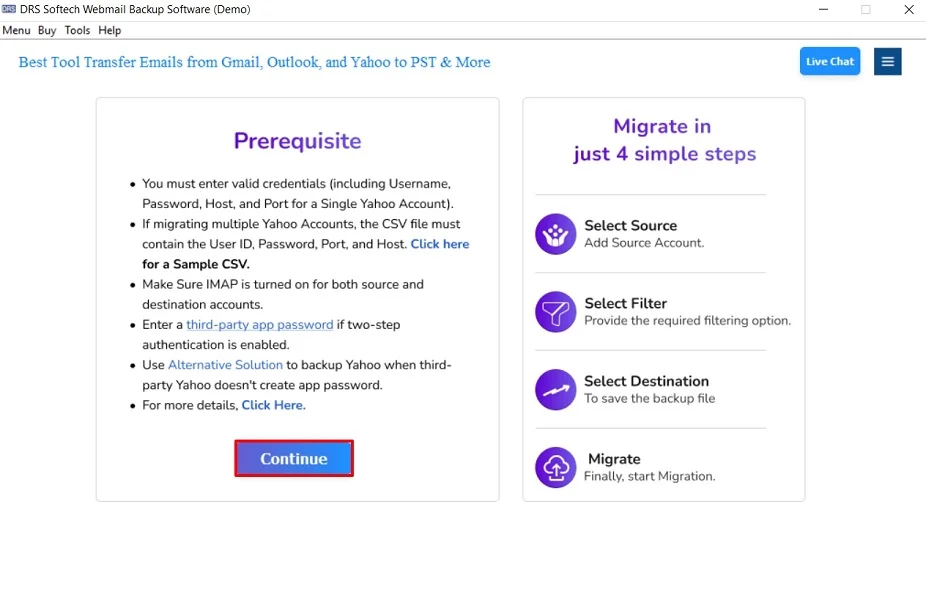
- Firstly, launch the MigrateEmails AOL Backup Tool and click Continue.
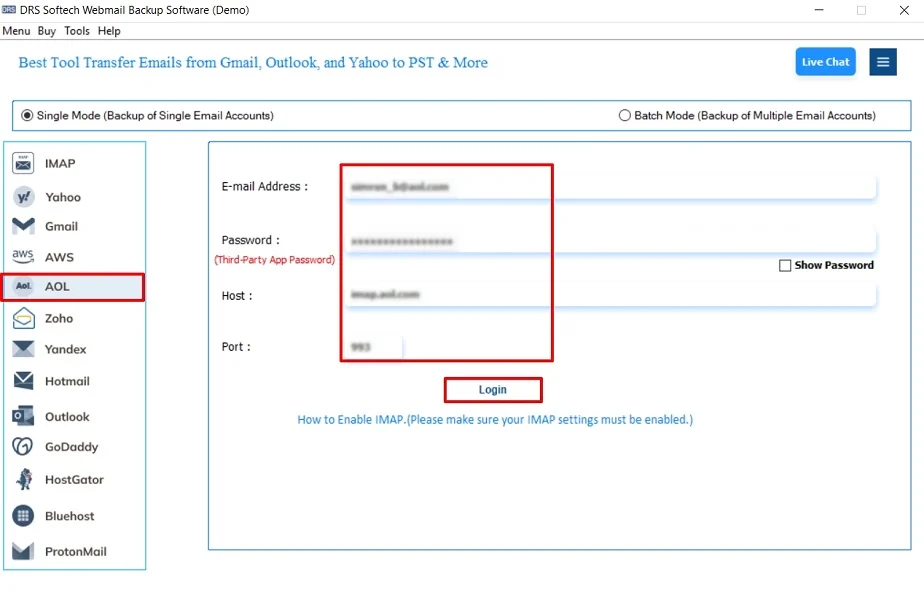
- Now, select AOL and enter the AOL Mail login credentials.
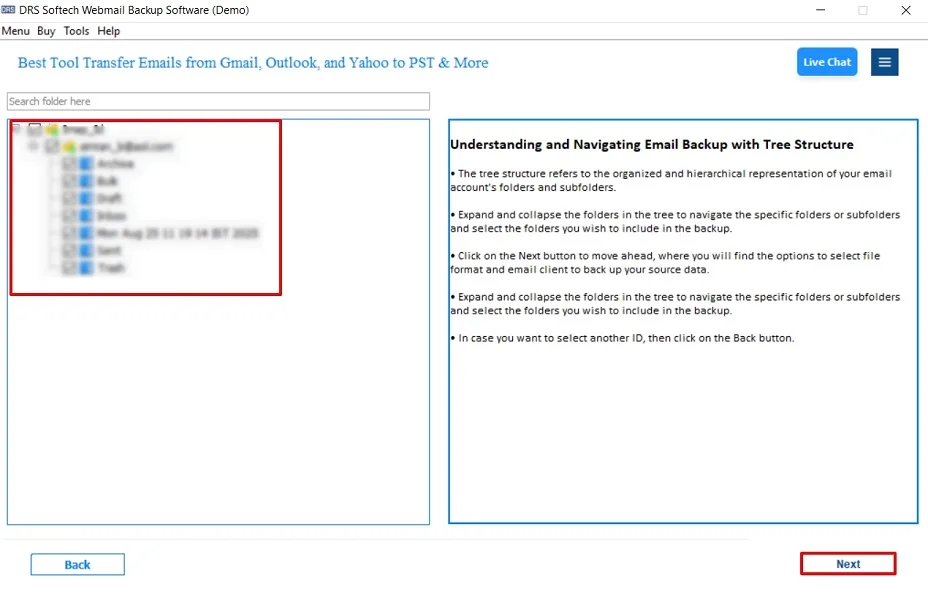
- After that, drag the tree structure, preview the mailbox, and click Next.
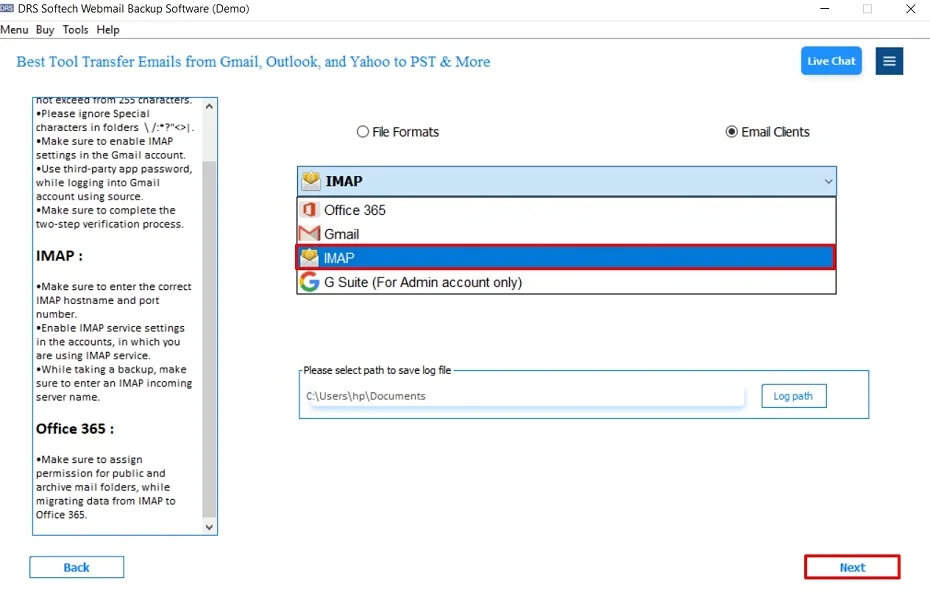
- Further, choose IMAP as the saving email platform and click Next.
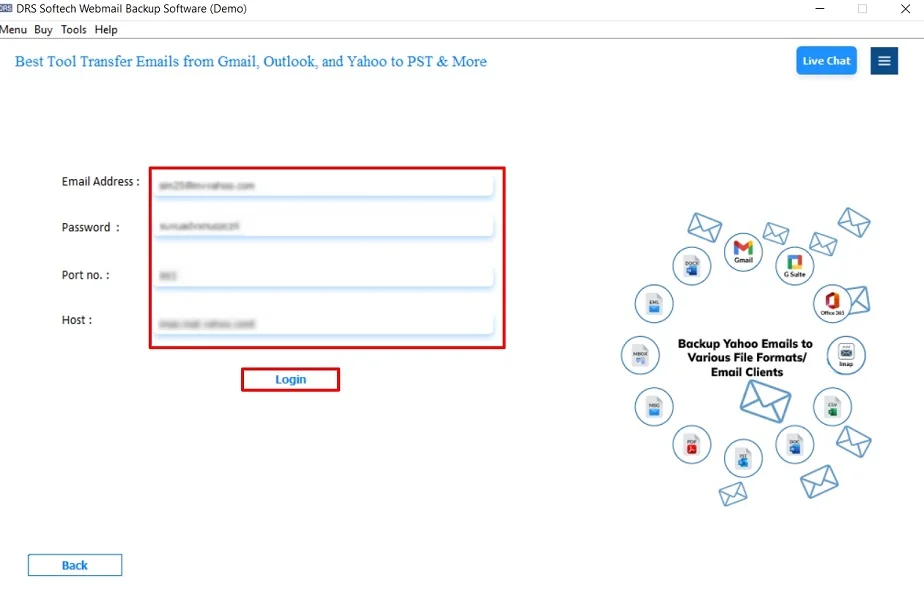
- Then, enter the Zoho Mail account login credentials.
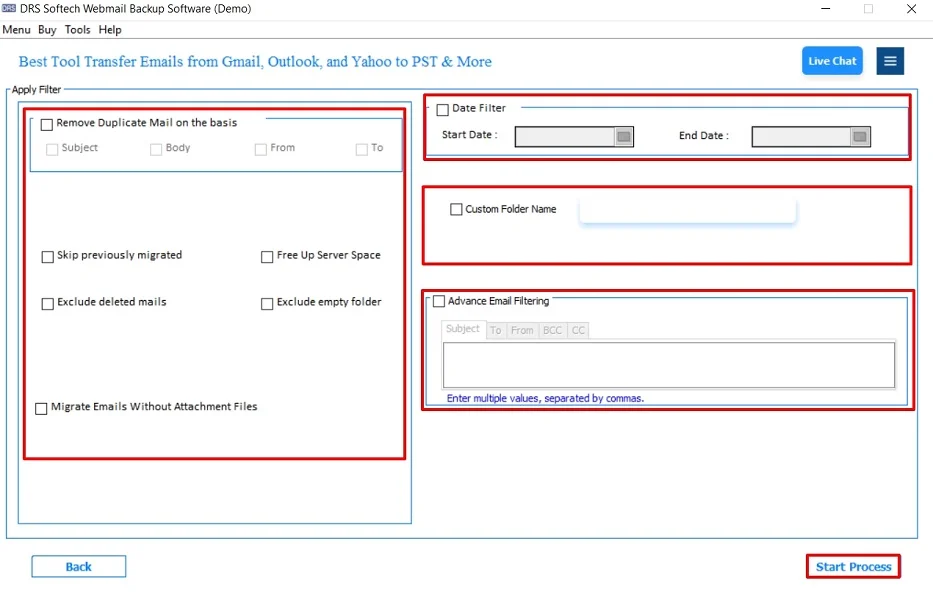
- In the end, apply the built-in filters and click Start Process to begin.
Top Characteristics: Migrate AOL Emails to Zoho Mail
- Preserves folder hierarchy and email structure intact.
- The tool supports multiple email migrations simultaneously.
- It has advanced filters for selective email transfer.
- This process usually works on both Windows and macOS.
- There is no data loss or email duplication.
- Additionally, it enables users to export AOL mails to Outlook PST file.
Real-World Scenario:-
A small business migrated from AOL Mail to Zoho Mail to improve team collaboration. Using an automated MigrateEmails AOL Backup tool, they successfully transferred all emails and attachments without downtime or technical issues.
A small business migrated from AOL Mail to Zoho Mail to improve team collaboration. Using an automated MigrateEmails AOL Backup tool, they successfully transferred all emails and attachments without downtime or technical issues.
Final Words
To conclude, migrating AOL emails to Zoho Mail requires careful execution to avoid data loss. While the manual IMAP method works for small mailboxes, it is time-consuming. The AOL Backup Tool provides a secure and efficient way to migrate AOL Emails to Zoho Mail. This ensures the conversion process with complete data integrity. For a smooth and reliable migration, an automated solution is the recommended approach.
Frequently Asked Questions
Q.1 Can I migrate AOL Mail to Zoho Mail for free?
Ans. Zoho Mail offers a basic IMAP migration option. This can be used for free, but it is limited and suitable only for small mailboxes. For accurate and bulk migration, a professional AOL Backup tool is highly recommended.
Q.2 How can I add my AOL email to Zoho Mail without technical skills?
Ans. You can move AOL email to Zoho Mail easily by using an automated MigrateEmails AOL Backup tool. This usually requires simple login details and performs the process without manual configuration or technical expertise.
Q.3 Is it safe to export AOL emails to Zoho Mail?
Ans. Yes, exporting AOL emails to Zoho Mail is safe when done using a trusted MigrateEmails AOL backup solution. This uses secure authentication and preserves email data, attachments, and metadata without modification.
Q.4 Can I migrate emails from AOL to Zoho Mail in bulk?
Ans. Yes, bulk migration is possible with an advanced MigrateEmails tool. It allows users to transfer complete AOL mailboxes or selected folders to Zoho Mail in a single process.
About The Author:

I am Kiran Sharma, a Technical Expert in Content writing. I have technical expertise in the field of Email Backup, Data Recovery, and Email Migration, and resolve technical queries related to Cloud Backup or Email Migration for individuals and businesses.
Related Post