-
Written By Kiran Sharma
-
Approved By
Vikash Bajpai -
Updated on December 25th, 2025
Delete Duplicate Contacts from iPhone Without Affecting Data
Harris Query:-
“My iPhone has many duplicate contacts. How can I delete duplicate contacts from iPhone without affecting original data or details?”
“My iPhone has many duplicate contacts. How can I delete duplicate contacts from iPhone without affecting original data or details?”
Introduction:- Duplicate contacts on an iPhone can create confusion. This can slow down searches and make calling or messaging inconvenient. These duplicates usually appear after syncing contacts from email clients multiple times. Although Apple provides limited options to manage duplicates. They may not always work effectively for large contact lists. This guide explains the manual ways to remove duplicate contacts iPhone safely. Also, covers an automated MigrateEmails Duplicate File Finder and Remover Tool.
Purpose of Removing Duplicate Contacts from iPhone?
Users generally prefer to delete duplicate contacts from iPhone due to the following reasons:
- To keep the contact list clean and organized.
- Avoiding confusion while calling or messaging.
- Improving contact search accuracy.
- Prevent syncing issues across devices.
- Saving storage and enhancing performance.
- Moreover, to maintain a professional and updated address book.
Manual Technique to Clean up duplicate contacts iPhone
Apple offers built-in options to merge or remove duplicate contacts using iOS and iCloud features. This method is most effective for a small number of duplicate files. Let’s discuss the steps to follow the process.
- Firstly, open the Contacts app on your iPhone.
- Now, look for the Duplicates Found notification (iOS 16 and later).
- Then, tap View Duplicates.
- After that, select Merge or Merge All.
- Lastly, confirm the action to combine duplicate contacts.
Limitations: Delete duplicate contacts from iPhone
- This process works only on newer iOS versions.
- It is not effective for large contact lists.
- The manual merging is time-consuming.
- No advanced duplicate detection rules.
- There is a risk of incorrect merging.
- Also, there is no preview or backup option.
Advanced Technique to Clean Duplicate Contacts iPhone
For accurate duplicate removal, the MigrateEmails Duplicate File Finder and Remover Tool is the only solution. It scans iPhone contacts thoroughly and removes duplicates. This process ensures the duplication without affecting original data. The automated approach guarantees accuracy, speed, and complete data safety. Additionally, this software comes with a free demo version.
One-Time Free Removal Service:-
If you prefer not to use software, the MigrateEmails One-Time Contact Cleanup Service is available. The experts securely delete duplicate contacts from iPhone. This ensures complete data privacy and zero data loss.
If you prefer not to use software, the MigrateEmails One-Time Contact Cleanup Service is available. The experts securely delete duplicate contacts from iPhone. This ensures complete data privacy and zero data loss.
Instant Steps to Use the MigrateEmails Software
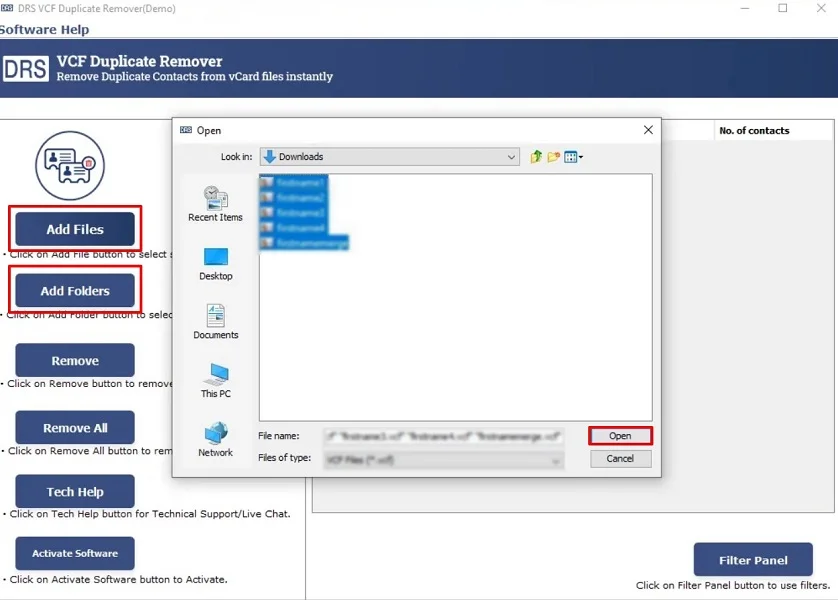
- Firstly, download & install the MigrateEmails vCard Duplicate Contact Remover.

- Now, click Add File(s)/Folders, upload the VCF file, and click Open.
- Then, select the VCF file that you want to convert and click Next.
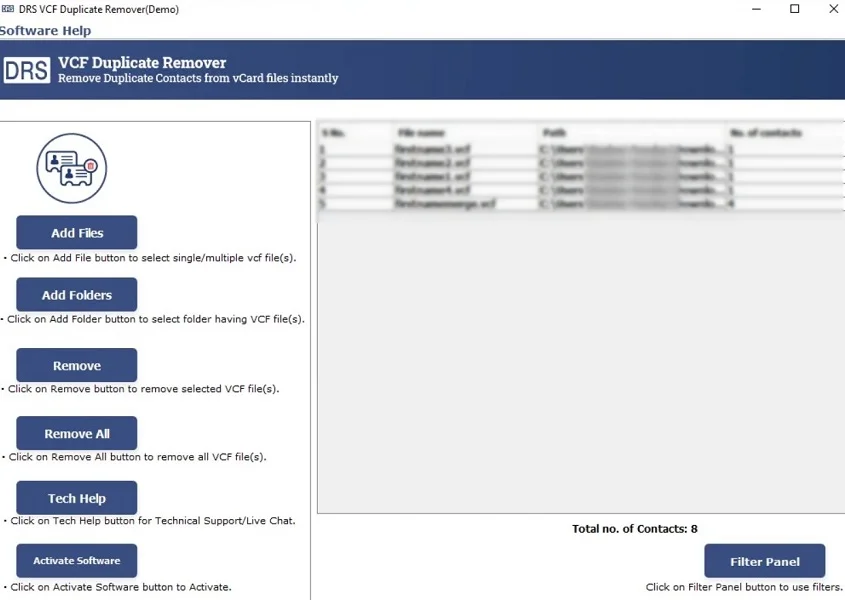
- After that, apply the additional filters and click Next.
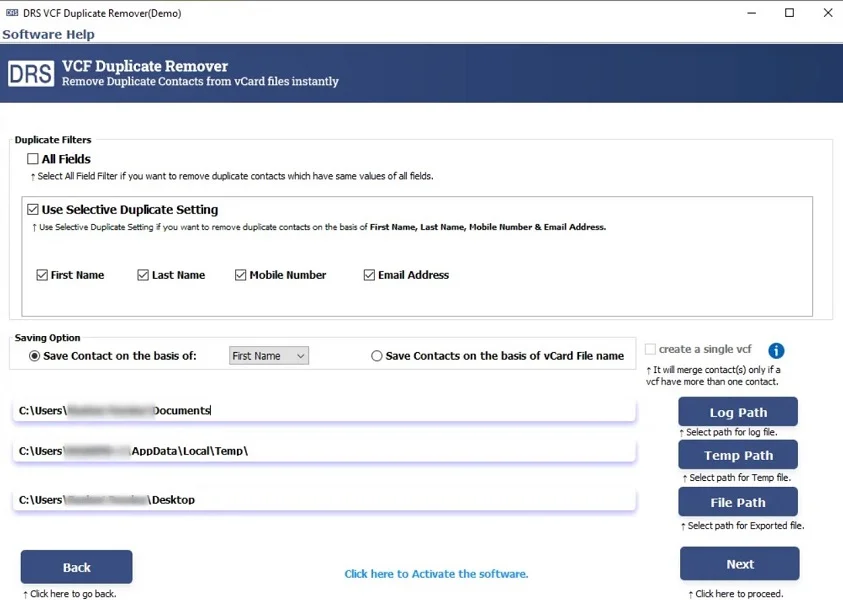
- Finally, download the report if necessary.
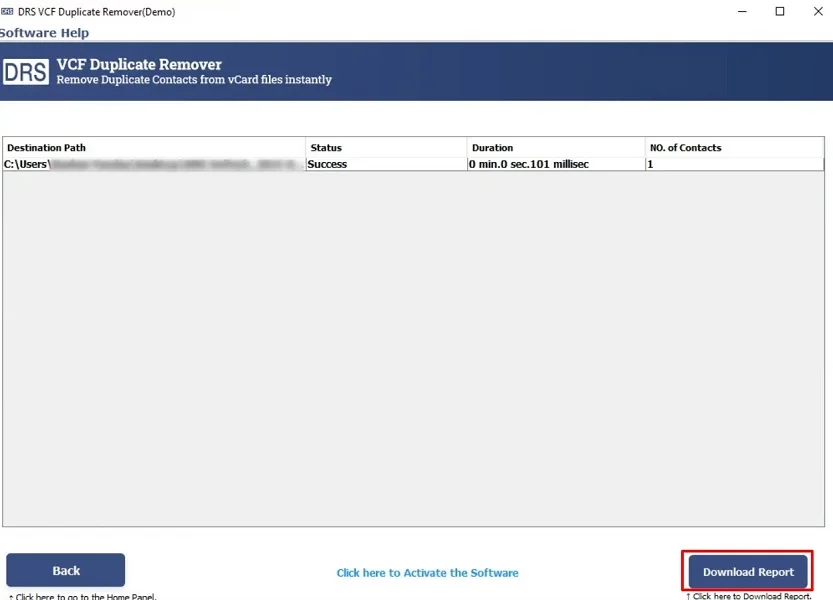
Top Benefits of the Tool: Delete duplicate contacts from iPhone
- It removes duplicate contacts in bulk.
- Preserves original contact information.
- This tool allows a preview before deletion.
- Supports multiple duplicate matching criteria.
- Compatible with Windows and macOS.
- Moreover, it is easy for both technical and non-technical users.
Real-World Scenario:-
A business professional noticed repeated contacts after syncing Gmail and iCloud on an iPhone. Using an automated MigrateEmails tool, it remove duplicate contacts iPhone Free without deleting any important phone numbers or email details.
A business professional noticed repeated contacts after syncing Gmail and iCloud on an iPhone. Using an automated MigrateEmails tool, it remove duplicate contacts iPhone Free without deleting any important phone numbers or email details.
Conclusion
In short, removing duplicate contacts from an iPhone is essential for maintaining a reliable address book. While manual methods are suitable for a few duplicates. But they are inefficient for large contact lists. The Duplicate File Finder and Remover Tool offers an error-free solution to delete duplicate contacts from iPhone. This ensures the process without affecting the original data. For fast and accurate results, this automated approach is highly recommended.
Frequently Asked Questions
Q.1 Is there a free way to delete duplicate contacts from iPhone?
Ans. Yes, iPhone offers a built-in Merge Duplicates option in the Contacts app. However, this free method works only for limited duplicates and does not provide advanced control or preview options.
Q.2 How to remove duplicate phone numbers from iPhone safely?
Ans. The safest way is to use a trusted MigrateEmails duplicate contact remover tool that scans contacts accurately. This allows preview and removes duplicates without deleting original phone numbers or contact details.
Q.3 What is the best enterprise solution to clean up duplicate contacts on iPhone?
Ans. For enterprise or large contact databases, a professional automated contact cleanup solution is best. It supports bulk duplicate removal, data validation, backup options, and secure processing.
Q.4 Can I clean duplicate contacts on iPhone without technical skills?
Ans. Yes, modern automated MigrateEmails tools are designed with an intuitive interface. It allows non-technical users to clean duplicate contacts on iPhone in just a few simple steps.
About The Author:

I am Kiran Sharma, a Technical Expert in Content writing. I have technical expertise in the field of Email Backup, Data Recovery, and Email Migration, and resolve technical queries related to Cloud Backup or Email Migration for individuals and businesses.
Related Post