-
Written By Neeru Kuchhal
-
Approved By
Vikash Bajpai -
Updated on February 14th, 2026
Safest Way to Convert EMLX to PST Without Errors
User Query:-
“I have many EMLX files from Apple Mail, and I need to open them in Microsoft Outlook. What is the safest way to convert EMLX to PST without losing emails, attachments, or formatting?”
“I have many EMLX files from Apple Mail, and I need to open them in Microsoft Outlook. What is the safest way to convert EMLX to PST without losing emails, attachments, or formatting?”
Introduction:- EMLX files are created by Apple Mail and are not directly supported by Microsoft Outlook. On the other hand, PST is the primary file format used by Outlook to store important details and other mailbox data. Because these formats belong to different platforms, direct conversion is not possible without a proper method. To solve this issue, this guide explains the safest ways to convert EMLX files to PST while preserving data integrity. If you need a quick solution, a dedicated MigrateEmails EMLX Converter Tool is the best option.
EMLX vs. PST: Which Email Format Do You Need?
Before starting the conversion process, let’s understand the difference between the two formats.
| Feature Aspects | EMLX | PST |
| Platform | Apple Mail | Microsoft Outlook |
| File Type | Single email file | Complete mailbox file |
| Compatibility | macOS | Windows & macOS (Outlook) |
| Bulk Storage | No | Yes |
| Direct Conversion | Not Supported | Fully Supported |
Why EMLX to PST Conversion is Essential?
There are several top benefits for why users choose to convert EMLX to PST:
- To move from Apple Mail to Microsoft Outlook.
- Accessing emails in a Windows environment.
- For creating a complete Outlook mailbox file.
- Maintaining business email continuity.
- Also, to centralize email data for backup or migration.
| Real-Life Scenario Problem: A marketing agency switched from Mac systems (Apple Mail) to a Windows-based environment using Microsoft Outlook. They had thousands of archived EMLX files that needed to be accessed in Outlook. Action Taken: They used a professional MigrateEmails EMLX to PST converter tool to migrate all files into a single PST file. Outcome: All emails were successfully converted without losing attachments, formatting, or folder structure, enabling seamless transition to Outlook. |
DIY Method to Convert EMLX to PST [Indirect Method]
If you don’t want to install any third-party software, you can complete the process manually. But remember that this method comes with a lot of limitations and consumes time and effort.
Manual Process to Follow the Steps
- Firstly, convert EMLX files to EML format.
- Now, import EML files into Outlook.
- After that, export the mailbox from Outlook to PST.
Limitations of the Manual Method to Convert EMLX emails to PST
- It is a very time-consuming process.
- There might be a risk of formatting issues.
- Attachments may not migrate properly.
- Sometimes, it is not suitable for bulk conversion.
- Moreover, it requires technical expertise.
| Note: Because of these limitations, manual conversion is not recommended for large-scale or important data. |
Direct Method to Convert EMLX to PST Automatically
The most reliable solution is using an automated MigrateEmails EMLX Converter Tool. This solution directly converts multiple EMLX files simultaneously with zero data loss. It enables users to convert EMLX files to MBOX and other supported file formats. Therefore, this process does not require technical expertise. This software offers complete data integrity and high security. Also, it has a user-friendly interface suitable for non-tech users as well.
One-Time Conversion Service Available:-
If you don’t want to handle the conversion process yourself, you can opt for a one-time conversion service. Just connect with our team. The experts securely shift your EMLX file into PST format with no data loss. Also, they offer full–time security, 100% accuracy, and complete preservation of every important detail. Thus, this option is ideal for business professionals and users without technical knowledge.
If you don’t want to handle the conversion process yourself, you can opt for a one-time conversion service. Just connect with our team. The experts securely shift your EMLX file into PST format with no data loss. Also, they offer full–time security, 100% accuracy, and complete preservation of every important detail. Thus, this option is ideal for business professionals and users without technical knowledge.
Complete Usage Guide to Export EMLX to PST Using the Software
- Firstly, launch the MigrateEmails EMLX Converter Tool, choose Single File/Folders, and click Next.
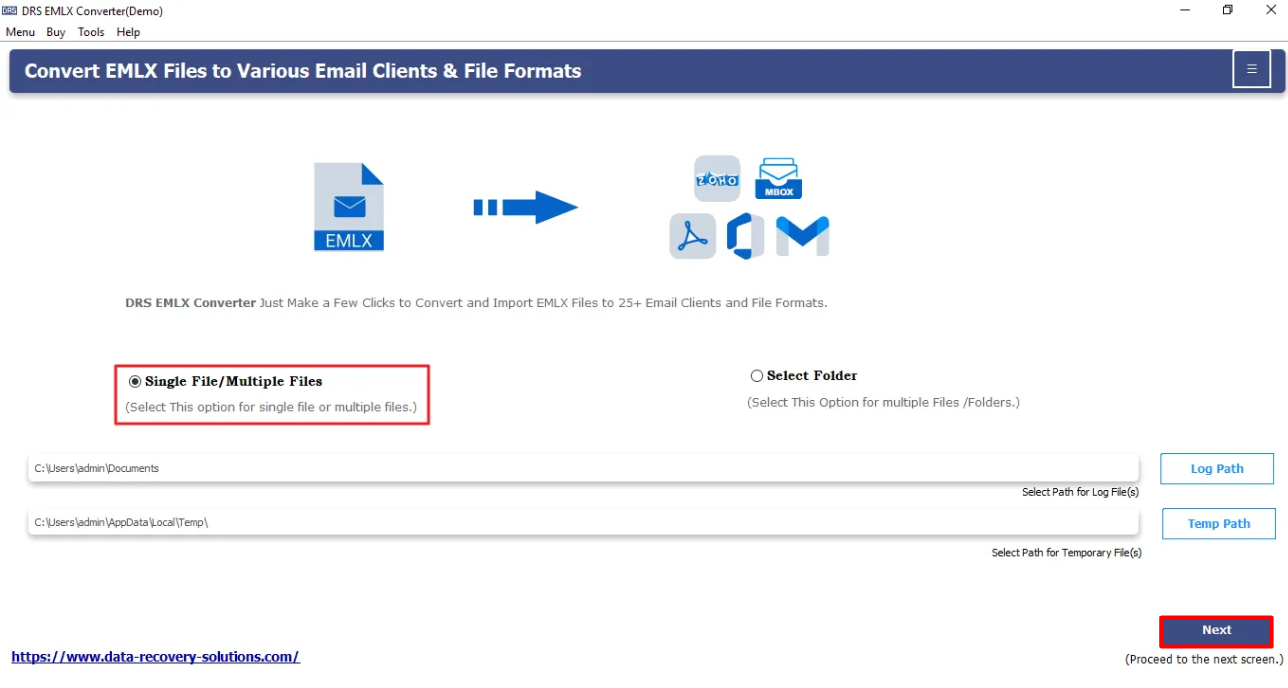
- Now, choose the EMLX file that you want to convert and click Next.

- Furthermore, drag the hierarchy, verify the mailbox, and click Next.

- Afterwards, choose PST as the saving file format.
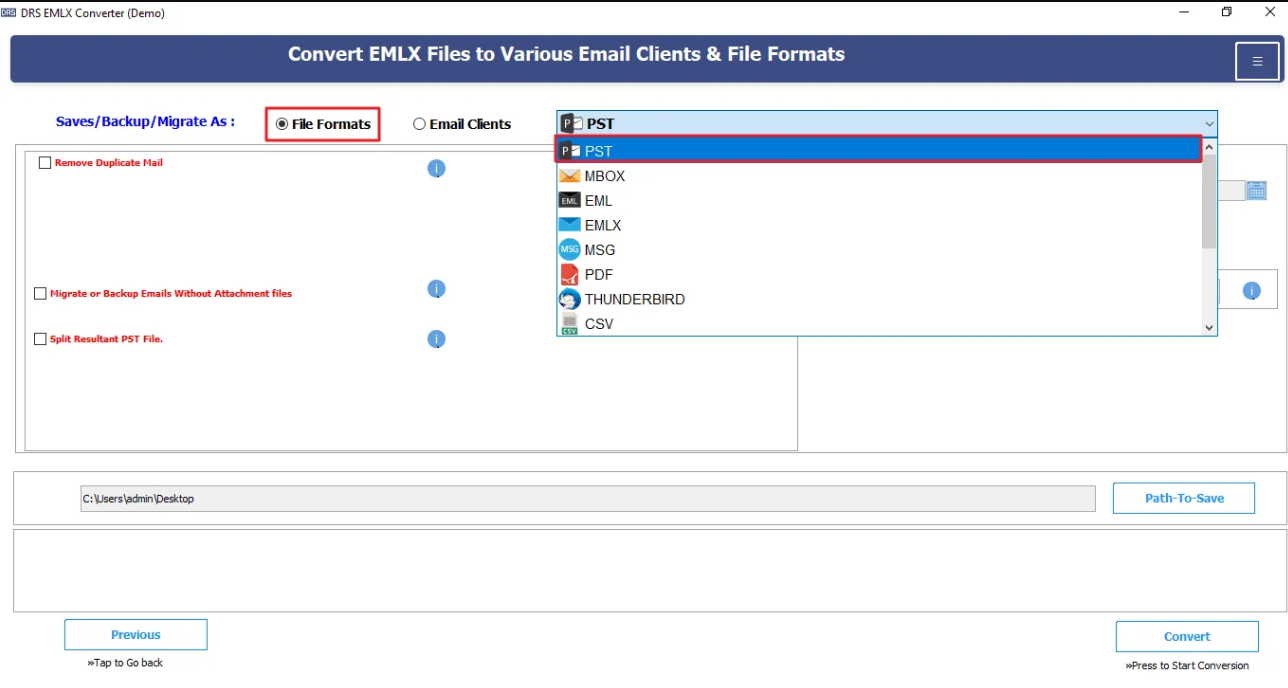
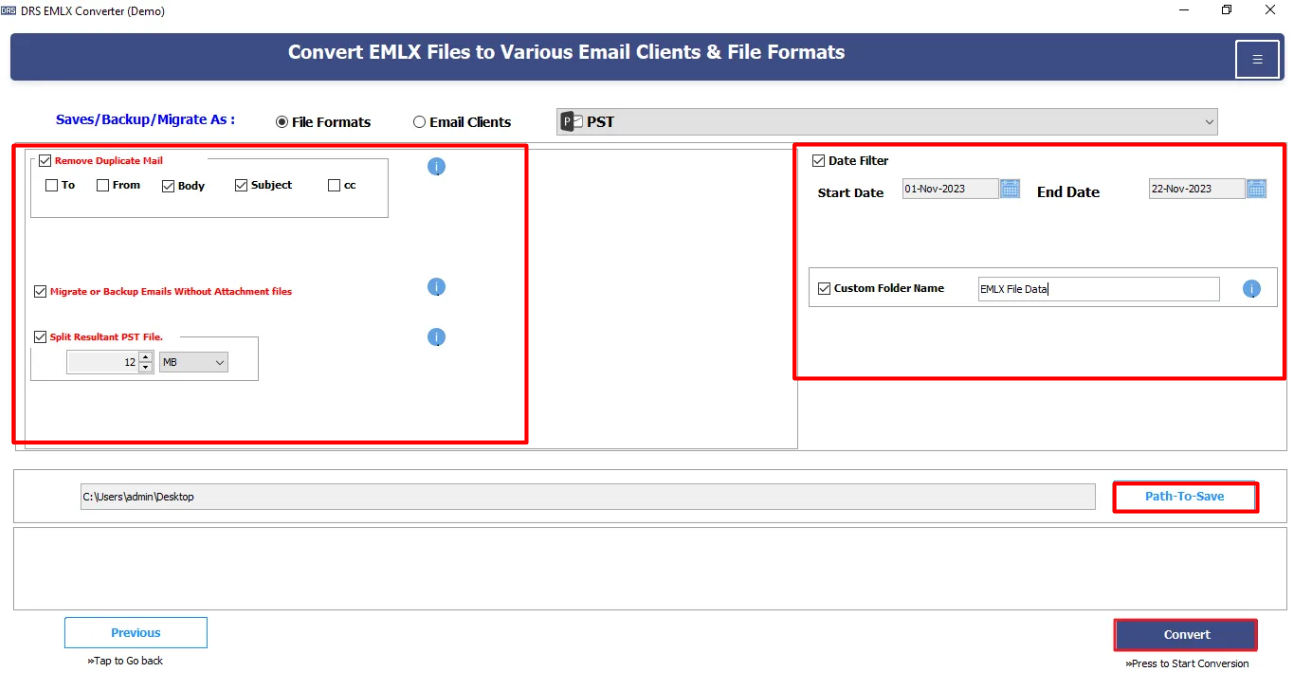
- Finally, apply filters, choose a path to save the file, and click Convert to begin the conversion.
Conclusion
In short, converting EMLX to PST manually can be complicated and risky due to platform differences between Apple Mail and Microsoft Outlook. While indirect methods also exist, they are time-consuming and not suitable for bulk data. The safest way to convert EMLX to PST without errors is by using a dedicated EMLX conversion tool. This offers complete accurate, fast, and secure migration. In case you find any queries regarding the software or during the conversion, feel free to reach out to our support team.
Frequently Asked Questions
Q1. What is the safest way to convert EMLX to PST without losing emails?
Ans. The safest way to save EMLX to PST is by using a MigrateEmails EMLX to PST converter tool. It ensures complete data integrity, preserves attachments, maintains folder hierarchy, and keeps email metadata intact during the conversion process.
Q2. Is it possible to convert EMLX to PST without having Outlook installed?
Ans. Yes, the automated MigrateEmails EMLX conversion tool allows you to shift EMLX files to PST without installing Microsoft Outlook. This software generates PST files independently and does not require Outlook configuration.
Q3. Can EMLX files be opened directly in Microsoft Outlook?
Ans. No, Microsoft Outlook does not support EMLX files directly. EMLX is an Apple Mail format, so it must be converted to a compatible format like PST before being accessed in Outlook.
Q4. Can I convert multiple EMLX files into a single PST file?
Ans. Yes, the advanced EMLX to PST converter tool supports bulk conversion and allows you to merge multiple EMLX files into one single PST file for easier management and import into Outlook.
Q5. Does converting EMLX to PST affect email formatting or attachments?
Ans. No, when using a reliable MigrateEmails EMLX Converter tool, email formatting, inline images, attachments, and metadata (To, From, Subject, Date, CC, BCC) remain unchanged during the conversion.
About The Author:

I am Neeru Kuchhal, a Technical Content Writer who focuses on turning complex ideas into clear, engaging, and impactful content. I combine creativity with strategy to write blogs, web content, and technical articles that connect with the right audience and support brand goals. I believe great content is not just written. It is thoughtfully created to inform, build trust, and drive action.
Related Post